
Reader Mode
Readline Reader Mode · EEdge MV3
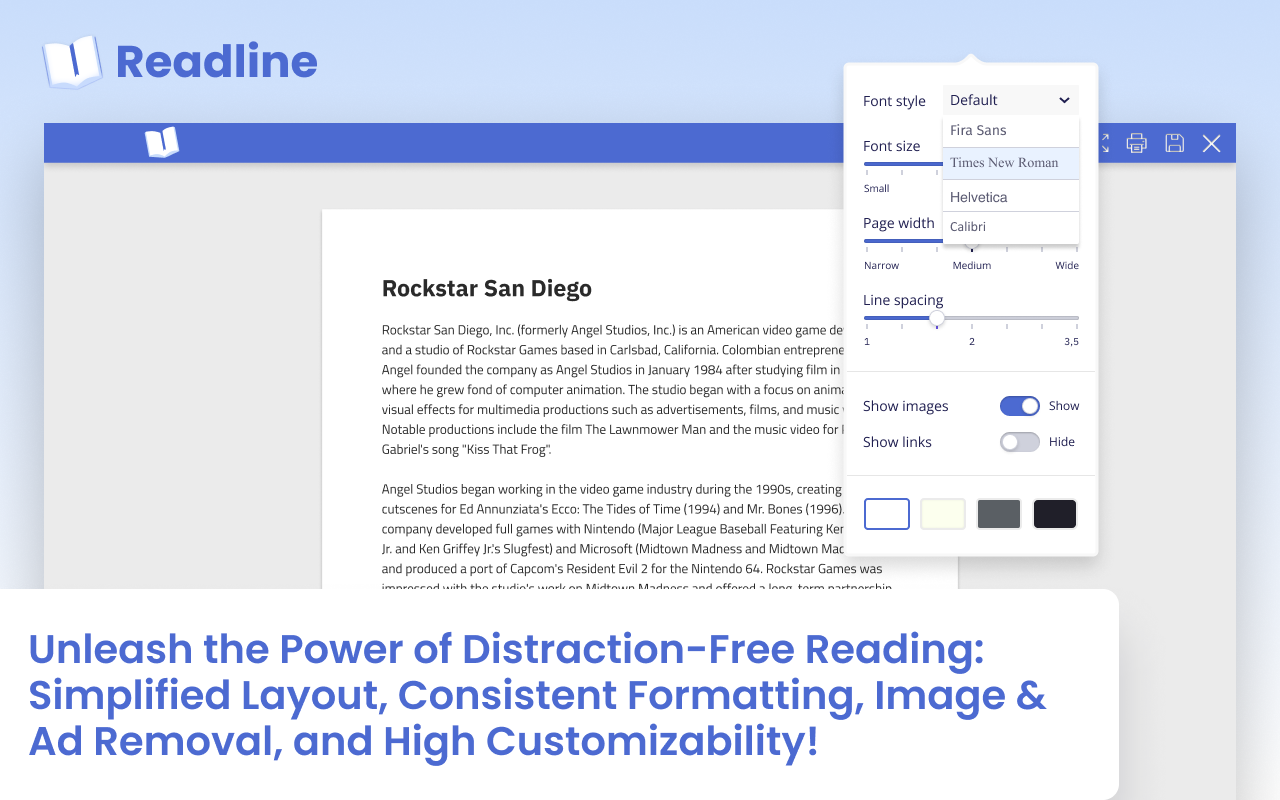
Unleash the Power of Distraction-Free Reading: Simplified Layout, Consistent Formatting, Image & Ad Removal, High Customizability!
<all_urls>),意味着它可以读取你在任意站点的页面内容,包括已登录的页面。这是许多扩展正常工作的必要条件,但也值得你确认来源可信。
截图
简介
🌟 Introducing Readline: Elevate Your Reading Experience! 🌟
Step into a world where reading becomes an enchanting journey with Readline, the browser extension that's poised to revolutionize how you engage with online content. Embark on this captivating story of how Readline can transform your reading habits into an immersive, distraction-free experience.
📖 Distraction-Free Reading: Immerse Yourself
Bid farewell to the clutter and noise of modern web pages. With Readline's Reader View, dive into a serene reading haven where advertisements, sidebars, and distractions vanish. Immerse yourself in the pure essence of the content you desire, undisturbed by the chaos of the digital world.
📚 Simplified Layout: Unveil the Essence
Let the content shine with Readline's simplified layout. Extraneous elements fade away, leaving you with the heart of the matter. Each word comes alive, taking you on a journey of knowledge that flows seamlessly from one paragraph to the next.
👁️ Enhanced Readability: A Feast for Your Eyes
Struggle no more with tiny fonts or cramped spacing. Readline's Reader View pampers your eyes with optimized font sizes, impeccable spacing, and visual elements that make reading an absolute pleasure. Bask in the comfort of text that's tailored for your reading enjoyment.
✨ Consistent Formatting: Your Reading Sanctuary
Say goodbye to disorienting switches between web page designs. Readline ensures that every reading experience is consistent, regardless of the original site's layout. Immerse yourself in the story without ever worrying about the design distractions.
🖼️ Image and Ad Removal: Focus Unleashed
Experience uninterrupted reading bliss as Readline sweeps away images and advertisements. Your attention remains steadfastly on the content, undisturbed by visual noise. Immerse yourself in a world of words without disruptions.
🎨 Customizable Settings: Your Reading, Your Rules
Personalize your reading universe with Readline's customizable settings. From font choices to text sizes and background colors, tailor the reading environment to match your preferences. Craft an ambiance that complements your reading style perfectly.
🌍 Multi-Language Support: Breaking Language Barriers
Expand your literary horizons with Readline's support for multiple languages. Traverse articles from diverse corners of the world effortlessly, breaking down language barriers and indulging in a truly global reading experience.
📜 Print-Friendly Version: Words in Your Hands
Extend your reading pleasure beyond the screen with Readline's print-friendly version. Transform your favorite content into tangible keepsakes, optimized for printing. Enjoy the same seamless layout and readability on paper as you do on your device.
♿ Accessibility Features: Inclusivity at Heart
Readline embraces all readers with its accessibility enhancements. Whether you rely on screen readers or need dyslexia-friendly fonts, Readline ensures that everyone can access the world of knowledge without barriers.
🔗 Discover Readline today and embark on a new chapter of reading! 🔗
🌟 引入Readline:提升阅读体验!🌟
踏入一个阅读成为迷人旅程的世界,借助Readline这款浏览器扩展,它将彻底改变您与在线内容互动的方式。踏上这个引人入胜的故事,了解Readline如何将您的阅读习惯转化为沉浸式、无干扰的体验。
📖 无干扰阅读:沉浸自我
告别现代网页的杂乱和噪音。通过Readline的阅读模式,您将潜入一个宁静的阅读天堂,广告、侧边栏和干扰都将消失。您将沉浸于所需内容的纯粹本质中,不受数字世界的混乱干扰。
📚 简化布局:揭示本质
让内容在Readline的简化布局中闪耀。多余的元素逐渐消失,只留下核心要点。每个词都栩栩如生,带领您从一个段落流畅地进入下一个知识之旅。
👁️ 提升可读性:你的眼睛的盛宴
不再为小字体或拥挤的间距而苦恼。Readline的阅读模式通过优化字体大小、完美的间距和视觉元素,为您的眼睛提供绝佳享受。沉浸于为您阅读愉悦而量身定制的文本中,尽情享受舒适。
✨ 一致的格式:你的阅读圣地
告别在网页设计之间迷失方向的困扰。Readline确保每一次阅读体验都是一致的,无论原始网站的布局如何。沉浸于故事中,无需担心设计上的干扰。
🖼️ 图片和广告移除:专注解放
当Readline清除图片和广告时,您将体验到持续的阅读幸福。您的注意力将始终集中在内容上,不受视觉噪音的干扰。沉浸于一个没有干扰的文字世界。
🎨 可自定义的设置:你的阅读,你的规则
通过Readline的可自定义设置,个性化您的阅读世界。从字体选择到文本大小和背景颜色,将阅读环境调整到与您偏好相匹配的状态。打造一个完美契合您阅读风格的氛围。
🌍 多语言支持:打破语言障碍
借助Readline对多种语言的支持,拓宽您的文学视野。轻松阅读来自世界各地的文章,打破语言障碍,享受真正全球化的阅读体验。
📜 适合打印的版本:文字尽在掌握
通过Readline的适合打印的版本,将阅读乐趣延伸至屏幕之外。将您最喜爱的内容转化为适合打印的珍藏品。在纸上享受与您设备上相同流畅的布局和可读性。
♿ 可访问性功能:以包容为本
Readline通过其可访问性增强功能,欢迎所有读者。无论您依赖屏幕阅读器还是需要适合阅读障碍的字体,Readline确保每个人都可以无障碍地访问知识世界。
🔗 今天就发现Readline,开始阅读的新篇章!🔗
Reader Mode 是做什么的
Reader Mode 是一款面向 Edge 的效率工具类扩展,主要用来管住注意力、屏蔽干扰站点、记录时间。官方对它的介绍是:Unleash the Power of Distraction-Free Reading: Simplified Layout, Consistent Formatting, Image & Ad Removal, High Customizability!在微软 Edge 加载项商店上,它当前版本 1.0.3,评分 5(3045 人评价),约 2,173 名用户。
适合什么人用
从功能定位看,Reader Mode 更适合想专注工作学习、减少无效刷网页的用户。如果你平时只是偶尔遇到相关需求,用浏览器自带功能也能凑合;但如果这件事每天都发生,装一个专门处理它的扩展通常比手动操作省事得多。需要注意的是它作用于所有网站,装上后建议先观察一两天,确认不影响常用站点的正常使用。
怎么安装 Reader Mode
- 打开微软 Edge 加载项商店上的官方页面;
- 点「添加到浏览器」并确认权限提示;
- 装好后在扩展列表里固定图标,方便随时开关。
本站只做索引与介绍,安装包来自官方商店。如果商店页面提示当前地区不可用,说明该扩展未在你所在区域上架。
常见问题
Reader Mode 是免费的吗?
Reader Mode 在微软 Edge 加载项商店免费提供下载。它是浏览器扩展,装上就能直接用,不需要注册账号。
Reader Mode 安全吗?
它只申请了 0 项权限,范围比较克制,没有申请「读取所有网站数据」这种大权限。
Reader Mode 支持哪些浏览器?
当前收录的版本来自微软 Edge 加载项商店,适用于 Edge。同一个扩展在其他商店可能有对应版本,但功能与版本号不一定相同。
怎么卸载 Reader Mode?
在扩展管理页找到 Reader Mode,点移除即可。它在本地保存的设置会一起清掉,不会残留数据。
权限清单 来自 manifest.json 原文
站点访问(可选) 1
<all_urls>
接口权限 7
alarmscontextMenusdeclarativeNetRequestfaviconnotificationsscriptingstorage
其他商店也有这款
同一款扩展在不同浏览器下的版本,权限与更新节奏可能不同
