
QVscribe EN
QRA · EEdge MV3
QVscribe Web Extension
<all_urls>),意味着它可以读取你在任意站点的页面内容,包括已登录的页面。这是许多扩展正常工作的必要条件,但也值得你确认来源可信。
截图
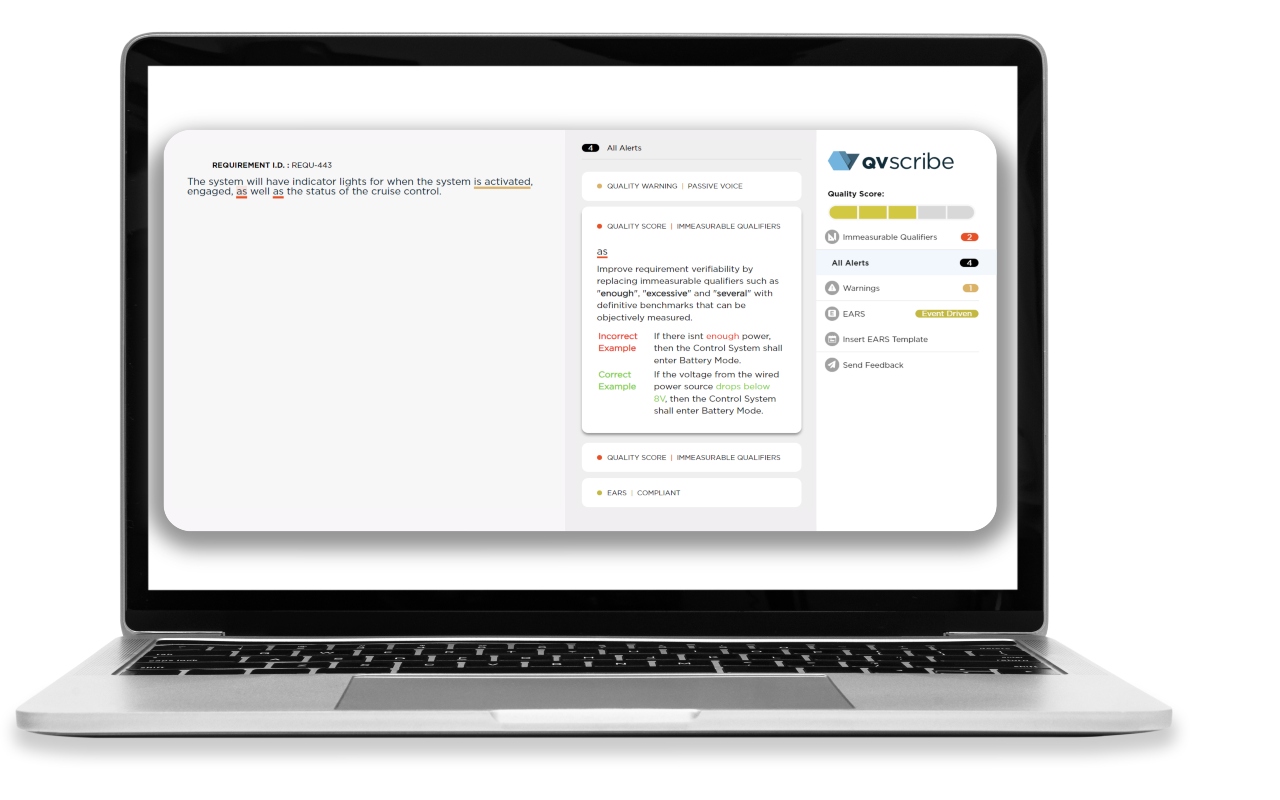
简介
Build Remarkable Products, Faster—With Clear, Compliant Requirements
QVscribe eliminates costly requirement errors, pinpointing ambiguities before they derail your project or budget. Automate quality checks, ensure industry standards adherence, and stop rework dead in its tracks.
Seamlessly integrated into Polarion, Jama, DOORS Next, Word, and Excel, QVscribe helps your team navigate complexity without complication so you can innovate with confidence and deliver on time.
Powerful, Precise, Easy to Use
QVscribe strikes a balance—more comprehensive than analysis features in requirements management platforms, yet more accessible than intimidating technologies that demand narrow use cases, significant effort, and deep expertise. Purpose-built for precision and efficiency, QVscribe elevates your requirements process to deliver accurate, high-quality results.
Latest Release: April 2026
Requirement Moments: Lifecycle Intelligence and EARS-Aware Authoring
QVscribe 7.2.4 and QRAcloud now deliver requirement-level Snapshots and Timelines, capturing the exact state of every requirement at the moment a snapshot is taken. Engineering teams receive a precise, timestamped record of how requirements evolve across the entire project lifecycle — including text, score, and quality flags — without manual versioning or exports. Authors, reviewers, and program managers can navigate back to any prior snapshot and see exactly how a requirement looked, when it changed, and whether quality is improving across documents.
This release also embeds EARS-compliant rewrites directly within QVscribe through ReqWriter, with Automatic ReqWriter Invocation surfacing suggestions as soon as the authoring view opens. Interactive filter badges, refined diff highlighting, and stronger analysis stability across the Polarion, Jama, and DOORS Next. This release reduces noise, speeds up reviews, and keeps feedback aligned with the moment of creation.
Key Benefits:
EARS-Compliant Rewrites in Workflow: Generate, review, and apply structured suggestions directly inside QVscribe — no exports, no re-entry.
Faster, Focused Reviews: Interactive filter badges and clearer diff highlighting keep attention on what matters most.
Stronger Stability at Scale: Refined analysis behavior, edit handling, and snapshot ordering deliver reliable results in regulated environments.
Requirement-Level Traceability: See exactly how every requirement evolved and create defensible records for design reviews, audits, and regulatory submissions.
Milestone Gate Benchmarking: Capture quality baselines to build a longitudinal record of improvement.
Leadership-Ready Visibility: Surface requirements health across projects and portfolios without manual reporting.
Reusable Quality Baselines: Certify known-good snapshots and replicate them across programs to accelerate ramp-up.
Snapshots turn requirements from static documents into actionable lifecycle intelligence, helping teams move faster, reduce rework, and make decisions from a clear, shared view of quality.
Note: Snapshots and Timelines are delivered automatically through your QRAcloud environment — no install required. EARS-aware ReqWriter and the latest UX, workflow, and stability improvements ship with the QVscribe browser extension.
QVscribe 是做什么的
QVscribe 是一款面向 Edge 的效率工具类扩展,主要用来管住注意力、屏蔽干扰站点、记录时间。官方对它的介绍是:QVscribe Web Extension在微软 Edge 加载项商店上,它当前版本 7.5.1,约 425 名用户。
适合什么人用
从功能定位看,QVscribe 更适合想专注工作学习、减少无效刷网页的用户。如果你平时只是偶尔遇到相关需求,用浏览器自带功能也能凑合;但如果这件事每天都发生,装一个专门处理它的扩展通常比手动操作省事得多。需要注意的是它作用于所有网站,装上后建议先观察一两天,确认不影响常用站点的正常使用。
怎么安装 QVscribe
- 打开微软 Edge 加载项商店上的官方页面;
- 点「添加到浏览器」并确认权限提示;
- 装好后在扩展列表里固定图标,方便随时开关。
本站只做索引与介绍,安装包来自官方商店。如果商店页面提示当前地区不可用,说明该扩展未在你所在区域上架。
常见问题
QVscribe 是免费的吗?
QVscribe 在微软 Edge 加载项商店免费提供下载。它是浏览器扩展,装上就能直接用,不需要注册账号。
QVscribe 安全吗?
它只申请了 0 项权限,范围比较克制,没有申请「读取所有网站数据」这种大权限。
QVscribe 支持哪些浏览器?
当前收录的版本来自微软 Edge 加载项商店,适用于 Edge。同一个扩展在其他商店可能有对应版本,但功能与版本号不一定相同。
怎么卸载 QVscribe?
在扩展管理页找到 QVscribe,点移除即可。它在本地保存的设置会一起清掉,不会残留数据。
权限清单 来自 manifest.json 原文
站点访问(可选) 1
<all_urls>
接口权限 8
cookiesidentitynativeMessagingoffscreenscriptingstoragesystem.cputabs