QR Code Generator - WiFi, vCard, Logo EN
DKL App · EEdge MV3
Free QR code generator for URLs, WiFi, vCard contacts, email & SMS. Add your logo and colors, then download PNG or SVG. No sign-up.
截图
简介
Create a QR code in seconds, right from your Edge toolbar. QR Code Generator turns any link, WiFi network, contact card, email or text message into a scannable QR code. Add your own colors and logo, then download it as a high-quality PNG or SVG. Free, with no account, no watermark and no ads.
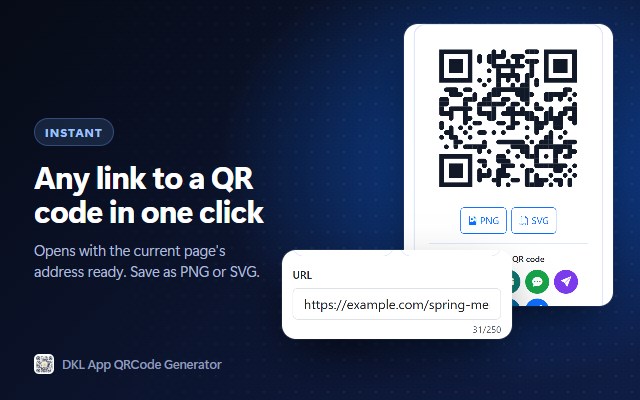
Open the extension on any web page and the page's address is already filled in. One click and your QR code is ready to download, print or share.
★ CREATE QR CODES FOR
• Website links (URL): share any page, menu, portfolio or product
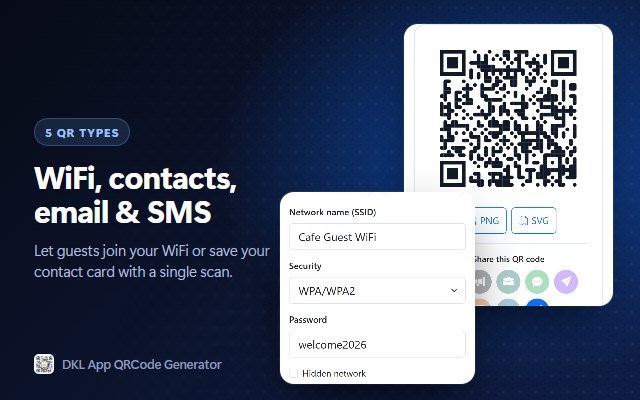
• WiFi: guests scan once to join your network, no typing passwords
• vCard contacts: name, phone, email, company and website in one scan
• Email: opens a pre-written email with recipient, subject and message
• SMS: opens a text message with the number and message ready
★ CUSTOM QR CODES WITH YOUR LOGO
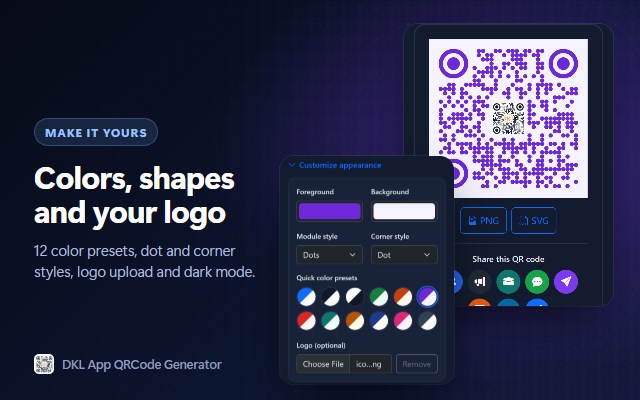
• Add your logo or image to the center of the QR code (PNG, JPEG, GIF, WebP or SVG)
• Pick any foreground and background color, or use one of 12 ready-made color presets
• Choose dot styles: square, rounded, dots, classy, classy rounded, extra rounded
• Choose corner styles: square, rounded or dot
• Sizes from 100 × 100 up to 700 × 700 pixels
• Built-in contrast warning so your QR code always scans reliably
★ DOWNLOAD AND SHARE
• Download as PNG for documents, social media and messages
• Download as SVG for print, business cards, flyers and posters: scales to any size without blur
• Share link QR codes in one click, or share the image with your device's share menu
★ FAST AND EASY
• Live preview updates as you type
• Only the fields you need for each QR code type
• Checks your links, emails, phone numbers and WiFi passwords before you download
• Light and dark mode
★ PRIVATE BY DESIGN
• QR codes are created on your device; nothing is uploaded
• No account, no tracking, no analytics
• WiFi passwords and contact details are never sent to any website
• Only the minimum permission: reads the current tab's address when you open the extension, to prefill the link
HOW TO MAKE A QR CODE
1. Click the QR Code Generator icon in the Edge toolbar.
2. Choose a type: URL, WiFi, vCard, Email or SMS.
3. Fill in the details. Your QR code appears instantly.
4. Optional: open "Customize appearance" to change colors, styles or add your logo.
5. Download as PNG or SVG.
Perfect for restaurant menus, WiFi signs for guests, business cards, event flyers, product packaging, classrooms and sharing links from your computer to your phone.
Tip: pin the extension to your toolbar (Extensions menu → eye icon) so it's always one click away.
Questions or ideas? Leave a review. We read every one.
PRIVACY: - No personal data collected. Based on the package contents, QR generation runs locally in the popup, the selected theme is stored locally, and the active tab URL is only used to prefill the URL field when available. External sharing is limited to URL QR codes, helping prevent WiFi details, contact information, email content, and SMS data from being sent to third-party sharing sites.
QR Code Generator - WiFi, vCard, Logo 是做什么的
QR Code Generator - WiFi, vCard, Logo 是一款面向 Edge 的效率工具类扩展,主要用来管住注意力、屏蔽干扰站点、记录时间。官方对它的介绍是:Free QR code generator for URLs, WiFi, vCard contacts, email & SMS. Add your logo and colors, then download PNG or SVG. No sign-up.在微软 Edge 加载项商店上,它当前版本 1.0.1,约 6 名用户。
适合什么人用
从功能定位看,QR Code Generator - WiFi, vCard, Logo 更适合想专注工作学习、减少无效刷网页的用户。如果你平时只是偶尔遇到相关需求,用浏览器自带功能也能凑合;但如果这件事每天都发生,装一个专门处理它的扩展通常比手动操作省事得多。
怎么安装 QR Code Generator - WiFi, vCard, Logo
- 打开微软 Edge 加载项商店上的官方页面;
- 点「添加到浏览器」并确认权限提示;
- 装好后在扩展列表里固定图标,方便随时开关。
本站只做索引与介绍,安装包来自官方商店。如果商店页面提示当前地区不可用,说明该扩展未在你所在区域上架。
常见问题
QR Code Generator - WiFi, vCard, Logo 是免费的吗?
QR Code Generator - WiFi, vCard, Logo 在微软 Edge 加载项商店免费提供下载。它是浏览器扩展,装上就能直接用,不需要注册账号。
QR Code Generator - WiFi, vCard, Logo 安全吗?
它只申请了 0 项权限,范围比较克制,没有申请「读取所有网站数据」这种大权限。
QR Code Generator - WiFi, vCard, Logo 支持哪些浏览器?
当前收录的版本来自微软 Edge 加载项商店,适用于 Edge。同一个扩展在其他商店可能有对应版本,但功能与版本号不一定相同。
怎么卸载 QR Code Generator - WiFi, vCard, Logo?
在扩展管理页找到 QR Code Generator - WiFi, vCard, Logo,点移除即可。它在本地保存的设置会一起清掉,不会残留数据。
权限清单 来自 manifest.json 原文
接口权限 1
activeTab