
ProxyScout — Proxy Finder & Switcher EN
Halil KAPLAN · EEdge MV3
Downloads free proxy lists, tests them over HTTP and HTTPS and routes your browser through a working proxy in one click.
<all_urls>),意味着它可以读取你在任意站点的页面内容,包括已登录的页面。这是许多扩展正常工作的必要条件,但也值得你确认来源可信。
截图
简介
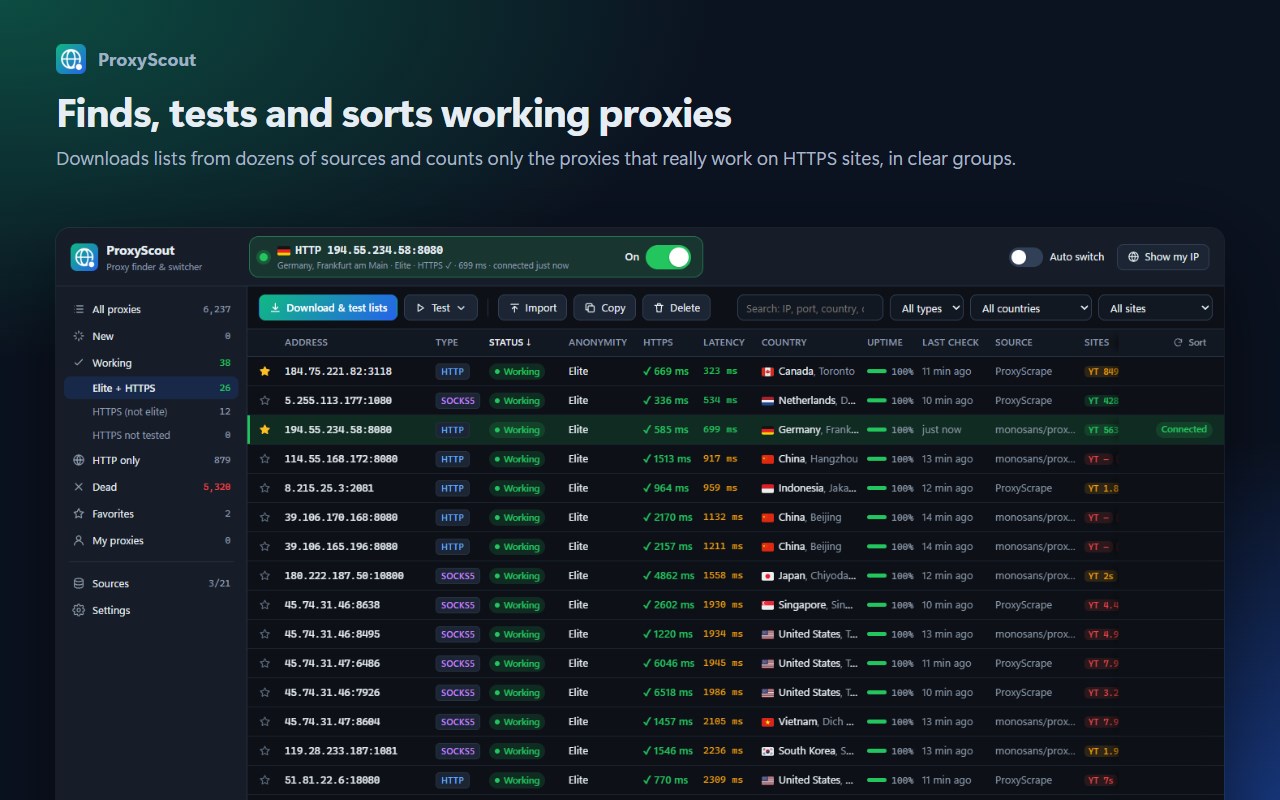
ProxyScout downloads free proxy lists from dozens of sources, really tests every proxy and shows you only the ones that work. Click a proxy and all your browser traffic goes through it. One click to turn it off and go back to a direct connection.
■ KEEPS ONLY THE PROXIES THAT REALLY WORK
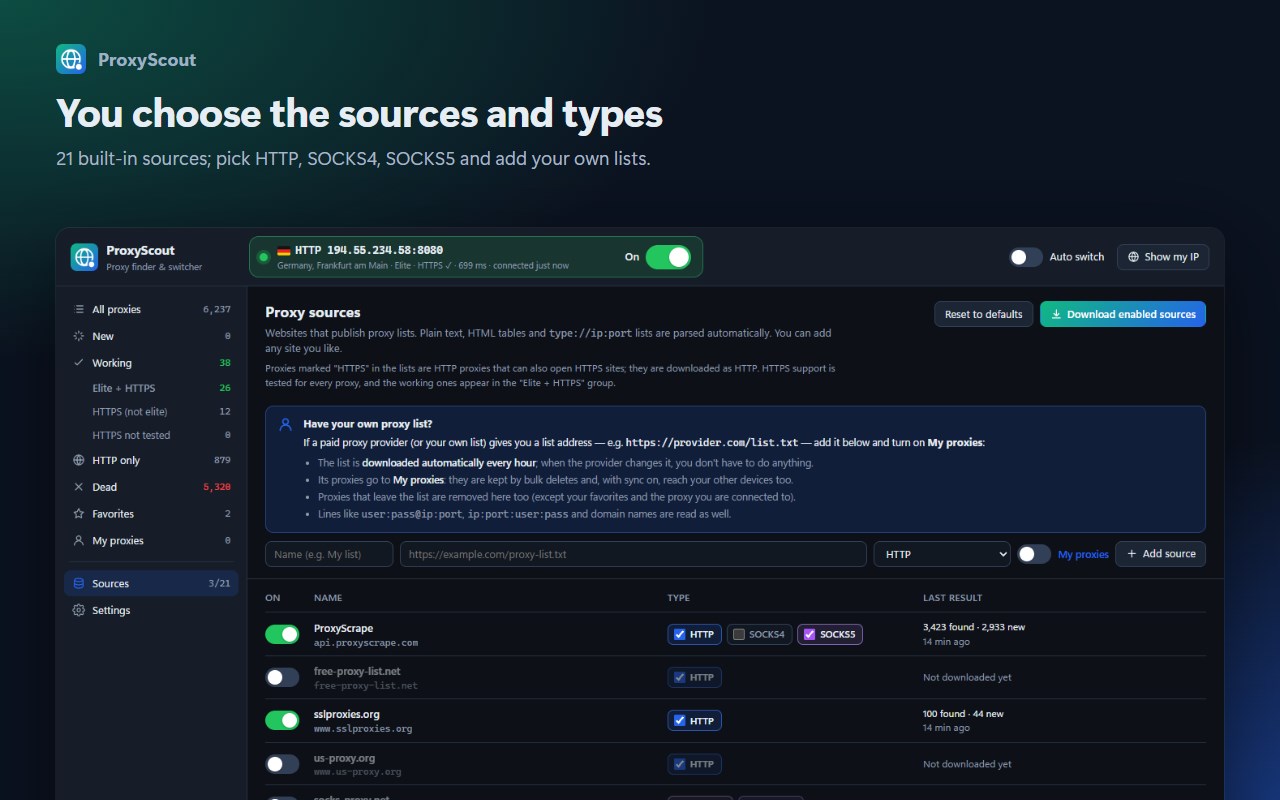
• 21 built-in sources (ProxyScrape, free-proxy-list.net, Spys.me, monosans, TheSpeedX…) — pick HTTP / SOCKS4 / SOCKS5 per source and add your own list URLs.
• Every proxy is tested over HTTP, then with two separate HTTPS connections and a page-load test. Proxies that can load a tiny test page but fail on real websites are filtered out; only proxies that work on HTTPS sites count as working.
• Hundreds of proxies are tested in parallel; the proxy you pick is verified again when you connect.
■ CLEAR GROUPS
• Elite + HTTPS · HTTPS (not elite) · HTTPS not tested — each working proxy in exactly one group.
• Elite: neither your IP nor the fact that you use a proxy is revealed. Transparent proxies leak your real IP (clearly marked).
• Proxies that cannot open HTTPS sites are listed under "HTTP only", dead ones separately; clean them up in one click.
■ SITE TEST
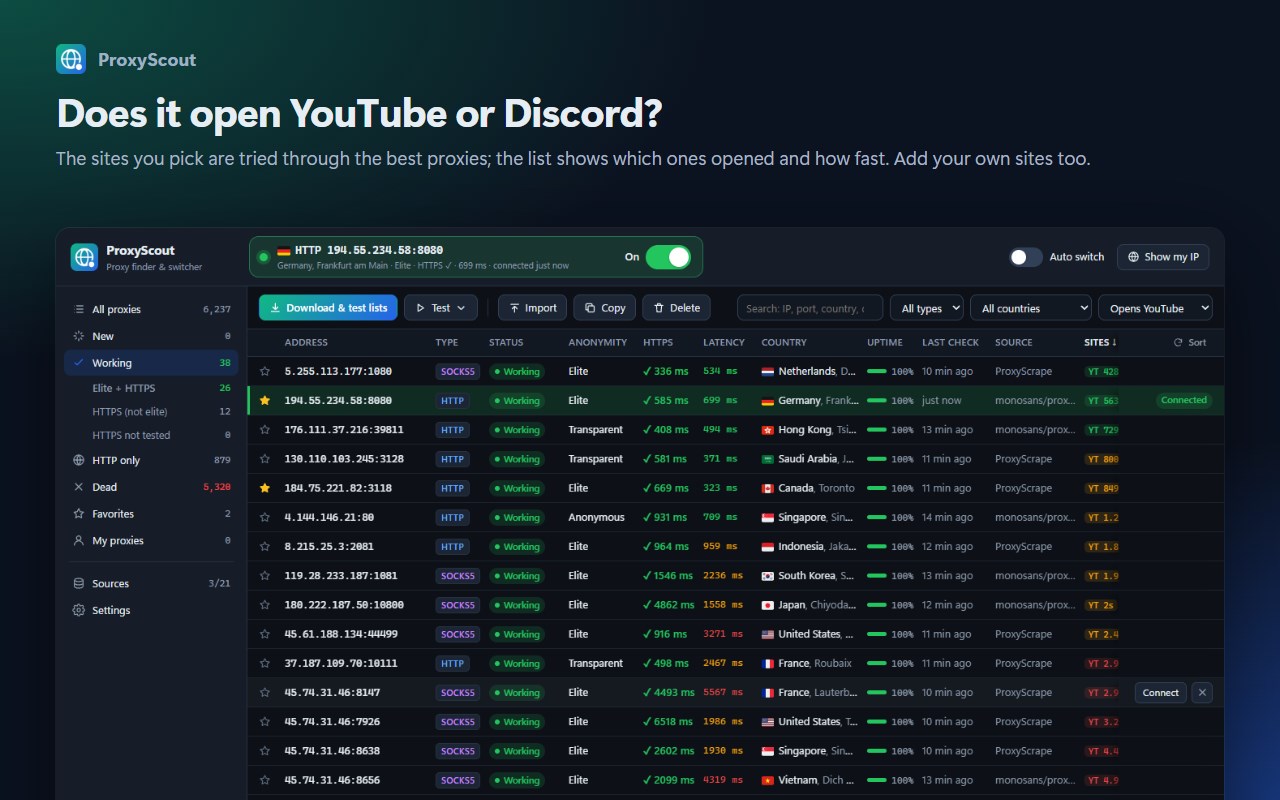
• The sites you pick — YouTube, Discord, Google, Instagram, X and more — are tried through the best working proxies; the list shows which sites opened through each proxy and how fast.
• Turn built-in sites on or off or add your own; the "Opens YouTube" filter shows only the proxies that open that site.
■ ONE-CLICK CONNECT
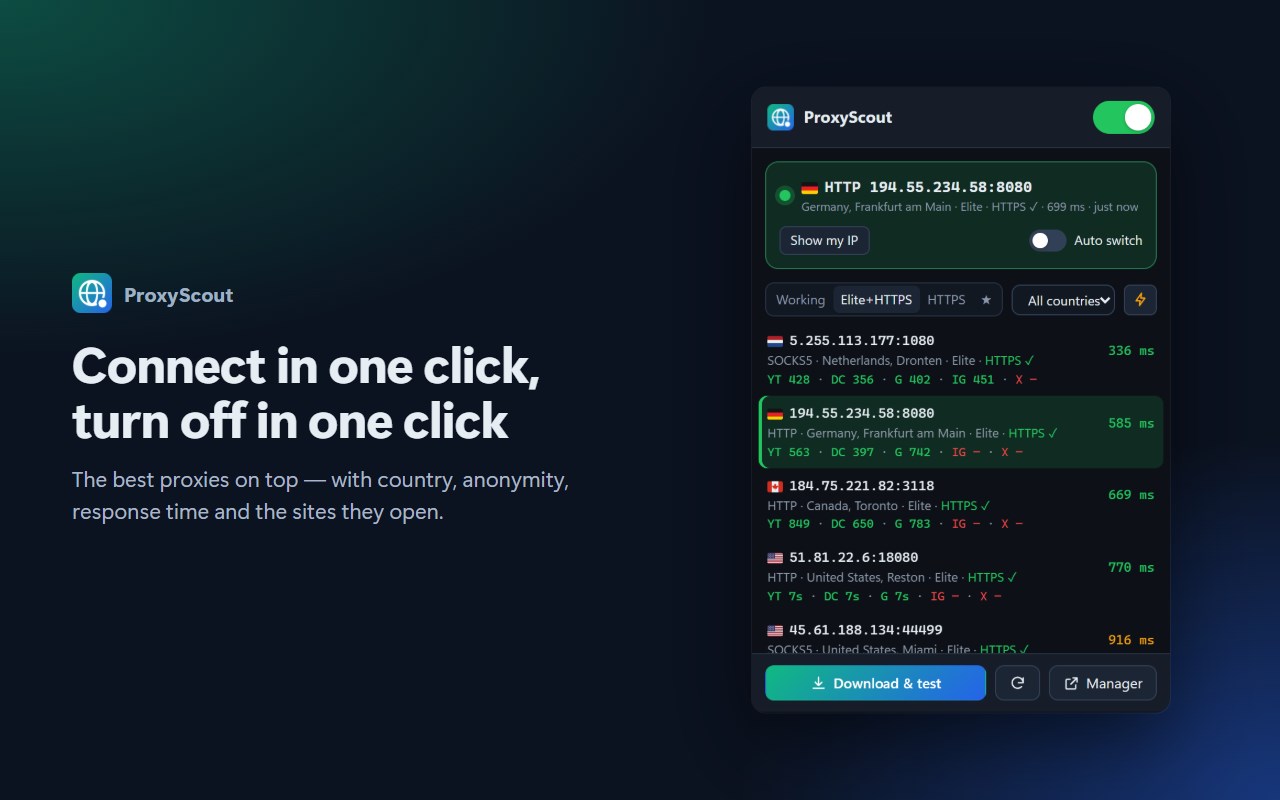
• Connect from the popup or by double-clicking in the manager; one switch turns it on and off.
• The toolbar icon shows the state: green connected, amber connecting, red not responding, grey off.
• The ⚡ button in the popup connects to the fastest proxy in the list; pick a country first if you like.
• Alt+Shift+P turns the proxy on or off from anywhere (you can change the shortcut).
• Auto switch: if the connected proxy dies, ProxyScout switches to the best working one.
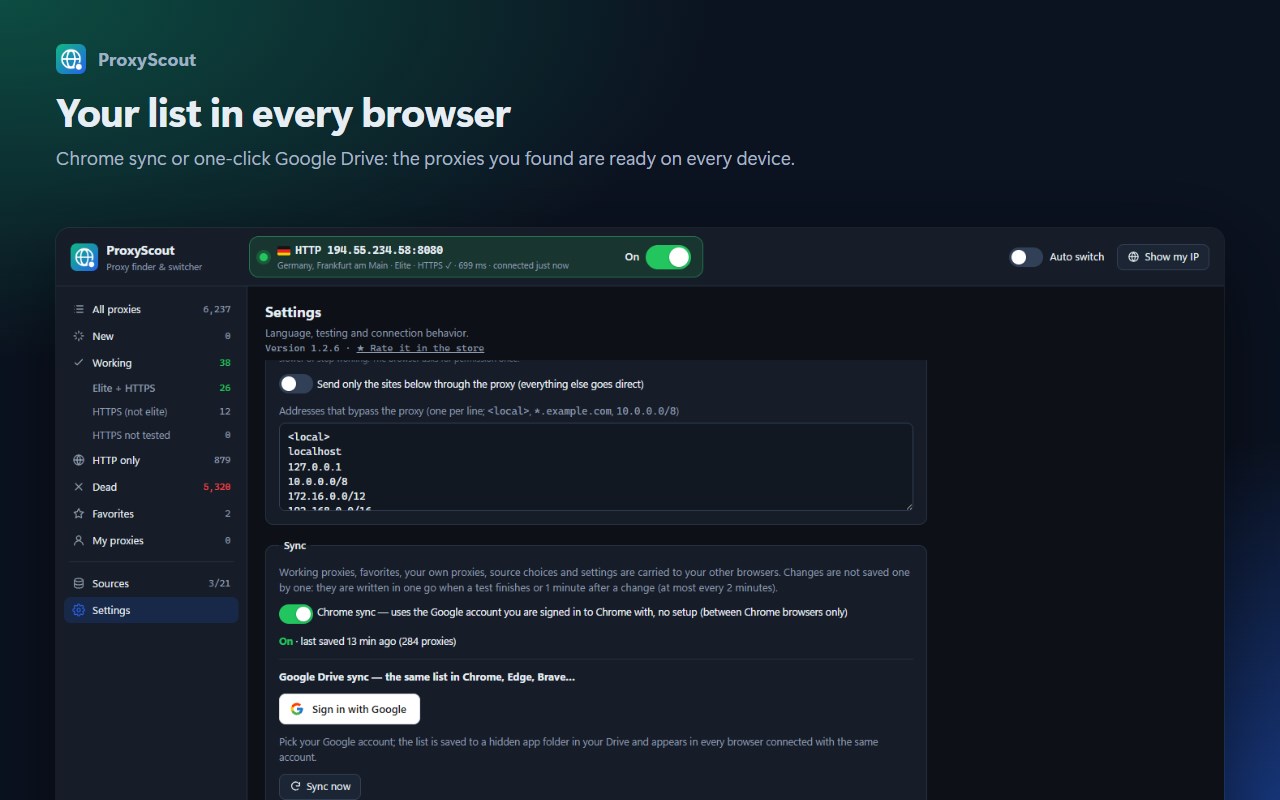
• Local network addresses and domains you choose bypass the proxy.
• Optionally send only the sites you choose (e.g. youtube.com) through the proxy; everything else goes direct.
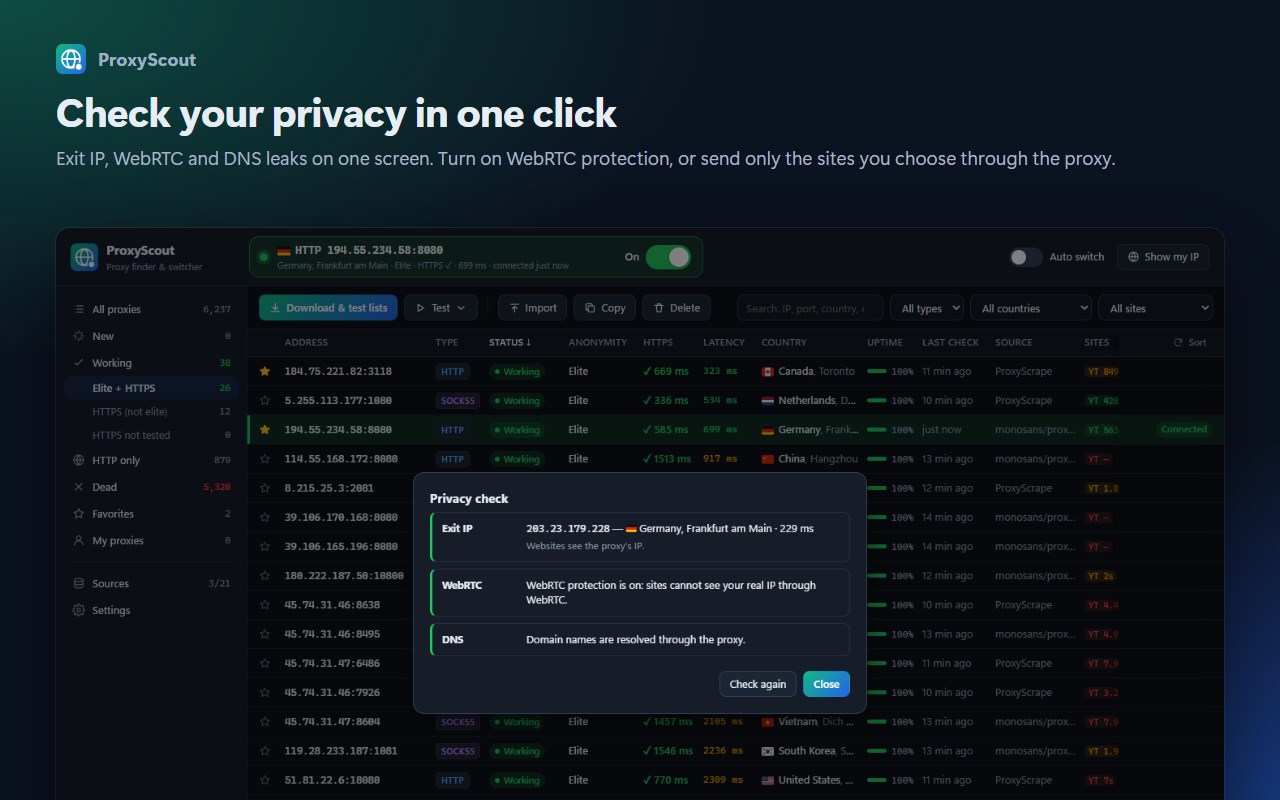
■ PRIVACY CHECK
• "Show my IP" shows on one screen your exit IP and its country, whether WebRTC reveals your real IP, and whether DNS goes through the proxy.
• Turn on WebRTC protection in one click: while connected, WebRTC cannot go around the proxy and reveal your real IP.
■ MY PROXIES
• Import the proxies you have (including HTTP proxies with username/password).
• Add a paid provider's list address: the list is updated every hour, new proxies are added and removed ones are dropped.
• My proxies and favorites are kept when you bulk-delete; save the list to a text file.
■ COUNTRY, CITY AND FLAGS
• Every proxy shows its country flag as soon as it is downloaded (offline database); working ones also show city and ISP.
• Filter by country, type and the sites a proxy opens; sort by response time.
■ THE SAME LIST IN ALL YOUR BROWSERS
• Browser sync: no setup needed (syncs through the account you are signed in to the browser with).
• Google Drive: click "Sign in with Google"; the list is kept in a hidden app folder in your Drive that only the extension can access — the same list in Chrome, Edge, Brave…
■ MORE
• English and Turkish interface (follows your browser language).
• Move proxies you don't want to see to Dead in one click; copy lists.
• No ads, no tracking, no account required. Open source (GPL-3.0): https://github.com/Halil-KAPLAN/ProxyScout
⚠ IMPORTANT: Free/public proxies are run by third parties and are not trustworthy. While connected they can see or modify unencrypted (http://) traffic; the content of HTTPS sites stays encrypted. Do not use free proxies for logins or sensitive tasks.
ProxyScout — Proxy Finder & Switcher 是做什么的
ProxyScout — Proxy Finder & Switcher 是一款面向 Edge 的效率工具类扩展,主要用来管住注意力、屏蔽干扰站点、记录时间。官方对它的介绍是:Downloads free proxy lists, tests them over HTTP and HTTPS and routes your browser through a working proxy in one click.在微软 Edge 加载项商店上,它当前版本 1.2.7,约 4 名用户。
适合什么人用
从功能定位看,ProxyScout — Proxy Finder & Switcher 更适合想专注工作学习、减少无效刷网页的用户。如果你平时只是偶尔遇到相关需求,用浏览器自带功能也能凑合;但如果这件事每天都发生,装一个专门处理它的扩展通常比手动操作省事得多。需要注意的是它作用于所有网站,装上后建议先观察一两天,确认不影响常用站点的正常使用。
怎么安装 ProxyScout — Proxy Finder & Switcher
- 打开微软 Edge 加载项商店上的官方页面;
- 点「添加到浏览器」并确认权限提示;
- 装好后在扩展列表里固定图标,方便随时开关。
本站只做索引与介绍,安装包来自官方商店。如果商店页面提示当前地区不可用,说明该扩展未在你所在区域上架。
常见问题
ProxyScout — Proxy Finder & Switcher 是免费的吗?
ProxyScout — Proxy Finder & Switcher 在微软 Edge 加载项商店免费提供下载。它是浏览器扩展,装上就能直接用,不需要注册账号。
ProxyScout — Proxy Finder & Switcher 安全吗?
它只申请了 0 项权限,范围比较克制,没有申请「读取所有网站数据」这种大权限。
ProxyScout — Proxy Finder & Switcher 支持哪些浏览器?
当前收录的版本来自微软 Edge 加载项商店,适用于 Edge。同一个扩展在其他商店可能有对应版本,但功能与版本号不一定相同。
怎么卸载 ProxyScout — Proxy Finder & Switcher?
在扩展管理页找到 ProxyScout — Proxy Finder & Switcher,点移除即可。它在本地保存的设置会一起清掉,不会残留数据。
权限清单 来自 manifest.json 原文
站点访问(可选) 1
<all_urls>
接口权限 7
alarmsidentityproxystorageunlimitedStoragewebRequestwebRequestAuthProvider
接口权限(可选) 1
privacy