
PrivacyLens EN
Deepak Thanam · EEdge MV3
See what every site you visit tries to read, store, fingerprint and send. Everything stays on your device.
<all_urls>),意味着它可以读取你在任意站点的页面内容,包括已登录的页面。这是许多扩展正常工作的必要条件,但也值得你确认来源可信。
截图
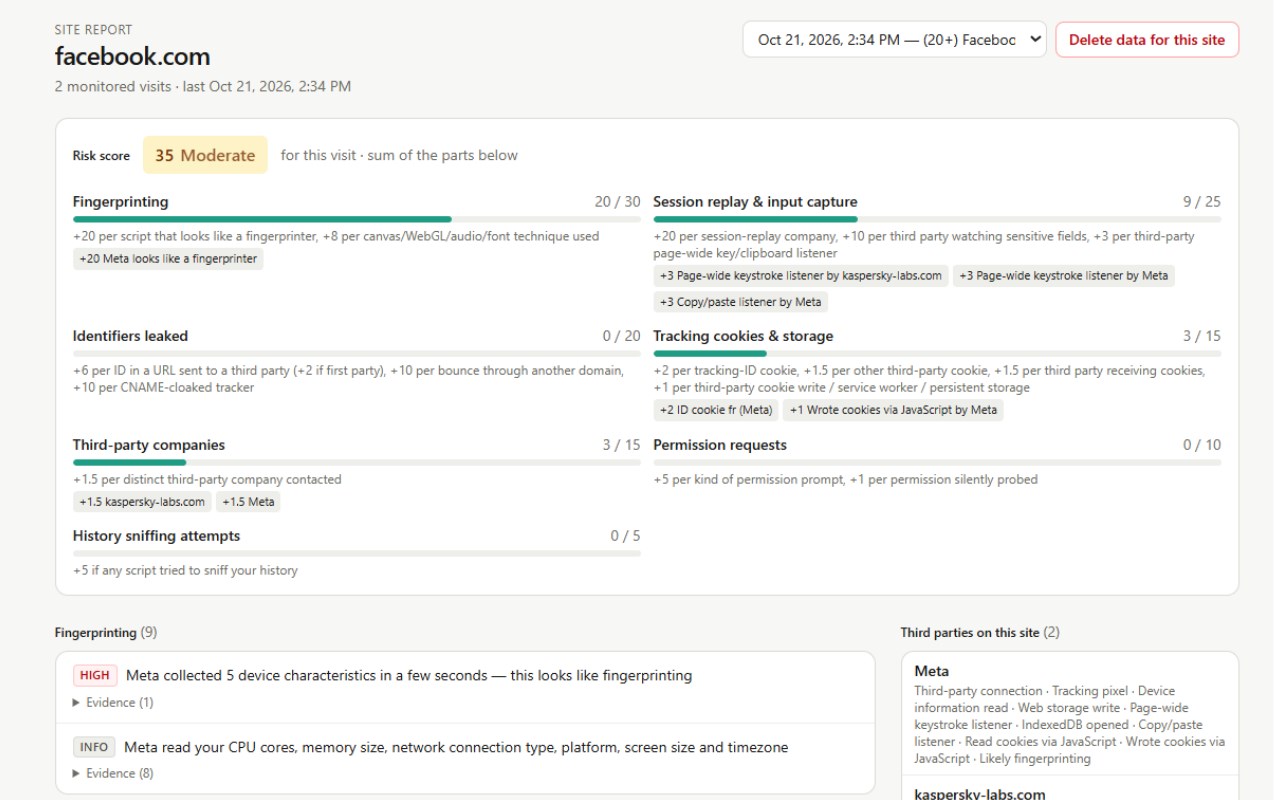
简介
Every website you open does more than show you a page. Behind the scenes, it and the companies it loads may read details about your device, set tracking cookies, send your activity to third parties, or ask for permissions. PrivacyLens shows you what happened, site by site and visit by visit, in plain language.
Everything stays on your device. PrivacyLens has no account, no servers, no analytics and no remote code, and makes no network requests of its own.
WHAT IT SHOWS YOU
• Who sees you: every third-party company a site connected to, including ad networks, analytics and data brokers, with what each one did.
• Fingerprinting: scripts that read canvas, WebGL/GPU, audio, installed fonts or device details to identify your browser without cookies.
• Tracking on the network: tracking pixels, beacons, identifiers hidden in URLs (like click IDs), cookies sent to third parties, and redirect ("bounce") tracking.
• Cookies & storage: tracking cookies and how long they last, plus local storage, IndexedDB, cache and service workers used to remember you.
• Permission requests: location, notifications, camera, microphone, screen sharing, clipboard reads and hardware access.
• Typing & behaviour: keystroke listeners on form fields, session-replay scripts and copy/paste listeners.
• History sniffing attempts.
HOW IT WORKS
• Toolbar popup: a quick summary of the current page and a risk score from 0 to 100.
• Site report: every finding grouped by type, with evidence. You see which script did it, which company it belongs to and how often it happened.
• Transparent risk score: the score is a simple sum with every point explained. Click any point to see the finding behind it.
• Timeline: your browsing history alongside what PrivacyLens recorded. Visits from before you installed it are marked "Not monitored" rather than guessed.
• Companies view: which companies appear across the sites you visit.
• Glossary: plain-language explanations of every technique.
YOU'RE IN CONTROL
• Data is stored only in your browser and deleted automatically after 30 days (adjustable from 1 to 365 days).
• Exclude any site from monitoring.
• Delete one site's data, or everything, at any time.
• Export your data as JSON or CSV.
• Private/incognito windows are not recorded unless you turn that on.
• We never store cookie values, form contents, passwords, keystrokes, clipboard contents or page content.
GOOD TO KNOW
• PrivacyLens observes and reports. It does not block anything, so it works alongside your ad blocker or tracking protection. With a blocker on, you'll see fewer findings, because blocked requests never happen.
• It can only see pages loaded after installation. Reload tabs that were already open.
Why the permissions? PrivacyLens needs access to all sites, because what it does is observe what every site does. Browsing history is only read to show your timeline. Full details are in our privacy policy.
PrivacyLens 是做什么的
PrivacyLens 是一款面向 Edge 的实用工具类扩展,主要用来解决浏览器里某类具体的小问题。官方对它的介绍是:See what every site you visit tries to read, store, fingerprint and send. Everything stays on your device.在微软 Edge 加载项商店上,它当前版本 0.1.0,约 1 名用户。
适合什么人用
从功能定位看,PrivacyLens 更适合想补上浏览器原生缺失功能的用户。如果你平时只是偶尔遇到相关需求,用浏览器自带功能也能凑合;但如果这件事每天都发生,装一个专门处理它的扩展通常比手动操作省事得多。需要注意的是它作用于所有网站,装上后建议先观察一两天,确认不影响常用站点的正常使用。
怎么安装 PrivacyLens
- 打开微软 Edge 加载项商店上的官方页面;
- 点「添加到浏览器」并确认权限提示;
- 装好后在扩展列表里固定图标,方便随时开关。
本站只做索引与介绍,安装包来自官方商店。如果商店页面提示当前地区不可用,说明该扩展未在你所在区域上架。
常见问题
PrivacyLens 是免费的吗?
PrivacyLens 在微软 Edge 加载项商店免费提供下载。它是浏览器扩展,装上就能直接用,不需要注册账号。
PrivacyLens 安全吗?
它只申请了 0 项权限,范围比较克制,没有申请「读取所有网站数据」这种大权限。
PrivacyLens 支持哪些浏览器?
当前收录的版本来自微软 Edge 加载项商店,适用于 Edge。同一个扩展在其他商店可能有对应版本,但功能与版本号不一定相同。
怎么卸载 PrivacyLens?
在扩展管理页找到 PrivacyLens,点移除即可。它在本地保存的设置会一起清掉,不会残留数据。
权限清单 来自 manifest.json 原文
站点访问(可选) 1
<all_urls>
接口权限 7
alarmscookieshistorystorageunlimitedStoragewebNavigationwebRequest