
Privacy Blur - Redact & Blur Sensitive Info EN
iamln · EEdge MV3
1-click blur or blackout sensitive data (API keys, emails, balances, tokens) for screen recordings & live demos.
截图
简介
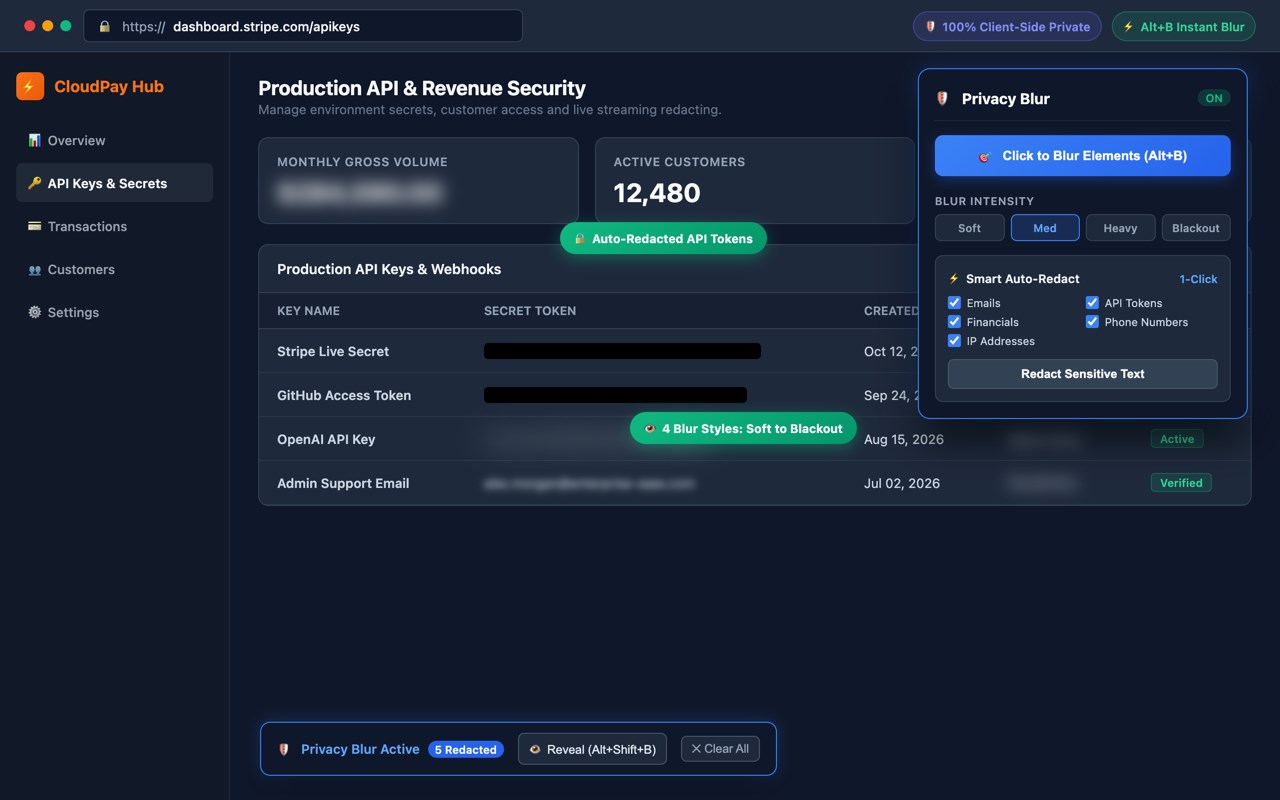
Safely blur or blackout sensitive credentials, API tokens, customer emails, financial metrics, and private data in 1-click for screen recordings, live streams, and client presentations!
Whether you are recording a SaaS product demo, teaching a YouTube tutorial, streaming on Twitch, or sharing your screen on Zoom, accidentally exposing production secrets or customer PII can lead to costly security leaks.
Privacy Blur is a privacy-first, lightweight browser tool engineered to protect your secrets instantly without requiring tedious post-production video editing.
━━━━━━━━━━━━━━━━━━━━
🌟 KEY FEATURES
━━━━━━━━━━━━━━━━━━━━
🎯 1-Click Click-to-Blur Any Element
Press Alt+B (Option+B on macOS) to enter inspection mode. Hover over any text, card, table cell, or image and click to blur it instantly.
• Smart Selector Generator: Generates resilient CSS selectors that automatically keep the element blurred even after page reloads and tab navigations.
• Dynamic SPA Support: Fully compatible with React, Vue, Next.js, and modern single-page applications.
⚡ 1-Click Smart Auto-Redaction
Skip manual clicking entirely! Privacy Blur intelligently scans the webpage text and automatically applies redaction to:
• API Keys & Access Tokens (Stripe, OpenAI, GitHub, AWS, JWTs, UUIDs)
• Email Addresses
• Financial Numbers & Credit Cards
• Phone Numbers
• IP Addresses (IPv4 & IPv6)
🎨 4 Configurable Blur Intensities
Choose the exact level of protection you need:
• Soft: Light aesthetic blur (4px)
• Medium: Standard secure blur (8px, default)
• Heavy: Strong obfuscation (14px)
• Blackout: High-security solid redaction bars (blackout mode)
👁️ Quick Peek / Temporary Reveal
Need to temporarily check an API key or password during a meeting without clearing your blur rules?
Press Alt+Shift+B to instantly reveal all blurred elements, and press it again to re-mask them.
🛡️ In-Page Non-Intrusive HUD
A sleek floating indicator appears at the bottom-right of blurred pages showing the exact count of hidden elements, with quick one-click shortcuts to Reveal or Clear rules.
━━━━━━━━━━━━━━━━━━━━
⌨️ DEFAULT SHORTCUTS
━━━━━━━━━━━━━━━━━━━━
• Alt + B: Toggle Click-to-Blur Mode
• Alt + Shift + B: Temporarily Peek / Reveal all blurred elements
(Customizable at edge://extensions/shortcuts)
━━━━━━━━━━━━━━━━━━━━
🔒 100% PRIVACY FIRST & OFFLINE
━━━━━━━━━━━━━━━━━━━━
• Zero External Servers: 100% client-side execution directly inside your browser.
• Zero Data Tracking: We do not track, collect, log, or sell your browsing history, DOM content, or personal info.
• Zero Third-Party SDKs: No Google Analytics, no telemetry, no tracking cookies.
• Local Storage Only: Element selectors and blur intensity preferences are stored solely on your local device via chrome.storage.local.
Need help or want to suggest new features? Open an issue on our GitHub repository or contact our developer team via the support tab!
Privacy Blur - Redact & Blur Sensitive Info 是做什么的
Privacy Blur - Redact & Blur Sensitive Info 是一款面向 Edge 的效率工具类扩展,主要用来管住注意力、屏蔽干扰站点、记录时间。官方对它的介绍是:1-click blur or blackout sensitive data (API keys, emails, balances, tokens) for screen recordings & live demos.在微软 Edge 加载项商店上,它当前版本 1.0.0。
适合什么人用
从功能定位看,Privacy Blur - Redact & Blur Sensitive Info 更适合想专注工作学习、减少无效刷网页的用户。如果你平时只是偶尔遇到相关需求,用浏览器自带功能也能凑合;但如果这件事每天都发生,装一个专门处理它的扩展通常比手动操作省事得多。
怎么安装 Privacy Blur - Redact & Blur Sensitive Info
- 打开微软 Edge 加载项商店上的官方页面;
- 点「添加到浏览器」并确认权限提示;
- 装好后在扩展列表里固定图标,方便随时开关。
本站只做索引与介绍,安装包来自官方商店。如果商店页面提示当前地区不可用,说明该扩展未在你所在区域上架。
常见问题
Privacy Blur - Redact & Blur Sensitive Info 是免费的吗?
Privacy Blur - Redact & Blur Sensitive Info 在微软 Edge 加载项商店免费提供下载。它是浏览器扩展,装上就能直接用,不需要注册账号。
Privacy Blur - Redact & Blur Sensitive Info 安全吗?
它只申请了 0 项权限,范围比较克制,没有申请「读取所有网站数据」这种大权限。
Privacy Blur - Redact & Blur Sensitive Info 支持哪些浏览器?
当前收录的版本来自微软 Edge 加载项商店,适用于 Edge。同一个扩展在其他商店可能有对应版本,但功能与版本号不一定相同。
怎么卸载 Privacy Blur - Redact & Blur Sensitive Info?
在扩展管理页找到 Privacy Blur - Redact & Blur Sensitive Info,点移除即可。它在本地保存的设置会一起清掉,不会残留数据。
权限清单 来自 manifest.json 原文
接口权限 3
activeTabcontextMenusstorage