PDFtrust - PDF 數位簽章驗證工具
Oharalab · EEdge MV3
Verify PDF digital signatures — integrity, certificate chain, trust, timestamp, revocation & LTV. Taiwan PKI (GRCA, TWCA, Chunghwa).
<all_urls>),意味着它可以读取你在任意站点的页面内容,包括已登录的页面。这是许多扩展正常工作的必要条件,但也值得你确认来源可信。
截图
简介
PDFtrust - PDF Digital Signature Verifier
Open a PDF in your browser and its digital signatures are verified automatically — no uploads, everything runs locally. Trusts Taiwan government and private certificate authorities by default, with timestamp and long-term validation (LTV) support.
Features
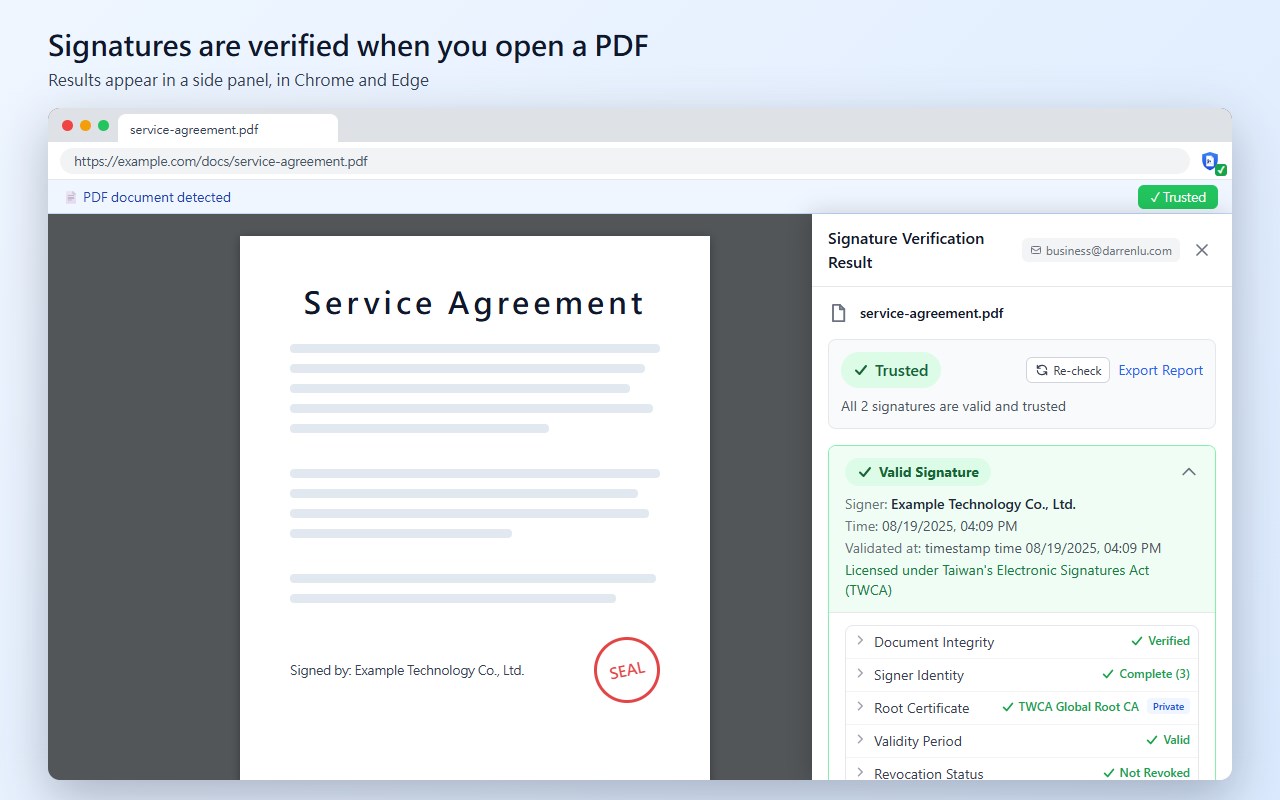
• Verify on open — PDFs opened in the browser are verified automatically and the result appears in a side panel (Chrome, Edge); choose all sites, listed sites only, or off
• Toolbar status — the extension icon shows ✓ trusted / ! not fully verified / ✗ failed; click it for the details
• Taiwan certificates — trusts certificates issued under Taiwan's government root (such as citizen and business certificates) and by Taiwan's commercial certificate authorities by default; self-signed certificates are not accepted
• International CAs (optional) — only Taiwan certificates are trusted by default; selected international document-signing and timestamping CAs can be turned on in settings
• Regulatory label — after the certificate chain is verified, each signature shows whether its CA is licensed under Taiwan's Electronic Signatures Act; international CAs are marked as not licensed in Taiwan
• Integrity check — confirms the document was not altered after signing and detects changes the signer did not allow
• Certificate chain and revocation — validates every link of the chain and checks revocation with embedded or online OCSP / CRL data
• Timestamps and LTV — verifies RFC 3161 timestamps (from a Taiwan PKI timestamp authority by default; also from the selected international ones when that option is on), uses the timestamp time for expired certificates, and checks whether long-term validation data is complete
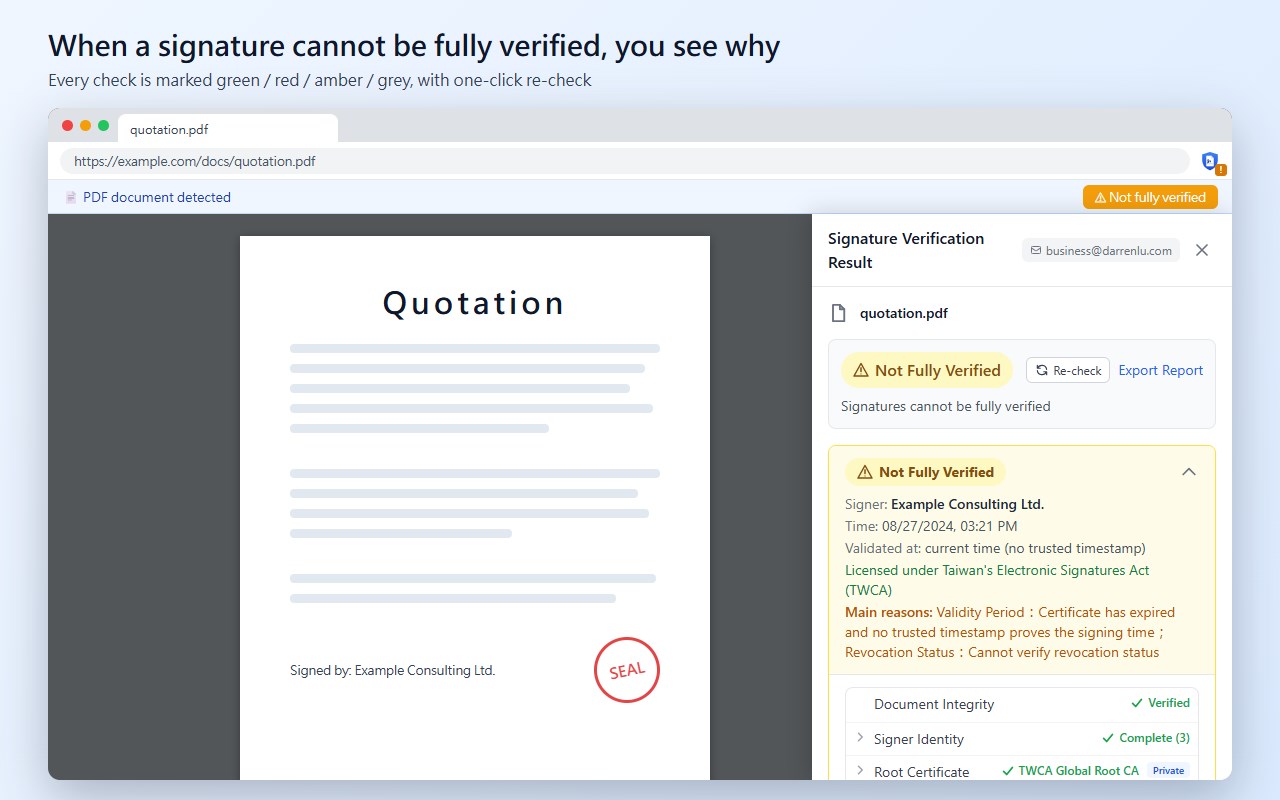
• Clear results — every check is marked green / red / amber / grey; when a signature cannot be fully verified the main reasons are listed, with one-click re-check
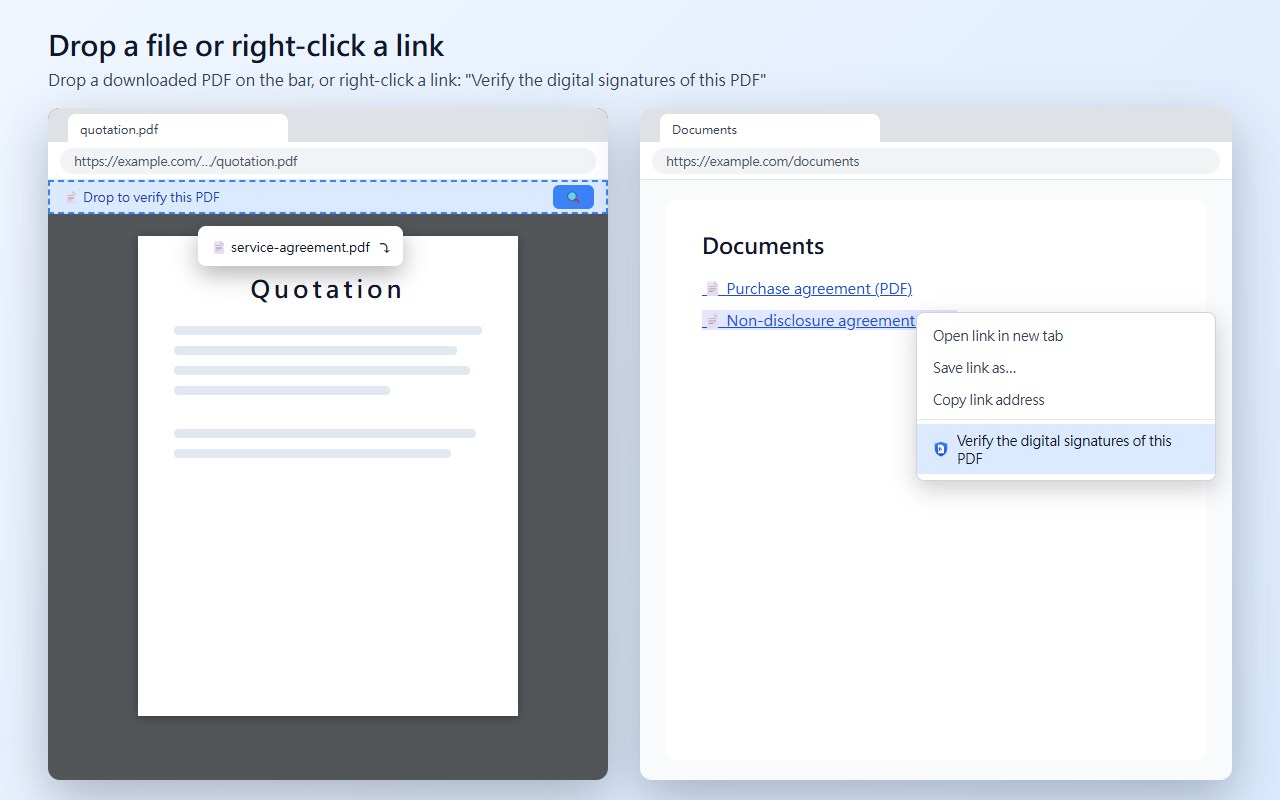
• Several ways to verify — drop a PDF on the notification bar or the extension window, right-click a link and choose "Verify the digital signatures of this PDF", or use the verify button next to PDF links
• Local files — after turning on "Allow access to file URLs" in the extension details, local PDFs are verified automatically too
• Report export — export a full verification report as PDF
How It Works
1. Open a PDF in the browser — verification starts automatically
2. See the result in the side panel or by clicking the toolbar icon, including certificate chain, timestamp and revocation status
3. Re-check when needed, or export the verification report
Privacy
Your PDF files are never uploaded to any server; verification runs locally in your browser. Revocation checks only ask the certificate authority's OCSP / CRL service about the certificate — the document is never sent. Answers are cached briefly to avoid repeated requests.
Supported Signatures
• CMS / PKCS#7 (adbe.pkcs7.detached, adbe.pkcs7.sha1)
• RSA, ECDSA, RSA-PSS signature algorithms
• SHA-256, SHA-384, SHA-512, SHA-1 hash algorithms
• PAdES (PDF Advanced Electronic Signatures)
Languages
English and Traditional Chinese (繁體中文). Automatically detected from browser language, or manually switch in settings.
PDFtrust - PDF 數位簽章驗證工具 是做什么的
PDFtrust - PDF 數位簽章驗證工具 是一款面向 Edge 的效率工具类扩展,主要用来管住注意力、屏蔽干扰站点、记录时间。官方对它的介绍是:Verify PDF digital signatures — integrity, certificate chain, trust, timestamp, revocation & LTV. Taiwan PKI (GRCA, TWCA, Chunghwa).在微软 Edge 加载项商店上,它当前版本 1.0.4,约 6 名用户。
适合什么人用
从功能定位看,PDFtrust - PDF 數位簽章驗證工具 更适合想专注工作学习、减少无效刷网页的用户。如果你平时只是偶尔遇到相关需求,用浏览器自带功能也能凑合;但如果这件事每天都发生,装一个专门处理它的扩展通常比手动操作省事得多。需要注意的是它作用于所有网站,装上后建议先观察一两天,确认不影响常用站点的正常使用。
怎么安装 PDFtrust - PDF 數位簽章驗證工具
- 打开微软 Edge 加载项商店上的官方页面;
- 点「添加到浏览器」并确认权限提示;
- 装好后在扩展列表里固定图标,方便随时开关。
本站只做索引与介绍,安装包来自官方商店。如果商店页面提示当前地区不可用,说明该扩展未在你所在区域上架。
常见问题
PDFtrust - PDF 數位簽章驗證工具 是免费的吗?
PDFtrust - PDF 數位簽章驗證工具 在微软 Edge 加载项商店免费提供下载。它是浏览器扩展,装上就能直接用,不需要注册账号。
PDFtrust - PDF 數位簽章驗證工具 安全吗?
它只申请了 0 项权限,范围比较克制,没有申请「读取所有网站数据」这种大权限。
PDFtrust - PDF 數位簽章驗證工具 支持哪些浏览器?
当前收录的版本来自微软 Edge 加载项商店,适用于 Edge。同一个扩展在其他商店可能有对应版本,但功能与版本号不一定相同。
怎么卸载 PDFtrust - PDF 數位簽章驗證工具?
在扩展管理页找到 PDFtrust - PDF 數位簽章驗證工具,点移除即可。它在本地保存的设置会一起清掉,不会残留数据。
权限清单 来自 manifest.json 原文
站点访问(可选) 1
<all_urls>
接口权限 5
activeTabalarmscontextMenusdownloadsstorage