PDF Wizardry
PDF Wizardry · EEdge MV3
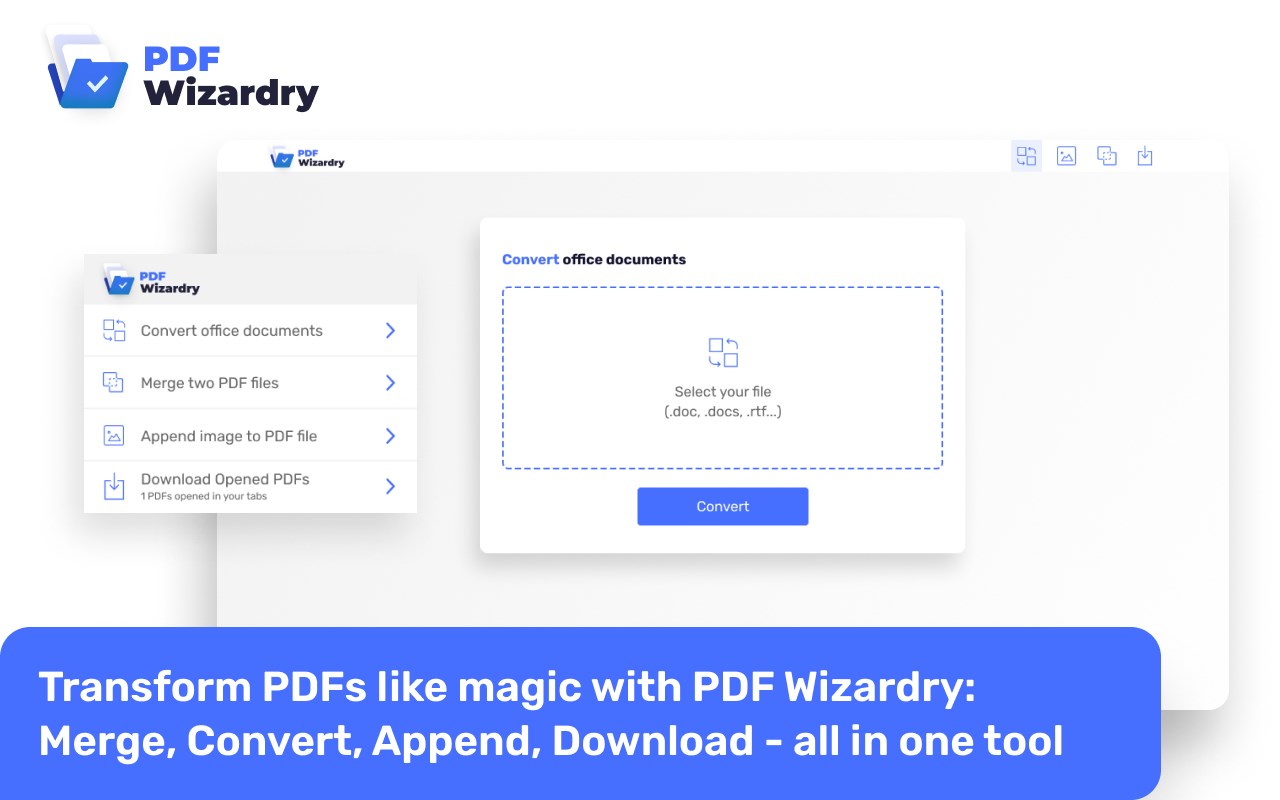
Transform PDFs like magic with PDF Wizardry: Merge, Convert, Append, Download - all in one tool!
<all_urls>),意味着它可以读取你在任意站点的页面内容,包括已登录的页面。这是许多扩展正常工作的必要条件,但也值得你确认来源可信。
截图
简介
🔮📚 Introducing PDF Wizardry: The Ultimate Browser Extension for PDF Mastery! 🌟
Are you tired of struggling with PDF files, wishing for a simpler and more efficient way to handle them? Look no further! PDF Wizardry is here to revolutionize your PDF experience and empower you with a powerful set of tools. With just a click of a button, you'll unlock a world of possibilities to effortlessly transform PDFs into masterpieces.
🔑 Key Features:
✅ Convert DOCX and DOC files to PDF: Say goodbye to tedious formatting issues and let PDF Wizardry seamlessly convert your Word documents into professional-looking PDFs. Preserve fonts, layouts, and hyperlinks with ease, and effortlessly share your documents with anyone.
✅ Merge PDFs with ease: Combine multiple PDF files into a single, well-organized document. Whether you need to merge reports, contracts, or presentation slides, PDF Wizardry has got you covered. Simplify your workflow and enhance productivity like never before.
✅ Insert images into PDFs: Add a touch of visual appeal to your PDFs by effortlessly inserting images. Whether it's a company logo, product shots, or captivating illustrations, PDF Wizardry allows you to seamlessly integrate them into your documents. Impress your clients, colleagues, or readers with stunning visuals.
✅ Download opened PDFs: Sometimes, you come across a PDF that you urgently need to save, but the browser won't let you. With PDF Wizardry, you can effortlessly download any opened PDF directly to your device. No more frustration—simply click and save!
💼 Use Cases:
Students: Convert lecture notes, research papers, and assignments into PDF format, merge multiple PDFs into a single comprehensive document, and add relevant images for more engaging presentations.
Professionals: Easily transform important reports, proposals, and contracts into PDFs, merge multiple versions into one cohesive file, and enhance your documents with impactful visuals.
Small Business Owners: Streamline your document management by converting invoices, receipts, and agreements into PDFs, merging related documents, and adding your company logo or product images.
Content Creators: Convert your blog posts, articles, or e-books into PDF format, merge multiple chapters into one seamless document, and include captivating images for an enhanced reading experience.
With PDF Wizardry, the power to manipulate and enhance PDFs is at your fingertips. Say goodbye to complex software installations and embrace the simplicity of a browser extension. Boost your productivity, improve collaboration, and transform your PDFs like magic.
🌟 Get PDF Wizardry today and unlock the true potential of your PDF files! 🌟
🔮📚 引入PDF巫术:PDF掌握的终极浏览器扩展!🌟
您是否厌倦了与PDF文件斗争,希望有一种更简单和高效的处理方式?别再寻找了!PDF巫术在这里为您的PDF体验带来革命,并赋予您强大的工具集。只需点击一下按钮,您将解锁一个无穷的可能性,轻松将PDF转化为杰作。
🔑 主要功能:
✅ 将DOCX和DOC文件转换为PDF:告别繁琐的格式问题,让PDF巫术无缝地将您的Word文档转换为专业的PDF。轻松保留字体、布局和超链接,并轻松与任何人共享您的文档。
✅ 轻松合并PDF:将多个PDF文件合并成一个完整的、井然有序的文档。无论您需要合并报告、合同还是演示幻灯片,PDF巫术都能为您提供帮助。简化您的工作流程,提高生产力。
✅ 将图像插入PDF:通过轻松插入图像为您的PDF增添一丝视觉吸引力。无论是公司标志、产品照片还是引人入胜的插图,PDF巫术都允许您将它们无缝地整合到您的文档中。用令人惊叹的视觉效果给客户、同事或读者留下深刻印象。
✅ 下载已打开的PDF:有时,您会遇到急需保存的PDF,但浏览器不允许您这样做。有了PDF巫术,您可以轻松地将任何已打开的PDF直接下载到您的设备上。不再有沮丧的情绪,只需点击保存!
💼 应用案例:
学生:将讲义、研究论文和作业转换为PDF格式,将多个PDF合并为一个全面的文档,并添加相关图像以获得更吸引人的演示。
专业人士:轻松将重要报告、提案和合同转换为PDF,将多个版本合并为一个连贯的文件,并用有影响力的视觉元素增强您的文档。
小企业主:通过将发票、收据和协议转换为PDF,合并相关文档,并添加您的公司标志或产品图像来简化您的文件管理。
内容创作者:将您的博客文章、文章或电子书转换为PDF格式,将多个章节合并为一个无缝文档,并包含引人入胜的图像,以提升阅读体验。
有了PDF巫术,您可以轻松操纵和增强PDF。告别复杂的软件安装,拥抱浏览器扩展的简单性。提升您的生产力,改善协作,并像魔法一样转化您的PDF。
🌟 立即获取PDF巫术,释放您的PDF文件真正潜力!🌟
PDF Wizardry is a free and unlimited alternative to the following tools: Adobe Acrobat: PDF edit, convert, sign tools, Annotate pdf, Beck PDF Downloader, Brick PDF, CocoDoc - PDF Editor, Filler & Converter, Combine pdf, Compress PDF, Convert PDF to Excel, Convert PDF to JPEG/PNG, Convert PDF to Word, DarkX PDF, DearPDF, DeftPDF, EZ PDF, Egypt ETA PDF Tool, Excel to PDF Converter, Foxit PDF Creator, Free PDF Editor, Give me the F-ing PDF, Image to PDF - dearprint, ImageRight PDF Import, JPG to PDF, Kofax PDF Create, LMS Hanyang PDF Download Button, Merge PDF, Merge PDF (EastHillsMedia.com), My PDF Manager, NFe para PDF, No PDF Download, Online PDF tools | ilovepdf.com, PDF Clipper, PDF Combine - Convert and Merge, PDF Combiner: Merge PDF Files, PDF Compressor, PDF Convert – Merge – Resize, PDF Converted - Convert Documents, PDF Converter, PDF Converter Online, PDF Converter Power, PDF Editor for Chrome:Edit, Fill, Sign, Print, PDF Generator, PDF Hub, PDF Mage, PDF Merge, PDF Paster, PDF Plus, PDF SmartBox, PDF Splitter, PDF Toolbox, PDF Tools - Convert, Resize & Merge, PDF to DOCX Converter, PDF to Excel, PDF to JPG, PDF to JPG Converter, PDF to PNG, PDF to PNG Converter, PNG to PDF Converter, PPTX to PDF Converter, Print Friendly & PDF, PrintFriendly - Print and PDF Web Pages, Quick PDF Combine Extension, Right PDF, Save image as PDF, Simple Word to PDF, SimplePDF - Edit and Fill PDF, Smallpdf—Edit, Convert, Compress, & AI Summarize PDF, Speedpdf, Split PDF., Tronclass pdf (原iClass get pdf),, Turbo PDF, Word to PDF, Word to PDF Converter, Word to PDF Converter Pro, Xodo | PDF Editor, Converter & Merger, YCT - PDF to JPG Converter, YOZOPDF-Free and easy PDF conversion platform, Zone PDF: Edit and Convert PDFs, iclass pdf (TronClass通用), merge files to pdf - with PDFzorro.
PDF Wizardry 是做什么的
PDF Wizardry 是一款面向 Edge 的效率工具类扩展,主要用来管住注意力、屏蔽干扰站点、记录时间。官方对它的介绍是:Transform PDFs like magic with PDF Wizardry: Merge, Convert, Append, Download - all in one tool!在微软 Edge 加载项商店上,它当前版本 1.0.3,评分 5(3581 人评价),约 20,366 名用户。
适合什么人用
从功能定位看,PDF Wizardry 更适合想专注工作学习、减少无效刷网页的用户。如果你平时只是偶尔遇到相关需求,用浏览器自带功能也能凑合;但如果这件事每天都发生,装一个专门处理它的扩展通常比手动操作省事得多。需要注意的是它作用于所有网站,装上后建议先观察一两天,确认不影响常用站点的正常使用。
怎么安装 PDF Wizardry
- 打开微软 Edge 加载项商店上的官方页面;
- 点「添加到浏览器」并确认权限提示;
- 装好后在扩展列表里固定图标,方便随时开关。
本站只做索引与介绍,安装包来自官方商店。如果商店页面提示当前地区不可用,说明该扩展未在你所在区域上架。
常见问题
PDF Wizardry 是免费的吗?
PDF Wizardry 在微软 Edge 加载项商店免费提供下载。它是浏览器扩展,装上就能直接用,不需要注册账号。
PDF Wizardry 安全吗?
它只申请了 0 项权限,范围比较克制,没有申请「读取所有网站数据」这种大权限。
PDF Wizardry 支持哪些浏览器?
当前收录的版本来自微软 Edge 加载项商店,适用于 Edge。同一个扩展在其他商店可能有对应版本,但功能与版本号不一定相同。
怎么卸载 PDF Wizardry?
在扩展管理页找到 PDF Wizardry,点移除即可。它在本地保存的设置会一起清掉,不会残留数据。
权限清单 来自 manifest.json 原文
站点访问(可选) 1
<all_urls>
接口权限 5
alarmsdeclarativeNetRequestdownloadsscriptingstorage