
PDF Toolkit Pro EN
Ave Netvs · EEdge MV3
Complete PDF toolkit: convert, merge, edit, split, compress, annotate, sign, and more - all in your browser
截图


简介
Transform your PDF workflow with PDF Toolkit Pro, the ultimate all-in-one PDF solution designed specifically for Microsoft Edge users. Access 24 professional-grade PDF tools that work completely offline, ensuring your documents stay private and secure.
🎯 COMPREHENSIVE TOOLSET (25 Tools)
Document Assembly & Organization:
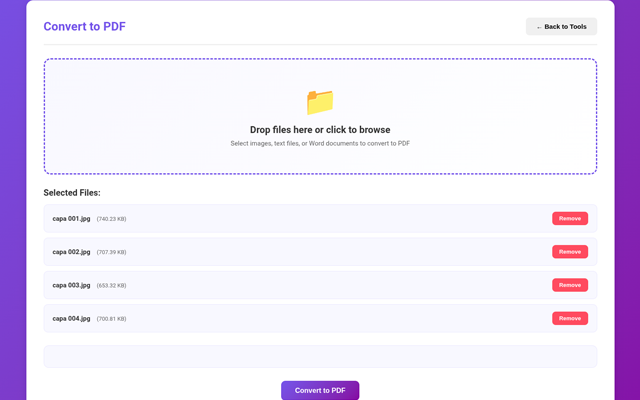
✓ Convert to PDF - Transform images, text, and Word files into PDF format
✓ Merge PDFs - Seamlessly combine multiple PDF documents into one
✓ Split PDF - Extract pages by range or split every N pages
✓ Rearrange Pages - Reorder pages with reverse, odd-even, or custom sequences
✓ Add/Remove Pages - Insert blank pages or delete unwanted content
Professional Editing Suite:
✓ Edit PDF - Add text annotations with custom fonts and colors
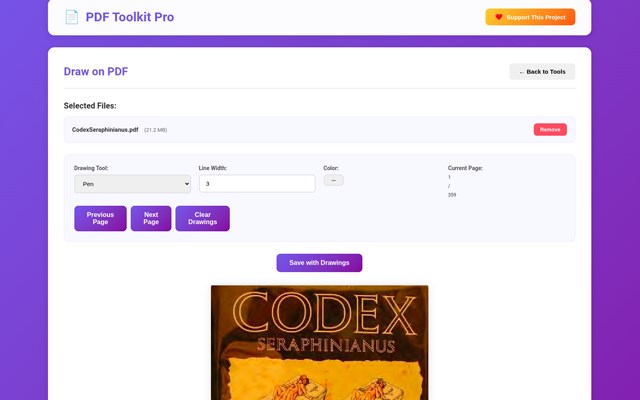
✓ Draw on PDF - Freehand drawing with pen, lines, rectangles, and circles
✓ Add Watermark - Apply custom text watermarks with rotation and transparency
✓ Sign PDF - Add digital signatures with optional date stamps
✓ Header & Footer - Insert custom headers and footers across all pages
✓ Page Numbering - Auto-number pages with flexible positioning
Optimization & Compression:
✓ Compress PDF - Intelligently reduce file size while maintaining quality
✓ Optimize PDF - Prepare PDFs for web viewing and faster loading
✓ Flatten PDF - Merge all layers and form fields into static content
Visual Transformations:
✓ Rotate PDF - Rotate pages 90°, 180°, or 270° individually or in bulk
✓ Crop PDF - Remove margins and trim pages to desired dimensions
✓ Grayscale PDF - Convert color PDFs to black and white or high-contrast
✓ PDF to Images - Export pages as high-quality PNG or JPEG images
Data Extraction & Analysis:
✓ Extract Text - Get all text content in plain, formatted, or structured format
✓ Extract Images - Export all embedded images from your PDF
✓ View Metadata - Access detailed PDF information and properties
✓ Edit Metadata - Modify title, author, subject, and keywords
✓ Validate PDF - Verify PDF structure and compliance
✓ Compare PDFs - Identify differences between two PDF documents
✓ Repair PDF - Attempt to fix corrupted or damaged PDF files
🛡️ PRIVACY & SECURITY GUARANTEED
Your Data Stays Yours:
100% offline processing - no internet required after installation
Zero file uploads - everything processes locally in your browser
No data collection - we never see or store your documents
No registration required - use immediately without accounts
Complete privacy - your sensitive documents never leave your device
✨ KEY ADVANTAGES
Performance:
Lightning-fast processing with optimized algorithms
Handles large PDF files efficiently (no size limits)
Instant results for most operations
Smooth, responsive interface
Usability:
Intuitive, modern design with clear visual cues
Drag-and-drop file upload
Real-time progress indicators
Helpful status messages and error handling
One-click operation for most tools
Reliability:
Built with industry-standard PDF-lib library
Robust error handling and recovery
Consistent results across all operations
Regular updates and improvements
Value:
Completely FREE - all 24 tools at no cost
No subscription fees or hidden charges
No watermarks on processed files
Unlimited usage with no restrictions
💼 IDEAL FOR
Business Professionals:
Sign contracts and agreements digitally
Add company watermarks to documents
Merge reports and presentations
Compress files for email attachments
Students & Educators:
Combine lecture notes and study materials
Extract text for research and citations
Add page numbers to assignments
Split large textbooks into chapters
Designers & Creatives:
Convert image portfolios to PDF
Extract images for reuse
Add visual annotations and markings
Optimize PDFs for web portfolios
Everyone Else:
Everyday PDF tasks made simple
No technical knowledge required
Quick solutions for common problems
Professional results every time
🚀 GETTING STARTED
Simple 5-Step Process:
Click the PDF Toolkit Pro icon in your Edge toolbar
Select your desired tool from the visual grid
Upload your PDF file(s) using click or drag-and-drop
Configure any tool-specific settings
Click process and download your result instantly!
🎨 BEAUTIFUL MODERN INTERFACE
Designed for Edge:
Stunning gradient purple theme
Large, clear tool icons with descriptions
Responsive layout that works on any screen size
Smooth animations and transitions
Clean, uncluttered workspace
📊 TECHNICAL SPECIFICATIONS
Powered By:
PDF-lib: Industry-standard PDF manipulation
PDF.js: Mozilla's PDF rendering engine
Modern JavaScript ES6+
HTML5 Canvas for image processing
Supported Formats:
Input: PDF, PNG, JPG, JPEG, GIF, TXT
Output: PDF, PNG, JPEG, TXT
System Requirements:
Microsoft Edge (latest version)
Windows, Mac, Linux, or Chrome OS
No additional software needed
🌟 STANDOUT FEATURES
Extract Text Tool:
Three output formats: Plain, Formatted, Structured
Preserves layout when possible
Shows preview before downloading
Perfect for data extraction and analysis
Advanced Compression:
Smart algorithms reduce size without visible quality loss
Shows before/after file sizes
Multiple compression levels available
Professional Watermarking:
Custom text with any font size
Adjustable opacity (0-100%)
45° rotation for diagonal placement
Custom colors with color picker
Digital Signatures:
Add professional signature text
Optional date stamps
Flexible positioning
Perfect for contracts and agreements
🔄 CONTINUOUS IMPROVEMENT
We're committed to making PDF Toolkit Pro even better:
Regular feature updates
Bug fixes and performance improvements
User feedback integration
New tools based on user requests
💝 SUPPORT THE DEVELOPER
PDF Toolkit Pro is free to use, but if you find it valuable, consider supporting the developer through the built-in PayPal donation button. Your contribution helps:
Keep all tools free for everyone
Fund new feature development
Maintain and improve existing features
Provide faster updates and support
📱 CROSS-PLATFORM COMPATIBILITY
Works seamlessly on:
Windows 10/11
macOS
Linux…
PDF Toolkit Pro 是做什么的
PDF Toolkit Pro 是一款面向 Edge 的效率工具类扩展,主要用来管住注意力、屏蔽干扰站点、记录时间。官方对它的介绍是:Complete PDF toolkit: convert, merge, edit, split, compress, annotate, sign, and more - all in your browser在微软 Edge 加载项商店上,它当前版本 1.0.0,约 23 名用户。
适合什么人用
从功能定位看,PDF Toolkit Pro 更适合想专注工作学习、减少无效刷网页的用户。如果你平时只是偶尔遇到相关需求,用浏览器自带功能也能凑合;但如果这件事每天都发生,装一个专门处理它的扩展通常比手动操作省事得多。
怎么安装 PDF Toolkit Pro
- 打开微软 Edge 加载项商店上的官方页面;
- 点「添加到浏览器」并确认权限提示;
- 装好后在扩展列表里固定图标,方便随时开关。
本站只做索引与介绍,安装包来自官方商店。如果商店页面提示当前地区不可用,说明该扩展未在你所在区域上架。
常见问题
PDF Toolkit Pro 是免费的吗?
PDF Toolkit Pro 在微软 Edge 加载项商店免费提供下载。它是浏览器扩展,装上就能直接用,不需要注册账号。
PDF Toolkit Pro 安全吗?
它只申请了 0 项权限,范围比较克制,没有申请「读取所有网站数据」这种大权限。
PDF Toolkit Pro 支持哪些浏览器?
当前收录的版本来自微软 Edge 加载项商店,适用于 Edge。同一个扩展在其他商店可能有对应版本,但功能与版本号不一定相同。
怎么卸载 PDF Toolkit Pro?
在扩展管理页找到 PDF Toolkit Pro,点移除即可。它在本地保存的设置会一起清掉,不会残留数据。
权限清单 来自 manifest.json 原文
接口权限 1
storage
其他商店也有这款
同一款扩展在不同浏览器下的版本,权限与更新节奏可能不同
