PDF Renamer EN
Pedro Matos · EEdge MV3
Guarde PDFs com nomes predefinidos baseados em perfis.
截图
简介
PDF Renamer Extension is a user-friendly browser add-on designed to automate and optimize the way you save PDF files from the web, particularly for Microsoft Edge and Google Chrome users. This extension empowers you to create custom renaming profiles that automatically rename downloaded PDFs according to your tailored patterns, eliminating the tedious task of manual renaming and helping keep your files organized and easy to identify. Whether you handle invoices, academic papers, reports, backups, or any other PDF documents, PDF Renamer Extension enhances productivity by providing a smart, seamless method to name and save your files consistently.
Once installed, the extension integrates directly into your browser’s context menu, allowing you to rename and save PDFs by simply right-clicking on PDF links or pages. You can create unlimited renaming profiles with customizable naming conventions that include dynamic variables such as the original file name (`{original}`), current date (`{date}`), time (`{time}`), and Unix timestamp (`{timestamp}`). For example, an invoice can be saved as `Invoice_01-12-2025_document.pdf`, or a report as `Report_01-12-2025_15h30m45s.pdf`, quickly reflecting the exact naming style suited for your workflow.
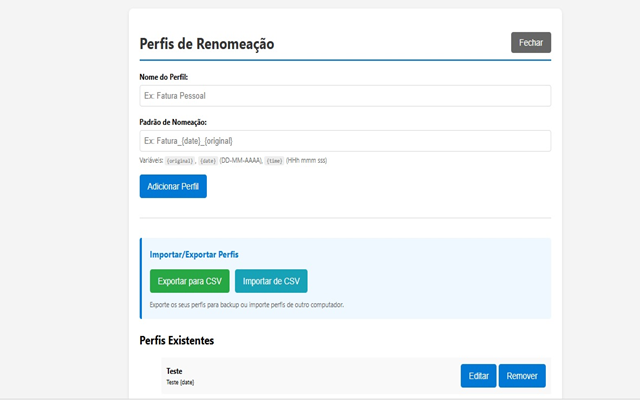
The extension’s settings page offers a modern, intuitive interface to create, modify, import, export, and manage your profiles efficiently. Exporting and importing profiles as CSV files lets you back up your configurations or share them across multiple devices with ease. The solution also supports local PDF files (`file:///` URLs), sanitizes invalid file names automatically to maintain compatibility, and works smoothly alongside popular PDF viewers like Adobe Acrobat Reader. Browser notifications keep you informed about download progress or errors, ensuring you never miss important events.
Internationalization support guarantees the extension is accessible and comfortable to use regardless of your locale, while all data is stored locally in your browser for full privacy and no external data transmission. You benefit from using the latest web extension technologies and APIs, including those for downloads, context menus, storage, scripting, active tabs, and notifications—resulting in a secure, fast, and reliable user experience.
Whether you're a student, researcher, business professional, or anyone managing multiple PDFs daily, PDF Renamer Extension is an essential tool for automating PDF organization, speeding up your workflow, and maintaining systematic file naming conventions effortlessly.
Key Features:
- Customizable renaming profiles allow you to define multiple unique naming patterns adapted to different types of PDFs.
- Smart context menu integration provides instant "Rename and Save" options through right-click on PDF links or pages.
- Dynamic filename variables such as `{original}`, `{date}`, `{time}`, and `{timestamp}` enable rich, informative file names.
- Import and export functionality via CSV supports profile backup and migration across devices.
- User-friendly, modern options page for creating, editing, deleting, and managing renaming profiles and rules.
- Popup interface offers quick access to your profiles, download actions, and settings.
- Error notifications keep you informed if a download fails or encounters issues, including diagnostic feedback.
- Support for local PDF files (`file:///`) and Adobe Acrobat Reader compatibility ensures versatility.
- Automatic sanitization of invalid characters in file names to maintain consistency and avoid errors.
- Full UTF-8 support for special characters in file names.
How It Works:
1. Install PDF Renamer Extension from the browser's extension store for Edge or Chrome.
2. Open the Options page to create one or more renaming profiles; specify patterns using variables like `Invoice_{date}_{original}` or `Backup_{timestamp}_{original}`.
3. When browsing, right-click any PDF link or page and select “Rename and Download,” then choose the profile you want to apply.
4. The extension applies the selected profile’s naming pattern, inserting dynamic variables to rename the PDF file as it downloads.
5. Manage profiles anytime via the popup or options page—add new profiles, update existing ones, export to CSV for backup, or import from CSV for restoration or sharing.
6. Receive browser notifications about download statuses or errors to stay informed.
7. All settings and profiles are securely saved locally in your browser, ensuring privacy and easy backup without any data leaving your device.
Privacy: - 100% local storage: All your profile data and preferences remain solely on your device. No data is sent to servers, no tracking or analytics are performed, and the extension is fully open source for complete transparency.
PDF Renamer 是做什么的
PDF Renamer 是一款面向 Edge 的效率工具类扩展,主要用来管住注意力、屏蔽干扰站点、记录时间。官方对它的介绍是:Guarde PDFs com nomes predefinidos baseados em perfis.在微软 Edge 加载项商店上,它当前版本 1.6,评分 5(2 人评价),约 21 名用户。
适合什么人用
从功能定位看,PDF Renamer 更适合想专注工作学习、减少无效刷网页的用户。如果你平时只是偶尔遇到相关需求,用浏览器自带功能也能凑合;但如果这件事每天都发生,装一个专门处理它的扩展通常比手动操作省事得多。
怎么安装 PDF Renamer
- 打开微软 Edge 加载项商店上的官方页面;
- 点「添加到浏览器」并确认权限提示;
- 装好后在扩展列表里固定图标,方便随时开关。
本站只做索引与介绍,安装包来自官方商店。如果商店页面提示当前地区不可用,说明该扩展未在你所在区域上架。
常见问题
PDF Renamer 是免费的吗?
PDF Renamer 在微软 Edge 加载项商店免费提供下载。它是浏览器扩展,装上就能直接用,不需要注册账号。
PDF Renamer 安全吗?
它只申请了 0 项权限,范围比较克制,没有申请「读取所有网站数据」这种大权限。
PDF Renamer 支持哪些浏览器?
当前收录的版本来自微软 Edge 加载项商店,适用于 Edge。同一个扩展在其他商店可能有对应版本,但功能与版本号不一定相同。
怎么卸载 PDF Renamer?
在扩展管理页找到 PDF Renamer,点移除即可。它在本地保存的设置会一起清掉,不会残留数据。
权限清单 来自 manifest.json 原文
站点访问(可选) 1
file:///*
接口权限 6
activeTabcontextMenusdownloadsnotificationsscriptingstorage