
Password Show - Reveal Login Passwords EN
mohamedsubarashi · EEdge MV3
Reveal hidden password fields only during login. Includes whitelist and blacklist options.
截图
简介
Password Reveal Extension is a practical and user-friendly browser tool designed to enhance your login experience by allowing you to quickly and safely reveal passwords hidden behind obscured input fields. If you’ve ever faced the frustration of mistyping passwords without being able to verify your input due to masked characters, this extension offers a convenient solution. It temporarily converts password fields into visible plain text when you hover your mouse over them, helping you identify input errors and simplifying the process of entering complex or lengthy passwords, all while maintaining your privacy and security.
This extension works quietly in the background, automatically detecting password inputs on the websites you visit. When activated, just placing your cursor over a password field instantly reveals the concealed characters, making it easier to confirm correctness without extra steps. Once your cursor leaves the field, the text immediately reverts to the hidden format to protect your information. This temporary and deliberate reveal mechanism ensures that your passwords are visible only when you explicitly intend to check them, thus preventing accidental exposure. Password Reveal is especially useful for users managing multiple accounts, copying complex passwords, or simply verifying their typed entries before submission.
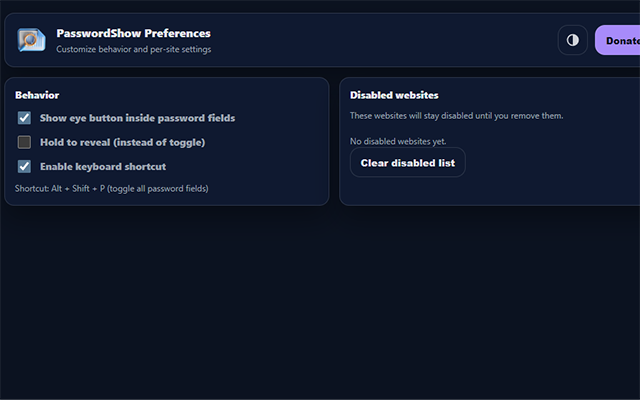
The interface of Password Reveal is sleek and modern, accessible via a popup menu located on your browser’s toolbar. The popup lets you effortlessly toggle the extension on or off with a single click. It also offers customizable appearance settings, including light, dark, and auto themes, providing a visually comfortable experience that adapts to your preference or environment. From the popup, you can conveniently access support resources or options for donations. For more detailed customization, the options page allows you to configure domain-specific behavior using whitelists and blacklists. If you want to ensure password reveal functionality doesn’t activate on sensitive sites like banking portals, you can add those domains to the blacklist. Conversely, the whitelist feature restricts password visibility solely to designated websites. All these preferences are stored locally within the browser for fast, secure operation.
Behind the scenes, the extension employs lightweight event listeners targeted exclusively at password fields to ensure efficient performance without unnecessary resource consumption. The background script keeps track of the extension’s activation status and visually communicates it through the toolbar badge—color-coded for immediate recognition whether the extension is active or inactive. Importantly, Password Reveal respects your privacy rigorously; it does not collect, transmit, or store any passwords or browsing data. All functionality is executed entirely within your browser locally, guaranteeing your credentials remain confidential. Accessibility considerations are built into the design, including support for varied interface directions and responsive layouts, making it usable and friendly for a worldwide user base.
This extension is ideal for a wide range of users—from everyday internet surfers and power users to IT professionals—who want to minimize login errors and streamline password input without compromising security. It adds an intelligent layer of convenience, helping you confidently enter passwords and reduce the hassle associated with hidden inputs across all your favorite websites.
Key Features:
- Effortlessly reveal passwords by hovering over password fields to temporarily display hidden input in plain text.
- Instant toggle via the browser popup, enabling or disabling the extension with a single click.
- Granular website control with whitelist and blacklist management to specify where passwords can be revealed or protected.
- Modern, clean user interface featuring theme switching (auto/light/dark) for an aesthetically pleasing and customizable experience.
- Toolbar badge that provides immediate visual feedback on extension status using color-coded indicators.
- Responsive options panel where you can configure preferences, manage domain lists, and access support resources in one streamlined place.
- Full accessibility support, including adaptable UI layout and language direction for users worldwide.
How It Works:
1. Install Password Reveal from your browser’s extension store.
2. Activate the extension from the toolbar and adjust appearance and preference settings in the popup or the detailed options page.
3. Navigate to any website with password input fields and hover your cursor over a password box to reveal its contents temporarily.
4. Remove your mouse pointer from the password field, and the password instantly becomes concealed again to maintain privacy.
5. Add sensitive or special websites to the blacklist to prevent password reveal functionality from activating on those domains.
6. Use the whitelist to restrict password reveal exclusively to selected websites for enhanced control.
7. Modify settings or disable the extension anytime; changes apply immediately and are saved locally in your browser.
Privacy: - No personal data collected.
Password Show - Reveal Login Passwords 是做什么的
Password Show - Reveal Login Passwords 是一款面向 Edge 的效率工具类扩展,主要用来管住注意力、屏蔽干扰站点、记录时间。官方对它的介绍是:Reveal hidden password fields only during login. Includes whitelist and blacklist options.在微软 Edge 加载项商店上,它当前版本 2.1.0,约 16 名用户。
适合什么人用
从功能定位看,Password Show - Reveal Login Passwords 更适合想专注工作学习、减少无效刷网页的用户。如果你平时只是偶尔遇到相关需求,用浏览器自带功能也能凑合;但如果这件事每天都发生,装一个专门处理它的扩展通常比手动操作省事得多。
怎么安装 Password Show - Reveal Login Passwords
- 打开微软 Edge 加载项商店上的官方页面;
- 点「添加到浏览器」并确认权限提示;
- 装好后在扩展列表里固定图标,方便随时开关。
本站只做索引与介绍,安装包来自官方商店。如果商店页面提示当前地区不可用,说明该扩展未在你所在区域上架。
常见问题
Password Show - Reveal Login Passwords 是免费的吗?
Password Show - Reveal Login Passwords 在微软 Edge 加载项商店免费提供下载。它是浏览器扩展,装上就能直接用,不需要注册账号。
Password Show - Reveal Login Passwords 安全吗?
它只申请了 0 项权限,范围比较克制,没有申请「读取所有网站数据」这种大权限。
Password Show - Reveal Login Passwords 支持哪些浏览器?
当前收录的版本来自微软 Edge 加载项商店,适用于 Edge。同一个扩展在其他商店可能有对应版本,但功能与版本号不一定相同。
怎么卸载 Password Show - Reveal Login Passwords?
在扩展管理页找到 Password Show - Reveal Login Passwords,点移除即可。它在本地保存的设置会一起清掉,不会残留数据。
权限清单 来自 manifest.json 原文
接口权限 2
storagetabs