
PassQGuard password autofill extension EN
Web Serwis · EEdge MV3
PassQGuard password autofill extension. Requires desktop app. Quantum secure, generated on-demand, never stored. No data collection.
截图
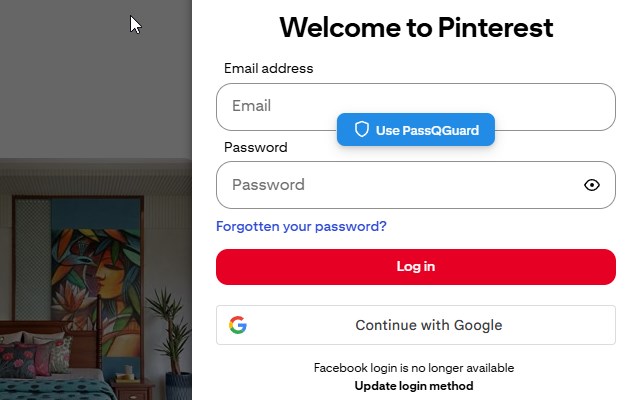
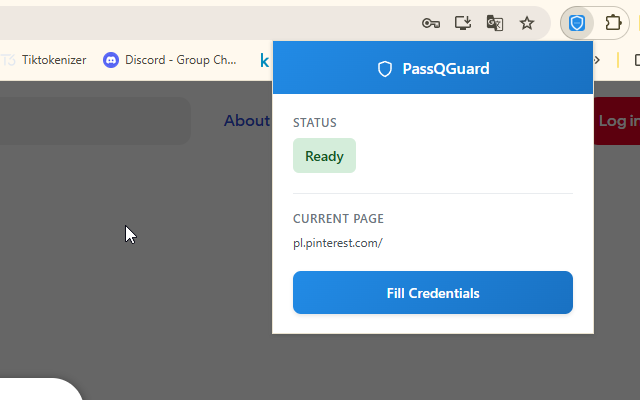
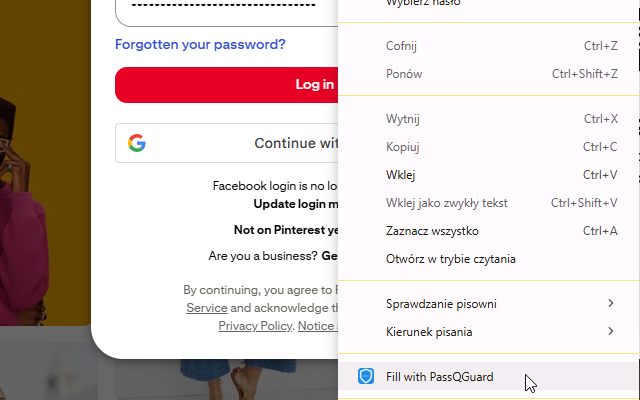
简介
This is the browser extension companion for the PassQGuard desktop application. Download this extension to enable password autofill functionality on websites and login forms when using the PassQGuard post-quantum secure password manager.
What This Extension Does
This browser extension connects your web browser to the PassQGuard desktop application, allowing you to:
• Automatically detect login forms on websites you visit
• Fill passwords generated by the PassQGuard desktop app
• Manage multiple accounts per website with ease
• Secure your web browsing with post-quantum cryptography
Important: Desktop App Required
This extension requires the PassQGuard desktop application to be installed and running on your computer. The extension acts as a bridge between your browser and the desktop app - it does not function as a standalone password manager.
Download PassQGuard from Microsoft Store to use this extension!
Key Features
Seamless Integration
• Works seamlessly with PassQGuard desktop application
• Automatic login form detection
• One-click password filling
• Supports multiple accounts per website
Post-Quantum Security
• Built with post-quantum cryptography
• Future-proof against quantum computing threats
• Your passwords remain secure as technology advances
Generative Password Technology
• Passwords are generated on-demand by the desktop app
• Passwords are never stored anywhere
• No password database to hack or breach
• Each password uniquely generated based on your master key
Complete Privacy
• Extension does not collect or store any data
• All communication happens locally (localhost)
• No cloud storage, no external servers
• Your credentials never leave your device
Zero Storage Design
• Extension stores nothing - pure communication bridge
• Desktop app stores only metadata (domains, usernames)
• Passwords and encryption keys are never stored
• Maximum security through minimal data footprint
How to Use
1. Install PassQGuard Desktop App: First, download and install the PassQGuard desktop application
2. Install This Extension: Add this browser extension to Edge
3. Pair Extension with Desktop App: Connect the extension to your desktop app
4. Browse and Login: Visit websites - the extension automatically detects login forms
5. Fill Passwords: Click to fill passwords generated by the desktop app
Requirements
• PassQGuard desktop application must be installed and running
• Desktop app communicates with extension via localhost (127.0.0.1:48000)
• No internet connection required for password operations
• Extension requires desktop app to generate and manage passwords
Security & Privacy
• No Data Collection: Extension collects zero data
• Local Communication Only: All operations happen locally between extension and desktop app
• Post-Quantum Ready: Future-proof cryptography
• Zero Storage: Extension stores nothing, desktop app generates passwords on-demand
• Complete Privacy: No external network communication
Important Notes
• This extension requires the PassQGuard desktop application to function
• The extension is a companion tool, not a standalone password manager
• Desktop app must be running for the extension to work
• Extension communicates only with the local desktop app (localhost)
• No external network communication is performed
• All password operations are local and secure
Support
For questions, support, or to download the desktop application:
• Website: https://webserwis.tech/
• Privacy Policy: https://pass-q-guard.netlify.app/
Download this extension to enable web password management with your PassQGuard desktop application.
PassQGuard password autofill extension 是做什么的
PassQGuard password autofill extension 是一款面向 Edge 的实用工具类扩展,主要用来解决浏览器里某类具体的小问题。官方对它的介绍是:PassQGuard password autofill extension. Requires desktop app. Quantum secure, generated on-demand, never stored. No data collection.在微软 Edge 加载项商店上,它当前版本 1.0.0,约 3 名用户。
适合什么人用
从功能定位看,PassQGuard password autofill extension 更适合想补上浏览器原生缺失功能的用户。如果你平时只是偶尔遇到相关需求,用浏览器自带功能也能凑合;但如果这件事每天都发生,装一个专门处理它的扩展通常比手动操作省事得多。
怎么安装 PassQGuard password autofill extension
- 打开微软 Edge 加载项商店上的官方页面;
- 点「添加到浏览器」并确认权限提示;
- 装好后在扩展列表里固定图标,方便随时开关。
本站只做索引与介绍,安装包来自官方商店。如果商店页面提示当前地区不可用,说明该扩展未在你所在区域上架。
常见问题
PassQGuard password autofill extension 是免费的吗?
PassQGuard password autofill extension 在微软 Edge 加载项商店免费提供下载。它是浏览器扩展,装上就能直接用,不需要注册账号。
PassQGuard password autofill extension 安全吗?
它只申请了 0 项权限,范围比较克制,没有申请「读取所有网站数据」这种大权限。
PassQGuard password autofill extension 支持哪些浏览器?
当前收录的版本来自微软 Edge 加载项商店,适用于 Edge。同一个扩展在其他商店可能有对应版本,但功能与版本号不一定相同。
怎么卸载 PassQGuard password autofill extension?
在扩展管理页找到 PassQGuard password autofill extension,点移除即可。它在本地保存的设置会一起清掉,不会残留数据。
权限清单 来自 manifest.json 原文
接口权限 3
contextMenusstoragetabs