
Online Image Compressor EN
Compress Karu · EEdge MV3
Compress your images easily with customizable quality settings
<all_urls>),意味着它可以读取你在任意站点的页面内容,包括已登录的页面。这是许多扩展正常工作的必要条件,但也值得你确认来源可信。
截图
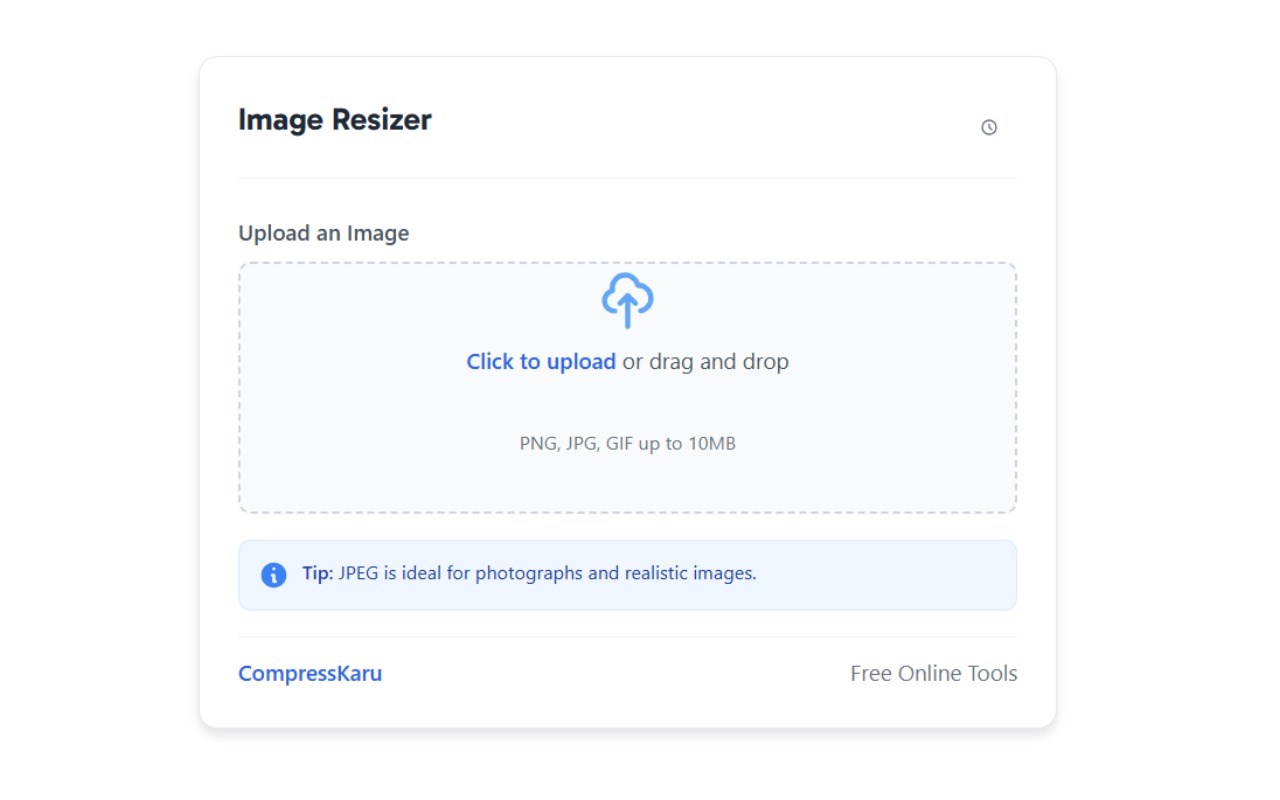
简介
Online Image Compressor brings professional-grade image compression directly to your Microsoft Edge browser. This lightweight extension enables you to quickly reduce image file sizes while maintaining excellent visual quality, perfect for web developers, content creators, and anyone who regularly works with images.
Featuring a clean, modern interface, Online Image Compressor makes image optimization intuitive.
Simply drag and drop your images, adjust compression settings to your preferences, and download the optimized results. The extension runs entirely within your browser - no uploads to external servers required, ensuring your images remain private and secure.
With highly customizable compression settings, you can perfectly balance quality and file size according to your specific needs.
Whether you're preparing images for websites, social media posts, email attachments, or personal storage, Online Image Compressor provides the tools you need for optimal results.
Save time with batch processing capabilities and convenient context menu integration that allows you to compress any image you find while browsing. Experience faster uploads, reduced storage usage, and improved website performance with the Online Image Compressor extension for Microsoft Edge.
Features
✔️Intuitive drag-and-drop interface: Simple, elegant design makes compression effortless
✔️Adjustable compression levels: Fine-tune quality settings from 0-100%
✔️Image resizing: Set maximum dimensions while maintaining aspect ratio
✔️Multiple output formats: Save as JPEG, PNG, or WebP for optimal compatibility
✔️EXIF data control: Option to preserve or remove metadata from your images
✔️Real-time preview: See compression results before downloading
✔️Context menu integration: Right-click on any image to compress it instantly
✔️Clipboard support: Copy compressed images directly to clipboard
✔️Customizable default settings: Set your preferred compression options
✔️100% private processing: All compression happens locally in your browser
✔️No file size limits: Compress images of any size your browser can handle
How to Compress an Image Size?
Basic Compression
➜ Click the extension icon in your Microsoft Edge toolbar
➜ Drag and drop an image into the compression area (or click "Choose File")
➜ Adjust the compression level using the slider (higher = better quality, larger file)
➜ Enter maximum width if you want to resize the image
➜ Choose your preferred output format
➜ Click "Compress Image"
➜ Click "Download Image" to save the compressed result
Context Menu Compression
➜ Right-click on any image on a webpage
➜ Select "Compress this image" from the context menu
➜ Adjust settings in the popup window
➜ Download or copy the compressed image
Customizing Default Settings
➜ Right-click the extension icon
➜ Select "Options"
➜ Set your preferred default compression level
➜ Choose default maximum width
➜ Select preferred output format
➜ Toggle EXIF data preservation
➜ Click "Save Settings"
FAQs
1️⃣. Does this extension upload my images to a server?
No. All processing happens locally in your browser. Your images never leave your computer.
2️⃣. What image formats are supported?
A: The extension supports JPEG, PNG, GIF, WebP, and BMP formats for input. You can save compressed images as JPEG, PNG, or WebP.
3️⃣. Will compression affect image quality?
A: Higher compression levels may reduce quality. Use the preview to find your ideal balance between size and quality.
4️⃣. Is there a file size limit?
A: No artificial limits. You can compress images of any size your browser can handle.
5️⃣. Can I compress multiple images at once?
A: Currently, the extension processes one image at a time.
6️⃣. Does this work on mobile Edge?
A: The extension is designed for desktop Microsoft Edge. Mobile support may vary.
7️⃣. Will this extension slow down my browsing?
A: The extension is lightweight and only uses resources when actively compressing images.
8️⃣. Is this extension compatible with Windows 11?
A: Yes, it works perfectly with Microsoft Edge on all Windows versions, macOS, and Linux.
Online Image Compressor 是做什么的
Online Image Compressor 是一款面向 Edge 的实用工具类扩展,主要用来解决浏览器里某类具体的小问题。官方对它的介绍是:Compress your images easily with customizable quality settings在微软 Edge 加载项商店上,它当前版本 2.2,约 6 名用户。
适合什么人用
从功能定位看,Online Image Compressor 更适合想补上浏览器原生缺失功能的用户。如果你平时只是偶尔遇到相关需求,用浏览器自带功能也能凑合;但如果这件事每天都发生,装一个专门处理它的扩展通常比手动操作省事得多。需要注意的是它作用于所有网站,装上后建议先观察一两天,确认不影响常用站点的正常使用。
怎么安装 Online Image Compressor
- 打开微软 Edge 加载项商店上的官方页面;
- 点「添加到浏览器」并确认权限提示;
- 装好后在扩展列表里固定图标,方便随时开关。
本站只做索引与介绍,安装包来自官方商店。如果商店页面提示当前地区不可用,说明该扩展未在你所在区域上架。
常见问题
Online Image Compressor 是免费的吗?
Online Image Compressor 在微软 Edge 加载项商店免费提供下载。它是浏览器扩展,装上就能直接用,不需要注册账号。
Online Image Compressor 安全吗?
它只申请了 0 项权限,范围比较克制,没有申请「读取所有网站数据」这种大权限。
Online Image Compressor 支持哪些浏览器?
当前收录的版本来自微软 Edge 加载项商店,适用于 Edge。同一个扩展在其他商店可能有对应版本,但功能与版本号不一定相同。
怎么卸载 Online Image Compressor?
在扩展管理页找到 Online Image Compressor,点移除即可。它在本地保存的设置会一起清掉,不会残留数据。
权限清单 来自 manifest.json 原文
站点访问(可选) 1
<all_urls>
接口权限 5
activeTabclipboardWritecontextMenusdownloadsstorage