
onBookmarks EN
onBookmarks · EEdge MV3
Save, organize, and sync your bookmarks across all browsers with AI-powered categorization and end-to-end encryption
截图

简介
Save, organize, and access your bookmarks from any browser with intelligent AI categorization and encryption.
🤖 AI Organization
Stop wasting time organizing bookmarks manually. Our AI automatically suggests the perfect collections for every link you save, keeping everything organized without any effort from you.
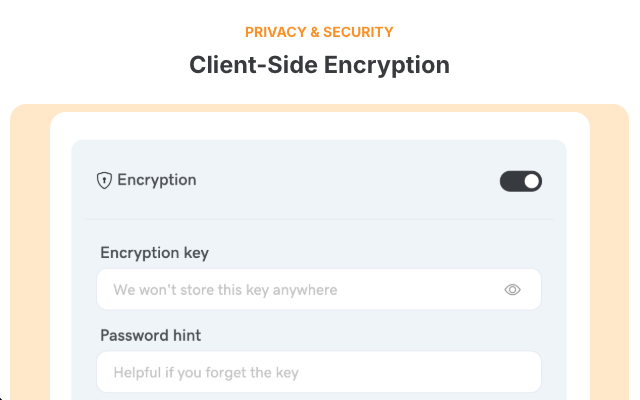
🔒 Zero-Knowledge Encryption
Your privacy matters. Bookmarks can be encrypted directly in your browser using AES-GCM encryption before syncing. Only you can decrypt and read your bookmarks - not even we can access them.
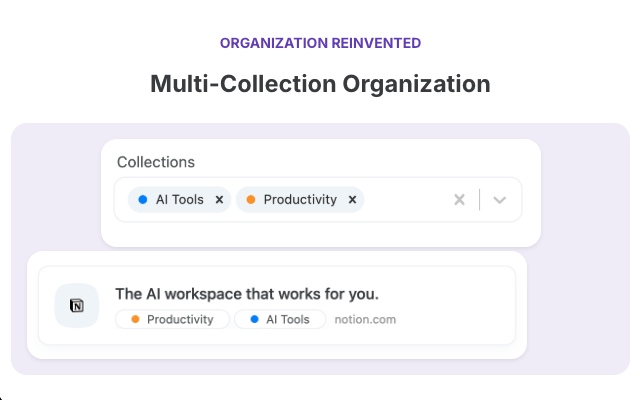
📁 Multi-Collection System
Assign bookmarks to multiple collections at once. That React tutorial can live in both "Web Development" and "Learning Resources" - find it wherever makes sense to you.
🏢 Workspaces
Separate your work, personal, and project bookmarks with dedicated workspaces. Keep different areas of your life organized and focused.
⚡ Key Features:
One-click bookmark saving from any webpage
Automatic duplicate detection
Cross-browser synchronization
Instant search across all bookmarks
Clean URLs (removes tracking parameters)
Works offline with local caching
Beautiful, intuitive interface
Free forever with 3 workspaces. Upgrade to Pro ($3/month) for unlimited workspaces and natural language search.
Transform how you save and organize web content. Your bookmarks, secured and intelligent.
onBookmarks 是做什么的
onBookmarks 是一款面向 Edge 的效率工具类扩展,主要用来管住注意力、屏蔽干扰站点、记录时间。官方对它的介绍是:Save, organize, and sync your bookmarks across all browsers with AI-powered categorization and end-to-end encryption在微软 Edge 加载项商店上,它当前版本 1.0.7,约 8 名用户。
适合什么人用
从功能定位看,onBookmarks 更适合想专注工作学习、减少无效刷网页的用户。如果你平时只是偶尔遇到相关需求,用浏览器自带功能也能凑合;但如果这件事每天都发生,装一个专门处理它的扩展通常比手动操作省事得多。
怎么安装 onBookmarks
- 打开微软 Edge 加载项商店上的官方页面;
- 点「添加到浏览器」并确认权限提示;
- 装好后在扩展列表里固定图标,方便随时开关。
本站只做索引与介绍,安装包来自官方商店。如果商店页面提示当前地区不可用,说明该扩展未在你所在区域上架。
常见问题
onBookmarks 是免费的吗?
onBookmarks 在微软 Edge 加载项商店免费提供下载。它是浏览器扩展,装上就能直接用,不需要注册账号。
onBookmarks 安全吗?
它只申请了 0 项权限,范围比较克制,没有申请「读取所有网站数据」这种大权限。
onBookmarks 支持哪些浏览器?
当前收录的版本来自微软 Edge 加载项商店,适用于 Edge。同一个扩展在其他商店可能有对应版本,但功能与版本号不一定相同。
怎么卸载 onBookmarks?
在扩展管理页找到 onBookmarks,点移除即可。它在本地保存的设置会一起清掉,不会残留数据。
权限清单 来自 manifest.json 原文
接口权限 7
activeTabbookmarkscontextMenusscriptingsidePanelstoragetabs