
Note Overlay & Popup EN
Noyo · EEdge MV3
Domain-specific note overlay with an independent standalone popup and saved-item history.
<all_urls>),意味着它可以读取你在任意站点的页面内容,包括已登录的页面。这是许多扩展正常工作的必要条件,但也值得你确认来源可信。
截图
简介
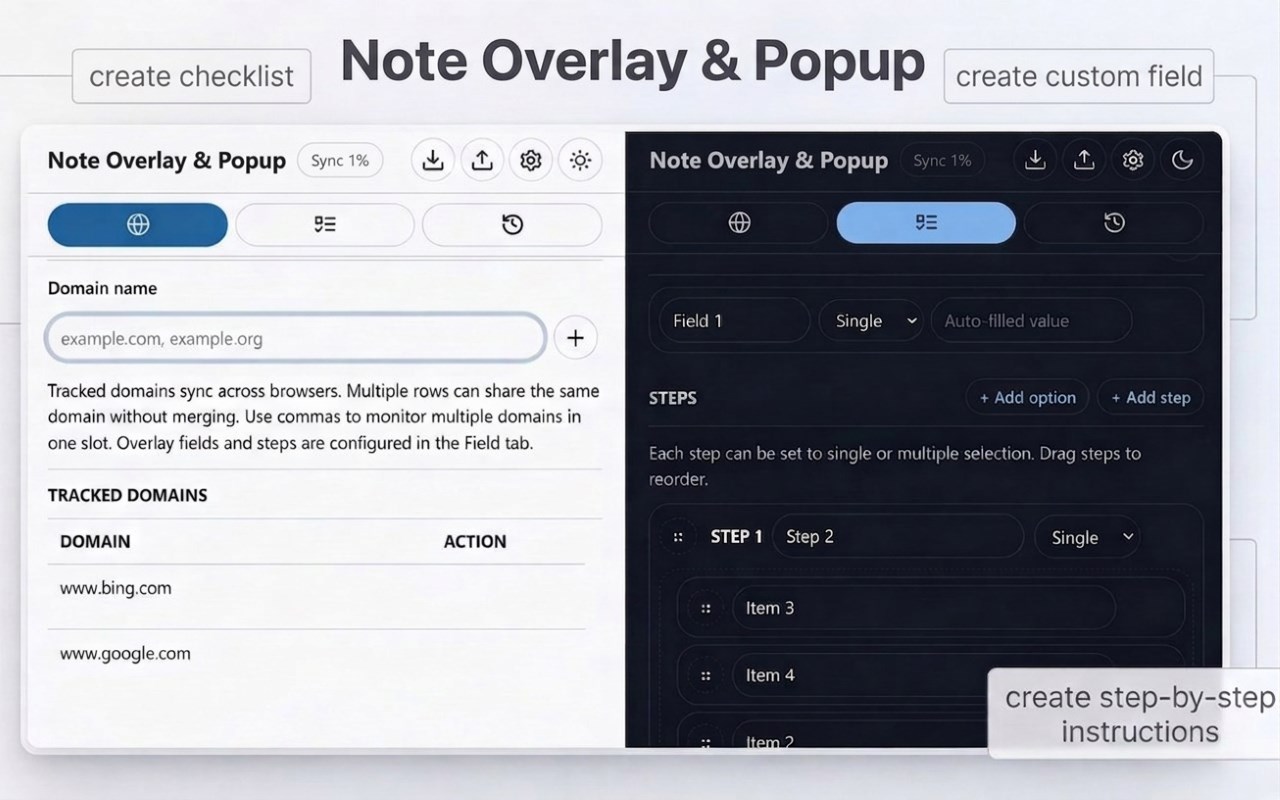
Note Overlay & Popup is a browser extension that adds a customizable note surface—either as a floating in-page overlay or a standalone popup window—to specific websites to track tasks and save data.
KEY FEATURES
__________________________
* Track Websites: Enable the note surface on specific sites via the extension popup or right-click menu.
* Dual Display Modes: Choose your preferred workflow in Settings—use a floating in-page overlay or a dedicated standalone popup window.
* Flexible Overlay: Drag, resize, or collapse the floating note. Open your preferred note surface instantly with a keyboard shortcut.
* Custom Fields & Searches: Create custom text or textarea fields and use a built-in button to search Google for your text inline.
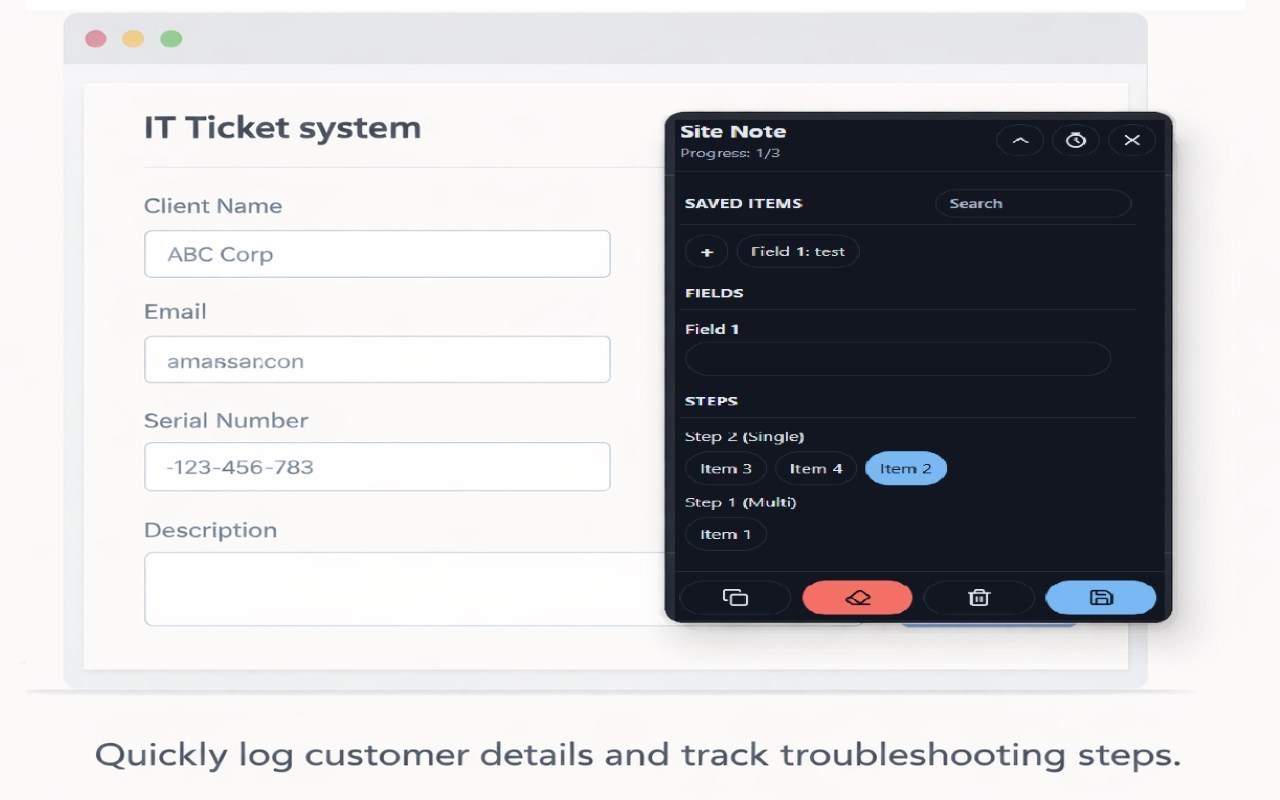
* Steps & Checklists: Build single or multi-select step flows with a live progress tracker.
* History & Auto-Save: Automatically save drafts to prevent data loss. Save permanent snapshots to view, copy, or delete later.
* Save Target Picker: When using the standalone popup, easily select which tracked site a newly created note should be saved under.
* Auto-Cleanup: Automatically delete history older than 7 days, configurable up to 3650 days or disabled (0).
* Countdown Timer: Set, start, stop, and reset countdowns directly from the floating note or standalone popup.
* Quick Actions: One-click buttons to copy the formatted note or clear all fields and steps.
* Theme Customization: Toggle Light, Dark, or Auto themes for the main popup, overlay, and standalone window.
* Sync & Backup: Sync setup configurations and tracked domains across browser profiles, and export/import your local history data anytime.
HOW TO USE IT
__________________________
1. Track a site: Add the website domain to your list via the main extension popup.
2. Customize: Configure text fields, steps, themes, and choose your preferred Display Mode (Overlay or Popup) in Settings.
3. Take notes: Open the tracked website and launch the note (via keyboard shortcut, right-click menu, or clicking "Open Current Site Popup"). Fill out the note, use the timer, and save snapshots.
4. Manage data: Review, copy, or configure auto-delete for saved notes in the History tab and Settings.
USE CASES
__________________________
* IT & Customer Support: Log customer details and track troubleshooting steps without losing your place on the page.
* QA Testing: Record bug details and reproduction steps in a dedicated popup window.
* Recruiting: Track candidate info and rate portfolios while browsing profiles.
* Research: Take structured notes and instantly highlight and search terms on Google.
IMPORTANT NOTES
__________________________
* Removing the extension deletes all associated data.
* For privacy and performance, only overlay setups and tracked domains sync across browsers; your actual notes do not.
* Notes use local browser storage due to sync size limits; back up your data regularly using the Export button.
* Restore from a JSON backup if needed after a reinstallation or moving to a new machine.
Note Overlay & Popup 是做什么的
Note Overlay & Popup 是一款面向 Edge 的效率工具类扩展,主要用来管住注意力、屏蔽干扰站点、记录时间。官方对它的介绍是:Domain-specific note overlay with an independent standalone popup and saved-item history.在微软 Edge 加载项商店上,它当前版本 1.3.2,约 8 名用户。
适合什么人用
从功能定位看,Note Overlay & Popup 更适合想专注工作学习、减少无效刷网页的用户。如果你平时只是偶尔遇到相关需求,用浏览器自带功能也能凑合;但如果这件事每天都发生,装一个专门处理它的扩展通常比手动操作省事得多。需要注意的是它作用于所有网站,装上后建议先观察一两天,确认不影响常用站点的正常使用。
怎么安装 Note Overlay & Popup
- 打开微软 Edge 加载项商店上的官方页面;
- 点「添加到浏览器」并确认权限提示;
- 装好后在扩展列表里固定图标,方便随时开关。
本站只做索引与介绍,安装包来自官方商店。如果商店页面提示当前地区不可用,说明该扩展未在你所在区域上架。
常见问题
Note Overlay & Popup 是免费的吗?
Note Overlay & Popup 在微软 Edge 加载项商店免费提供下载。它是浏览器扩展,装上就能直接用,不需要注册账号。
Note Overlay & Popup 安全吗?
它只申请了 0 项权限,范围比较克制,没有申请「读取所有网站数据」这种大权限。
Note Overlay & Popup 支持哪些浏览器?
当前收录的版本来自微软 Edge 加载项商店,适用于 Edge。同一个扩展在其他商店可能有对应版本,但功能与版本号不一定相同。
怎么卸载 Note Overlay & Popup?
在扩展管理页找到 Note Overlay & Popup,点移除即可。它在本地保存的设置会一起清掉,不会残留数据。
权限清单 来自 manifest.json 原文
站点访问(可选) 1
<all_urls>
接口权限 7
contextMenusnotificationsscriptingstoragesystem.displaytabsunlimitedStorage