
MyTheme Studio for GitHub EN
Shreyas Kumar · EEdge MV3
12 dark and anime GitHub themes with cartoon mascots, game sounds, remixed labels and achievements. Optional Pro upgrade.
截图
简介
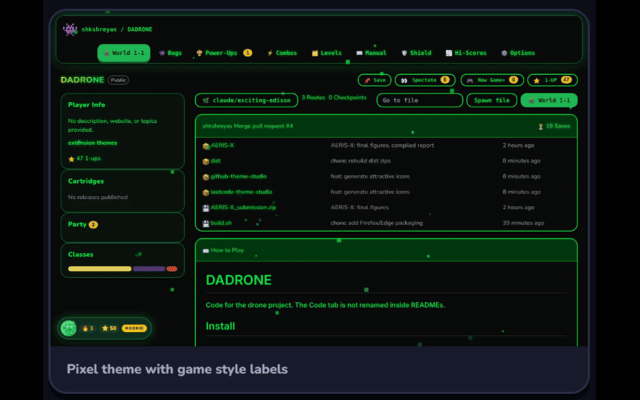
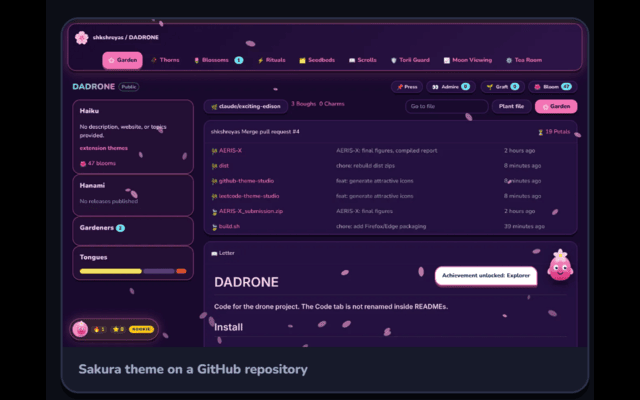
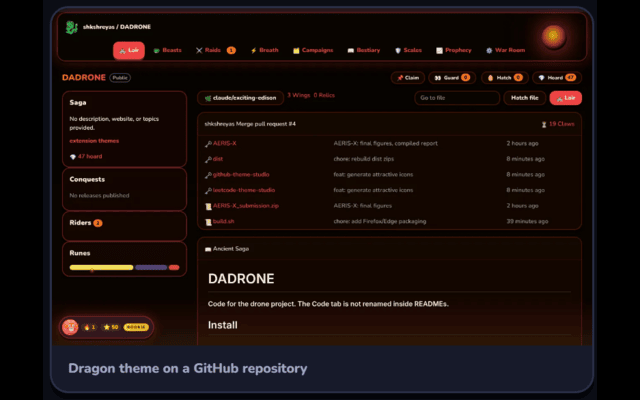
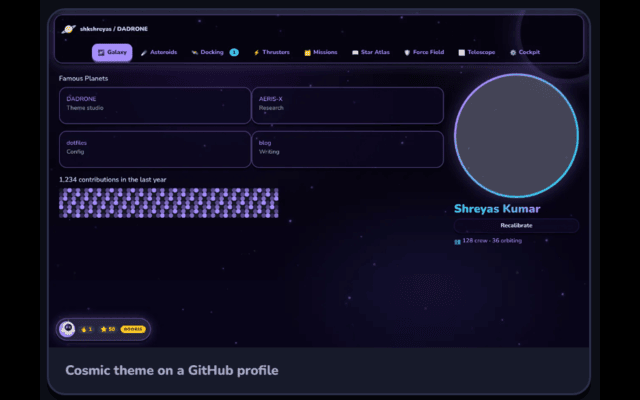
MyTheme Studio for GitHub transforms GitHub and Gist into a more stylized, theme-driven experience with custom visuals, playful interface changes, ambient effects, and light gamification. Based on the extension package, it is designed as more than a simple theme switcher: it acts as a presentation layer that changes the appearance of github.com and gist.github.com while adding themed vocabulary, mascots, sound feedback, animated particles, and progression-style rewards. Users can switch between multiple built-in themes through the popup interface, enable or disable the extension, manage sounds, review achievements, and access Pro-related options. The package shows support for themes such as Midnight, Sakura, Forest, Ocean, Amber, Orchid, Pixel, and Grid, along with Pro-only themes including Shrine, Dragon, Cyber, and Cosmic. When active, the extension injects the selected theme stylesheet, marks the page with a theme identifier, and applies a matching visual style across GitHub pages for a more expressive and personalized browsing experience.
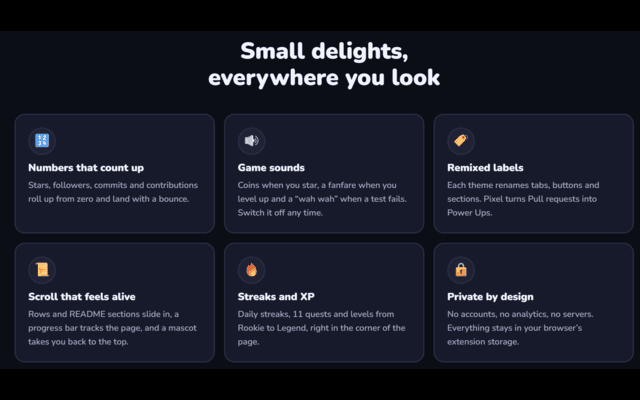
A key part of the extension is its visual atmosphere. The package indicates that each theme can include decorative particle overlays matched to its style, such as stars, petals, leaves, bubbles, embers, sparkles, bits, dots, rain, fire, or nebula-like effects. These overlays are intended to remain non-interactive so they decorate the page without interrupting normal browsing. The extension also includes a “Remix GitHub” feature that rewords familiar GitHub labels and sections into theme-specific alternatives. Standard interface items such as Code, Issues, Pull requests, Actions, Wiki, Releases, Packages, Contributors, Languages, Commits, and Branches may be renamed according to the active theme. The package also shows decoration of selected interface icons with emoji-style alternatives, plus greetings, mascots, accents, and motion that give each theme a stronger personality. The implementation focuses on modifying text nodes and attributes carefully so GitHub’s own dynamic navigation continues to work smoothly.
The extension also adds gamification through achievements, XP, and progression. The package defines achievements such as Explorer, Commit Warrior, Merge Master, Bug Slayer, Star Gazer, The Fork Path, Release Rider, Code Reviewer, Issue Raiser, Code Surfer, and Dark Lord. Each has its own icon, title, descriptive text, and XP value, and when an achievement is triggered, an animated toast can appear to celebrate the unlock. The popup includes a Quests area that displays total XP, unlocked achievements, current progress, level rank, and the next milestone. Level names such as Rookie, Bronze, Silver, Gold, Platinum, and Legend reinforce the game-inspired structure. Mascot functionality is also included through original SVG-based characters associated with themes, with their own greetings, moods, and spoken-style lines in the popup. Sound effects are generated directly in the browser using the Web Audio API rather than external files, allowing clicks, coins, sparkles, success tones, level-up sounds, and mascot-style feedback to be toggled on or off.
Key Features:
- Applies custom themes to GitHub and Gist, including Midnight, Sakura, Forest, Ocean, Amber, Orchid, Pixel, Grid, and Pro-only themes Shrine, Dragon, Cyber, and Cosmic.
- Adds theme-matched particle overlays such as stars, petals, leaves, bubbles, embers, sparkles, rain, and nebula-like effects for decorative atmosphere.
- Includes Remix GitHub, which can rename familiar GitHub labels and sections with theme-specific vocabulary and decorate selected icons.
- Features a gamified achievement system with XP, unlockable quests, animated achievement toasts, and level progression from Rookie to Legend.
- Provides a popup interface with Themes, Quests, and Pro sections for theme switching, feature toggles, progress tracking, and license-related options.
- Uses original mascot characters with greetings, moods, and playful personality in the popup experience.
- Generates browser-based sound effects with the Web Audio API and allows users to toggle sounds on or off at any time.
How It Works:
1. After installation, the extension stores settings such as the selected theme, enabled state, remix mode, and sound preferences.
2. When you open GitHub or Gist, it injects its scripts and styles and applies the selected theme to supported pages.
3. The active theme stylesheet is loaded, a theme marker is added to the document root, and matching particle overlays can begin decorating the page.
4. As you browse GitHub, the extension can detect supported page contexts and interactions to unlock achievements, update XP, and show achievement toasts.
5. Through the popup, you can switch themes, enable or disable the extension, manage sounds, review quests, and access Pro-related features.
6. If Remix GitHub is enabled, selected labels and icons can be replaced with theme-specific alternatives while remaining compatible with GitHub’s dynamic navigation.
7. If Pro is activated with a valid license, premium themes and premium remix functionality become available, with validation and related license handling supported by the extension.
Privacy: - This extension stores settings, achievement progress, streak data, and Pro license state in browser storage, and it communicates with the Lemon Squeezy license API for license activation and validation when Pro features are used.
MyTheme Studio for GitHub 是做什么的
MyTheme Studio for GitHub 是一款面向 Edge 的实用工具类扩展,主要用来解决浏览器里某类具体的小问题。官方对它的介绍是:12 dark and anime GitHub themes with cartoon mascots, game sounds, remixed labels and achievements. Optional Pro upgrade.在微软 Edge 加载项商店上,它当前版本 2.1.1。
适合什么人用
从功能定位看,MyTheme Studio for GitHub 更适合想补上浏览器原生缺失功能的用户。如果你平时只是偶尔遇到相关需求,用浏览器自带功能也能凑合;但如果这件事每天都发生,装一个专门处理它的扩展通常比手动操作省事得多。
怎么安装 MyTheme Studio for GitHub
- 打开微软 Edge 加载项商店上的官方页面;
- 点「添加到浏览器」并确认权限提示;
- 装好后在扩展列表里固定图标,方便随时开关。
本站只做索引与介绍,安装包来自官方商店。如果商店页面提示当前地区不可用,说明该扩展未在你所在区域上架。
常见问题
MyTheme Studio for GitHub 是免费的吗?
MyTheme Studio for GitHub 在微软 Edge 加载项商店免费提供下载。它是浏览器扩展,装上就能直接用,不需要注册账号。
MyTheme Studio for GitHub 安全吗?
它只申请了 0 项权限,范围比较克制,没有申请「读取所有网站数据」这种大权限。
MyTheme Studio for GitHub 支持哪些浏览器?
当前收录的版本来自微软 Edge 加载项商店,适用于 Edge。同一个扩展在其他商店可能有对应版本,但功能与版本号不一定相同。
怎么卸载 MyTheme Studio for GitHub?
在扩展管理页找到 MyTheme Studio for GitHub,点移除即可。它在本地保存的设置会一起清掉,不会残留数据。
权限清单 来自 manifest.json 原文
接口权限 3
activeTabstoragetabs