
Multi Search NewTab EN
ApeX · EEdge MV3
Boost search speed and productivity with Multi Search NewTab. Search multiple engines like Google, Bing, Yandex, etc simultaneously!
<all_urls>),意味着它可以读取你在任意站点的页面内容,包括已登录的页面。这是许多扩展正常工作的必要条件,但也值得你确认来源可信。
截图


简介
Introducing Multi Search NewTab: The Ultimate Search Accelerator for Your Browser!
It's simple yet efficient !
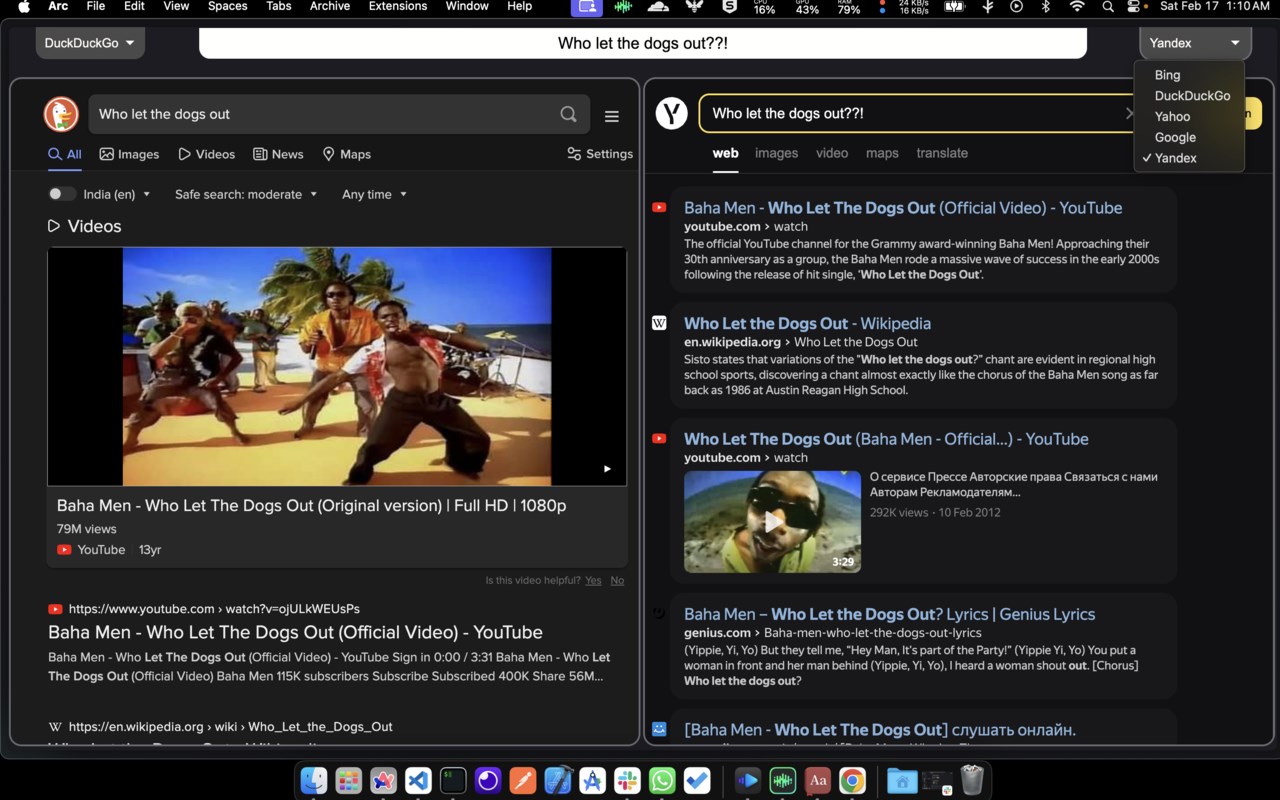
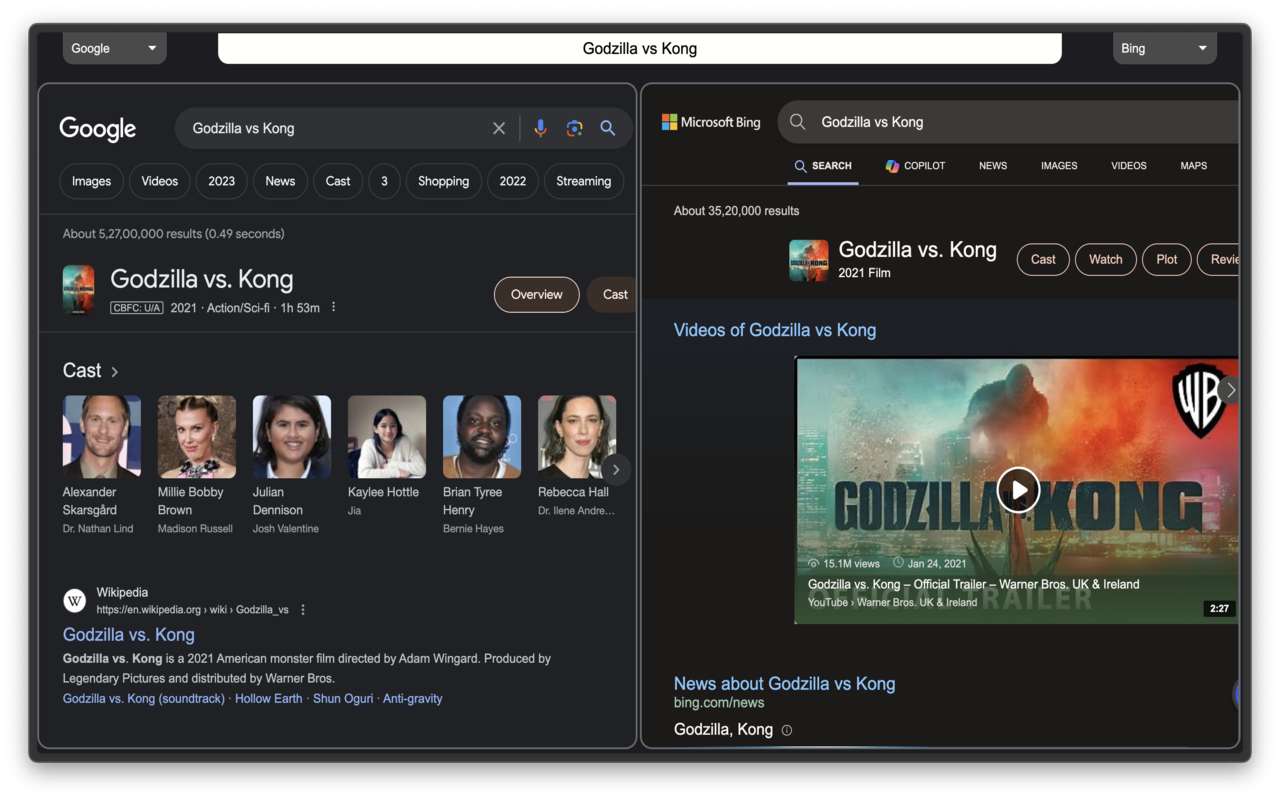
Are you tired of toggling between different search engines to find the precise information you need? Multi Search NewTab changes the way you search by amalgamating the power of multiple search engines into one convenient new tab. Gone are the days of singular, restrictive searches. Welcome to a new era of comprehensive, efficient, and diverse searching!
Instructions for use:
- Simply enter you search query on the top most search bar after opening a new tab.
- Select your preferred search engine via drop-down menu available on top left and the top right side for left and right windows respectively.
- To navigate backwards, select one of the two windows (left or right) and press your browser's back button.
- Write " ms " in url search/address bar of your browser and press on your keyboard, the extension will then take over any further words you press as search query! (hit enter in the end to search) | ms stands for Multi Search :D
- You can also think of left and right split windows as individual tabs and use them as such.
Supported search engines: Google, Perplexity (ai), Bing, Duckduckgo, Yahoo, Yandex, etc. Google Scholar and Consensus (ai for research) are also included for people involved in academics!
Why Choose Multi Search NewTab?
> Time-Saving Efficiency: Multi Search NewTab saves you precious seconds with every search, which add up over the course of a day. No more manual switching between search engines or opening multiple tabs.
> Diverse Perspectives: Different search engines excel in different areas. Multi Search NewTab ensures you receive a wide array of results, from scholarly articles and news reports to forums and blogs, enhancing the quality and diversity of information at your fingertips.
> Sleek, User-Friendly Interface: Designed with simplicity in mind, our intuitive interface ensures a seamless search experience. No clutter, no fuss—just the results you need, when you need them.
> Privacy-Focused: Your searches are your own business. Multi Search NewTab is committed to maintaining your privacy and does not track your search history.
> Free to Use: Multi Search NewTab is completely free, offering an unbeatable search solution without any cost to you.
How It Works:
Once installed, simply open a new tab, and you'll be greeted by the Multi Search NewTab interface. Enter your query on the top most search bar, and behold as multiple search engines work in tandem to fetch a comprehensive list of results. Click on any result to navigate directly to the source, or explore the results of individual search engines with just one click.
Who Can Benefit from Multi Search NewTab?
> Researchers & Academics: Access a broad spectrum of scholarly
> Professionals: Find the most relevant, up-to-date information for your industry.
> Students: Gather diverse sources for your studies and
> Everyday Users: Enhance your daily search activities, from shopping and news to entertainment.
Get Started Today!
Elevate your search game with Multi Search NewTab. It's more than just an extension—it's your new search companion, designed to make your online experience more productive and enjoyable. Install Multi Search NewTab now and transform the way you search the web <3
Multi Search NewTab 是做什么的
Multi Search NewTab 是一款面向 Edge 的搜索增强类扩展,主要用来补充搜索结果、切换搜索引擎、过滤无效结果。官方对它的介绍是:Boost search speed and productivity with Multi Search NewTab. Search multiple engines like Google, Bing, Yandex, etc simultaneously!在微软 Edge 加载项商店上,它当前版本 0.0.5,评分 4.4(5 人评价),约 212 名用户。
适合什么人用
从功能定位看,Multi Search NewTab 更适合每天大量搜索、希望结果更干净准确的用户。如果你平时只是偶尔遇到相关需求,用浏览器自带功能也能凑合;但如果这件事每天都发生,装一个专门处理它的扩展通常比手动操作省事得多。需要注意的是它作用于所有网站,装上后建议先观察一两天,确认不影响常用站点的正常使用。
怎么安装 Multi Search NewTab
- 打开微软 Edge 加载项商店上的官方页面;
- 点「添加到浏览器」并确认权限提示;
- 装好后在扩展列表里固定图标,方便随时开关。
本站只做索引与介绍,安装包来自官方商店。如果商店页面提示当前地区不可用,说明该扩展未在你所在区域上架。
常见问题
Multi Search NewTab 是免费的吗?
Multi Search NewTab 在微软 Edge 加载项商店免费提供下载。它是浏览器扩展,装上就能直接用,不需要注册账号。
Multi Search NewTab 安全吗?
它只申请了 0 项权限,范围比较克制,没有申请「读取所有网站数据」这种大权限。
Multi Search NewTab 支持哪些浏览器?
当前收录的版本来自微软 Edge 加载项商店,适用于 Edge。同一个扩展在其他商店可能有对应版本,但功能与版本号不一定相同。
怎么卸载 Multi Search NewTab?
在扩展管理页找到 Multi Search NewTab,点移除即可。它在本地保存的设置会一起清掉,不会残留数据。
权限清单 来自 manifest.json 原文
站点访问(可选) 1
<all_urls>
接口权限 2
declarativeNetRequestwebNavigation