
Marqly EN
Marqly · EEdge MV3
Marqly – The Ultimate Bookmark & Tab Manager
截图
简介
Supercharge your browser with Marqly – a powerful, privacy-first bookmark manager and highlighter that now helps you reduce tab clutter and save up to 95% memory.
Effortlessly save links, highlight text, organize bookmarks, and now collapse all your open tabs into a clean, restorable list — all in one sleek extension.
🔹 Why Marqly?
Tired of messy bookmarks and tab chaos? Marqly makes it incredibly easy to:
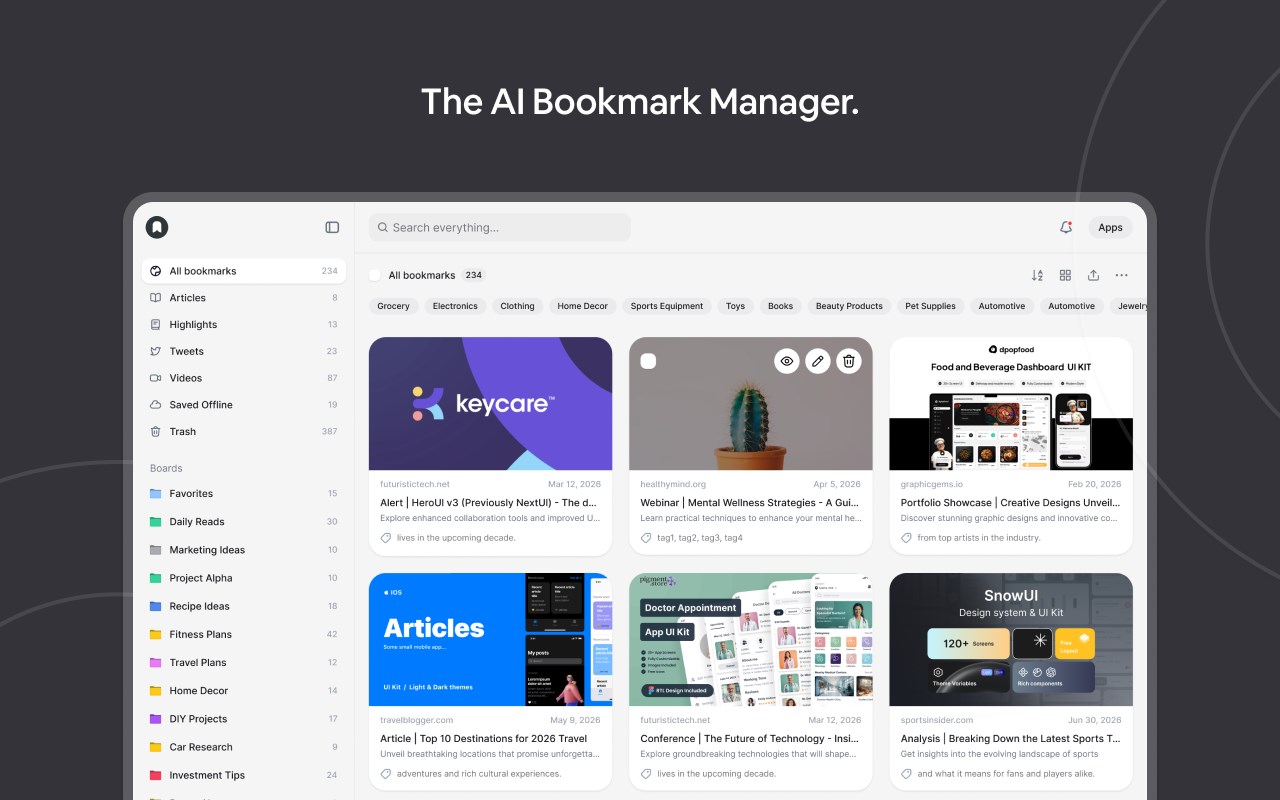
📌 Save and organize bookmarks with tags and boards
📝 Highlight and save text snippets from any webpage
🗂 Create nested collections and custom boards
🔍 Use advanced search & filters to find anything fast
🧠 Restore memory and reduce CPU usage with OneTab-style tab saving
🚀 What You Can Do with Marqly
- Save and edit websites effortlessly
- Add bookmarks to customizable boards
- Tag your links for powerful filtering
- Search by URL, content, date, or type
- Collapse all open tabs into a single list, saving up to 95% of memory
- Restore tabs individually or all at once
- Sync across devices securely
🆕 Latest Features
🔥 All-new Tab Saver to eliminate clutter and save memory
✨ Fresh new UI and responsive mobile layout
⭐️ Highlighted texts now auto-organized into quick-access boards
🧮 Enhanced filters and viewing controls
💡 Full-screen website preview
🖱 Drag-and-drop board reordering
💾 Nested collections
🔒 Privacy First
Your data stays with you. Marqly never transmits your bookmarks, tabs, or highlights to anyone. Your tab lists are private — shared only if you choose to.
Marqly is the only tool you need to take control of your web browsing — save smarter, organize better, and browse faster.
➡️ Try Marqly now and simplify your digital life.
Marqly 是做什么的
Marqly 是一款面向 Edge 的效率工具类扩展,主要用来管住注意力、屏蔽干扰站点、记录时间。官方对它的介绍是:Marqly – The Ultimate Bookmark & Tab Manager在微软 Edge 加载项商店上,它当前版本 9.53,评分 5(1 人评价),约 51 名用户。
适合什么人用
从功能定位看,Marqly 更适合想专注工作学习、减少无效刷网页的用户。如果你平时只是偶尔遇到相关需求,用浏览器自带功能也能凑合;但如果这件事每天都发生,装一个专门处理它的扩展通常比手动操作省事得多。
怎么安装 Marqly
- 打开微软 Edge 加载项商店上的官方页面;
- 点「添加到浏览器」并确认权限提示;
- 装好后在扩展列表里固定图标,方便随时开关。
本站只做索引与介绍,安装包来自官方商店。如果商店页面提示当前地区不可用,说明该扩展未在你所在区域上架。
常见问题
Marqly 是免费的吗?
Marqly 在微软 Edge 加载项商店免费提供下载。它是浏览器扩展,装上就能直接用,不需要注册账号。
Marqly 安全吗?
它只申请了 0 项权限,范围比较克制,没有申请「读取所有网站数据」这种大权限。
Marqly 支持哪些浏览器?
当前收录的版本来自微软 Edge 加载项商店,适用于 Edge。同一个扩展在其他商店可能有对应版本,但功能与版本号不一定相同。
怎么卸载 Marqly?
在扩展管理页找到 Marqly,点移除即可。它在本地保存的设置会一起清掉,不会残留数据。
权限清单 来自 manifest.json 原文
接口权限 9
activeTabalarmsbookmarkscontextMenuscookiessidePanelstoragetabGroupstabs