
Local PDF Recycler EN
devaj · EEdge MV3
Moves current local PDF to Windows Recycle Bin and closes the tab.
截图
简介
Local PDF Recycler is a focused productivity extension for handling local PDF cleanup directly from the browser. When you open a PDF from your computer using a file URL, the extension gives you a fast way to move that file to the Windows Recycle Bin without leaving your current workflow. Instead of switching to File Explorer, locating the document manually, and deleting it there, you can take action from the browser tab where the PDF is already open. This makes the extension especially practical for people who regularly review downloaded files, archived documents, or batches of PDFs and want a more efficient way to remove the ones they no longer need.
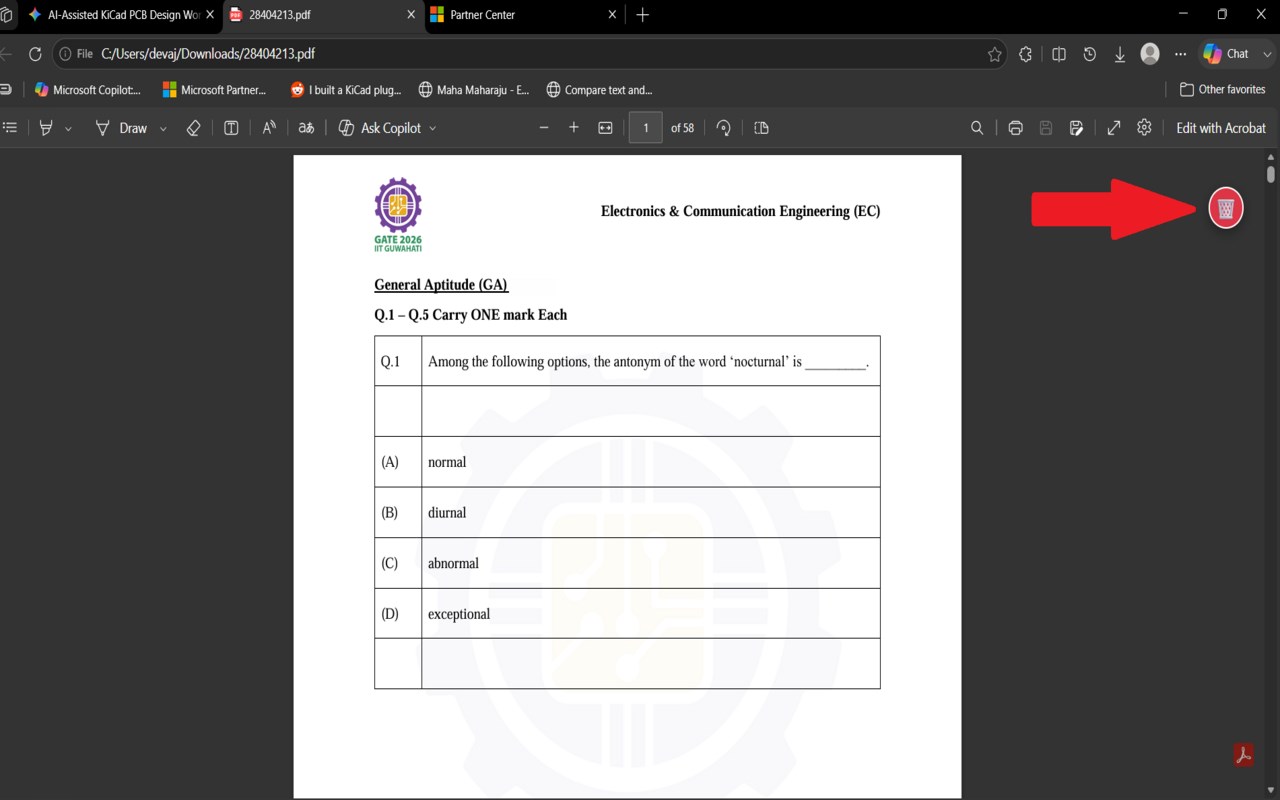
The extension is designed specifically for local PDF files opened in browser tabs. It checks whether the active tab is a supported local PDF and only enables its action in that situation. This context-aware behavior helps keep the feature targeted and reduces the chance of using it on pages where it does not apply. When a compatible PDF is detected, you can trigger the recycle action in more than one way. The extension supports use through the toolbar action, a keyboard shortcut, and a floating button displayed directly on local file views. This gives users flexibility to work in the style they prefer, whether that means clicking an icon, using the keyboard for speed, or relying on a visible on-page control while reading.
Its file-handling flow is built around native messaging. When the recycle action is triggered, the extension closes the current PDF tab and sends a request to a native messaging host identified as com.pdf.deleter. That local integration enables the browser extension to request that the selected PDF be moved to the Windows Recycle Bin. After the attempt is made, the extension displays a notification to show whether the operation succeeded or failed. The notification includes the file name, which makes the result clearer and helps confirm exactly which document was processed.
Local PDF Recycler also includes an onboarding step for new users. After installation, it automatically opens a setup page hosted on a GitHub Pages site. This setup behavior is relevant because the extension depends on a native messaging component to perform the recycle operation outside the browser environment. The onboarding page helps guide initial configuration so users can prepare the required local integration and understand how the extension works before using it on their files.
Overall, Local PDF Recycler is a niche but highly practical utility for users who work with local PDFs in the browser and want a faster cleanup process. Its design centers on speed, minimal interaction, and direct feedback. By focusing on one clear task—recycling an open local PDF and closing its tab—it helps streamline repetitive document review and cleanup workflows.
Key Features:
- Moves the currently open local PDF file to the Windows Recycle Bin through native messaging.
- Automatically closes the browser tab for the selected PDF as part of the recycle process.
- Works only when the active tab contains a supported local PDF file opened from your computer.
- Offers multiple ways to trigger the action, including the toolbar icon, keyboard shortcut, and floating on-page button.
- Displays success or failure notifications that include the file name for clearer confirmation.
- Opens an onboarding page automatically after installation to help with setup.
- Supports faster repetitive PDF cleanup for users reviewing many local documents.
How It Works:
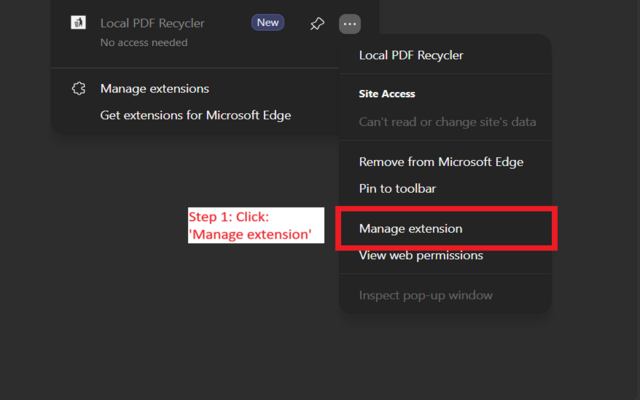
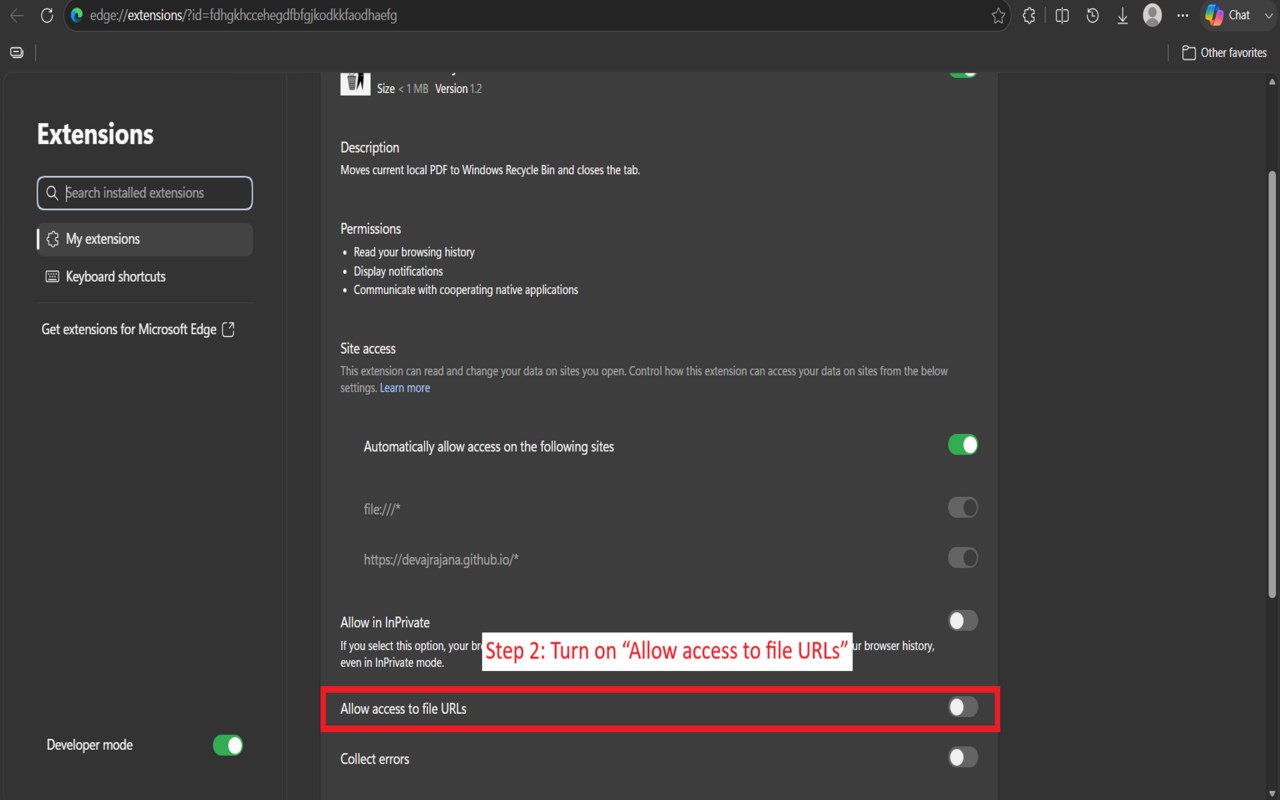
1. Install the extension and review the onboarding page that opens after setup begins.
2. Open a PDF file locally in the browser using a file-based URL.
3. The extension detects whether the active tab contains a supported local PDF.
4. Trigger the recycle action through the toolbar button, keyboard shortcut, or floating button on the page.
5. The extension extracts the local file path from the tab and closes the current PDF tab.
6. It sends a request to the native messaging host com.pdf.deleter to move the file to the Windows Recycle Bin.
7. A notification appears showing whether the file was successfully moved or whether the action failed.
Privacy: - This extension processes the path of the current local PDF file to send it to a native messaging host for recycling, checks browser tab state to determine when its action should be enabled, and opens an onboarding page hosted at devajrajana.github.io when installed.
Local PDF Recycler 是做什么的
Local PDF Recycler 是一款面向 Edge 的效率工具类扩展,主要用来管住注意力、屏蔽干扰站点、记录时间。官方对它的介绍是:Moves current local PDF to Windows Recycle Bin and closes the tab.在微软 Edge 加载项商店上,它当前版本 1.3,评分 5(2 人评价),约 3 名用户。
适合什么人用
从功能定位看,Local PDF Recycler 更适合想专注工作学习、减少无效刷网页的用户。如果你平时只是偶尔遇到相关需求,用浏览器自带功能也能凑合;但如果这件事每天都发生,装一个专门处理它的扩展通常比手动操作省事得多。
怎么安装 Local PDF Recycler
- 打开微软 Edge 加载项商店上的官方页面;
- 点「添加到浏览器」并确认权限提示;
- 装好后在扩展列表里固定图标,方便随时开关。
本站只做索引与介绍,安装包来自官方商店。如果商店页面提示当前地区不可用,说明该扩展未在你所在区域上架。
常见问题
Local PDF Recycler 是免费的吗?
Local PDF Recycler 在微软 Edge 加载项商店免费提供下载。它是浏览器扩展,装上就能直接用,不需要注册账号。
Local PDF Recycler 安全吗?
它只申请了 0 项权限,范围比较克制,没有申请「读取所有网站数据」这种大权限。
Local PDF Recycler 支持哪些浏览器?
当前收录的版本来自微软 Edge 加载项商店,适用于 Edge。同一个扩展在其他商店可能有对应版本,但功能与版本号不一定相同。
怎么卸载 Local PDF Recycler?
在扩展管理页找到 Local PDF Recycler,点移除即可。它在本地保存的设置会一起清掉,不会残留数据。
权限清单 来自 manifest.json 原文
接口权限 3
nativeMessagingnotificationstabs