LinkMate Core (Edge) EN
Linfang Li · EEdge MV3
Cross-browser tab manager. Syncs your Edge tabs with LinkMate desktop app in real-time.
截图
简介
LinkMate Core is an advanced browser extension designed to provide seamless, real-time synchronization of tabs and tab groups between Microsoft Edge and the LinkMate desktop application. Tailored for power users, professionals, researchers, and multitaskers, this extension ensures your browsing sessions remain perfectly in sync across devices and platforms, enabling smoother workflows and continuous productivity. By bridging your Edge browser and the desktop app through secure native messaging, LinkMate Core maintains up-to-date synchronization of open tabs—including their titles, URLs, favicons, and group metadata—without any manual effort on your part.
At its core, LinkMate Core operates as a background service worker within Edge, constantly monitoring key tab lifecycle events such as creation, removal, updates, activation, and group changes. This constant vigilance guarantees that every action you take in your browser is captured and transmitted reliably to your LinkMate desktop app. The extension also supports Microsoft's Edge tab group functionality by syncing not only individual tabs but also group titles and colors, preserving the structure and organization of your workspace on every device.
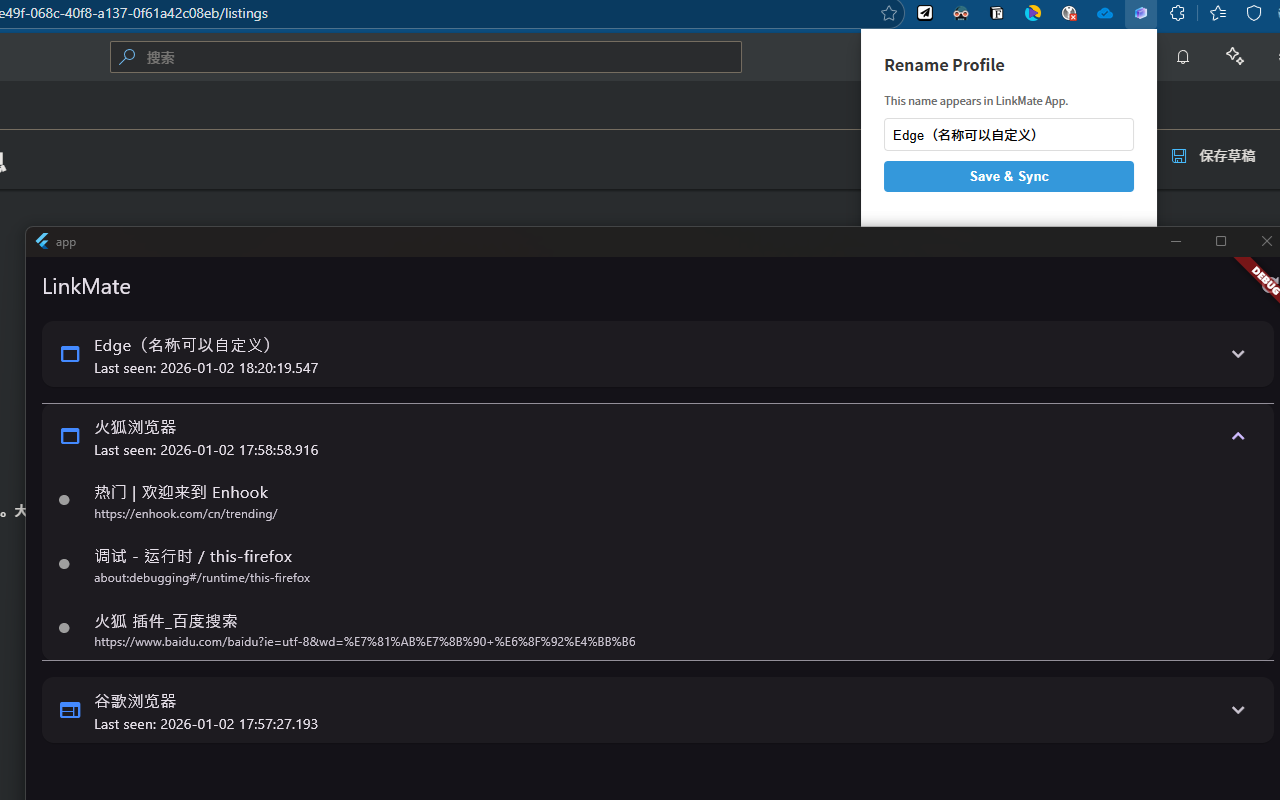
User customization is straightforward and accessible through the extension’s popup interface, where you can set a personalized profile name. This name acts as a unique identifier for your browser sessions, helping you differentiate between multiple workflows or devices within the LinkMate desktop app. The profile name is stored locally, ensuring quick loading and minimal setup time every time you use the extension. Additionally, the responsive popup allows users to rename profiles and manually trigger synchronization on demand, giving you full control over your browsing data syncing process.
LinkMate Core is designed with cross-browser compatibility in mind. While optimized for Microsoft Edge, it can intelligently detect and adapt to other popular Chromium-based browsers and Firefox, delivering a consistent and reliable experience across multiple platforms. The extension’s synchronization mechanism relies on secure native messaging, sending timestamped sync payloads that include your complete tab and group information together with profile identifiers. This system safeguards your browsing data while making your tab management professional and straightforward.
With LinkMate Core, managing multiple sessions across devices becomes effortless, helping you maintain continuity whether you’re on a desktop, laptop, or switching to another platform. The extension’s robust architecture and minimal user interaction requirements make it an indispensable tool for anyone looking to enhance their browser productivity, reduce session fragmentation, and organize their web workspace efficiently.
Key Features:
- Real-time synchronization of tabs and tab groups between Microsoft Edge and the LinkMate desktop app.
- Full compatibility with Edge tab group features, syncing group titles and colors to preserve organization.
- Intelligent browser detection supporting Edge, Chrome, Firefox, and other Chromium-based browsers.
- Local profile customization through an easy-to-use popup interface for identifying different browser sessions.
- Continuous monitoring of tab lifecycle events (creation, removal, update, activation) and group changes for accurate syncing.
- Secure native messaging integration for fast and reliable transmission of sync data to the desktop application.
- Convenient browser action popup for renaming profiles, saving changes, and triggering manual synchronization instantly.
How It Works:
1. Install LinkMate Core on your Microsoft Edge browser.
2. Open the extension’s popup and set a personalized profile name to uniquely identify your session.
3. The extension continuously monitors all tabs and tab groups, detecting any changes as they happen.
4. Sync data comprising open tabs, tab groups, and profile information is automatically packaged and sent securely to the LinkMate desktop app using native messaging.
5. You can manually initiate synchronization any time via the popup interface for immediate updates.
6. The LinkMate desktop app receives and processes the data, allowing you to view, restore, or organize your browsing sessions exactly as they appear in Edge.
7. Benefit from consistent, reliable cross-device tab management without losing track, even after browser updates or system restarts.
Privacy: - No personal data collected. All tab and profile management data is handled locally, and synchronization payloads are transmitted exclusively to the native LinkMate desktop application. Your browsing information is never shared with external parties or stored remotely.
LinkMate Core (Edge) 是做什么的
LinkMate Core (Edge) 是一款面向 Edge 的效率工具类扩展,主要用来管住注意力、屏蔽干扰站点、记录时间。官方对它的介绍是:Cross-browser tab manager. Syncs your Edge tabs with LinkMate desktop app in real-time.在微软 Edge 加载项商店上,它当前版本 1.0.0,约 2 名用户。
适合什么人用
从功能定位看,LinkMate Core (Edge) 更适合想专注工作学习、减少无效刷网页的用户。如果你平时只是偶尔遇到相关需求,用浏览器自带功能也能凑合;但如果这件事每天都发生,装一个专门处理它的扩展通常比手动操作省事得多。
怎么安装 LinkMate Core (Edge)
- 打开微软 Edge 加载项商店上的官方页面;
- 点「添加到浏览器」并确认权限提示;
- 装好后在扩展列表里固定图标,方便随时开关。
本站只做索引与介绍,安装包来自官方商店。如果商店页面提示当前地区不可用,说明该扩展未在你所在区域上架。
常见问题
LinkMate Core (Edge) 是免费的吗?
LinkMate Core (Edge) 在微软 Edge 加载项商店免费提供下载。它是浏览器扩展,装上就能直接用,不需要注册账号。
LinkMate Core (Edge) 安全吗?
它只申请了 0 项权限,范围比较克制,没有申请「读取所有网站数据」这种大权限。
LinkMate Core (Edge) 支持哪些浏览器?
当前收录的版本来自微软 Edge 加载项商店,适用于 Edge。同一个扩展在其他商店可能有对应版本,但功能与版本号不一定相同。
怎么卸载 LinkMate Core (Edge)?
在扩展管理页找到 LinkMate Core (Edge),点移除即可。它在本地保存的设置会一起清掉,不会残留数据。
权限清单 来自 manifest.json 原文
接口权限 5
identitynativeMessagingstoragetabGroupstabs