
LinkedIn Text Formatter EN
Linkedin Text Formatter · EEdge MV3
Use LinkedIn Text Formatter to add to linkedin bold text options. Find these and more font editor tools in this linkedin formatter.
截图
简介
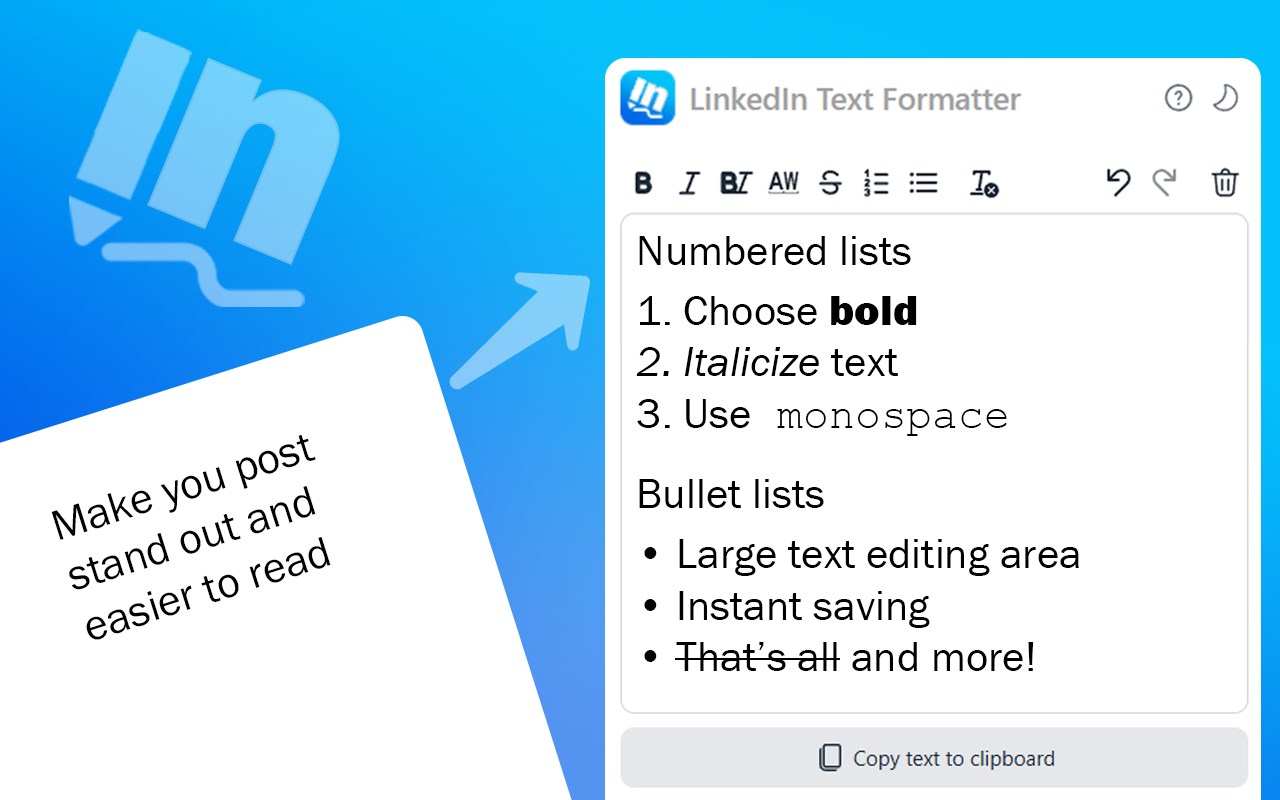
The Linkedin text formatter is a powerful solution designed to elevate your content creation. Our extension acts as a reliable post formatter that helps you overcome native editor limitations and achieve a professional text format in your posts with ease. Our app functions as a powerful unicode text converter, enabling you to effortlessly transfer styled text into your LinkedIn posts. It transforms the default plain style of posts by incorporating advanced formatting features, such as bold text formatting, italic styling, and customizable lists.
Key style options available in linkedin text font editor include:
✅ Bold – instantly adds to linkedin bold text to emphasize your message
✅ Italic – provides gentle emphasis ability to style options for a refined look
✅ Bold-italic mixed – combines bold and italic styles simultaneously
✅ Monospace – also our linkedin formatter have options for for technical content and code snippets
✅ Strikethrough – you can use this effect in post formatter for effects like revisions.
In addition to font styling, our extension offers helpful list formatting features to organize your content. You can easily create:
🔹Ordered list for sequential ideas
🔹Unordered list for bullet-point clarity
🛠️ Our Linkedin text formatter also provides an array of control elements that make editing seamless. As a dependable linkedin formatter tool, it empowers you to quickly format text and efficiently edit it for linkedin posts. These controls include:
✔️ Undo – instantly revert changes to maintain consistent linkedin post formatting
✔️ Redo – swiftly restore your latest modifications, ensuring flawless edit
✔️ Copy formatted text to clipboard – way to transfer your refined linkedin text format to your posts
✔️ Clear formatting – remove unwanted styles instantly, whether you’re using a text formatter linkedin or adjusting your format linkedin text
✔️ Clear editor window – start fresh whenever needed to enhance your linkedin text formatter experience
🔝 Our Linkedin text formatter is built with simplicity in mind. The design is streamlined and focused on one core purpose—to help you efficiently create professional text format for your posts. There are 3 main interface part of formatter:
🔹 Toolbar which contains font styling options, lists toggles and controls.
🔹 Input window - main space to work with the text.
🔹 Copy button - to one click copy formatted text to clipboard.⌨️ For power users Linkedin text formatter offers set of keyboard shortcuts to duplicate visual control interface:
🔸 To undo changes, press "Ctrl+Z" or "⌘+Z" on Mac
🔸 To redo changes, press "Ctrl+Y" or "⌘+Y" on Mac
🔸 To toggle bold formatting, press "Ctrl+B" or "⌘+B" on Mac
🔸 To toggle italic formatting, press "Ctrl+I" or "⌘+I" on Mac
🔸 To toggle monospace formatting, press "Ctrl+M" or "⌘+M" on Mac
💡 There are some ideas behind the appearance of the Linkedin text formatter:
➤ Implemented as a sidebar unicode text converter formatter ensures that the essential tools of this text font editor are always at the same place on your screen.
➤ Additionally, our extension offers a light and dark theme for you to choose from.
➤ Help with list of shortcuts available for use in LinkedIn text formatter for PC and Mac platforms
📥 One of the standout features of our LinkedIn text formatter is its persistent storage capability. With this text formatter, you can safely close the extension and even exit your browser without worrying about losing your work. Your carefully crafted linkedin post format remains stored until you decide to manually delete it or remove the extension, allowing you to work at your own pace without interruption.
🫂 Inspired by personal experience, the idea was born out of a question “how to bold text in linkedin post?”. This set the development of an extension that supports a variety of font and paragraphs editor tools, but started from a simple linkedin post formatter with bold text styling.
📬 Any feedback is welcomed, as your insights play a vital role in refining this linkedin text formatter tool and ensuring it continues to meet your needs. Your suggestions help shape future updates and improvements, making this tool even more powerful for creating standout LinkedIn content.
LinkedIn Text Formatter 是做什么的
LinkedIn Text Formatter 是一款面向 Edge 的效率工具类扩展,主要用来管住注意力、屏蔽干扰站点、记录时间。官方对它的介绍是:Use LinkedIn Text Formatter to add to linkedin bold text options. Find these and more font editor tools in this linkedin formatter.在微软 Edge 加载项商店上,它当前版本 1.0.5,约 489 名用户。
适合什么人用
从功能定位看,LinkedIn Text Formatter 更适合想专注工作学习、减少无效刷网页的用户。如果你平时只是偶尔遇到相关需求,用浏览器自带功能也能凑合;但如果这件事每天都发生,装一个专门处理它的扩展通常比手动操作省事得多。
怎么安装 LinkedIn Text Formatter
- 打开微软 Edge 加载项商店上的官方页面;
- 点「添加到浏览器」并确认权限提示;
- 装好后在扩展列表里固定图标,方便随时开关。
本站只做索引与介绍,安装包来自官方商店。如果商店页面提示当前地区不可用,说明该扩展未在你所在区域上架。
常见问题
LinkedIn Text Formatter 是免费的吗?
LinkedIn Text Formatter 在微软 Edge 加载项商店免费提供下载。它是浏览器扩展,装上就能直接用,不需要注册账号。
LinkedIn Text Formatter 安全吗?
它只申请了 0 项权限,范围比较克制,没有申请「读取所有网站数据」这种大权限。
LinkedIn Text Formatter 支持哪些浏览器?
当前收录的版本来自微软 Edge 加载项商店,适用于 Edge。同一个扩展在其他商店可能有对应版本,但功能与版本号不一定相同。
怎么卸载 LinkedIn Text Formatter?
在扩展管理页找到 LinkedIn Text Formatter,点移除即可。它在本地保存的设置会一起清掉,不会残留数据。
权限清单 来自 manifest.json 原文
接口权限 2
sidePanelstorage