Link Cleaner EN
Sarangan · EEdge MV3
Remove or replace desired parts from a URL with regular expression rules.
<all_urls>),意味着它可以读取你在任意站点的页面内容,包括已登录的页面。这是许多扩展正常工作的必要条件,但也值得你确认来源可信。
截图
简介
Link Cleaner is a sophisticated browser extension designed to give users comprehensive control over the URLs they interact with while browsing the web. By harnessing the power of customizable regular expression rules, Link Cleaner empowers you to automatically remove, modify, or replace specific portions of a URL. This capability streamlines navigation, eliminates unnecessary tracking parameters, and transforms links into cleaner, more readable, and easily shareable formats. Whether your goal is to strip out extraneous marketing parameters, simplify social media URLs, or enforce uniform URL structures for bookmarking and sharing purposes, Link Cleaner offers an intuitive and highly flexible solution integrated seamlessly into your browsing experience.
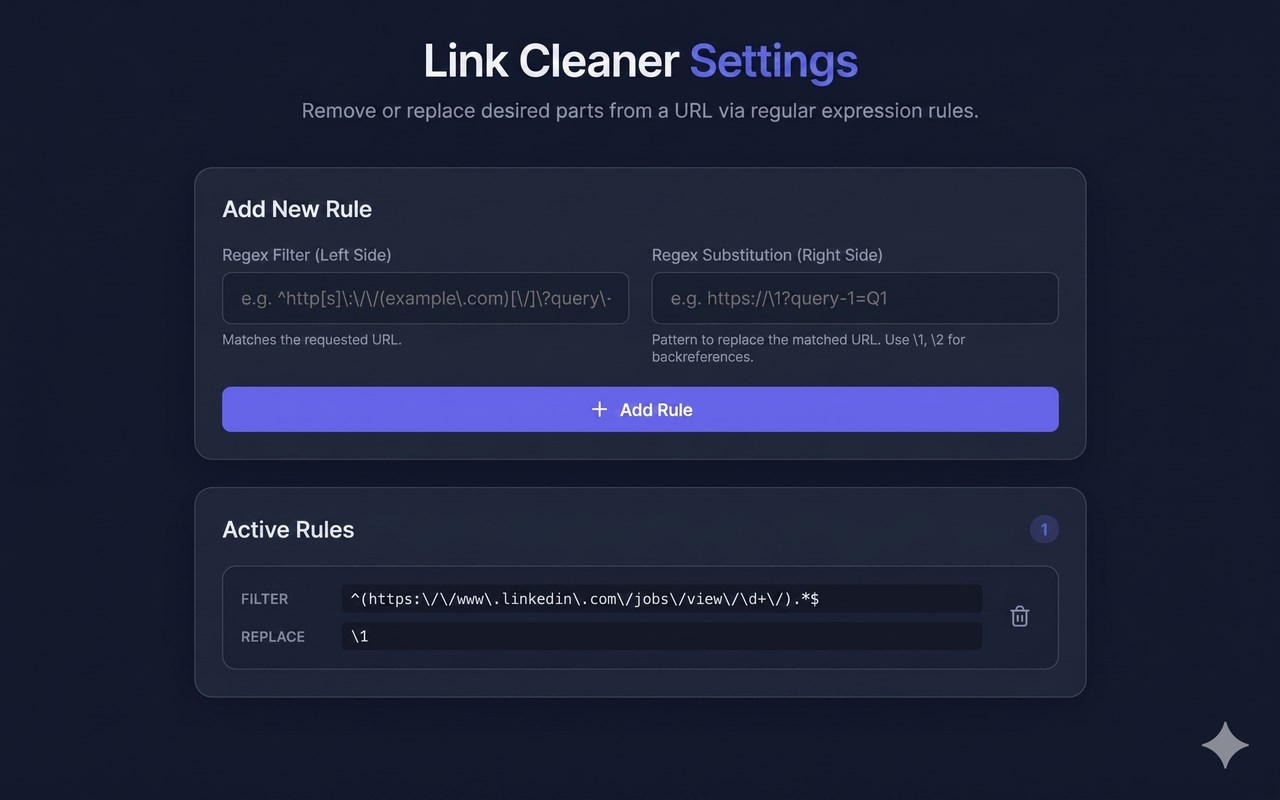
The extension operates quietly in the background, processing links according to your personalized rules without interrupting your workflow. Upon installation, Link Cleaner includes a default rule specifically targeted at cleaning LinkedIn job URLs, removing superfluous elements to produce straightforward, direct links that are optimal for sharing. However, the true strength of the extension lies in its user-driven customization—users can add, edit, or delete any number of rules to fit their individual needs. Each rule is built upon robust regular expressions: you simply define a "filter" to match URL patterns and a "substitution" to specify how those matched segments should be changed or removed. Link Cleaner then dynamically applies these rules in real time as you browse, ensuring your URLs always conform to your preferences.
Managing your rules is made simple and visual through the extension’s dedicated options page. Here, you can review all your current rules, see which ones are active, and add new ones using a straightforward form interface. Changes are immediately effective and saved locally with support for Chrome’s sync storage, which means your customized settings are preserved and carried over automatically to any device where you are signed in with the same browser account. This ensures a consistent URL management experience on all your devices without any extra setup.
Under the hood, Link Cleaner integrates with Chrome’s declarativeNetRequest API, enabling efficient, secure, and instant URL rewriting with minimal resource consumption. The extension adheres strictly to the principle of privacy and security: it requests no unnecessary permissions, and none of your personalized rules or browsing data are sent outside your device unless you authorize syncing via Chrome’s cloud services. This guarantees that your URL customizations remain private and under your control at all times.
Key Features:
- Custom URL manipulation using user-defined regular expressions for flexible cleaning and restructuring.
- Preinstalled default rule optimized for LinkedIn job URLs to offer immediate benefit out of the box.
- User-friendly, visual options page for easy rule creation, editing, and deletion without expert knowledge.
- Seamless background processing powered by Chrome’s declarativeNetRequest API for performant link adjustments.
- Rule synchronization across devices utilizing Chrome's cloud storage for a unified user experience.
- Intelligent migration logic ensures smooth updates by cleaning up legacy rules for long-term users.
- Strong commitment to privacy with no personal data collection—your rules and browsing habits never leave your device.
How It Works:
1. Install Link Cleaner from your browser’s extension marketplace.
2. On first run, the extension automatically applies a default LinkedIn job link cleaning rule.
3. Open the extension's options page via the browser toolbar menu to view all current URL rules.
4. Add new rules by specifying a regular expression to filter URLs and a substitution pattern to define changes.
5. Link Cleaner saves your rules and applies them automatically to URLs during your browsing sessions.
6. Modify or remove any existing rule anytime through the options interface to refine your link cleaning criteria.
7. Your customized rules sync automatically across all devices connected to your browser account, ensuring consistent URL handling everywhere.
Privacy: - No personal data collected.
Link Cleaner 是做什么的
Link Cleaner 是一款面向 Edge 的效率工具类扩展,主要用来管住注意力、屏蔽干扰站点、记录时间。官方对它的介绍是:Remove or replace desired parts from a URL with regular expression rules.在微软 Edge 加载项商店上,它当前版本 1.1,约 11 名用户。
适合什么人用
从功能定位看,Link Cleaner 更适合想专注工作学习、减少无效刷网页的用户。如果你平时只是偶尔遇到相关需求,用浏览器自带功能也能凑合;但如果这件事每天都发生,装一个专门处理它的扩展通常比手动操作省事得多。需要注意的是它作用于所有网站,装上后建议先观察一两天,确认不影响常用站点的正常使用。
怎么安装 Link Cleaner
- 打开微软 Edge 加载项商店上的官方页面;
- 点「添加到浏览器」并确认权限提示;
- 装好后在扩展列表里固定图标,方便随时开关。
本站只做索引与介绍,安装包来自官方商店。如果商店页面提示当前地区不可用,说明该扩展未在你所在区域上架。
常见问题
Link Cleaner 是免费的吗?
Link Cleaner 在微软 Edge 加载项商店免费提供下载。它是浏览器扩展,装上就能直接用,不需要注册账号。
Link Cleaner 安全吗?
它只申请了 0 项权限,范围比较克制,没有申请「读取所有网站数据」这种大权限。
Link Cleaner 支持哪些浏览器?
当前收录的版本来自微软 Edge 加载项商店,适用于 Edge。同一个扩展在其他商店可能有对应版本,但功能与版本号不一定相同。
怎么卸载 Link Cleaner?
在扩展管理页找到 Link Cleaner,点移除即可。它在本地保存的设置会一起清掉,不会残留数据。
权限清单 来自 manifest.json 原文
站点访问(可选) 1
*://*/*
接口权限 4
declarativeNetRequestdeclarativeNetRequestFeedbackdeclarativeNetRequestWithHostAccessstorage
其他商店也有这款
同一款扩展在不同浏览器下的版本,权限与更新节奏可能不同