
Lexcope – Multi Find, Multi Search & Multi Highlight Tool EN
Sathya Stark · EEdge MV3
⚡Lexcope is the ultimate Multi word search, multi find, and super highlight extension for Chrome
截图

简介
⚡Lexcope is the ultimate Multi word search, multi find, and super highlight extension for Edge
Lexcope is a powerful multi find and multi search & highlight Edge extension that goes far beyond traditional Ctrl+F. Instead of searching one word at a time, Lexcope lets you search multiple keywords at once, instantly highlighting each with its own color. It works as an advanced multi highlighter, multi-finder, and multiple search and highlight tool for fast scanning, research, and analysis on any webpage.
Whether you need instant multi search, super find, or a clean multi keyword search extension, Lexcope keeps everything fast, simple, and distraction-free.
________________________________________
🔍 Multi-Word Search & Multi Find
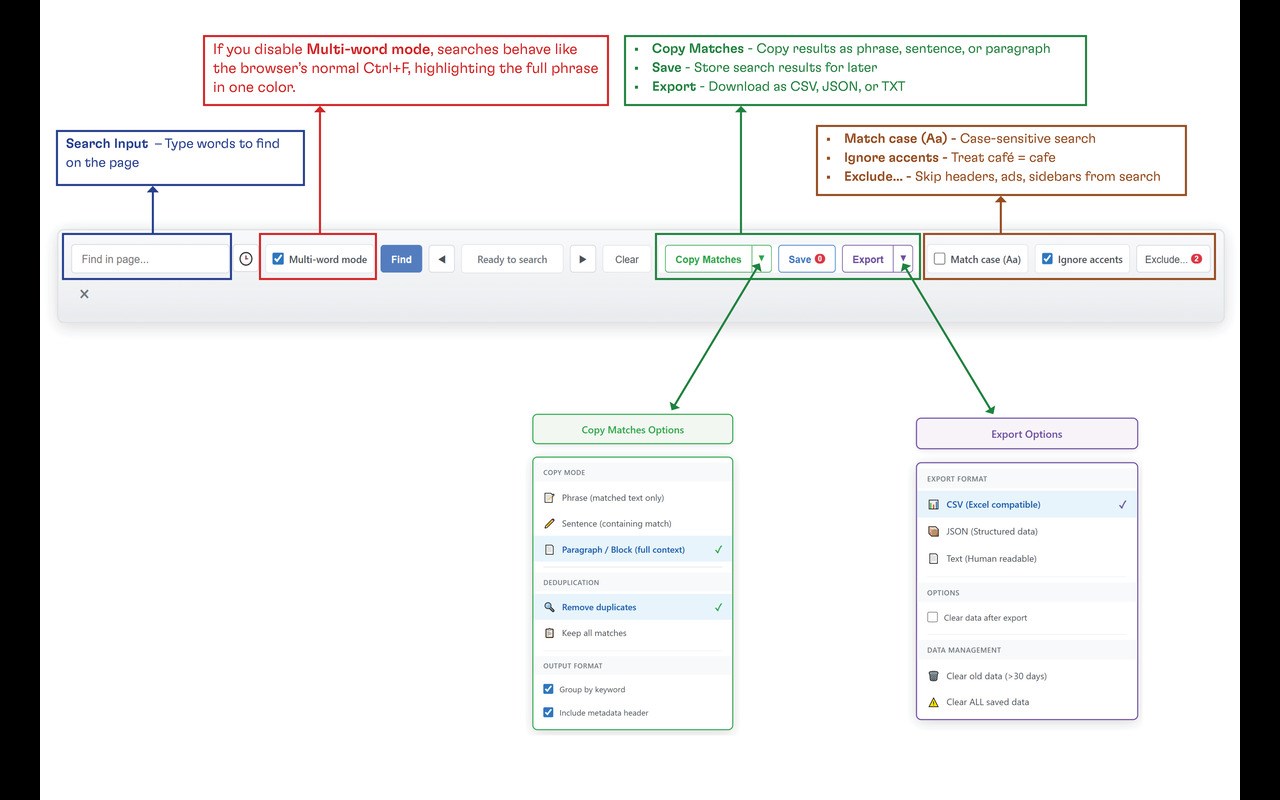
Search multiple words simultaneously and highlight all matches across the page. Lexcope acts as a true multi find tool, helping you locate information instantly without repeating searches.
________________________________________
🎨 Multi Highlighter with Custom Colors
Assign unique colors to each keyword for quick visual recognition. Use Lexcope as a multi highlight or super highlight tool to scan dense content, code, articles, or documentation with ease.
________________________________________
🚫 Smart Exclusions (Advanced Multi-Find Control)
Exclude unwanted sections like headers, footers, sidebars, or ads using CSS selectors. This makes Lexcope a precise multi-finder pro-style solution for focused searching.
________________________________________
⏭️ Super Find Navigation & Match Counts
Jump between results using next/previous controls and see real-time match counts. Navigate pages efficiently with super find–style navigation designed for speed and clarity.
________________________________________
🕘 Search History
Reuse previous multi search and multi keyword find queries with one click. Perfect for research, testing, and repeated analysis.
________________________________________
📤 Export Highlighted Matches
Copy highlighted results along with surrounding context for notes, documentation, research, or sharing—ideal for developers, analysts, and writers.
________________________________________
🔄 Toggle Mode
Switch instantly between Lexcope’s multi search & highlight mode and Edge’s default find behavior whenever needed.
________________________________________
⚡ Lightweight & Fast
Runs smoothly on most websites with no performance lag (PDFs not supported). Designed to feel instant, even on long or complex pages.
________________________________________
👥 Who Is Lexcope For?
Lexcope is ideal for anyone who relies on multiple search and highlight tools, including:
• Researchers & analysts
• Students & academics
• Developers & testers
• Writers, editors & power users
• Anyone needing a reliable multi find, multi highlight, or multi search extension
________________________________________
🧭 How to Use
1. Click the Lexcope extension icon to enable it
2. Press Ctrl+F (or Cmd+F on Mac)
3. Enter multiple keywords (space-separated)
4. Press Enter to perform an instant multi find and navigate results
________________________________________
🔐 Privacy First
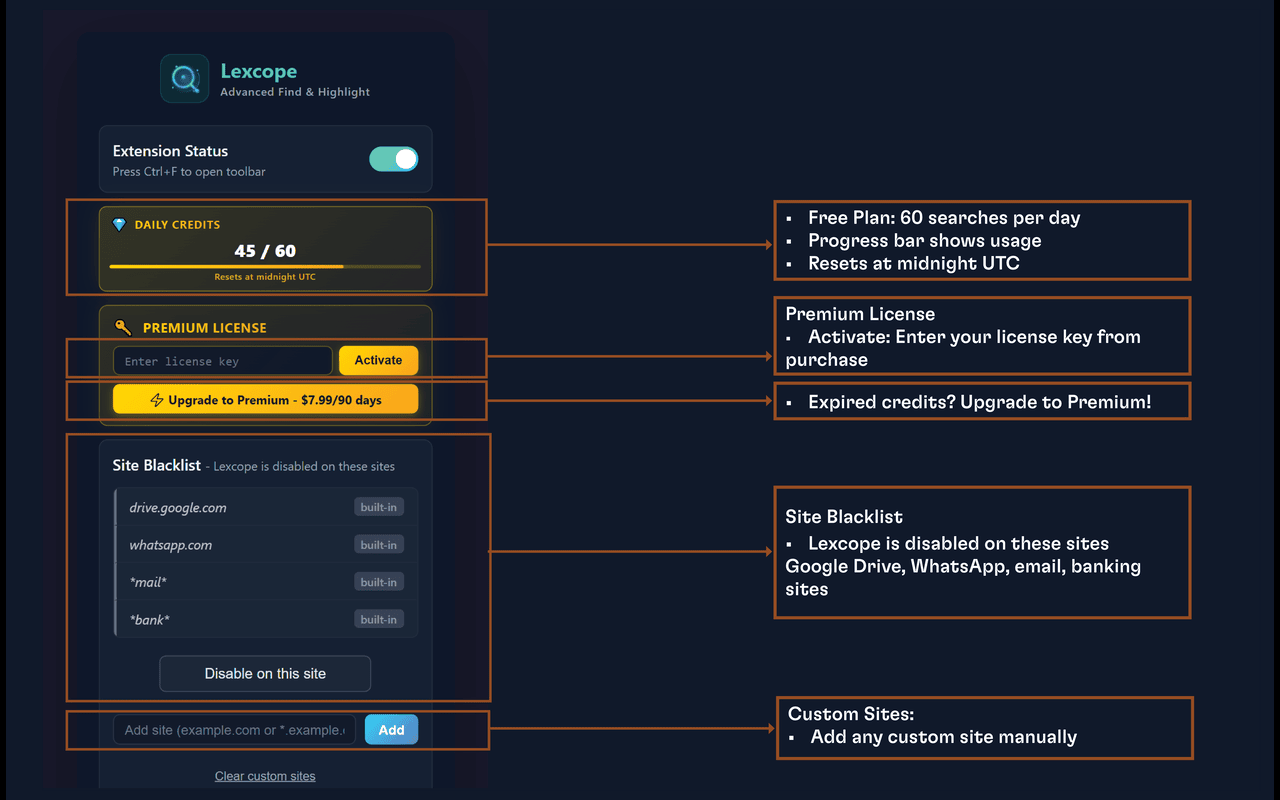
Lexcope does not collect, track, or share any data. All processing happens locally on your device.
________________________________________
⭐ Why Choose Lexcope?
Lexcope combines the best features of multi find, multi search, and multi highlight extensions into one clean, ad-free experience—without clutter or tracking.
________________________________________
📩 Support
Have questions or feedback?
Email: atjakatjuara@gmail.com
Or leave a review to help improve Lexcope 🚀
Lexcope – Multi Find, Multi Search & Multi Highlight Tool 是做什么的
Lexcope – Multi Find, Multi Search & Multi Highlight Tool 是一款面向 Edge 的效率工具类扩展,主要用来管住注意力、屏蔽干扰站点、记录时间。官方对它的介绍是:⚡Lexcope is the ultimate Multi word search, multi find, and super highlight extension for Chrome在微软 Edge 加载项商店上,它当前版本 1.5,评分 5(1 人评价),约 29 名用户。
适合什么人用
从功能定位看,Lexcope – Multi Find, Multi Search & Multi Highlight Tool 更适合想专注工作学习、减少无效刷网页的用户。如果你平时只是偶尔遇到相关需求,用浏览器自带功能也能凑合;但如果这件事每天都发生,装一个专门处理它的扩展通常比手动操作省事得多。
怎么安装 Lexcope – Multi Find, Multi Search & Multi Highlight Tool
- 打开微软 Edge 加载项商店上的官方页面;
- 点「添加到浏览器」并确认权限提示;
- 装好后在扩展列表里固定图标,方便随时开关。
本站只做索引与介绍,安装包来自官方商店。如果商店页面提示当前地区不可用,说明该扩展未在你所在区域上架。
常见问题
Lexcope – Multi Find, Multi Search & Multi Highlight Tool 是免费的吗?
Lexcope – Multi Find, Multi Search & Multi Highlight Tool 在微软 Edge 加载项商店免费提供下载。它是浏览器扩展,装上就能直接用,不需要注册账号。
Lexcope – Multi Find, Multi Search & Multi Highlight Tool 安全吗?
它只申请了 0 项权限,范围比较克制,没有申请「读取所有网站数据」这种大权限。
Lexcope – Multi Find, Multi Search & Multi Highlight Tool 支持哪些浏览器?
当前收录的版本来自微软 Edge 加载项商店,适用于 Edge。同一个扩展在其他商店可能有对应版本,但功能与版本号不一定相同。
怎么卸载 Lexcope – Multi Find, Multi Search & Multi Highlight Tool?
在扩展管理页找到 Lexcope – Multi Find, Multi Search & Multi Highlight Tool,点移除即可。它在本地保存的设置会一起清掉,不会残留数据。
权限清单 来自 manifest.json 原文
接口权限 4
activeTabalarmsstoragetabs