
Level Up for Dynamics 365/Power Apps EN
Natraj Yegnaraman · Edge MV3
Quickly perform advanced/hidden actions in Dynamics 365/Power Apps, without bookmarklets.
截图
简介
Level Up is a powerful browser extension that provides productivity tools for Dynamics 365/Power Apps users. Quickly perform common tasks, access forms and views, and navigate in your Dynamics 365/Power Apps environment with ease.
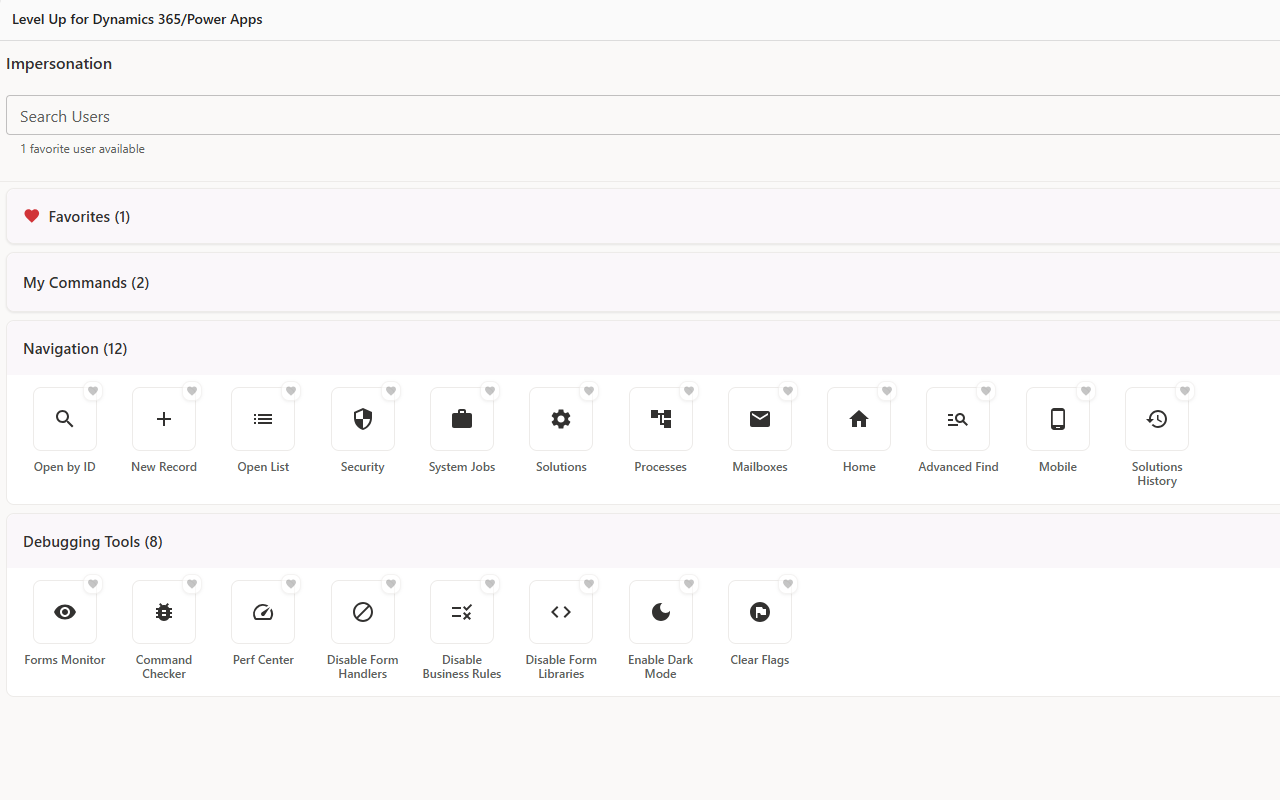
Below are some of the features of the extension
🎯 Form Actions
-------------------
Logical Names: Display logical names for fields, tabs, and sections
God Mode: Unlock all fields, make mandatory fields optional, show hidden elements
Field Management: Blur/unblur fields, highlight changed fields, show all field values
Record Operations: Get record URL/ID, clone records, open in Web API
Quick Actions: Fill minimum values, show option set values, refresh subgrids
Form Utilities: Toggle tabs, disable auto-save, show processes and business rules
Form Editor: Direct access to form editor for quick customizations
🧭 Navigation Tools
-----------------------
Quick Access: Open records by ID, create new records, browse entity lists
System Areas: Direct access to Security, System Jobs, Solutions, Processes
Admin Tools: Power Platform Admin, Instance Picker, Performance Diagnostics
Quick Links: Main page, Advanced Find, Mobile Client, Mailboxes, Solutions History
Workspace Management: Pin extension to side panel for persistent access
🔧 Debugging & Development
-----------------------------------
Forms Monitor: Real-time monitoring of form events and performance
Command Checker: Ribbon debugger for troubleshooting command bar issues
Performance Center: Access to Dynamics 365/Power Apps performance diagnostics
Script Management: Disable form handlers, business rules, and form libraries
UI Enhancements: Enable dark mode, clear flags and debug markers
👥 User Impersonation
--------------------------
Secure Impersonation: Act on behalf of other users (requires privileges)
Favorites Management: Save frequently impersonated users for quick access
Session Management: Per-tab impersonation with automatic cleanup
⚡ Custom Commands
------------------------
Command Management: Create, edit, delete, and organize custom commands
Import/Export: Share command collections with team members
Community Hub: Browse and install commands shared by the community
Level Up for Dynamics 365/Power Apps 是做什么的
Level Up for Dynamics 365/Power Apps 是一款面向 Edge 的实用工具类扩展,主要用来解决浏览器里某类具体的小问题。官方对它的介绍是:Quickly perform advanced/hidden actions in Dynamics 365/Power Apps, without bookmarklets.在微软 Edge 加载项商店上,它当前版本 4.1.3,评分 3.8(79 人评价),约 134,335 名用户。
适合什么人用
从功能定位看,Level Up for Dynamics 365/Power Apps 更适合想补上浏览器原生缺失功能的用户。如果你平时只是偶尔遇到相关需求,用浏览器自带功能也能凑合;但如果这件事每天都发生,装一个专门处理它的扩展通常比手动操作省事得多。
怎么安装 Level Up for Dynamics 365/Power Apps
- 打开微软 Edge 加载项商店上的官方页面;
- 点「添加到浏览器」并确认权限提示;
- 装好后在扩展列表里固定图标,方便随时开关。
本站只做索引与介绍,安装包来自官方商店。如果商店页面提示当前地区不可用,说明该扩展未在你所在区域上架。
常见问题
Level Up for Dynamics 365/Power Apps 是免费的吗?
Level Up for Dynamics 365/Power Apps 在微软 Edge 加载项商店免费提供下载。它是浏览器扩展,装上就能直接用,不需要注册账号。
Level Up for Dynamics 365/Power Apps 安全吗?
它只申请了 0 项权限,范围比较克制,没有申请「读取所有网站数据」这种大权限。
Level Up for Dynamics 365/Power Apps 支持哪些浏览器?
当前收录的版本来自微软 Edge 加载项商店,适用于 Edge。同一个扩展在其他商店可能有对应版本,但功能与版本号不一定相同。
怎么卸载 Level Up for Dynamics 365/Power Apps?
在扩展管理页找到 Level Up for Dynamics 365/Power Apps,点移除即可。它在本地保存的设置会一起清掉,不会残留数据。
权限清单 来自 manifest.json 原文
接口权限 6
activeTabcontextMenusdeclarativeNetRequestscriptingsidePanelstorage