
JumpAI
MagiCore · EEdge MV3
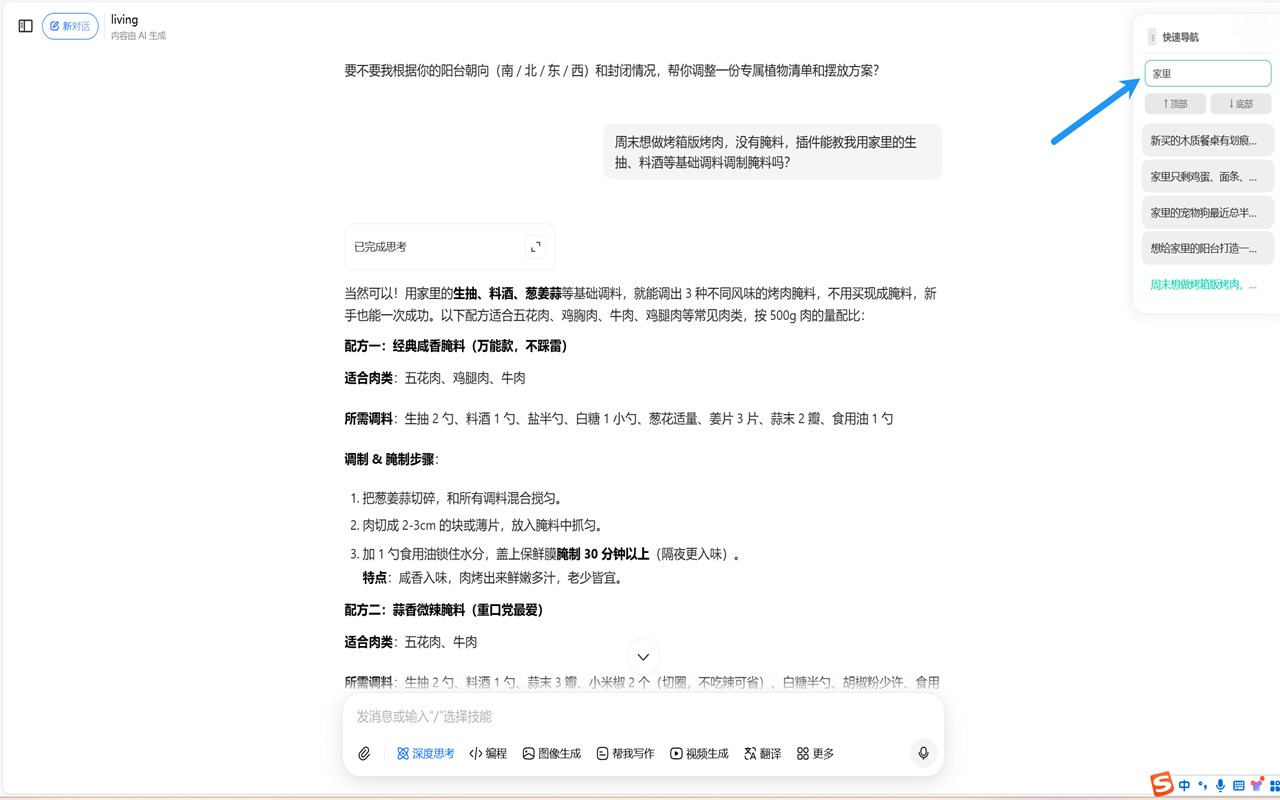
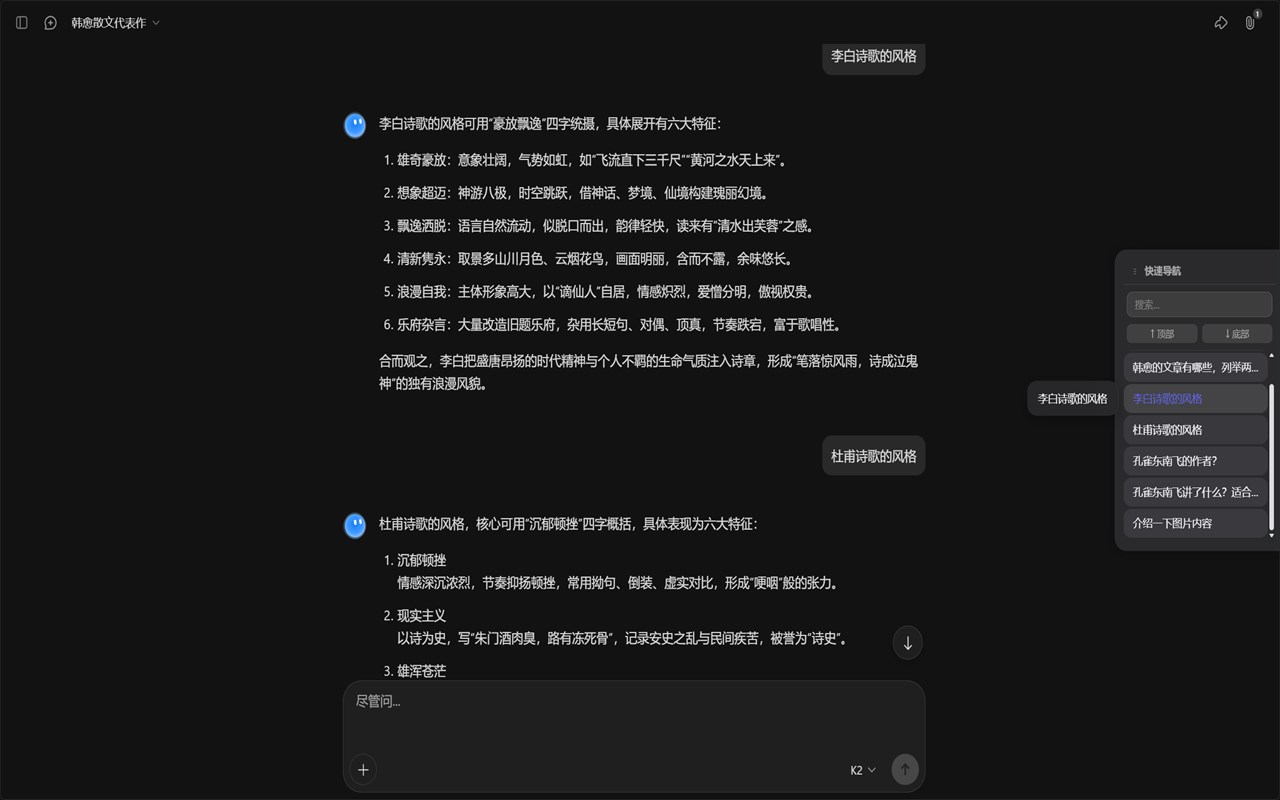
这是一个 AI 对话快速跳转浏览器扩展,用于提升多模型长对话场景下的浏览与定位效率,适用于 ChatGPT、Gemini、Kimi、通义千问、豆包等主流 AI 平台。
截图


简介
JumpAI 是一款功能强大的浏览器插件,专为深度 AI 用户打造,旨在简化用户与 ChatGPT、Gemini、Kimi、通义千问、豆包等主流 AI 聊天平台的交互流程。它能自动检测、索引并整理你所有的提问,将其整合到一个无缝嵌入聊天界面的悬浮导航面板中,从而把冗长繁杂的对话转化为条理清晰、易于浏览的内容。该工具通过支持话题与历史提问的快速跳转,省去了在复杂 AI 对话中反复滚动和搜索的麻烦,为用户节省时间和精力。
随着聊天会话愈发冗长复杂,用户往往难以查找过往消息、追踪当前话题或聚焦特定交流内容。JumpAI 针对性解决了这些常见痛点:它提供了一个智能侧边面板,以简洁可滚动的形式动态列出所有用户提问。该面板支持拖拽操作,可停靠在浏览器窗口的任意一侧,让用户能完全自主调整其位置,适配个人使用习惯,且不会遮挡聊天视图。此外,它还支持实时搜索与筛选功能,即便在跨多个会话的冗长聊天中,你也能即时找到所需内容。
在技术实现上,JumpAI 融入了平台专属索引技术,针对每个支持的 AI 平台的独特结构进行定制优化,确保能快速、准确地检索你的提问。其智能高亮功能会在聊天历史中视觉标记当前选中的消息,帮助你在浏览过程中保持上下文连贯性。工具提示与交互式控件提升了易用性,无论是 AI 新手还是高级用户都能轻松上手。而且,这款插件体积轻巧,完全在客户端运行,无需额外设置——安装后即可立即享受更智能的 AI 聊天导航体验。
JumpAI 具备广泛的平台兼容性,可与几乎所有主流网页版 AI 聊天机器人无缝集成。无论你使用的是 ChatGPT、Gemini 还是其他支持的服务,它都能智能适配并优化功能,带来无与伦比的对话管理体验。对于任何希望将冗长 AI 对话转化为有序、可完全搜索内容的用户而言,JumpAI 提供了革命性的效率提升,让 AI 交互更清晰、更高效。
【核心功能】
- 主流 AI 平台全面支持:自动检测并适配 ChatGPT、Gemini、Kimi、通义千问、豆包等多个 AI 聊天机器人,实现无缝导航。
- 悬浮可拖拽导航面板:简洁的侧边面板紧凑列出过往提问,支持左右停靠与垂直拖拽,适配个人工作流偏好。
- 即时搜索与筛选:强大的关键词搜索功能,实时筛选全部对话历史,快速定位相关消息。
- 一键跳转与滚动:单击即可快速跳转到聊天历史中的任意提问,配备专属控件可直接返回会话开头或结尾。
- 活跃消息视觉高亮:选中的提问会在聊天中进行视觉高亮标记,浏览冗长对话时保持上下文清晰。
- 平台专属逻辑快速索引:通过定制化选择器分析支持平台的聊天内容,精准索引提问,保障导航可靠性。
- 直观工具提示与控件:悬停工具提示与上下文反馈引导用户操作导航功能,各技能水平用户均能轻松使用。
- 面板位置与边缘停靠自定义:可自由调整导航面板位置,设置会自动保存,跨会话保持一致的摆放方式。
【使用方法】
1. 从浏览器应用商店安装 JumpAI 插件;
2. 打开任意支持的 AI 聊天平台(如 ChatGPT、Gemini、Kimi 等);
3. JumpAI 会自动在 AI 聊天界面中注入悬浮导航面板;
4. 当你与 AI 交互时,JumpAI 会实时索引你的提问并填充到面板中;
5. 使用搜索栏可通过关键词即时筛选过往提问;
6. 单击导航列表中的任意提问,即可瞬间跳转到其在对话中的对应位置;
7. 将面板拖拽并停靠到你偏好的屏幕边缘与垂直位置,既能保证操作便捷,又不会影响聊天流程。
## 隐私说明
- 不收集任何个人数据。
JumpAI is a powerful browser extension purpose-built for deep AI users aiming to streamline their interactions with major AI chat platforms such as ChatGPT, Gemini, Kimi, Tongyi Qianwen, and Doubao. It transforms unwieldy, lengthy conversations into manageable, navigable dialogues by automatically detecting, indexing, and organizing all your questions into a floating navigation panel seamlessly integrated into the chat interface. This tool is engineered to save time and effort by enabling rapid jumps between topics and past queries, eliminating the frustration of endless scrolling and searching in complex AI conversations.
As chat sessions grow longer and more intricate, users often struggle to locate previous messages, track ongoing topics, or focus on specific exchanges. JumpAI addresses these common pain points by providing an intelligent side panel that dynamically lists every user question in a clean, scrollable format. The panel is draggable and dockable to either side of the browser window, allowing users full control over its placement to suit their workflow without obstructing the chat view. It supports real-time search and filtering, so you can instantly find exactly what you’re looking for within conversations, even across sprawling multi-session chats.
Behind the scenes, JumpAI incorporates platform-sensitive indexing techniques tailored to the unique structure of each supported AI platform, ensuring fast and accurate retrieval of your queries. Its smart highlighting visually marks the currently selected message in the chat history, maintaining context as you navigate. Tooltips and interactive controls enhance usability, making it accessible to both AI novices and advanced users alike. Moreover, the extension is lightweight and runs entirely client-side, requiring no setup — simply install it and enjoy smarter AI chat navigation right away.
JumpAI’s broad platform compatibility means it can integrate effortlessly with virtually all mainstream web-based AI chatbots. Whether you’re using it on ChatGPT, Gemini, or any other supported service, it smartly adapts and optimizes its functions for an unparalleled conversational management experience. For anyone seeking to turn long AI dialogues into ordered, fully searchable conversations, JumpAI offers a game-changing productivity boost that brings clarity and speed to AI interactions.
Key Features:
- Universal Support for Major AI Platforms: Automatically detects and adjusts to multiple AI chatbots including ChatGPT, Gemini, Kimi, Tongyi Qianwen, and Doubao for seamless navigation.
- Floating, Draggable Navigation Panel: A sleek side panel lists your previous questions compactly, with the flexibility to dock left or right and drag vertically for personal workflow preferences.
- Instant Search and Filter: Powerful keyword-based search that filters your entire conversation history in real-time, enabling immediate access to relevant messages.
- One-Click Jump and Scroll: Quickly jump to any question in your chat history with a single click, with dedicated controls to return to the start or end of the conversation.
- Visual Highlighting of Active Messages: Selected queries are visually highlighted in the chat, preserving context as you browse through extensive dialogues.
- Rapid Indexing with Platform-Specific Logic: Custom selectors analyze chat content on supported platforms to accurately index questions for reliable navigation.
- Intuitive Tooltips and Controls: Helpful hover tooltips and contextual feedback guide users through navigation options, enhancing ease of use for all skill levels.
- Customizable Panel Position and Edge Docking: Easily reposition the navigation panel, with settings saved for consistent placement across sessions.
How It Works:
1. Install JumpAI from your browser’s extension store.
2. Open any supported AI chat platform such as ChatGPT, Gemini, or Kimi.
3. JumpAI automatically injects a floating navigation panel into the AI chat interface.
4. As you interact with the AI, JumpAI indexes your questions in real-time and populates them in the panel.
5. Use the search bar to filter your past queries by keyword instantly.
6. Click on any question in the navigation list to jump instantly to its location in the conversation.
7. Drag and dock the panel to your preferred screen edge and vertical position for optimal accessibility without disrupting your chat workflow.
Privacy: - No personal data collected.
JumpAI 是做什么的
JumpAI 是一款面向 Edge 的效率工具类扩展,主要用来管住注意力、屏蔽干扰站点、记录时间。官方对它的介绍是:这是一个 AI 对话快速跳转浏览器扩展,用于提升多模型长对话场景下的浏览与定位效率,适用于 ChatGPT、Gemini、Kimi、通义千问、豆包等主流 AI 平台。在微软 Edge 加载项商店上,它当前版本 2.0.0,评分 4.3(3 人评价),约 146 名用户。
适合什么人用
从功能定位看,JumpAI 更适合想专注工作学习、减少无效刷网页的用户。如果你平时只是偶尔遇到相关需求,用浏览器自带功能也能凑合;但如果这件事每天都发生,装一个专门处理它的扩展通常比手动操作省事得多。
怎么安装 JumpAI
- 打开微软 Edge 加载项商店上的官方页面;
- 点「添加到浏览器」并确认权限提示;
- 装好后在扩展列表里固定图标,方便随时开关。
本站只做索引与介绍,安装包来自官方商店。如果商店页面提示当前地区不可用,说明该扩展未在你所在区域上架。
常见问题
JumpAI 是免费的吗?
JumpAI 在微软 Edge 加载项商店免费提供下载。它是浏览器扩展,装上就能直接用,不需要注册账号。
JumpAI 安全吗?
它只申请了 0 项权限,范围比较克制,没有申请「读取所有网站数据」这种大权限。
JumpAI 支持哪些浏览器?
当前收录的版本来自微软 Edge 加载项商店,适用于 Edge。同一个扩展在其他商店可能有对应版本,但功能与版本号不一定相同。
怎么卸载 JumpAI?
在扩展管理页找到 JumpAI,点移除即可。它在本地保存的设置会一起清掉,不会残留数据。
权限清单 来自 manifest.json 原文
未解析到权限条目。