
JSON Beautify - JSON 格式化与验证工具
zhoutianling · EEdge MV3
简洁高效的 JSON 格式化、美化、压缩、转义、对比与验证工具。自动检测页面 JSON 响应并一键美化。
<all_urls>),意味着它可以读取你在任意站点的页面内容,包括已登录的页面。这是许多扩展正常工作的必要条件,但也值得你确认来源可信。
截图
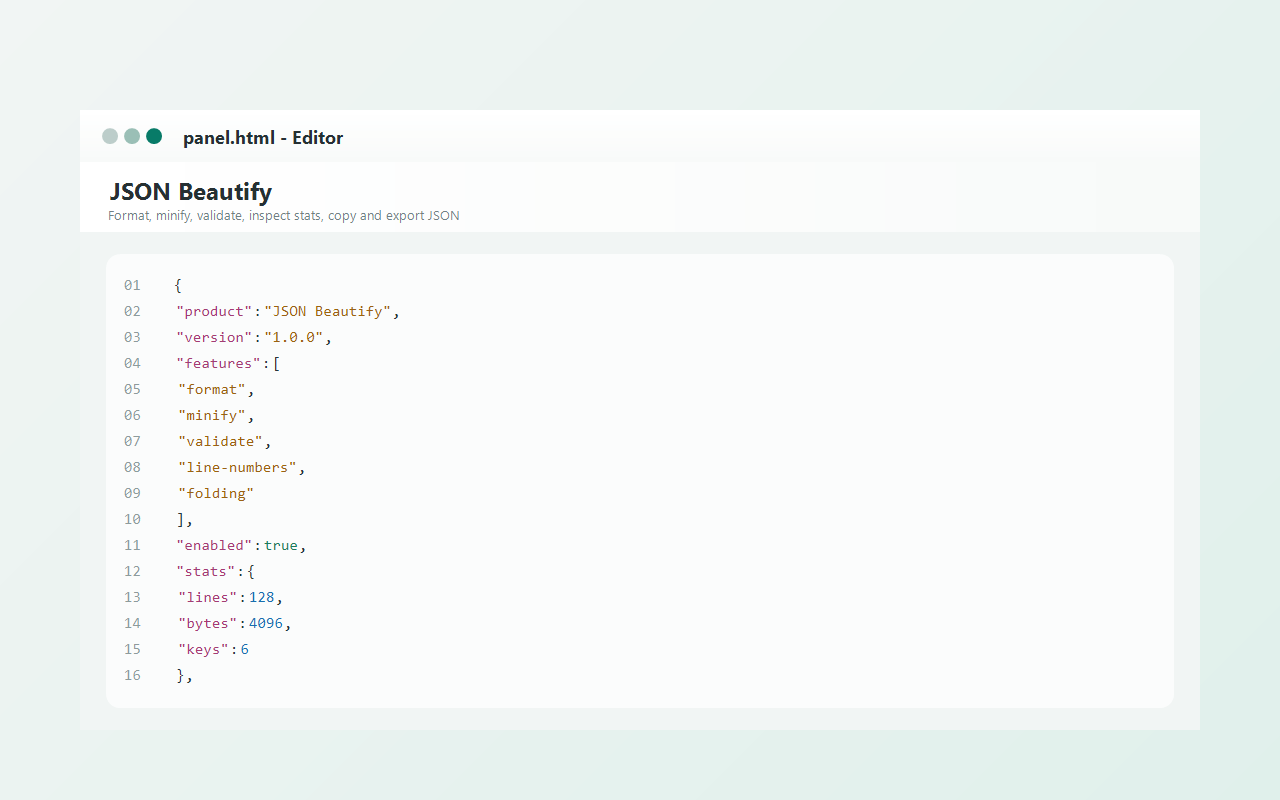
简介
JSON Beautify is a practical browser extension for anyone who regularly works with JSON and wants a faster, cleaner workflow directly in the browser. Based on the provided package details, it combines several JSON-focused tools into a single workspace, making it useful for reading API responses, checking structured data, cleaning pasted snippets, and converting raw JSON into a more readable form without needing a separate application. Instead of limiting itself to basic formatting, the extension provides an editor-style environment where JSON can be pasted, typed, inspected, transformed, and compared in multiple ways.
The extension supports beautifying JSON with configurable indentation, validating syntax, and minifying content into a compact single-line format. It also provides structural insights such as line count, byte size, number of keys, and nesting depth, helping users quickly understand the complexity and size of a document. For larger or deeply nested data, the included tree view offers a clearer way to navigate objects and arrays through expandable and collapsible nodes. This can make it easier to inspect specific branches of a JSON document without scanning through a large block of text.
A notable strength described in the package is its handling of more than strictly valid JSON. The formatting and validation logic attempts to repair common issues before parsing, including comments, trailing commas, and unquoted object keys. This makes the extension useful not only for strict JSON documents, but also for developer-oriented snippets and configuration-like content that is close to JSON but not perfectly compliant. In addition, utility tools for escaping and unescaping text are included, which can help when preparing strings for JSON values or decoding escaped content during development and debugging.
The extension also works at the page level. It can detect JSON-like pages automatically, read JSON content from the current page, and enhance raw JSON pages by replacing plain text with a more readable beautified presentation. On detected JSON pages, users can switch between the original and formatted view, copy the beautified output, and download it as a JSON file. Context menu support adds another layer of convenience by allowing selected text to be formatted, minified, validated, or copied as beautified JSON with quick right-click actions. There is also a page-level option to beautify the current page’s JSON directly.
Settings are available through an options page, where users can define default indentation style, tree expansion depth, key sorting behavior, syntax highlighting, and automatic JSON detection on pages. According to the package details, these preferences are stored locally so the chosen workflow remains consistent each time the extension is used.
Key Features:
- JSON formatting with configurable indentation using 2 spaces, 4 spaces, or tabs.
- JSON validation with error reporting that can include position, line, column, and nearby content snippets.
- JSON minification for producing compact single-line output.
- Tree view for exploring nested objects and arrays with expandable and collapsible nodes.
- Automatic detection of JSON pages, with beautified in-page rendering and quick actions.
- Text escape and unescape utilities for JSON-related workflows.
- Side-by-side JSON comparison that detects differences in structure, types, values, missing keys, and array lengths.
How It Works:
1. Install the extension and open its main panel from the toolbar, or access tools through the context menu on selected text or pages.
2. Paste or type JSON into the editor, or read content from the current page using the built-in page-reading feature.
3. Choose formatting preferences such as indentation style and optional key sorting.
4. Run actions such as beautify, validate, minify, build a tree view, escape or unescape text, or compare two JSON documents.
5. Review the output along with available statistics such as line count, byte size, total keys, and nesting depth.
6. Copy the processed result, download it as a JSON file, or send the formatted output back into the editor for further editing.
7. Adjust default behaviors in the settings page, including syntax highlighting, automatic JSON detection, and tree expansion depth.
Privacy: - No personal data collected. The provided package details indicate that settings are stored locally in the browser, JSON processing happens locally, and processed data is not uploaded to third-party servers. The all-sites access is described as supporting context menu actions and current-page JSON reading across websites.
JSON Beautify - JSON 格式化与验证工具 是做什么的
JSON Beautify - JSON 格式化与验证工具 是一款面向 Edge 的实用工具类扩展,主要用来解决浏览器里某类具体的小问题。官方对它的介绍是:简洁高效的 JSON 格式化、美化、压缩、转义、对比与验证工具。自动检测页面 JSON 响应并一键美化。在微软 Edge 加载项商店上,它当前版本 1.0.7,约 32 名用户。
适合什么人用
从功能定位看,JSON Beautify - JSON 格式化与验证工具 更适合想补上浏览器原生缺失功能的用户。如果你平时只是偶尔遇到相关需求,用浏览器自带功能也能凑合;但如果这件事每天都发生,装一个专门处理它的扩展通常比手动操作省事得多。需要注意的是它作用于所有网站,装上后建议先观察一两天,确认不影响常用站点的正常使用。
怎么安装 JSON Beautify - JSON 格式化与验证工具
- 打开微软 Edge 加载项商店上的官方页面;
- 点「添加到浏览器」并确认权限提示;
- 装好后在扩展列表里固定图标,方便随时开关。
本站只做索引与介绍,安装包来自官方商店。如果商店页面提示当前地区不可用,说明该扩展未在你所在区域上架。
常见问题
JSON Beautify - JSON 格式化与验证工具 是免费的吗?
JSON Beautify - JSON 格式化与验证工具 在微软 Edge 加载项商店免费提供下载。它是浏览器扩展,装上就能直接用,不需要注册账号。
JSON Beautify - JSON 格式化与验证工具 安全吗?
它只申请了 0 项权限,范围比较克制,没有申请「读取所有网站数据」这种大权限。
JSON Beautify - JSON 格式化与验证工具 支持哪些浏览器?
当前收录的版本来自微软 Edge 加载项商店,适用于 Edge。同一个扩展在其他商店可能有对应版本,但功能与版本号不一定相同。
怎么卸载 JSON Beautify - JSON 格式化与验证工具?
在扩展管理页找到 JSON Beautify - JSON 格式化与验证工具,点移除即可。它在本地保存的设置会一起清掉,不会残留数据。
权限清单 来自 manifest.json 原文
站点访问(可选) 1
<all_urls>
接口权限 5
activeTabcontextMenusscriptingstoragetabs