
Jian Yi | On-device Hover Translator EN
ProjectFUMI · EEdge MV3
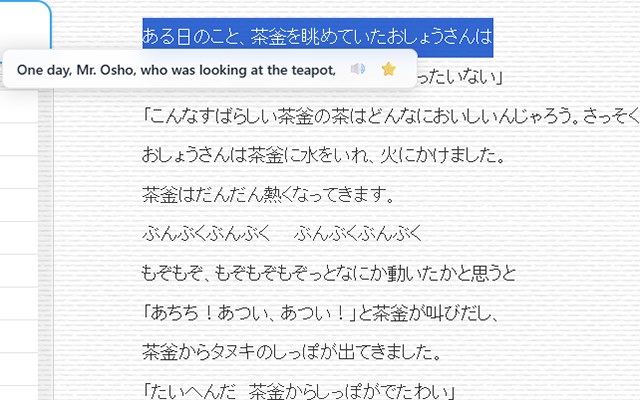
Translate selected, hovered, or right-clicked text anytime with on-device models, speech, and bookmarks.
截图
简介
Translation stays on your device. Browse in Edge without breaking your flow.
When you come across unfamiliar text, there is no need to copy and paste it into another translation website or send it to an unfamiliar service. Jian Yi uses the on-device Language Detector and Translator APIs built into Microsoft Edge to detect languages and translate text directly on your computer. The text you translate is never sent to the developer's servers or a third-party translation API.
The first time you use a particular language, Microsoft Edge may need an internet connection to download the required on-device model. Once the model is ready, you can enjoy fast, seamless translation designed with privacy in mind. Text-to-speech playback uses the voices available in your browser and operating system.
Fewer interruptions. Greater peace of mind.
Install Jian Yi and browse foreign-language content in Microsoft Edge without breaking your flow.
Key features
Translate text by selecting it, hovering over it, holding Alt, or right-clicking.
Translate an entire page from the page context menu while keeping the original text and inserting the translation alongside it.
Automatically split long articles into manageable sections for translation.
Detect the source language automatically, or choose both the source and target languages yourself.
Automatically use the Microsoft Edge display language as the target language.
Switch source and target languages directly from the extension icon's context menu.
Download the required model when text in a language that is not yet ready is detected.
Preload and manage source-language models.
Listen to the original text using the browser's speech feature.
Save individual words or complete sentences, with duplicate entries filtered automatically.
Manage settings and word bookmarks in separate tabs.
Optionally sync bookmarks between computers through the Microsoft account signed in to Edge; sync is off by default.
Export and import bookmarks, including file-based transfers between Microsoft Edge and Chrome.
Use the interface in Traditional Chinese, English, or Japanese.
No account, API key, or subscription is required for the core features. A browser account is needed only if you choose to enable cross-device sync.
Requirements
Microsoft Edge 148 or later on desktop.
When a language pair is used for the first time, the browser may need to download a language model.
Available languages, models, and voices vary by Microsoft Edge version, operating system, and device.
Privacy
Jian Yi includes no analytics, advertising trackers, or developer-operated translation servers. It does not record URLs, domains, page titles, or visit times. During normal use, it processes only the visible text that you point to, select, or explicitly ask to translate. Visible article sections are read only when you choose Translate entire page.
Settings and bookmarks are stored on the current device by default. Bookmark data is sent through Microsoft Edge's browser sync service only after you explicitly enable bookmark sync, allowing it to be accessed through your signed-in account on other devices. This data is never sent to developer-operated servers. Turning sync off does not automatically delete an existing synced copy; you can remove the cloud copy from the settings page.
The read-aloud feature is handled by your browser and operating system through the Web Speech API. If you choose an online voice, the text being read may be processed by Microsoft, your operating system provider, or another voice service provider; the developer does not receive that content.
Disclaimer
Automatic translations may contain errors, omissions, or differences in meaning. They are provided only as a general aid for browsing and language learning. They do not constitute legal, medical, financial, tax, contractual, certified, or other professional translation. For important decisions or commercial use, always check the original text and consult a qualified professional or human translator when necessary.
Jian Yi | On-device Hover Translator 是做什么的
Jian Yi | On-device Hover Translator 是一款面向 Edge 的效率工具类扩展,主要用来管住注意力、屏蔽干扰站点、记录时间。官方对它的介绍是:Translate selected, hovered, or right-clicked text anytime with on-device models, speech, and bookmarks.在微软 Edge 加载项商店上,它当前版本 1.13.2。
适合什么人用
从功能定位看,Jian Yi | On-device Hover Translator 更适合想专注工作学习、减少无效刷网页的用户。如果你平时只是偶尔遇到相关需求,用浏览器自带功能也能凑合;但如果这件事每天都发生,装一个专门处理它的扩展通常比手动操作省事得多。
怎么安装 Jian Yi | On-device Hover Translator
- 打开微软 Edge 加载项商店上的官方页面;
- 点「添加到浏览器」并确认权限提示;
- 装好后在扩展列表里固定图标,方便随时开关。
本站只做索引与介绍,安装包来自官方商店。如果商店页面提示当前地区不可用,说明该扩展未在你所在区域上架。
常见问题
Jian Yi | On-device Hover Translator 是免费的吗?
Jian Yi | On-device Hover Translator 在微软 Edge 加载项商店免费提供下载。它是浏览器扩展,装上就能直接用,不需要注册账号。
Jian Yi | On-device Hover Translator 安全吗?
它只申请了 0 项权限,范围比较克制,没有申请「读取所有网站数据」这种大权限。
Jian Yi | On-device Hover Translator 支持哪些浏览器?
当前收录的版本来自微软 Edge 加载项商店,适用于 Edge。同一个扩展在其他商店可能有对应版本,但功能与版本号不一定相同。
怎么卸载 Jian Yi | On-device Hover Translator?
在扩展管理页找到 Jian Yi | On-device Hover Translator,点移除即可。它在本地保存的设置会一起清掉,不会残留数据。
权限清单 来自 manifest.json 原文
接口权限 2
contextMenusstorage