
网络翻译,字典 - 简单翻译
PadillaK · EEdge MV3
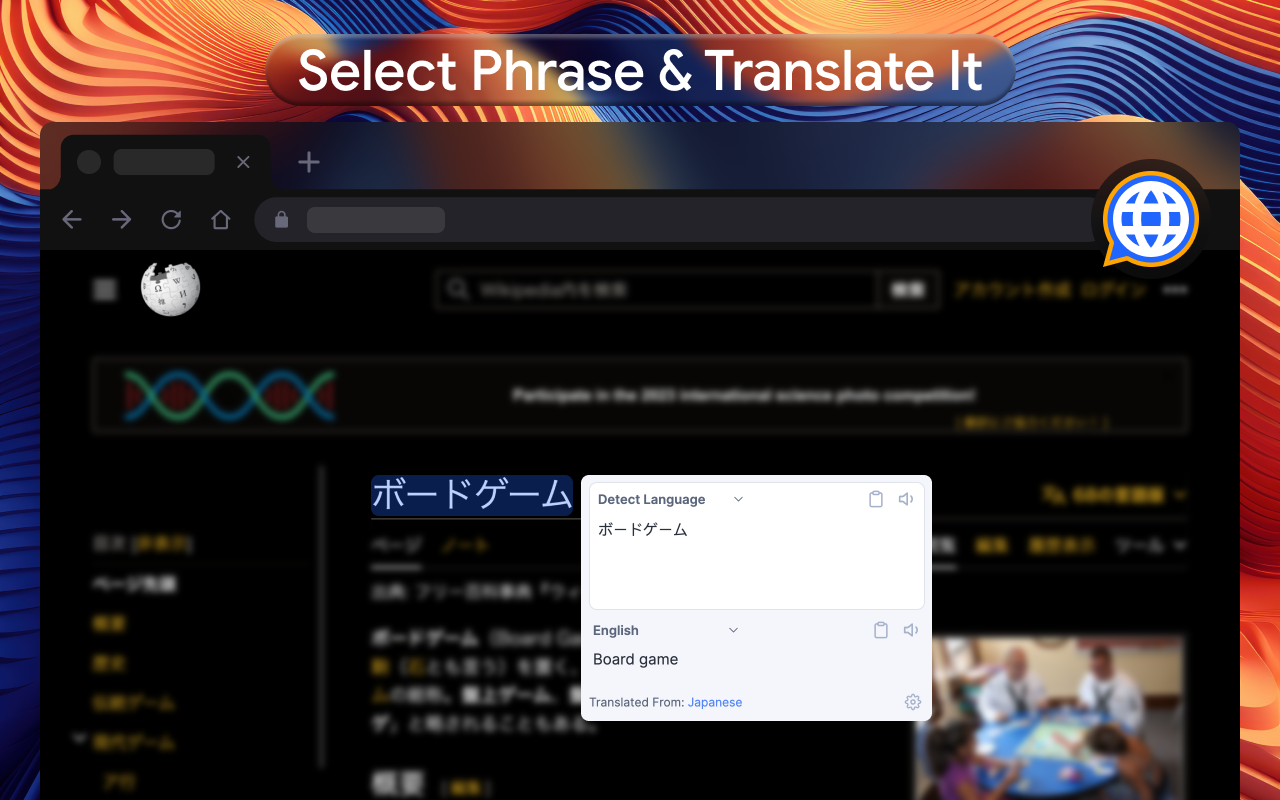
右键单击要使用谷歌翻译器翻译的单词或短语。在线翻译
截图
简介
Multilanguage text translator with full-page translation, built-in dictionary, and text-to-speech (TTS) functionality
🌐 Multilanguage Translator: The optimal and simplest method to swiftly interpret specific content, be it words, phrases, or even menu items.
🔍 Highlight the desired word or text for an instant translation into your language. All within a user-friendly browser extension.
➖ Completely free. No registration or subscriptions required.
➖ Supports 120+ languages.
➖ Auto language detection.
➖ Text-to-voice feature for 60 languages.
➖ Reverse translation.
➖ Compatible with all sites, including Gmail, Facebook, Twitter, and more.
➖ Streamlined and intuitive extension interface.
➖ Word translation using a dictionary (offline functionality).
🗣️ Quick Translator: Reads and vocalizes words, phrases, and texts using high-quality human text-to-speech (TTS) translation. Displays transcription and transliteration, ensuring correct accent and stress. Learn accurate word pronunciation instantly!
🎚️ Functionality:
🔍 Web Page Translation - Translate entire web pages with hover translation.
📘 Dictionary - Word meaning, pronunciation, synonyms, hypernyms, hyponyms, and more.
🔖 Bookmarks - Tracks changes made to bookmarks, saving translation history.
🔊 Text-to-Speech - Hear correct pronunciation and play words and texts with the right accent.
🖼️ Image Translation (Image Recognition) - Select the monitor area for translation (similar to a screenshot tool).
🆕 In the latest extension version, choose your preferred translator without additional installations. Access Google Translate features seamlessly within the Quick Translator extension.
🎙️ Text-to-Speech:
Utilize the TTS function to understand word sounds and phonetic transcription.
🖥️ Full-Page Translations:
Translate entire web pages instantly with Google Translator's free integration.
🔄 Choose your translator today: Quick Translator or Google Translate.
🙏 We sincerely hope our translator proves valuable to you! Your feedback and ratings are eagerly anticipated!
网络翻译,字典 - 简单翻译 是做什么的
网络翻译,字典 - 简单翻译 是一款面向 Edge 的实用工具类扩展,主要用来解决浏览器里某类具体的小问题。官方对它的介绍是:右键单击要使用谷歌翻译器翻译的单词或短语。在线翻译在微软 Edge 加载项商店上,它当前版本 1.9,评分 4.9(97 人评价),约 13,124 名用户。
适合什么人用
从功能定位看,网络翻译,字典 - 简单翻译 更适合想补上浏览器原生缺失功能的用户。如果你平时只是偶尔遇到相关需求,用浏览器自带功能也能凑合;但如果这件事每天都发生,装一个专门处理它的扩展通常比手动操作省事得多。
怎么安装 网络翻译,字典 - 简单翻译
- 打开微软 Edge 加载项商店上的官方页面;
- 点「添加到浏览器」并确认权限提示;
- 装好后在扩展列表里固定图标,方便随时开关。
本站只做索引与介绍,安装包来自官方商店。如果商店页面提示当前地区不可用,说明该扩展未在你所在区域上架。
常见问题
网络翻译,字典 - 简单翻译 是免费的吗?
网络翻译,字典 - 简单翻译 在微软 Edge 加载项商店免费提供下载。它是浏览器扩展,装上就能直接用,不需要注册账号。
网络翻译,字典 - 简单翻译 安全吗?
它只申请了 0 项权限,范围比较克制,没有申请「读取所有网站数据」这种大权限。
网络翻译,字典 - 简单翻译 支持哪些浏览器?
当前收录的版本来自微软 Edge 加载项商店,适用于 Edge。同一个扩展在其他商店可能有对应版本,但功能与版本号不一定相同。
怎么卸载 网络翻译,字典 - 简单翻译?
在扩展管理页找到 网络翻译,字典 - 简单翻译,点移除即可。它在本地保存的设置会一起清掉,不会残留数据。
权限清单 来自 manifest.json 原文
接口权限 2
contextMenusstorage