
Instant Data Scraper EN
Flavr Technology · EEdge MV3
Instant Data Scraper extracts data from web pages and exports it as Excel or CSV files
<all_urls>),意味着它可以读取你在任意站点的页面内容,包括已登录的页面。这是许多扩展正常工作的必要条件,但也值得你确认来源可信。
截图
简介
Instant Data Scraper extracts data from web pages and exports it as Excel or CSV files
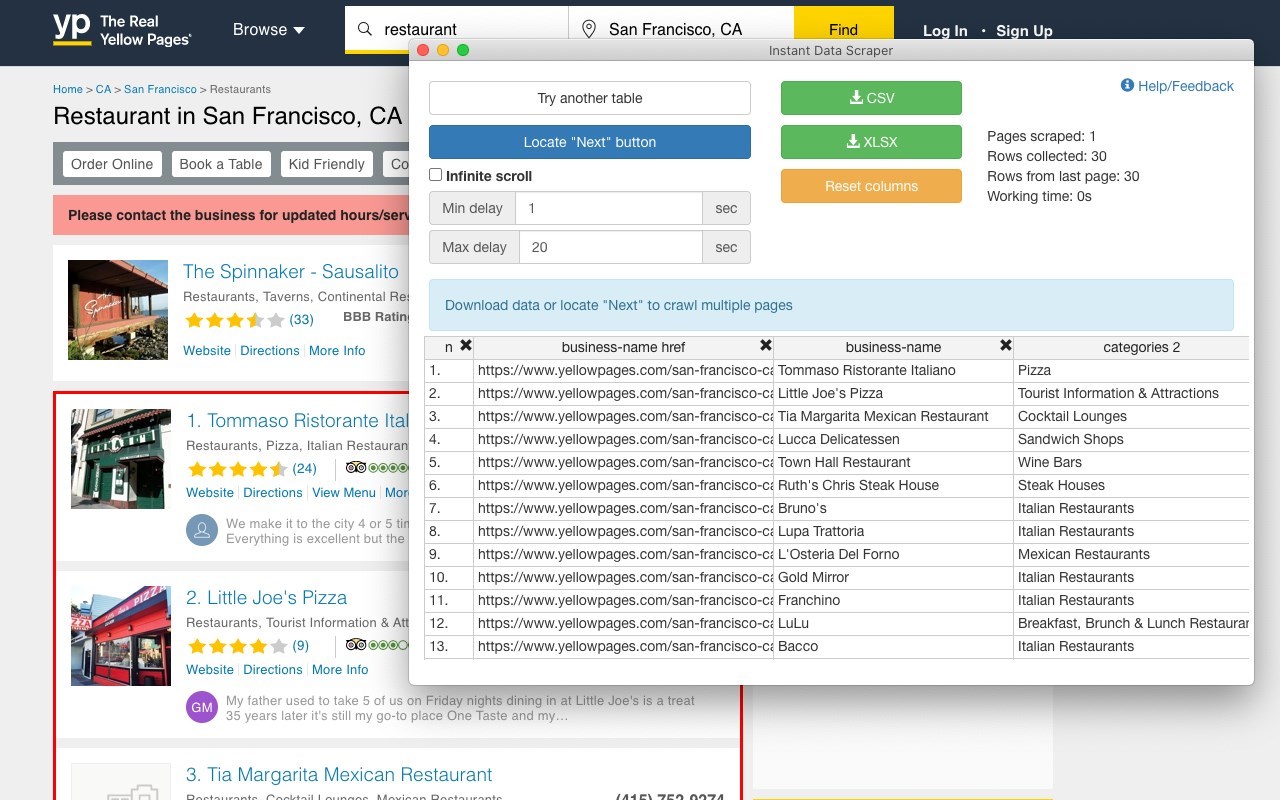
Instant Data Scraper is an automated data extraction tool for any website. It uses AI to predict which data is most relevant on a HTML page and allows saving it to Excel or CSV file (XLS, XLSX, CSV).
This tool does not require website specific scripts, instead it uses heuristic AI analysis of HTML structure to detect data for extraction. If the prediction is not satisfactory, it lets the user customize the selections for greater accuracy. This type of scraping technology is much more convenient, because it does not require large user created libraries of scraping scripts, which often become filled with outdated and redundant versions. This means that our scraping method works just as well with small and lesser known websites, as it does with global giants like Amazon. Also, our users do not need to have any coding, json or xml skills!
Instant Data Scraper FEATURES:
* Detecting data for extraction with AI.
* Detecting when dynamic data has loaded.
* Delay and maximum wait time customization for desired crawling speed
* Support for pagination on websites.
* Automatic navigation to next page via buttons or links.
* Support for infinite scrolling.
* Extracted data preview with copy and paste support.
* Data export to Excel spreadsheet or CSV file.
* Extracted data column renaming and filtering.
This extension is completely FREE. Instant Data Scraper works well in unison with SEO tools, CRM recruiter systems, sales leads management tools or email marketing campaigns. Web scraping and data downloading is made easy with our tool. Furthermore, you have data security and privacy as the scraped data does not leave your browser.
Instant Data Scraper USE CASES:
* Lead generation for companies and freelancers.
* Growth hackers looking for easy ways to collect data.
* Recruiters looking for job candidates.
* Crawl results from search engines.
* Get product pricing data from e-commerce websites.
* Amazon sellers, distributors and review analysts.
* Get email and addresses and phone numbers from directories.
* Get contact info from professional association websites.
* Scrape reviews and ratings.
* Analyze posts for likes, comments, connection and contacts.
* Extract emails and ID from social media profiles.
Instant Data Scraper 是做什么的
Instant Data Scraper 是一款面向 Edge 的效率工具类扩展,主要用来管住注意力、屏蔽干扰站点、记录时间。官方对它的介绍是:Instant Data Scraper extracts data from web pages and exports it as Excel or CSV files在微软 Edge 加载项商店上,它当前版本 1.7.1,评分 4.2(20 人评价),约 66,034 名用户。
适合什么人用
从功能定位看,Instant Data Scraper 更适合想专注工作学习、减少无效刷网页的用户。如果你平时只是偶尔遇到相关需求,用浏览器自带功能也能凑合;但如果这件事每天都发生,装一个专门处理它的扩展通常比手动操作省事得多。需要注意的是它作用于所有网站,装上后建议先观察一两天,确认不影响常用站点的正常使用。
怎么安装 Instant Data Scraper
- 打开微软 Edge 加载项商店上的官方页面;
- 点「添加到浏览器」并确认权限提示;
- 装好后在扩展列表里固定图标,方便随时开关。
本站只做索引与介绍,安装包来自官方商店。如果商店页面提示当前地区不可用,说明该扩展未在你所在区域上架。
常见问题
Instant Data Scraper 是免费的吗?
Instant Data Scraper 在微软 Edge 加载项商店免费提供下载。它是浏览器扩展,装上就能直接用,不需要注册账号。
Instant Data Scraper 安全吗?
它只申请了 0 项权限,范围比较克制,没有申请「读取所有网站数据」这种大权限。
Instant Data Scraper 支持哪些浏览器?
当前收录的版本来自微软 Edge 加载项商店,适用于 Edge。同一个扩展在其他商店可能有对应版本,但功能与版本号不一定相同。
怎么卸载 Instant Data Scraper?
在扩展管理页找到 Instant Data Scraper,点移除即可。它在本地保存的设置会一起清掉,不会残留数据。
权限清单 来自 manifest.json 原文
站点访问(可选) 1
<all_urls>
接口权限 7
alarmscontextMenusscriptingstoragetabswebNavigationwebRequest