Inline Text Formatter for LinkedIn & X: Bold, Italic & Font Styles EN
Tyler Huang · EEdge MV3
Inline text formatter for LinkedIn & X. Format posts, comments, threads & replies with bold, italic & stylish fonts instantly.
截图
简介
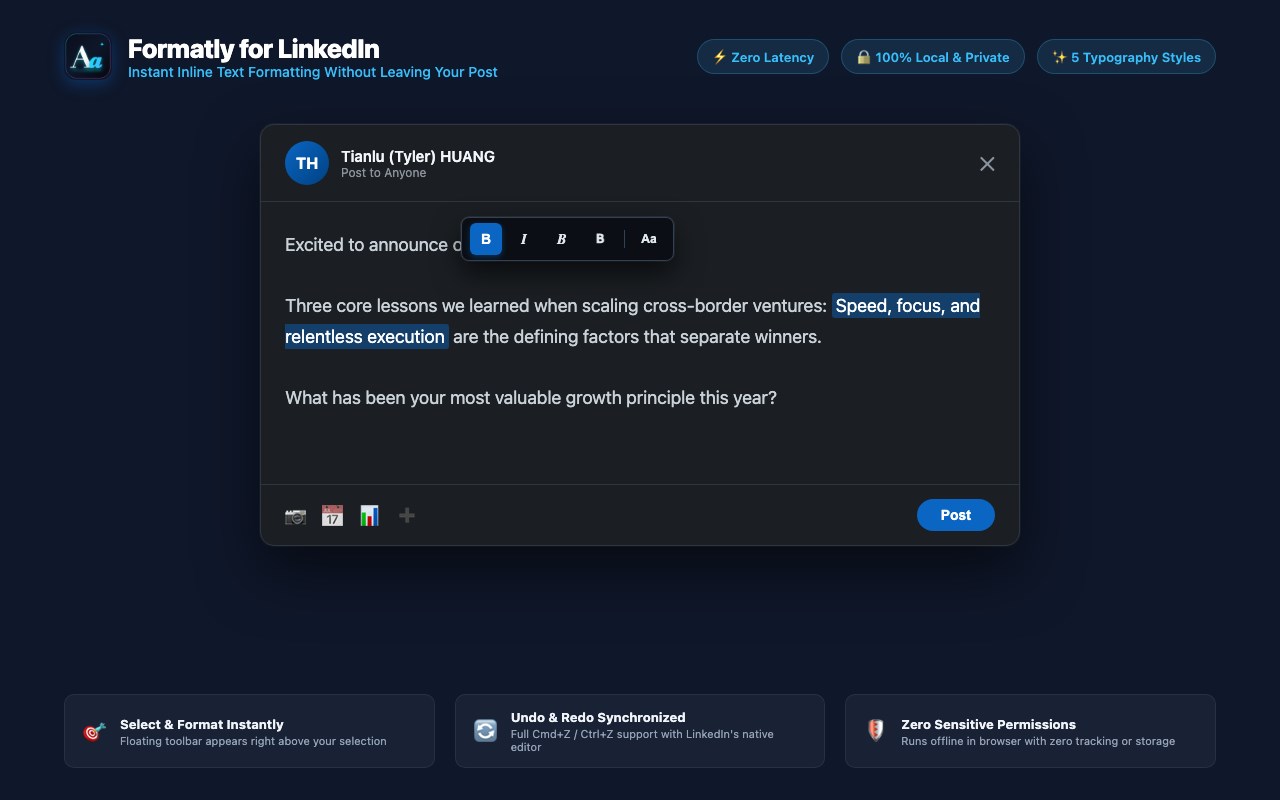
Formatly provides an inline formatting toolbar directly inside LinkedIn and X (Twitter) post composers, comment fields, threads, and reply boxes. It eliminates the need to switch browser tabs to copy-paste formatted text from external generator websites.
Select any text within an editable field on LinkedIn or X (Twitter) to format it instantly with bold, italic, and Unicode typography.
HIGHLIGHTS
- No X Premium Required: Unlock bold, italic, and font styles across all X posts and replies without a paid subscription.
- Universal Feed Visibility: Uses standard Unicode characters that display natively for all followers across web, iOS, Android, and embeds.
- Works Across Both Platforms: Seamlessly format LinkedIn posts and comments, X tweets and threads, quote tweets, and reply dialogs.
FEATURES
- Instant Floating Toolbar: Appears directly over selected text within LinkedIn's or X's editor.
- Universal Comment & Reply Support: Works seamlessly across posts, inline feed comments, threads, and deeply nested reply boxes without disabling submit buttons.
- Five Core Styles:
* Serif Bold (Bold)
* Serif Italic (Italic)
* Serif Bold Italic (Bold Italic)
* Sans-Serif Bold (Bold)
* Plain Revert (Aa): Restores styled text to standard plain characters.
- Universal Compatibility: Uses standard Unicode characters. Styled text renders consistently across iOS, Android, web browsers, and email notifications without requiring plugins for readers.
- Editor Synchronization: Integrates with LinkedIn's Quill and X's React/Draft.js editor models via native input commands, keeping the submit button active and preserving Cmd+Z / Ctrl+Z undo history.
- Strict Site Isolation: Configured strictly for *.linkedin.com, *.x.com, and *.twitter.com. The extension never runs on or inspects any other website.
- Clean and Unobtrusive: No configuration panels or background processes. The toolbar only displays when text is selected.
HOW TO USE
1. Start writing a post, comment, thread, or reply on LinkedIn or X.
2. Highlight the text you want to format.
3. Click "B", "I", or any style on the floating toolbar.
4. To revert, highlight the styled text and click "Aa", or press Cmd+Z / Ctrl+Z.
PRIVACY & SECURITY
- Zero sensitive permissions: Declares no host permissions, no storage access, and no background worker.
- Site-isolated: Scoped exclusively to *.linkedin.com, *.x.com, and *.twitter.com.
- Local execution: All transformations occur locally in your browser. No data is collected, logged, or transmitted.
- Fully compliant with LinkedIn and X Content Security Policies.
DISCLAIMER
Formatly is an independent open-source project and is not affiliated with, sponsored by, or endorsed by LinkedIn Corporation or X Corp. LinkedIn is a registered trademark of LinkedIn Corporation. X and Twitter are registered trademarks of X Corp.
Open source under the MIT License:
https://github.com/xemee82/formatly-for-linkedin
v1.1.0 Updates:
- Added full support for X (Twitter) posts, threads, and replies.
- Fixed an issue where the toolbar host could intermittently block clicks on LinkedIn's Messaging panel.
- Improved toolbar positioning and click-through reliability.
Inline Text Formatter for LinkedIn & X: Bold, Italic & Font Styles 是做什么的
Inline Text Formatter for LinkedIn & X: Bold, Italic & Font Styles 是一款面向 Edge 的效率工具类扩展,主要用来管住注意力、屏蔽干扰站点、记录时间。官方对它的介绍是:Inline text formatter for LinkedIn & X. Format posts, comments, threads & replies with bold, italic & stylish fonts instantly.在微软 Edge 加载项商店上,它当前版本 1.2.9,约 4 名用户。
适合什么人用
从功能定位看,Inline Text Formatter for LinkedIn & X: Bold, Italic & Font Styles 更适合想专注工作学习、减少无效刷网页的用户。如果你平时只是偶尔遇到相关需求,用浏览器自带功能也能凑合;但如果这件事每天都发生,装一个专门处理它的扩展通常比手动操作省事得多。
怎么安装 Inline Text Formatter for LinkedIn & X: Bold, Italic & Font Styles
- 打开微软 Edge 加载项商店上的官方页面;
- 点「添加到浏览器」并确认权限提示;
- 装好后在扩展列表里固定图标,方便随时开关。
本站只做索引与介绍,安装包来自官方商店。如果商店页面提示当前地区不可用,说明该扩展未在你所在区域上架。
常见问题
Inline Text Formatter for LinkedIn & X: Bold, Italic & Font Styles 是免费的吗?
Inline Text Formatter for LinkedIn & X: Bold, Italic & Font Styles 在微软 Edge 加载项商店免费提供下载。它是浏览器扩展,装上就能直接用,不需要注册账号。
Inline Text Formatter for LinkedIn & X: Bold, Italic & Font Styles 安全吗?
它只申请了 0 项权限,范围比较克制,没有申请「读取所有网站数据」这种大权限。
Inline Text Formatter for LinkedIn & X: Bold, Italic & Font Styles 支持哪些浏览器?
当前收录的版本来自微软 Edge 加载项商店,适用于 Edge。同一个扩展在其他商店可能有对应版本,但功能与版本号不一定相同。
怎么卸载 Inline Text Formatter for LinkedIn & X: Bold, Italic & Font Styles?
在扩展管理页找到 Inline Text Formatter for LinkedIn & X: Bold, Italic & Font Styles,点移除即可。它在本地保存的设置会一起清掉,不会残留数据。
权限清单 来自 manifest.json 原文
未解析到权限条目。