
image2n8n EN
bonik · EEdge MV3
우클릭한 이미지를 base64로 변환하여 n8n으로 전송합니다.
<all_urls>),意味着它可以读取你在任意站点的页面内容,包括已登录的页面。这是许多扩展正常工作的必要条件,但也值得你确认来源可信。
截图
简介
image2n8n helps you send images from webpages directly into n8n workflows without the extra steps of downloading files first or manually copying image links into another tool. It is designed as a practical bridge between browsing and automation, giving you a faster way to move images from the web into your configured webhook destinations. When you find an image you want to process, archive, classify, or route through an automated workflow, the extension lets you send it directly from the page with image-focused controls and a guided upload interface.
The extension centers its experience around real image interaction. It adds context menu actions for images so you can right-click and send an image to n8n. If you have configured multiple webhooks, it creates separate labeled menu entries for each destination, making it easy to route images to different workflows. If no webhook has been set up yet, the extension provides a setup shortcut that opens the settings page so the first-use experience remains clear and functional.
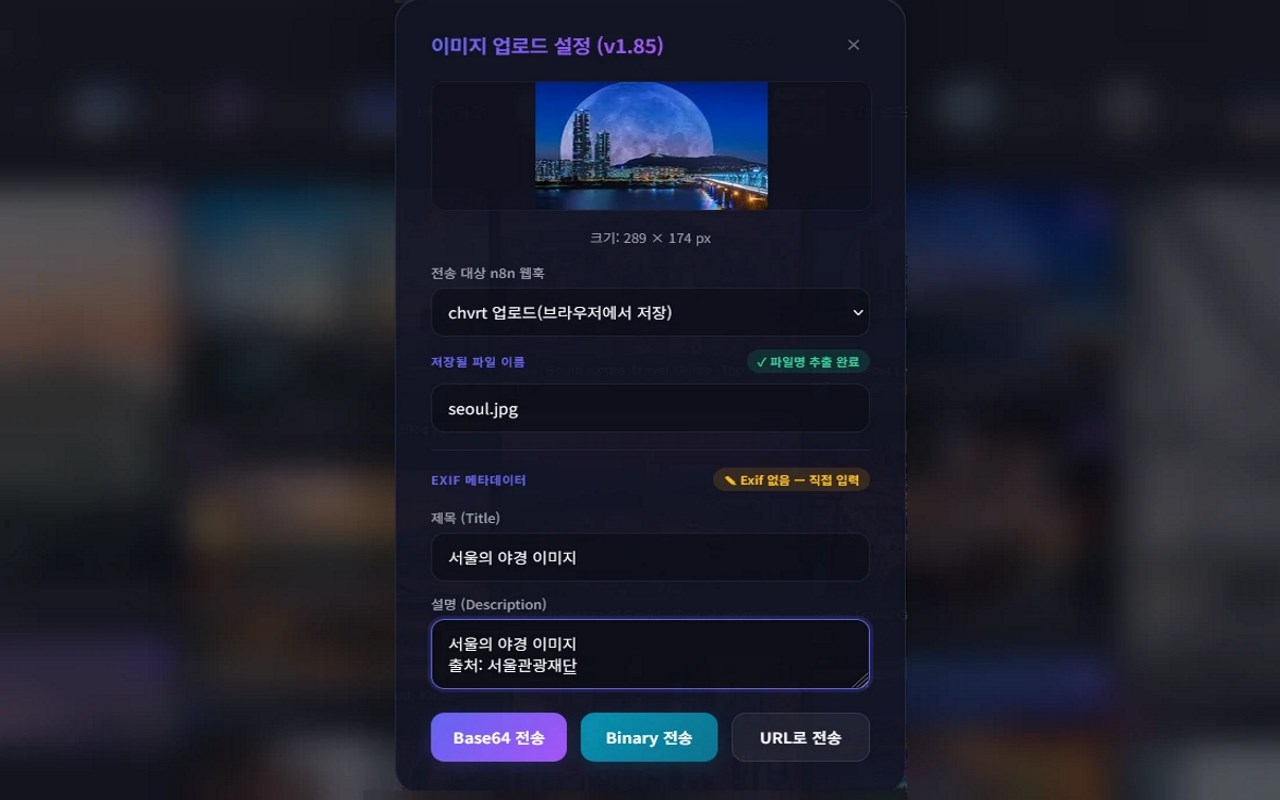
A key part of image2n8n is its flexibility in how data is sent. After selecting an image, the extension opens a modal-style upload panel directly on the page. From there, you can choose to send the image as Base64-encoded data, as a binary file through multipart form submission, or as the original image URL. This makes the extension adaptable to different n8n workflow designs. Some workflows may expect file uploads, others may work best with encoded data inside a payload, and some may only need the image source URL. By supporting all three approaches, the extension avoids locking you into a single automation pattern.
The upload panel also gives you more control over what is submitted. It previews the selected image, attempts to extract a filename from the image URL, and lets you edit the filename before sending. If a filename can be derived automatically, that is surfaced clearly; if not, you can enter one manually. The extension can also include the current page URL so the source context of the image can travel with the upload into the receiving workflow.
Optional EXIF metadata handling adds another layer of usefulness. If enabled in settings, the extension attempts to read image metadata and extract fields such as title and description. These values appear in editable fields within the upload interface. If metadata is available, it is prefilled. If not, it can be entered manually. This supports workflows that need more than the image itself, including pipelines that depend on richer descriptive data.
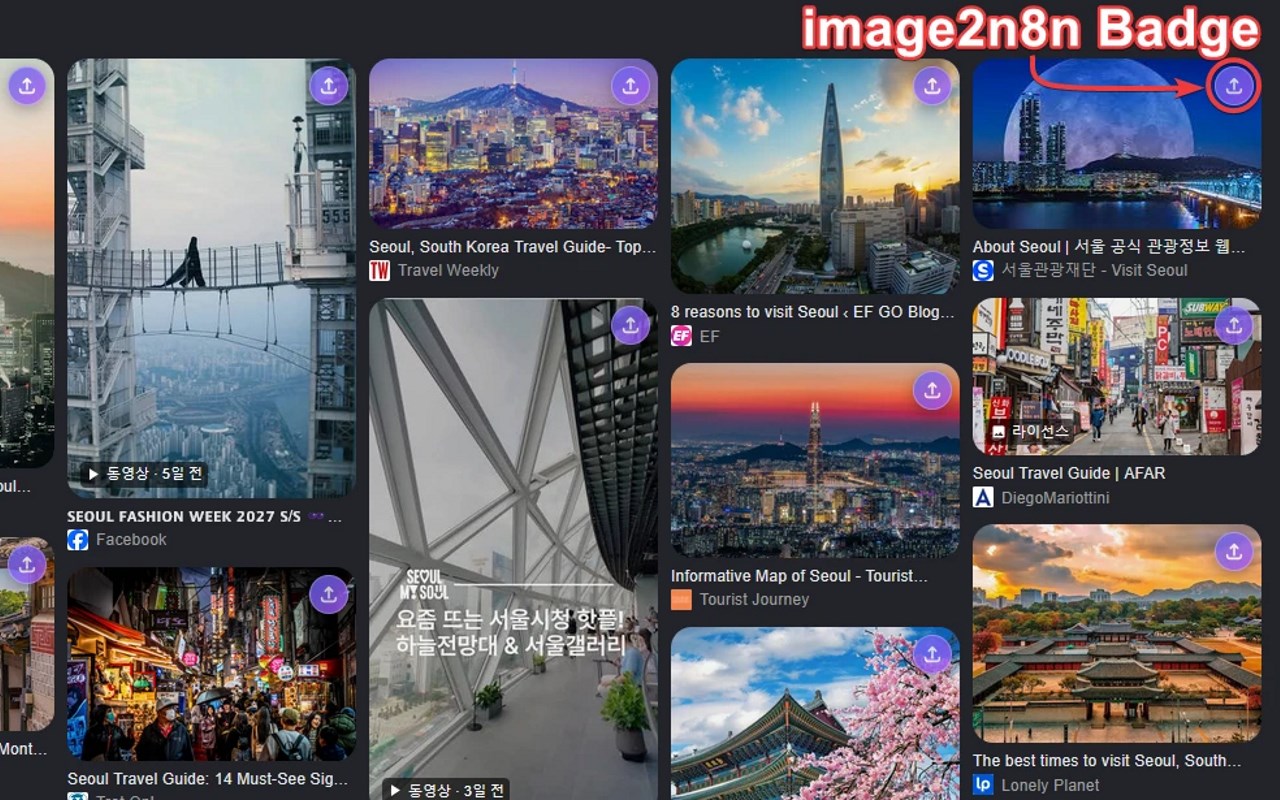
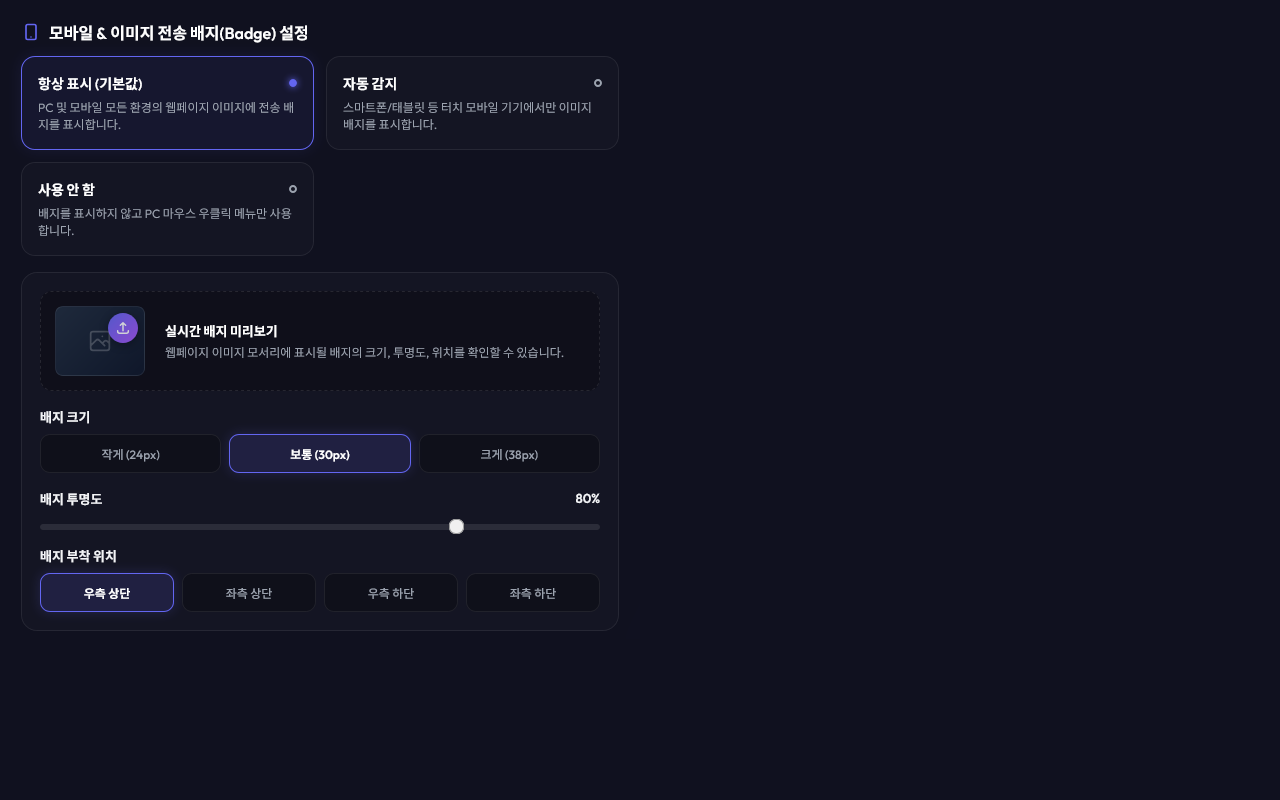
For faster interaction, image2n8n can display a small upload badge directly on images in webpages. This allows you to open the upload panel without using the context menu. The badge system is configurable, including when badges appear, their opacity, size, and corner position. An automatic mode can enable badges based on touch-style device detection, and the extension watches for newly added images so the feature can continue working on dynamic pages.
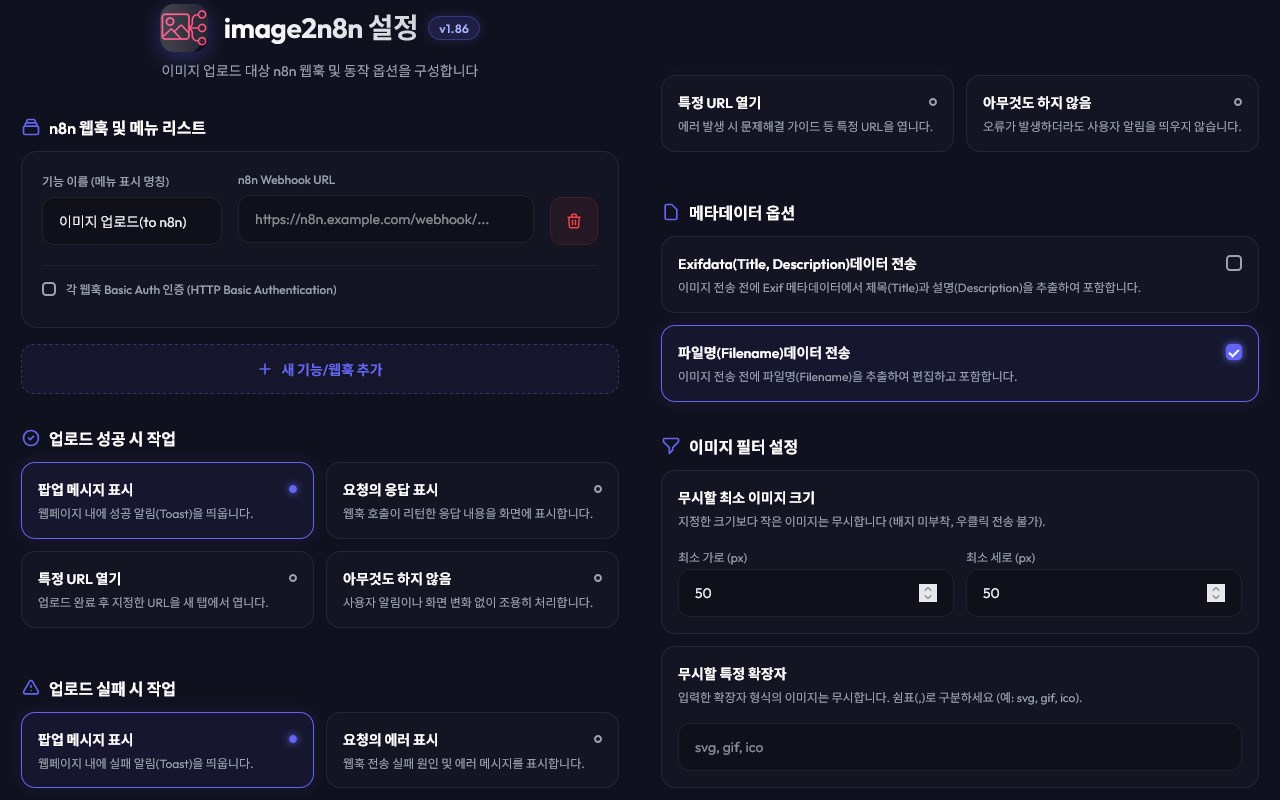
To reduce clutter, the extension includes image filtering controls. You can set minimum width and height thresholds so very small graphics or decorative elements are ignored, and you can specify file extensions to ignore as well. The settings page also supports multiple named webhooks, optional Basic Authentication credentials, and configurable actions after successful or failed uploads, such as showing a popup notification, displaying response text, or opening a specified URL. During use, the extension provides toast-style in-page notifications for progress, success, errors, and setup guidance.
Key Features:
- Send images from webpages directly to n8n through image-specific context menu actions.
- Configure multiple named webhooks and route images to different workflows with separate menu entries.
- Choose between Base64 image data, binary file upload, or original image URL transmission.
- Preview images before submission and edit filenames, with automatic filename extraction when available.
- Optionally read EXIF metadata such as title and description and edit those values before sending.
- Use configurable on-image upload badges with adjustable mode, opacity, size, and position.
- Filter out unwanted images using minimum dimension settings and ignored file extension rules.
How It Works:
1. Open the settings page and add one or more n8n webhooks with names, URLs, and optional Basic Authentication credentials.
2. Adjust preferences such as EXIF handling, filename behavior, badge visibility, image filtering, and upload result actions.
3. Visit a webpage with images and either right-click an image or use the on-image badge if that feature is enabled.
4. In the upload panel, review the image preview, choose the destination webhook, and edit the filename or metadata if needed.
5. Select how the image should be sent: Base64 data, binary file upload, or the source URL.
6. The extension sends the selected image data, along with optional page URL and metadata, to the chosen n8n webhook.
7. Receive in-page notifications about progress, success, errors, or any configured follow-up behavior.
Privacy: - This extension stores configuration such as webhook URLs, authentication settings, badge preferences, filename and EXIF options, and upload behavior in local browser storage. It also sends selected image data, image URLs, page URLs, filenames, and optional metadata to the user-configured n8n webhook endpoints when the user triggers an upload.
image2n8n 是做什么的
image2n8n 是一款面向 Edge 的实用工具类扩展,主要用来解决浏览器里某类具体的小问题。官方对它的介绍是:우클릭한 이미지를 base64로 변환하여 n8n으로 전송합니다.在微软 Edge 加载项商店上,它当前版本 1.86,约 4 名用户。
适合什么人用
从功能定位看,image2n8n 更适合想补上浏览器原生缺失功能的用户。如果你平时只是偶尔遇到相关需求,用浏览器自带功能也能凑合;但如果这件事每天都发生,装一个专门处理它的扩展通常比手动操作省事得多。需要注意的是它作用于所有网站,装上后建议先观察一两天,确认不影响常用站点的正常使用。
怎么安装 image2n8n
- 打开微软 Edge 加载项商店上的官方页面;
- 点「添加到浏览器」并确认权限提示;
- 装好后在扩展列表里固定图标,方便随时开关。
本站只做索引与介绍,安装包来自官方商店。如果商店页面提示当前地区不可用,说明该扩展未在你所在区域上架。
常见问题
image2n8n 是免费的吗?
image2n8n 在微软 Edge 加载项商店免费提供下载。它是浏览器扩展,装上就能直接用,不需要注册账号。
image2n8n 安全吗?
它只申请了 0 项权限,范围比较克制,没有申请「读取所有网站数据」这种大权限。
image2n8n 支持哪些浏览器?
当前收录的版本来自微软 Edge 加载项商店,适用于 Edge。同一个扩展在其他商店可能有对应版本,但功能与版本号不一定相同。
怎么卸载 image2n8n?
在扩展管理页找到 image2n8n,点移除即可。它在本地保存的设置会一起清掉,不会残留数据。
权限清单 来自 manifest.json 原文
站点访问(可选) 1
<all_urls>
接口权限 3
activeTabcontextMenusstorage