
Hide .meta Files on GitHub EN
Sator Imaging · EEdge MV3
Hide .meta files from GitHub repository file lists.
截图
简介
Hide .meta Files on GitHub: Streamlined Repository Views for Developers
Full source code: https://github.com/sator-imaging/Chrome-HideMetaFilesOnGitHub
The "Hide .meta Files on GitHub" browser extension is a purpose-built tool designed to enhance the experience of developers and collaborators working within GitHub repositories, especially those involved with Unity projects. Unity projects commonly generate numerous `.meta` files that, while necessary for the engine, tend to clutter the view when browsing repositories on GitHub. This extension automatically hides all `.meta` files in repository file lists, offering a cleaner, more focused interface so users can concentrate on the meaningful source code and assets without distraction.
The extension operates seamlessly and transparently—once installed, it activates instantly on all GitHub pages containing file lists. It scans the document for filenames ending with the `.meta` extension and hides these entries dynamically using efficient DOM manipulation techniques. No configuration or manual setup is needed from the user. Moreover, it intelligently adapts its interface language for notification popups based on the browser’s language setting, supporting both English and Japanese to accommodate international teams and cross-regional collaboration smoothly.
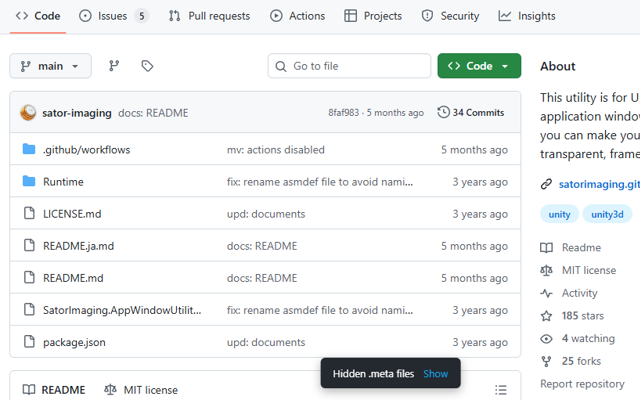
User experience is a key consideration. When `.meta` files are hidden on a repository page, a concise, user-friendly notification popup appears above the file list, clearly informing the user that `.meta` files have been concealed. This eliminates confusion and helps maintain situational awareness. If at any time users wish to view these hidden files, they can simply click the “Show” button integrated within the popup. This action instantly reveals all `.meta` files without requiring a page reload or additional page navigation, enabling quick inspections when necessary. The toggle feature balances automation with user control, ensuring the extension assists without restricting.
From a technical perspective, the extension employs the Mutation Observer API to monitor and respond to dynamic content changes on GitHub repository pages. This means that as users navigate through folders or interact with the repository’s updating interface, `.meta` files remain hidden automatically and smoothly. This real-time observation mechanism prevents hidden files from reappearing during page updates or AJAX-driven navigation, providing consistency and reliability. Additionally, the extension is lightweight and privacy-conscious: it performs all its functions entirely on the client side, without any tracking, background scripts, or external data communication, ensuring user privacy and optimal browser performance.
For developers who frequently interact with Unity-based projects on GitHub, the "Hide .meta Files on GitHub" extension offers a simple yet effective way to declutter the repository file view. This streamlined presentation reduces visual noise and makes navigation faster and more productive, enhancing overall workflow without sacrificing access to any files. It is an excellent helper for code reviewers, maintainers, and creators who want a more ergonomic and distraction-free code browsing experience.
Key Features:
- Automatically hides `.meta` files in GitHub repository file lists to simplify navigation and reduce visual clutter.
- Supports multiple languages with notification popups adapting seamlessly to English and Japanese based on browser settings.
- Informative notification popup that appears atop file lists to alert users when `.meta` files are hidden, preventing confusion.
- Instant toggle to show or hide `.meta` files via a “Show” button in the popup, allowing flexible control without page reloads.
- Utilizes Mutation Observer technology to continuously monitor and manage file visibility as GitHub pages dynamically update.
- Requires no configuration or permissions, working automatically the moment it is installed.
- Lightweight and privacy-focused with no background activity, no tracking, and zero personal data collected.
How It Works:
1. Install the extension from your browser’s official extension store.
2. Navigate to any GitHub repository page displaying files and folders.
3. The extension scans the repository’s file list for entries ending in `.meta`.
4. All `.meta` files found are immediately hidden from view to declutter the interface.
5. A notification popup appears at the top of the file list, informing you that `.meta` files have been hidden; the message is presented in your browser language.
6. If you need to see the hidden `.meta` files, simply click the “Show” button in the popup, and the files will reappear instantly.
7. The extension continuously observes changes in the file list during navigation or content updates, maintaining the hidden state of `.meta` files unless toggled by the user.
Privacy: - No personal data collected.
Hide .meta Files on GitHub 是做什么的
Hide .meta Files on GitHub 是一款面向 Edge 的实用工具类扩展,主要用来解决浏览器里某类具体的小问题。官方对它的介绍是:Hide .meta files from GitHub repository file lists.在微软 Edge 加载项商店上,它当前版本 1.0.0,约 6 名用户。
适合什么人用
从功能定位看,Hide .meta Files on GitHub 更适合想补上浏览器原生缺失功能的用户。如果你平时只是偶尔遇到相关需求,用浏览器自带功能也能凑合;但如果这件事每天都发生,装一个专门处理它的扩展通常比手动操作省事得多。
怎么安装 Hide .meta Files on GitHub
- 打开微软 Edge 加载项商店上的官方页面;
- 点「添加到浏览器」并确认权限提示;
- 装好后在扩展列表里固定图标,方便随时开关。
本站只做索引与介绍,安装包来自官方商店。如果商店页面提示当前地区不可用,说明该扩展未在你所在区域上架。
常见问题
Hide .meta Files on GitHub 是免费的吗?
Hide .meta Files on GitHub 在微软 Edge 加载项商店免费提供下载。它是浏览器扩展,装上就能直接用,不需要注册账号。
Hide .meta Files on GitHub 安全吗?
它只申请了 0 项权限,范围比较克制,没有申请「读取所有网站数据」这种大权限。
Hide .meta Files on GitHub 支持哪些浏览器?
当前收录的版本来自微软 Edge 加载项商店,适用于 Edge。同一个扩展在其他商店可能有对应版本,但功能与版本号不一定相同。
怎么卸载 Hide .meta Files on GitHub?
在扩展管理页找到 Hide .meta Files on GitHub,点移除即可。它在本地保存的设置会一起清掉,不会残留数据。
权限清单 来自 manifest.json 原文
未解析到权限条目。