
Hasten LinkLens – SEO Link Checker EN
GrowthHasten · EEdge MV3
Inspect every link on the page: broken links, redirects, nofollow, anchor text and more, highlighted right where they sit.
<all_urls>),意味着它可以读取你在任意站点的页面内容,包括已登录的页面。这是许多扩展正常工作的必要条件,但也值得你确认来源可信。
截图
简介
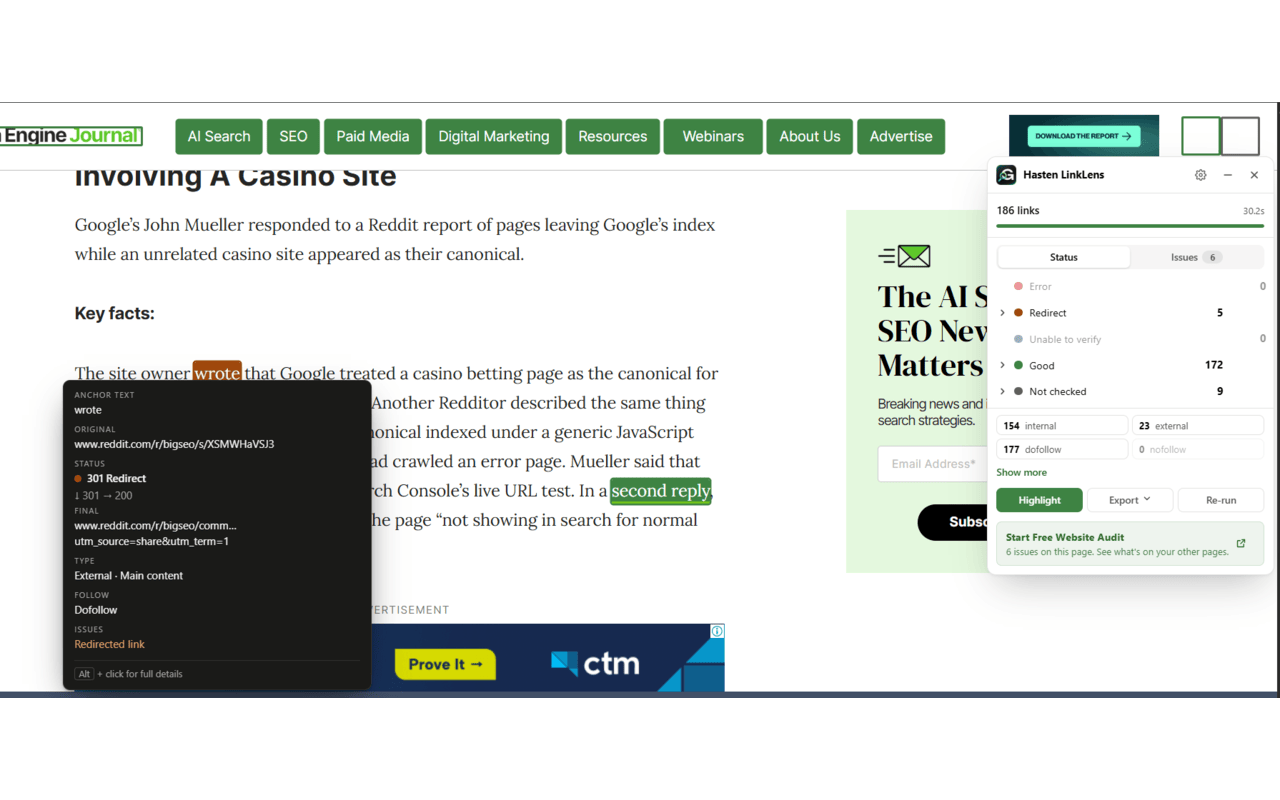
Hasten LinkLens is an SEO link checker that works right on the page you're viewing. Click the icon and every link is checked and coloured where it sits: green for working, orange for redirects, red for broken. No crawl to set up, nothing to export first. Hover any link to see what's behind it.
Built for SEOs, content editors, developers and anyone who publishes web pages.
WHAT'S NEW IN 2.0
• An Issues tab that tells you what to fix first, sorted into High, Medium and Low
• Filters for internal/external, dofollow/nofollow/sponsored/UGC, and where each link sits on the page
• Colour the page by status, by follow, or by internal/external
• Alt+click any link for full details, then copy a ready-to-paste diagnostic
• A better CSV export, a keyboard shortcut and right-click checks
• Light, dark or system theme
• Works with modern sites: links that load after the scan are checked too
SEE EVERY LINK AT A GLANCE
• Working, redirected, broken, unable to verify and not checked, each with its own colour
• Image and icon links get an outline instead of a fill, so nothing is covered up
• Hover any link for its status, destination, final URL, type, location and follow status
• Click a link in the panel to jump straight to it on the page
FIND WHAT TO FIX FIRST
The Issues tab groups problems by priority, with a one-line reason and a fix for each:
• High: broken links, redirect loops, links to localhost or staging sites
• Medium: redirect chains, insecure http:// links, internal nofollow, links with no anchor text, image links without alt text, #section links that point nowhere
• Low: single redirects, generic anchor text like "click here", empty links
Judgement calls such as generic anchors and internal nofollow are marked "Review", not "wrong".
SEO DETAIL FOR EVERY LINK
• Internal vs external, with subdomains recognised as part of your site
• Dofollow, nofollow, sponsored and UGC, counted and filterable
• Link location: main content, navigation, header, sidebar or footer
• A details view with every redirect step, how often the URL is linked on the page, where it opens, file type (PDF, Word and more), response time and the link's HTML
HONEST RESULTS
Many sites block automated checks. LinkLens reports those as "Unable to verify", not "broken", so you don't waste time on links that work fine. Rate limits, bot checks and sites that refuse checks (LinkedIn, for example) are each explained.
SHARE AND EXPORT
• Copy a ready-to-paste diagnostic for a developer ticket
• Copy all broken URLs, or any other group, in one click
• Export to CSV: all links, only links with issues, or just your filtered view. Includes the source page, priority, issues, status, redirect steps, location and follow status
WORKS THE WAY YOU DO
• Keyboard shortcut: Alt+Shift+L
• Right-click a link to check just that one, or select part of a page and check only those links
• The panel stays open on its tab while you work in other tabs, and closes when you move to a different page
• Links that load after the scan (lazy-loaded sections, infinite scroll, single-page apps) are checked automatically
• Drag the panel anywhere and it remembers where you put it
• Checks up to 2,000 links per page
SETTINGS
• Exact redirect codes: see 301 vs 302, every step of a redirect chain, redirect loops, and the real reason a request failed. This needs one extra permission, which is only requested if you turn it on
• Skip domains you don't need checked, such as social networks
• Check your own staging or members-only sites using your cookies for those sites
• Scan history: compare with your last scan ("2 new broken links, 1 fixed"). Off by default
• Theme: System, Light or Dark
PRIVACY
• Nothing runs until you click the icon, press the shortcut or use the right-click menu
• Results stay in memory and are cleared when you close the panel, leave the page or close the tab
• Settings and the optional history are stored on your device only and never synced
• No URL you check is ever sent to GrowthHasten or anyone else. Each link is requested directly from your browser, and without your cookies unless you choose otherwise
WANT YOUR WHOLE SITE CHECKED?
LinkLens checks one page at a time. To audit every page on your site, start a free website audit at GrowthHasten, right from the panel.
Learn more: https://growthhasten.com/tools/hasten-linklens
Hasten LinkLens – SEO Link Checker 是做什么的
Hasten LinkLens – SEO Link Checker 是一款面向 Edge 的实用工具类扩展,主要用来解决浏览器里某类具体的小问题。官方对它的介绍是:Inspect every link on the page: broken links, redirects, nofollow, anchor text and more, highlighted right where they sit.在微软 Edge 加载项商店上,它当前版本 2.0.0,约 2 名用户。
适合什么人用
从功能定位看,Hasten LinkLens – SEO Link Checker 更适合想补上浏览器原生缺失功能的用户。如果你平时只是偶尔遇到相关需求,用浏览器自带功能也能凑合;但如果这件事每天都发生,装一个专门处理它的扩展通常比手动操作省事得多。需要注意的是它作用于所有网站,装上后建议先观察一两天,确认不影响常用站点的正常使用。
怎么安装 Hasten LinkLens – SEO Link Checker
- 打开微软 Edge 加载项商店上的官方页面;
- 点「添加到浏览器」并确认权限提示;
- 装好后在扩展列表里固定图标,方便随时开关。
本站只做索引与介绍,安装包来自官方商店。如果商店页面提示当前地区不可用,说明该扩展未在你所在区域上架。
常见问题
Hasten LinkLens – SEO Link Checker 是免费的吗?
Hasten LinkLens – SEO Link Checker 在微软 Edge 加载项商店免费提供下载。它是浏览器扩展,装上就能直接用,不需要注册账号。
Hasten LinkLens – SEO Link Checker 安全吗?
它只申请了 0 项权限,范围比较克制,没有申请「读取所有网站数据」这种大权限。
Hasten LinkLens – SEO Link Checker 支持哪些浏览器?
当前收录的版本来自微软 Edge 加载项商店,适用于 Edge。同一个扩展在其他商店可能有对应版本,但功能与版本号不一定相同。
怎么卸载 Hasten LinkLens – SEO Link Checker?
在扩展管理页找到 Hasten LinkLens – SEO Link Checker,点移除即可。它在本地保存的设置会一起清掉,不会残留数据。
权限清单 来自 manifest.json 原文
站点访问(可选) 2
http://*/*https://*/*
接口权限 4
activeTabcontextMenusscriptingstorage
接口权限(可选) 1
webRequest