
gridtabs - Bookmark Manager for New Tab EN
manpo · EEdge MV3
Spreadsheet-style bookmark manager for new tab: one-click save, drag & drop, notes, highlights and cloud sync.
截图


简介
gridtabs turns your new tab into a fast, focused speed dial — a spreadsheet-like grid for bookmarks, notes, and ideas. Save pages in one click, drag links from anywhere, and keep everything tidy and easy to scan.
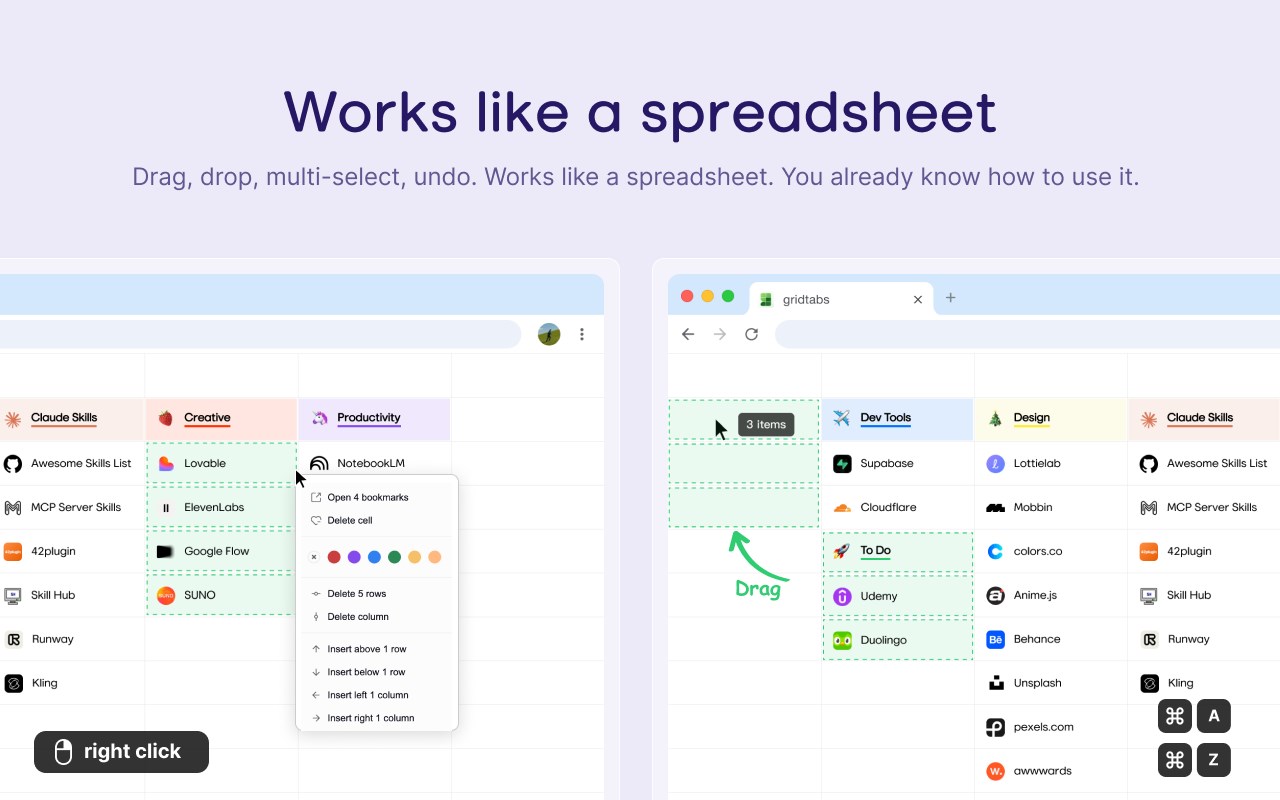
Works like a spreadsheet. You already know how to use it.
━━━━━━━━━━━━━━━━━━━━━━━━━━━━
WHY GRIDTABS
✦ Spreadsheet-like organizing
Arrange sites in a customizable grid layout — no nested folders, just a clean visual overview.
✦ One-click save
Add or remove the current page from the toolbar. The badge updates instantly so you always know what's saved.
✦ Drag & drop from anywhere
Drag URLs directly into your grid to build your workspace in seconds.
✦ Batch actions
Multi-select tiles, move them together, and drop to the remove zone to clean up fast.
✦ Inline editing
Rename tiles and jot notes in place. Switch between Bookmark mode and Memo mode anytime.
✦ Color highlights
Use highlights to group and prioritize at a glance — perfect for visual thinkers.
✦ Optional cloud sync
Sign in with Google to sync across all your devices. Your data, your choice.
━━━━━━━━━━━━━━━━━━━━━━━━━━━━
NEW IN v0.3.0
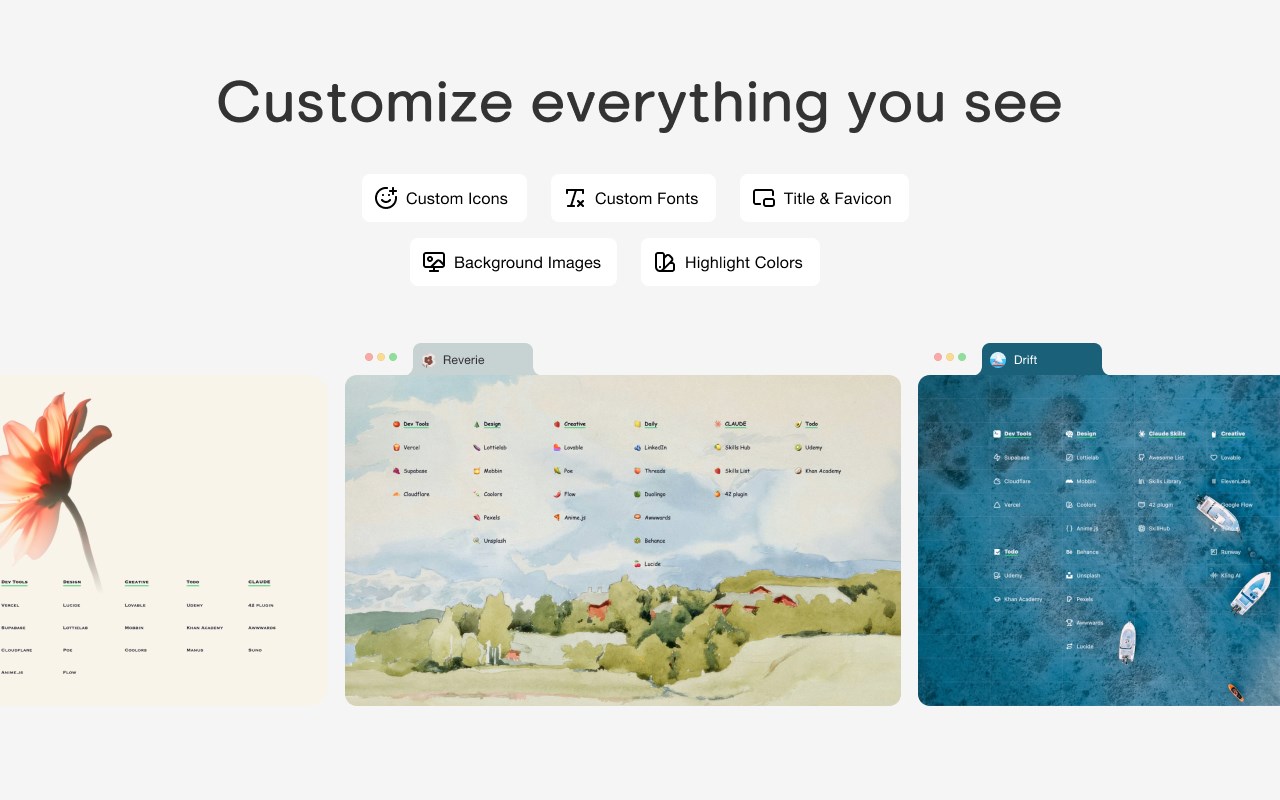
• Custom background images
• Additional font options
• Custom cell icons via image upload
━━━━━━━━━━━━━━━━━━━━━━━━━━━━
PRIVACY-FIRST
gridtabs only stores what you explicitly add — it never reads browsing data unrelated to your tiles. No tracking, no analytics, no surprises.
━━━━━━━━━━━━━━━━━━━━━━━━━━━━
PERFECT FOR
• Research collections
• Study dashboards
• Project planning boards
• Daily workflow organization
• Reading lists and inspiration boards
━━━━━━━━━━━━━━━━━━━━━━━━━━━━
Keywords: new tab, start page, speed dial, visual bookmarks, bookmark manager, bookmark grid, tab saver, dashboard, notes extension
gridtabs - Bookmark Manager for New Tab 是做什么的
gridtabs - Bookmark Manager for New Tab 是一款面向 Edge 的效率工具类扩展,主要用来管住注意力、屏蔽干扰站点、记录时间。官方对它的介绍是:Spreadsheet-style bookmark manager for new tab: one-click save, drag & drop, notes, highlights and cloud sync.在微软 Edge 加载项商店上,它当前版本 0.4.0,约 10 名用户。
适合什么人用
从功能定位看,gridtabs - Bookmark Manager for New Tab 更适合想专注工作学习、减少无效刷网页的用户。如果你平时只是偶尔遇到相关需求,用浏览器自带功能也能凑合;但如果这件事每天都发生,装一个专门处理它的扩展通常比手动操作省事得多。
怎么安装 gridtabs - Bookmark Manager for New Tab
- 打开微软 Edge 加载项商店上的官方页面;
- 点「添加到浏览器」并确认权限提示;
- 装好后在扩展列表里固定图标,方便随时开关。
本站只做索引与介绍,安装包来自官方商店。如果商店页面提示当前地区不可用,说明该扩展未在你所在区域上架。
常见问题
gridtabs - Bookmark Manager for New Tab 是免费的吗?
gridtabs - Bookmark Manager for New Tab 在微软 Edge 加载项商店免费提供下载。它是浏览器扩展,装上就能直接用,不需要注册账号。
gridtabs - Bookmark Manager for New Tab 安全吗?
它只申请了 0 项权限,范围比较克制,没有申请「读取所有网站数据」这种大权限。
gridtabs - Bookmark Manager for New Tab 支持哪些浏览器?
当前收录的版本来自微软 Edge 加载项商店,适用于 Edge。同一个扩展在其他商店可能有对应版本,但功能与版本号不一定相同。
怎么卸载 gridtabs - Bookmark Manager for New Tab?
在扩展管理页找到 gridtabs - Bookmark Manager for New Tab,点移除即可。它在本地保存的设置会一起清掉,不会残留数据。
权限清单 来自 manifest.json 原文
接口权限 5
activeTabidentityscriptingstoragetabs
接口权限(可选) 1
bookmarks