
GitHubSelectiveDownloader EN
realchenglong · EEdge MV3
Download selected files and folders from any GitHub repository without cloning the entire repo.
截图


简介
GitHubSelectiveDownloader is a powerful browser extension specifically designed to enhance your interaction with GitHub repositories by allowing you to selectively download only the files and folders you actually need. Instead of downloading or cloning an entire repository—a process that can consume a lot of bandwidth and storage—this extension makes it possible to pick and choose content directly from the GitHub webpage. This makes it an ideal tool for developers, researchers, students, or any GitHub user who values efficiency and precision in acquiring repository data.
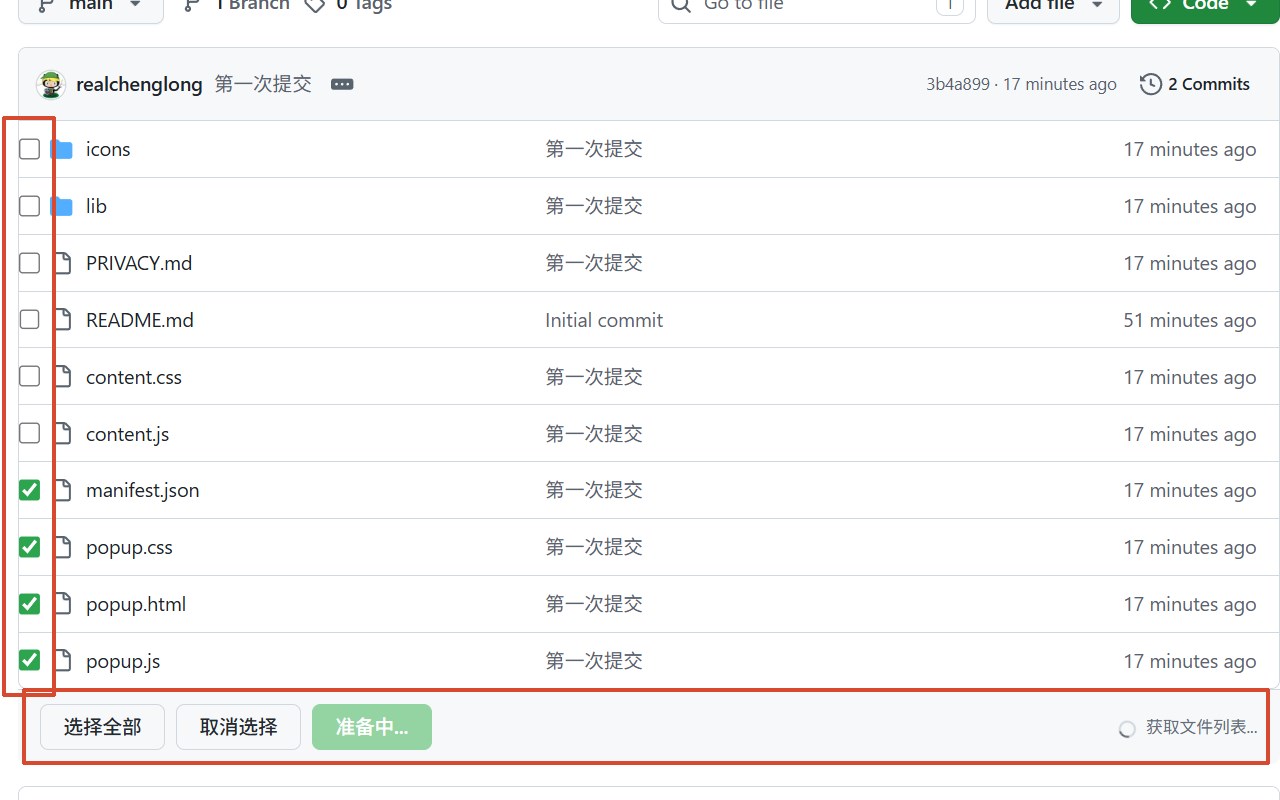
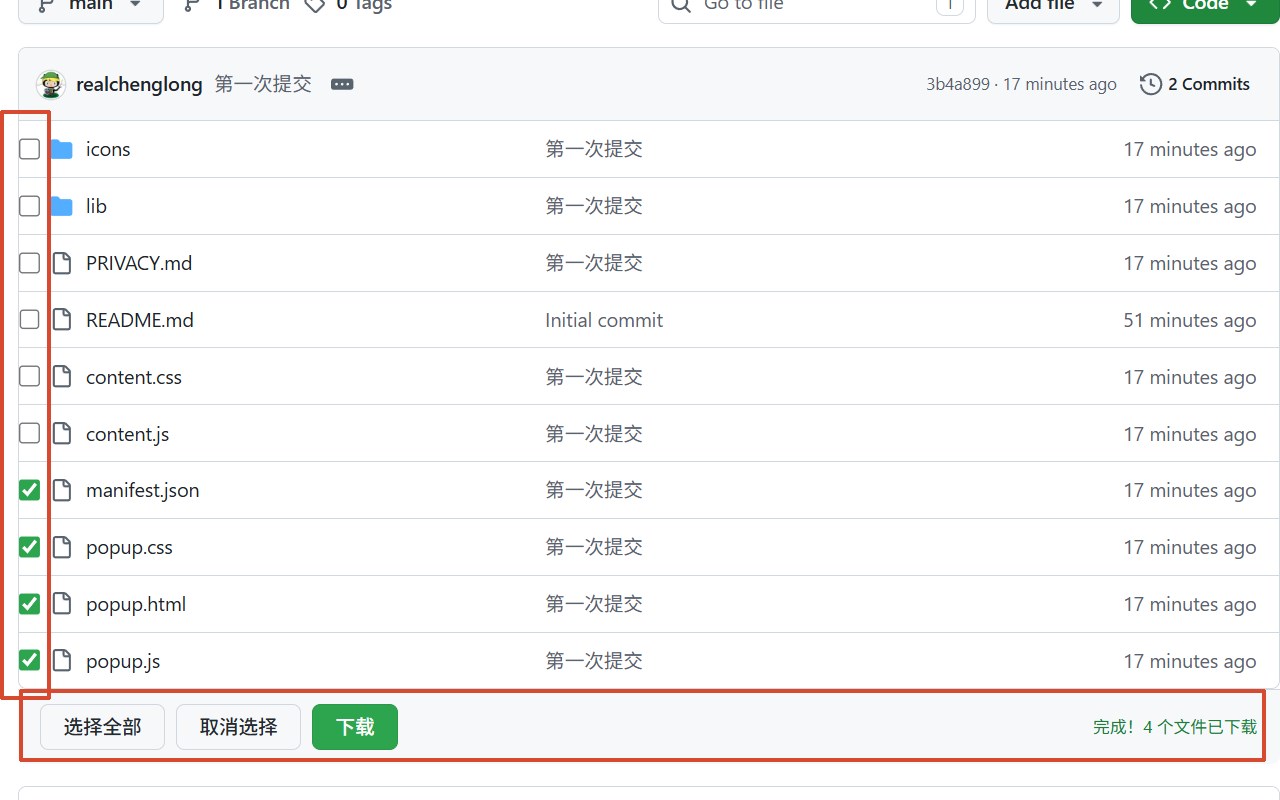
Once installed, GitHubSelectiveDownloader seamlessly integrates with the GitHub interface. It automatically detects when you are viewing a repository’s file or directory page and injects intuitive checkboxes next to each file and folder. This dynamic integration works flawlessly even when navigating through repositories with GitHub’s AJAX-based loading, ensuring the selection controls are always available regardless of how you browse. The extension’s interface is clean and user-friendly, making it easy to select individual files or entire directories for download.
To accommodate larger repositories or frequent usage, the extension offers optional support for a personal GitHub Access Token. By entering this token securely in the extension’s popup window, you significantly increase the API call limits from the standard unauthenticated rate to up to 5,000 calls per hour. This reduces the chances of running into GitHub’s API rate limiting and ensures smooth operation when downloading multiple or large files. The token is stored locally within your browser’s storage and is never transmitted elsewhere, maintaining strict user privacy.
When you initiate a download, GitHubSelectiveDownloader harnesses cutting-edge JavaScript alongside the JSZip library to compile all your selected files and folders—including deeply nested directories—into a single ZIP archive. It fetches the file content directly from GitHub’s API or raw content URLs, reconstructs the original directory structure, and creates a neatly packaged ZIP file on the client side. This means your files are processed entirely locally without exposure to third-party servers or external services.
This extension is especially useful when you want to quickly obtain specific scripts, documentation, assets, or segments of a project without overhead. It streamlines the workflow for reviewing open source projects, gathering learning materials, or extracting files for rapid prototyping. GitHubSelectiveDownloader essentially enriches your browser with agile, precision-driven file management capabilities tailored for GitHub repositories.
Key Features:
- Selective file and folder download: Adds checkboxes beside each file and folder on GitHub repositories, enabling exact content selection before downloading.
- Intelligent page recognition: Automatically activates on relevant GitHub repository pages and adapts to dynamic page updates and navigation.
- Comprehensive ZIP bundling: Packages all chosen files and folders into a well-structured ZIP archive that preserves the original directory hierarchy.
- Personal Access Token integration: Optional support for securely storing your GitHub token to raise API request limits to 5,000 calls per hour, facilitating downloads from larger repositories.
- Embedded toolbar with real-time feedback: Provides an interactive download toolbar directly on GitHub pages, displaying progress and error messages to keep you informed.
- User-friendly token management popup: Offers an easy-to-use interface to enter, save, or clear your GitHub personal access token while providing status updates on its usage.
- Handles nested directories recursively: Enables downloading entire folder structures with depth, maintaining their original path organization within the ZIP file.
How It Works:
1. Install GitHubSelectiveDownloader from your browser’s extension marketplace.
2. (Optional) Open the extension popup, input your GitHub Personal Access Token, and save it to enhance API request limits for smoother operation.
3. Browse to any GitHub repository page; the extension automatically adds a toolbar with checkboxes next to files and folders.
4. Select the desired files and directories by ticking the checkboxes beside them.
5. Click the ‘Download’ button on the toolbar; the extension fetches all selected content, compresses it into a single ZIP file, and triggers download automatically.
6. Track download progress and receive live status updates and error notifications in the toolbar embedded within the GitHub interface.
7. Manage or clear your stored personal access token anytime through the extension popup to maintain privacy and control.
Privacy: - No personal data collected. Personal access tokens are stored securely in local browser storage and are used exclusively to increase API call limits. Your browsing habits, selections, and downloads are not transmitted or logged to any external server.
GitHubSelectiveDownloader 是做什么的
GitHubSelectiveDownloader 是一款面向 Edge 的实用工具类扩展,主要用来解决浏览器里某类具体的小问题。官方对它的介绍是:Download selected files and folders from any GitHub repository without cloning the entire repo.在微软 Edge 加载项商店上,它当前版本 1.0.0,约 11 名用户。
适合什么人用
从功能定位看,GitHubSelectiveDownloader 更适合想补上浏览器原生缺失功能的用户。如果你平时只是偶尔遇到相关需求,用浏览器自带功能也能凑合;但如果这件事每天都发生,装一个专门处理它的扩展通常比手动操作省事得多。
怎么安装 GitHubSelectiveDownloader
- 打开微软 Edge 加载项商店上的官方页面;
- 点「添加到浏览器」并确认权限提示;
- 装好后在扩展列表里固定图标,方便随时开关。
本站只做索引与介绍,安装包来自官方商店。如果商店页面提示当前地区不可用,说明该扩展未在你所在区域上架。
常见问题
GitHubSelectiveDownloader 是免费的吗?
GitHubSelectiveDownloader 在微软 Edge 加载项商店免费提供下载。它是浏览器扩展,装上就能直接用,不需要注册账号。
GitHubSelectiveDownloader 安全吗?
它只申请了 0 项权限,范围比较克制,没有申请「读取所有网站数据」这种大权限。
GitHubSelectiveDownloader 支持哪些浏览器?
当前收录的版本来自微软 Edge 加载项商店,适用于 Edge。同一个扩展在其他商店可能有对应版本,但功能与版本号不一定相同。
怎么卸载 GitHubSelectiveDownloader?
在扩展管理页找到 GitHubSelectiveDownloader,点移除即可。它在本地保存的设置会一起清掉,不会残留数据。
权限清单 来自 manifest.json 原文
接口权限 1
storage