
Github Aid - displays repo file sizes EN
omar-azmi · EEdge MV3
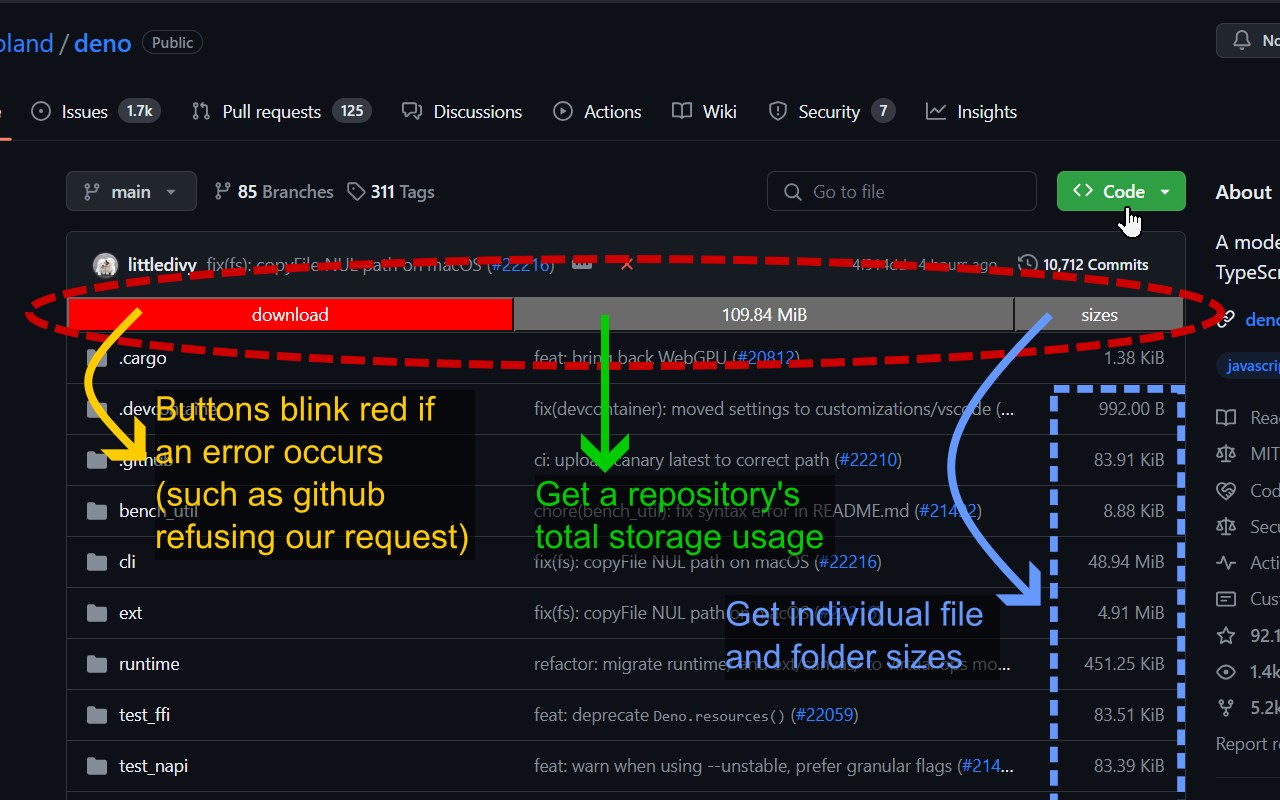
Displays github repository file and folder sizes. Supports GraphQL and REST api modes. Also mobile friendly.
截图
简介
This is an open source extension that lets you view the sizes of Github repository content. In the future, it will also let you download multiple files from within your browser.
Features:
- Preview a Repository's entire Disk Space usage (which includes git history)
- Preview the sizes of individual files and folders under the directory
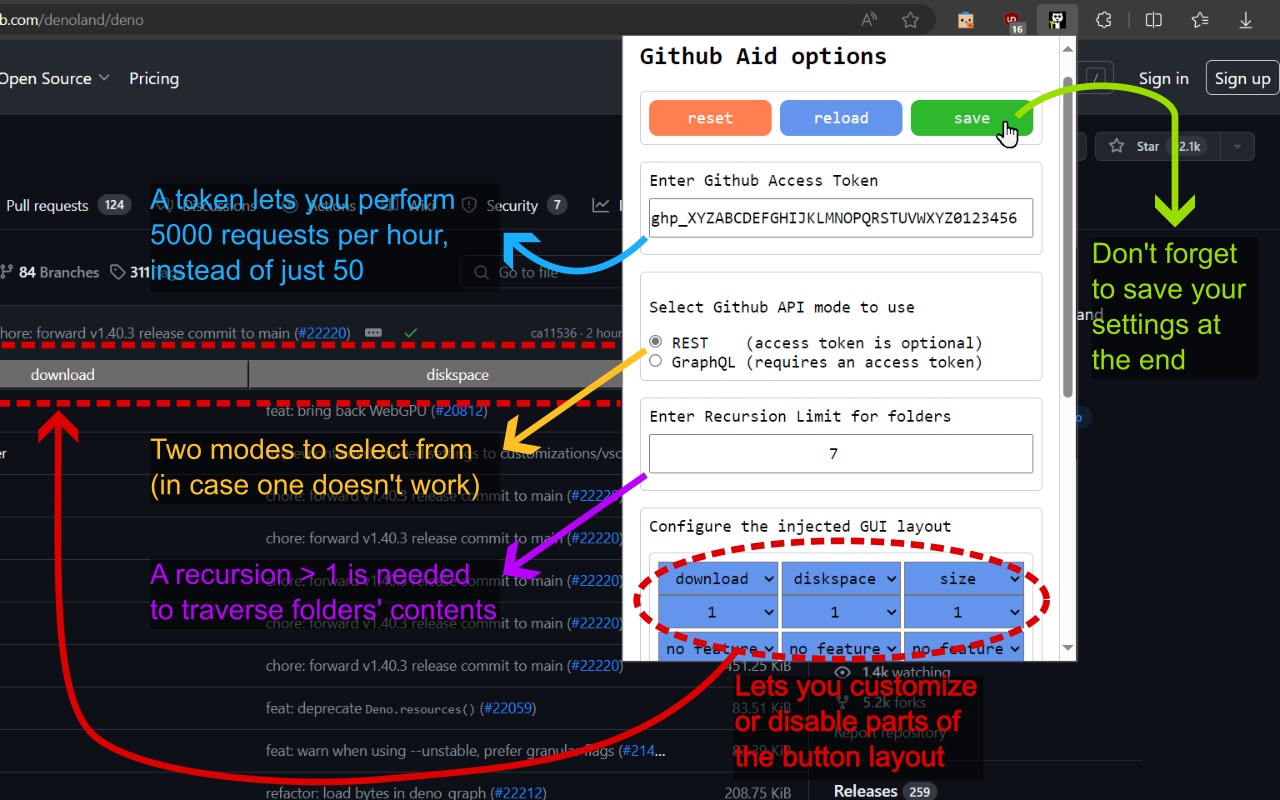
- Ability to choose between github's REST api, or GraphQL api
- Ability to set an Access Token to view your private repository stats
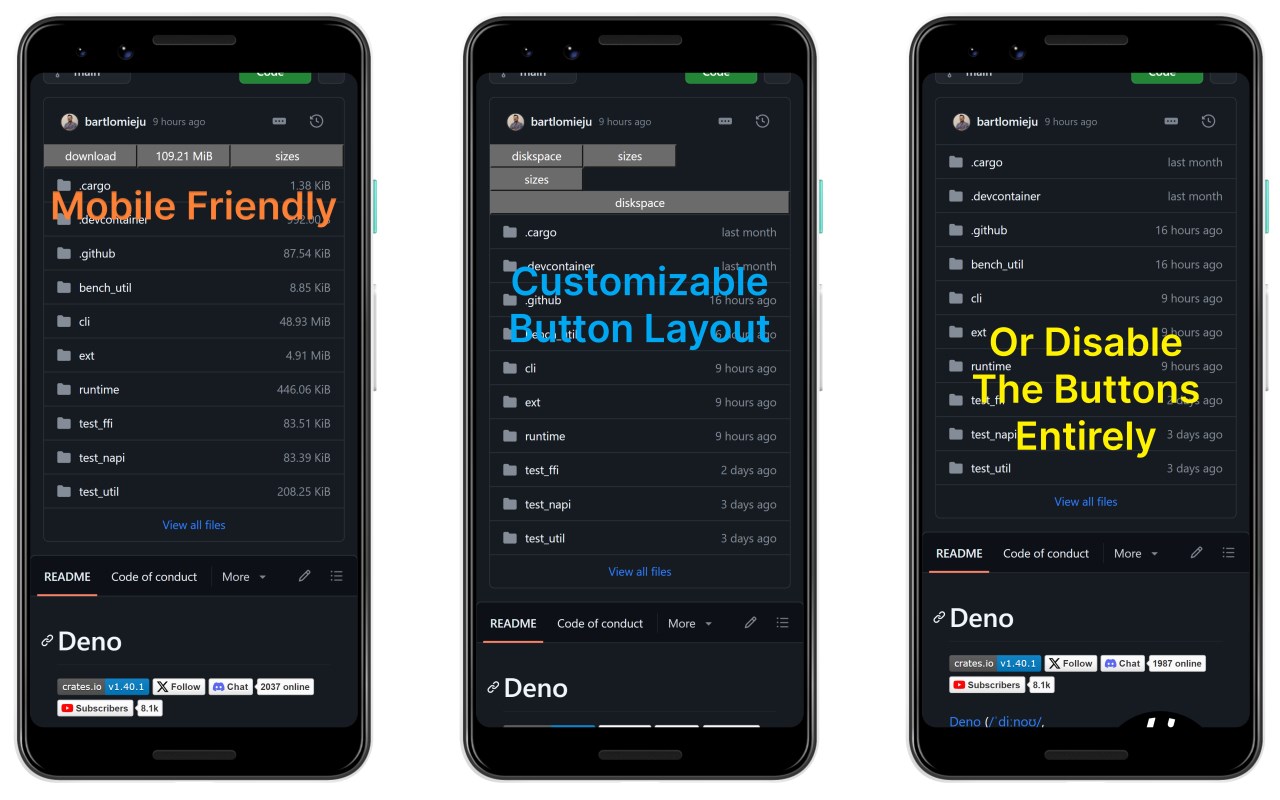
- Buttons that are added to the page are customizable (and can be turned off)
- Display is optimized for both mobile and desktop browsers
- Open source: checkout the source code on github: https://github.com/omar-azmi/github_aid_ts
Planned features:
- Add support for selecting files and folders, then queuing them for download in a ".tar.gz" archive
- Add support for defaulting to REST api and disabling access token in Incognito mode
Permissions required:
- Access to running background javascript in all github.com pages
- Access to storage for storing your access token, and saving your configuration settings
Problems you may encounter:
1) The buttons are not appearing
- Refresh the page. Github is an SPA (single-page application), so there are times when the background script does not get reloaded upon navigation from one page to another.
- Make sure that you did not disable all buttons in the option page's layout section. If you're having touble, consider clicking on the red "reset" button to clear any misconfigurations and return to factory settings.
- Make sure that storage permission has been granted to this extension, otherwise the script will fail to load the default configuration, and terminate fatally.
2) One of the buttons flashes in red, and nothing happens.
- This is because the request query sent to github's server has failed, possibly due to one of the following reasons:
- Github's server is overloaded, and it decided to reject your request (quite common). In this case, try switching your api method in the options page, and reload your webpage and retry.
- You are viewing a private repo, and the access token that you have (or may lack) is not authorized for pulling up data of that private repository
- Your Github Access Token key is invalid, or has expired
- You (and your Token) have reached their per hour request limit, or that you've been sending too many requests too quickly. The request data rate for github is: 50 requests per hour for non-authorized tokenless users, and 5000 per hour for authorized users. Moreover, the REST api in this extension used 2 requests for fetching file and folder sizes
- There might be a bug in the code, or github's api might have changed. In that case, I'd appreciate if you could open up an issue on github: https://github.com/omar-azmi/github_aid_ts/issues
Guide on how to get a Github Access Token:
1) First of all, you'll need to be logged into your github account.
2) Navigate to github's "Generate new token (classic)" page: https://github.com/settings/tokens/new
3) Set an "Expiration" date, (you'll probably want to choose "No expiration")
4) In the "Select scopes" section, under the "repo" checkbox:
- enable only the "public_repo" checkbox if you will NOT be viewing your private repository's stats
- enable the whole "repo" group checkbox otherwise
5) Scroll to the bottom and click on the "Generate token" button
6) You will now be presented with the access token. Make sure to copy and save it securely! This is a one time preview of you key, and it disappear forever after you've closed the dialog
7) Paste the token into this browser extension
For a visual guide, see one of:
- https://www.geeksforgeeks.org/how-to-generate-personal-access-token-in-github/
- https://docs.github.com/en/authentication/keeping-your-account-and-data-secure/managing-your-personal-access-tokens
But remember NOT to check any scope boxes besides the "repo" one.
Having anything else checked is dangerous if your access key gets leaked from your browser storage, and someone decides to maliciously delete your projects.
Github Aid - displays repo file sizes 是做什么的
Github Aid - displays repo file sizes 是一款面向 Edge 的实用工具类扩展,主要用来解决浏览器里某类具体的小问题。官方对它的介绍是:Displays github repository file and folder sizes. Supports GraphQL and REST api modes. Also mobile friendly.在微软 Edge 加载项商店上,它当前版本 0.1.2,评分 1(1 人评价),约 59 名用户。
适合什么人用
从功能定位看,Github Aid - displays repo file sizes 更适合想补上浏览器原生缺失功能的用户。如果你平时只是偶尔遇到相关需求,用浏览器自带功能也能凑合;但如果这件事每天都发生,装一个专门处理它的扩展通常比手动操作省事得多。
怎么安装 Github Aid - displays repo file sizes
- 打开微软 Edge 加载项商店上的官方页面;
- 点「添加到浏览器」并确认权限提示;
- 装好后在扩展列表里固定图标,方便随时开关。
本站只做索引与介绍,安装包来自官方商店。如果商店页面提示当前地区不可用,说明该扩展未在你所在区域上架。
常见问题
Github Aid - displays repo file sizes 是免费的吗?
Github Aid - displays repo file sizes 在微软 Edge 加载项商店免费提供下载。它是浏览器扩展,装上就能直接用,不需要注册账号。
Github Aid - displays repo file sizes 安全吗?
它只申请了 0 项权限,范围比较克制,没有申请「读取所有网站数据」这种大权限。
Github Aid - displays repo file sizes 支持哪些浏览器?
当前收录的版本来自微软 Edge 加载项商店,适用于 Edge。同一个扩展在其他商店可能有对应版本,但功能与版本号不一定相同。
怎么卸载 Github Aid - displays repo file sizes?
在扩展管理页找到 Github Aid - displays repo file sizes,点移除即可。它在本地保存的设置会一起清掉,不会残留数据。
权限清单 来自 manifest.json 原文
接口权限 1
storage