
FoxyProxy
Beholder Corporation · EEdge MV3
简单易用的高级代理管理工具,适合所有用户
<all_urls>),意味着它可以读取你在任意站点的页面内容,包括已登录的页面。这是许多扩展正常工作的必要条件,但也值得你确认来源可信。
截图
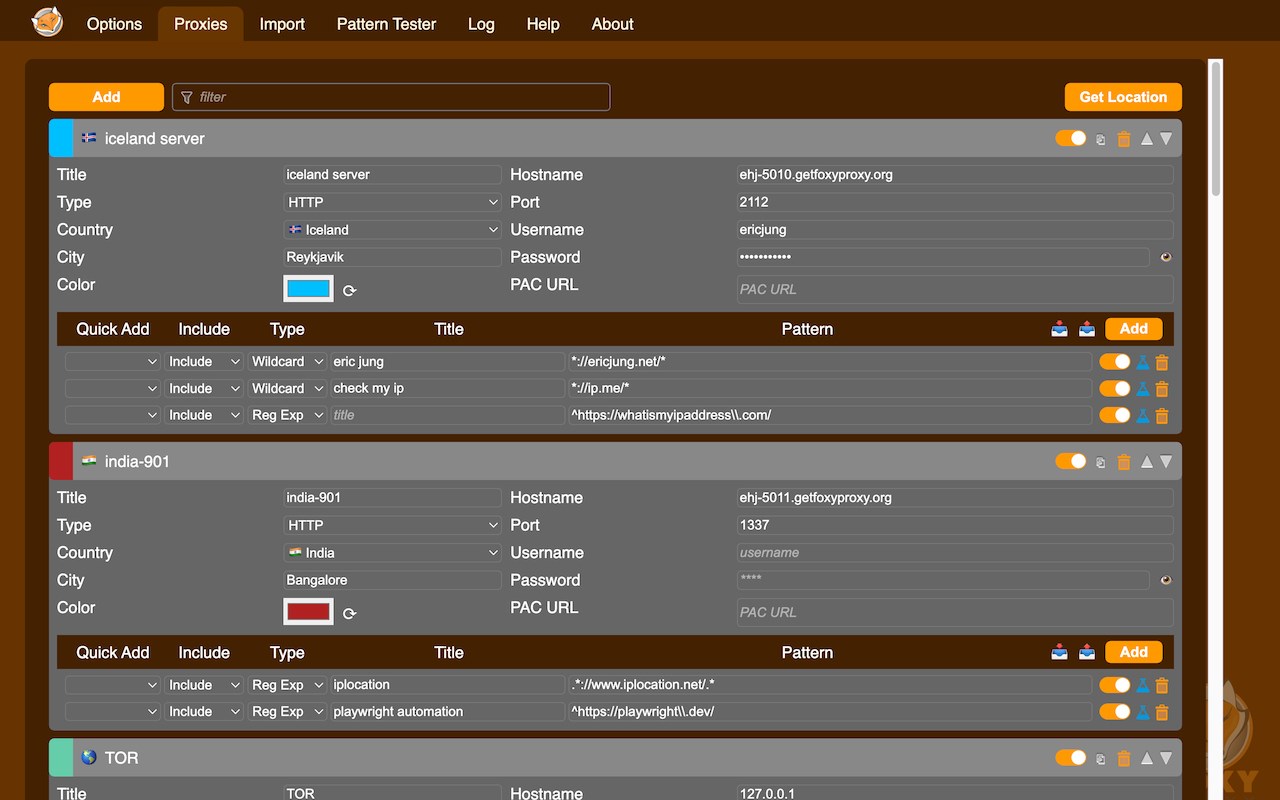
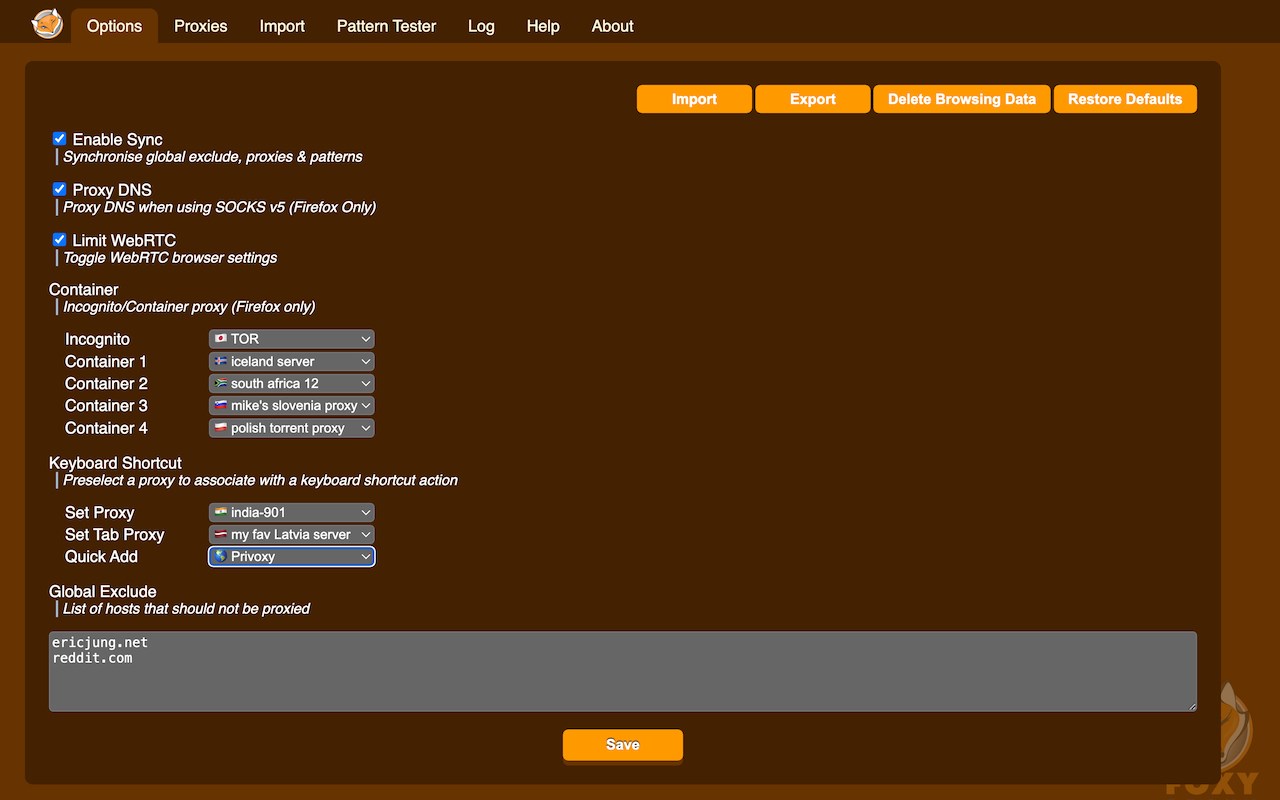


简介
FoxyProxy is an open-source, advanced proxy management tool that completely replaces Edge's limited proxying capabilities. No paid accounts are necessary; bring your own proxies or buy from any vendor. The original proxy tool, since 2006. FoxyProxy has been owned and developed consistently by the same team since 2006. It has never been sold and never will.
WHAT IS IT?
FoxyProxy is a browser extension which switches an internet connection across one or more proxy servers:
1. by point-and-click of colored icons
2. by URL (define URL patterns with wildcards or regular expressions)
3. by browser tab - set individual proxies per tab: assign up to 4 proxy servers for use on 4 different tabs.
FoxyProxy automates the manual process of editing your browser's proxy settings.
* Customize colors and country flags to make it easy to see which proxy is in use
* Proxy per tab, by URL, or by point-and-click of colored icons
* Import/Export all of your settings, or just URL patterns, to share with others (fixed in 8.0 and above)
* Select a proxy specifically to use in Incognito Mode
* Keyboard shortcuts
* Globally exclude any domain from proxying
* Create patterns with wildcards or regular expressions. A pattern tester is included.
* (optional) Automatically synchronize all of your proxy settings with your other browser instances when you use Sync.
* Turn WebRTC on/off to further limit discovery of your IP address
* Built-in predefined selections for tor, privoxy, and psiphon
* Extensive built-in help
Source code is at https://github.com/foxyproxy/browser-extension
FoxyProxy has been owned and developed consistently by the same team since 2006. It has never been sold and never will.
PERMISSIONS
* downloads: Required to export the extension settings to a file. Users can import that file to other browser instances, or share it with colleagues, in order to keep the same settings. It can also be backed up and used later.
* proxy: The core function of the extension is to allow users to set the proxy server used by the browser.
* storage: Required to store proxy server settings (hostname, port, username, and which proxy
server is enabled by the user).
* tabs: Required so that users can set separate proxies to use per tab. It is also needed for "QuickAdd" to quickly add a URL pattern that applies to the current/active tab. It is also used to open a URL to getfoxyproxy.org where there is online help.
webRequest: Required to authenticate with proxy servers via webRequest.onAuthRequired
webRequestAuthProvider: Required to authenticate with proxies servers via webRequest.onAuthRequired
* browsingData: Required so the extension can delete cookies, indexedDB, and localStorage when requested by the user on the Options page (Delete Browsing Data button)
privacy: Required so the extension can call browser.privacy.network.webRTCIPHandlingPolicy to turn on/off webRTC in Edge/Chrome (Limit WebRTC checkbox in Options page)
* host permission: Required to proxy all webRequests and provide proxy server authentication. is used because users may choose to load any/all URLs through proxy servers (chrome.webRequest.onAuthRequired and chrome.webRequest.onAuthRequired.addListener) . Required to proxy all webRequests and provide proxy server authentication. Also needed to get accounts details from FoxyProxy servers, if requested by the user with the Import FoxyProxy Account on the Import tab.
** No remote code is used in this extension. **
* Why is there a crypto javascript library in the extension?
This crypto library is needed to migrate encrypted settings from version 3.x to version 8.x. It is not used to encrypt anything; only to decrypt old data when upgrading from version 3.x -> 8.x.
FoxyProxy 是做什么的
FoxyProxy 是一款面向 Edge 的效率工具类扩展,主要用来管住注意力、屏蔽干扰站点、记录时间。官方对它的介绍是:简单易用的高级代理管理工具,适合所有用户在微软 Edge 加载项商店上,它当前版本 9.7,评分 4.5(4 人评价),约 70,103 名用户。
适合什么人用
从功能定位看,FoxyProxy 更适合想专注工作学习、减少无效刷网页的用户。如果你平时只是偶尔遇到相关需求,用浏览器自带功能也能凑合;但如果这件事每天都发生,装一个专门处理它的扩展通常比手动操作省事得多。需要注意的是它作用于所有网站,装上后建议先观察一两天,确认不影响常用站点的正常使用。
怎么安装 FoxyProxy
- 打开微软 Edge 加载项商店上的官方页面;
- 点「添加到浏览器」并确认权限提示;
- 装好后在扩展列表里固定图标,方便随时开关。
本站只做索引与介绍,安装包来自官方商店。如果商店页面提示当前地区不可用,说明该扩展未在你所在区域上架。
常见问题
FoxyProxy 是免费的吗?
FoxyProxy 在微软 Edge 加载项商店免费提供下载。它是浏览器扩展,装上就能直接用,不需要注册账号。
FoxyProxy 安全吗?
它只申请了 0 项权限,范围比较克制,没有申请「读取所有网站数据」这种大权限。
FoxyProxy 支持哪些浏览器?
当前收录的版本来自微软 Edge 加载项商店,适用于 Edge。同一个扩展在其他商店可能有对应版本,但功能与版本号不一定相同。
怎么卸载 FoxyProxy?
在扩展管理页找到 FoxyProxy,点移除即可。它在本地保存的设置会一起清掉,不会残留数据。
权限清单 来自 manifest.json 原文
站点访问(可选) 1
<all_urls>
接口权限 8
contextMenusdownloadsnotificationsproxystoragetabswebRequestwebRequestAuthProvider
接口权限(可选) 2
browsingDataprivacy