Font Hammer: Absolute EN
EdgeX Dev Labs · EEdge MV3
Font Hammer: Absolute – Take Control of Web Fonts Everywhere All language font works Multiple language font works Font Hammer: Absolute is an advanced browser extension crafted for users who want comprehensive control over the fonts displayed on every website they visit. Whether you seek improved readability for accessibility, want to unify inconsistent fonts on various sites, or simply desire a
<all_urls>),意味着它可以读取你在任意站点的页面内容,包括已登录的页面。这是许多扩展正常工作的必要条件,但也值得你确认来源可信。
截图

简介
Font Hammer: Absolute – Take Control of Web Fonts Everywhere All language font works Multiple language font works
Font Hammer: Absolute is an advanced browser extension crafted for users who want comprehensive control over the fonts displayed on every website they visit. Whether you seek improved readability for accessibility, want to unify inconsistent fonts on various sites, or simply desire a customized browsing experience, Font Hammer enables you to specify and enforce your font preferences universally across the web in an instant.
This extension uniquely allows you to set exact fonts for multiple language categories, not limited to English and Bangla, but extending to any language script worldwide. For example, you can assign primary fonts for Latin-based text, secondary fonts for South Asian scripts like Bangla or Hindi, and tertiary fonts for global CJK characters, Arabic, Cyrillic, or other international alphabets. This ensures consistent and harmonious text rendering no matter the website’s original typography choices.
Font Hammer achieves such deep integration by injecting advanced CSS rules directly into webpages and monitoring dynamic content changes, including those inside complex shadow DOM elements commonly found in modern single-page applications, chat interfaces, and social media platforms. This thorough approach guarantees that your font preferences remain applied even as content updates or new elements load.
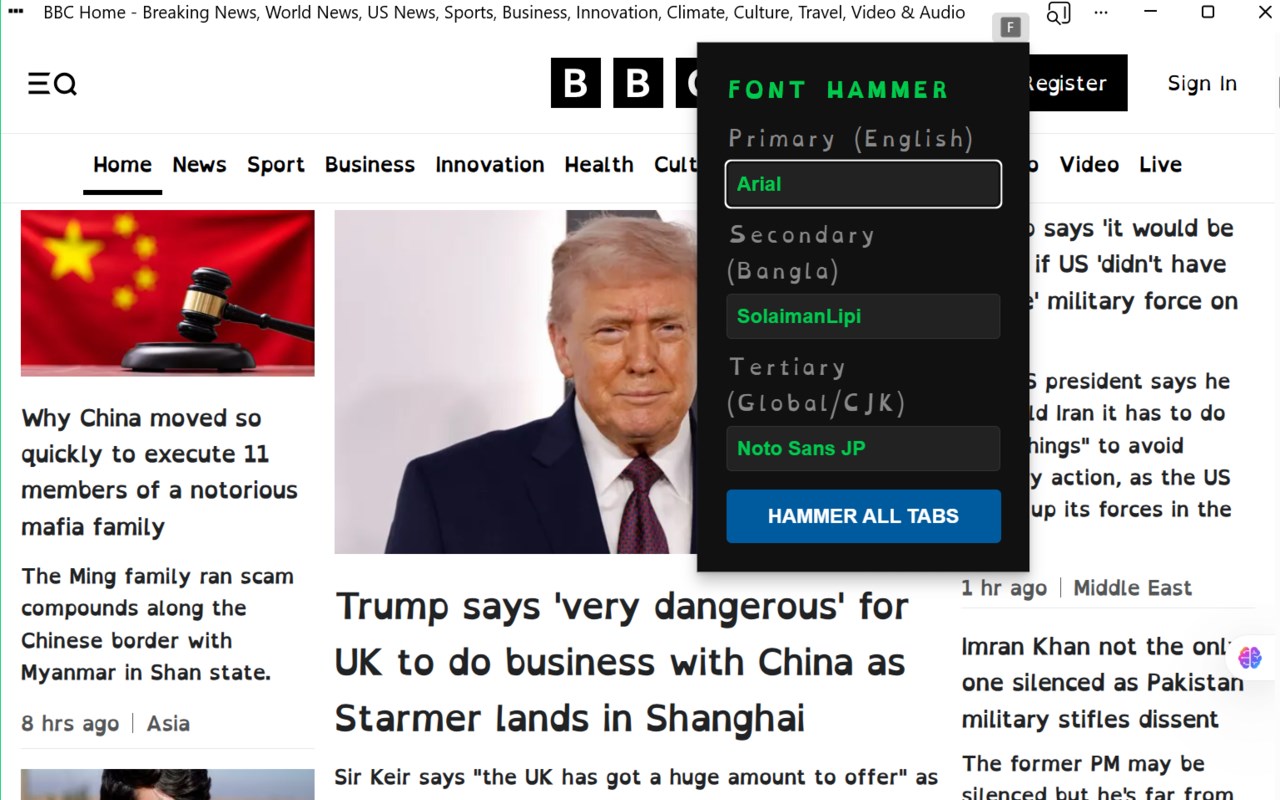
Configuring Font Hammer is straightforward through its user-friendly popup interface. You simply enter up to three preferred fonts—one for each language category—and then click the “Hammer All Tabs” button. Your chosen fonts are immediately applied across all open tabs and frames, saving you time and effort while ensuring a seamless browsing experience tailored to your visual needs. These settings are stored locally on your system, so your preferences persist across browser sessions and new tabs without requiring repetitive adjustments.
Ideal for accessibility advocates including individuals with dyslexia or visual impairments, multilingual users, international readers, and power users who value typographic consistency, Font Hammer operates securely and silently without tracking or collecting any personal information. It leverages the latest extension APIs to deliver a robust, fast, and privacy-respecting font management tool compatible with all modern browsers.
Key Features:
- Universal font enforcement: Overrides all website font-family settings globally, including embedded frames and shadow DOM elements, ensuring comprehensive font control.
- Multi-language script support: Allows definition of up to three fonts to accommodate a wide spectrum of languages and scripts from around the world, such as Latin, Bangla, CJK, Arabic, Cyrillic, and more.
- Instant “Hammer All Tabs”: One-click application of your font selections to every open tab, guaranteeing immediate and thorough consistency.
- Live mutation observation: Dynamically detects and adapts your font settings to new or updated content within web pages, single-page apps, and chat windows.
- Intuitive, user-friendly interface: Simple font input fields with clear guidance and a single-button operation designed for effortless use.
- Persistent font settings: Saves your preferences locally to automatically apply them across sessions and new browsing contexts.
- Privacy-focused design: No personal data is collected or transmitted; all operations are performed locally for maximum security.
How It Works:
1. Open Font Hammer via the browser’s toolbar popup.
2. Input your preferred fonts for primary, secondary, and tertiary language categories in the designated fields.
3. Click the “Hammer All Tabs” button to immediately apply these fonts across all your open tabs and frames.
4. Font Hammer saves your selections locally for persistent use in future browsing sessions.
5. The extension injects custom CSS rules to enforce your font choices, extending to shadow DOM and dynamically loaded content.
6. Mutation observers continuously monitor webpage changes to maintain font consistency as content updates or new elements appear.
7. Your font preferences automatically apply to new tabs and sessions, providing a consistent and accessible reading experience every time you browse.
Privacy: - No personal data collected.
Font Hammer: Absolute 是做什么的
Font Hammer: Absolute 是一款面向 Edge 的效率工具类扩展,主要用来管住注意力、屏蔽干扰站点、记录时间。官方对它的介绍是:Font Hammer: Absolute – Take Control of Web Fonts Everywhere All language font works Multiple language font works Font Hammer: Absolute is an advanced browser extension crafted for users who want comprehensive control over the fonts displayed on every website they visit. Whether you seek improved readability for accessibility, want to unify inconsistent fonts on various sites, or simply desire a在微软 Edge 加载项商店上,它当前版本 5.0,约 3 名用户。
适合什么人用
从功能定位看,Font Hammer: Absolute 更适合想专注工作学习、减少无效刷网页的用户。如果你平时只是偶尔遇到相关需求,用浏览器自带功能也能凑合;但如果这件事每天都发生,装一个专门处理它的扩展通常比手动操作省事得多。需要注意的是它作用于所有网站,装上后建议先观察一两天,确认不影响常用站点的正常使用。
怎么安装 Font Hammer: Absolute
- 打开微软 Edge 加载项商店上的官方页面;
- 点「添加到浏览器」并确认权限提示;
- 装好后在扩展列表里固定图标,方便随时开关。
本站只做索引与介绍,安装包来自官方商店。如果商店页面提示当前地区不可用,说明该扩展未在你所在区域上架。
常见问题
Font Hammer: Absolute 是免费的吗?
Font Hammer: Absolute 在微软 Edge 加载项商店免费提供下载。它是浏览器扩展,装上就能直接用,不需要注册账号。
Font Hammer: Absolute 安全吗?
它只申请了 0 项权限,范围比较克制,没有申请「读取所有网站数据」这种大权限。
Font Hammer: Absolute 支持哪些浏览器?
当前收录的版本来自微软 Edge 加载项商店,适用于 Edge。同一个扩展在其他商店可能有对应版本,但功能与版本号不一定相同。
怎么卸载 Font Hammer: Absolute?
在扩展管理页找到 Font Hammer: Absolute,点移除即可。它在本地保存的设置会一起清掉,不会残留数据。
权限清单 来自 manifest.json 原文
站点访问(可选) 1
<all_urls>
接口权限 3
activeTabscriptingstorage