
Font Changer EN
Lounes Hareb · EEdge MV3
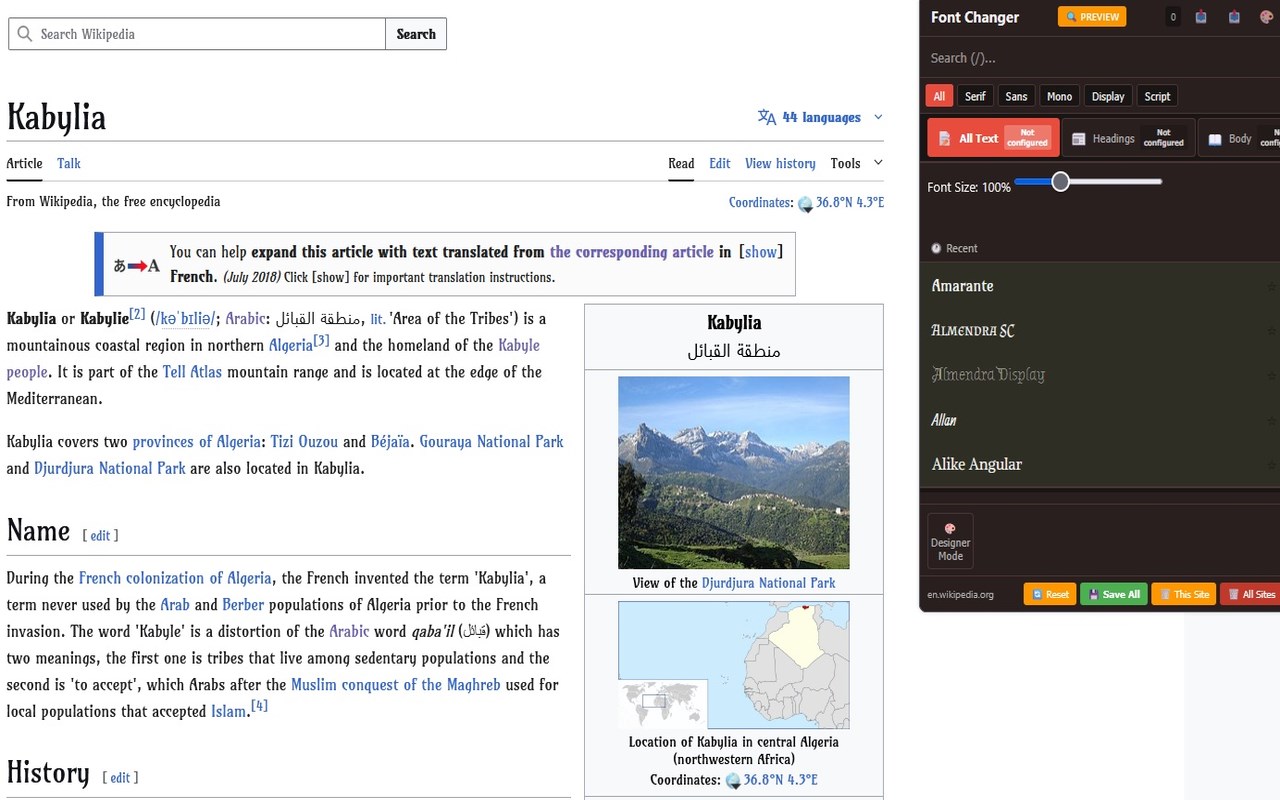
Change the page font instantly with a simple click from a list of over 1600 different fonts. Save preferences per site.
截图

简介
Font Changer gives you complete control over the typography of any website you visit. Choose from over 800 beautiful Google Fonts and customize the reading experience to match your preferences and save your settings for the site.
🎨 Key Features
▸Multi-Context Font Control
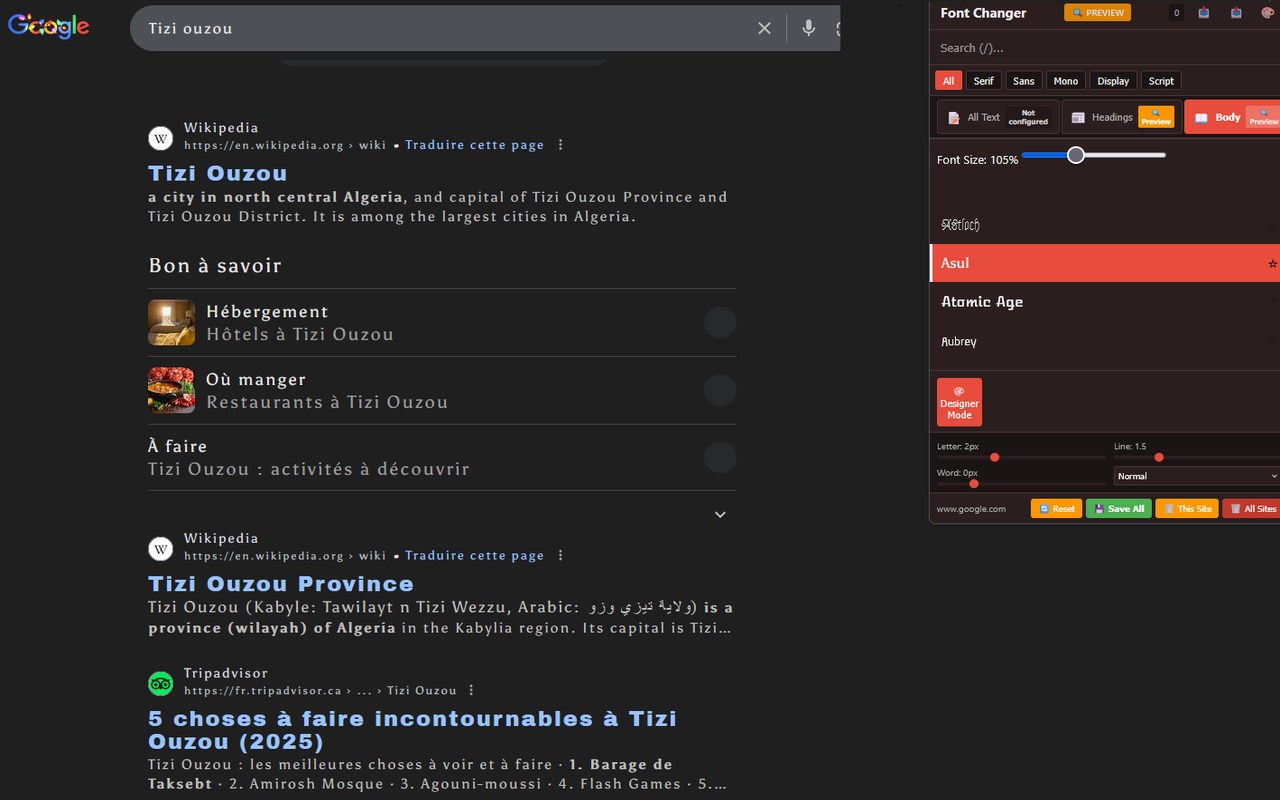
- Apply different fonts to headings, body text, or all text independently
- Mix and match fonts for perfect typography combinations
- Each context (All Text, Headings, Body) can be customized separately
▸ Per-Site Preferences
- 📥Save different settings for each website
- Automatic font application when you revisit sites
- Easy management: Reset individual sites or clear all at once
▸Smart Font Management
- ⭐ Favorites: Star your favorite fonts for quick access
- 🕐 Recent fonts: Quickly reuse fonts you've tried recently
- 🔍 Search: Find fonts instantly with real-time search
- 📂 Filter by category: Serif, Sans-serif, Monospace, Display, Script
▸Advanced Typography Designer Mode
- Letter spacing: Adjust character spacing for better readability
- Line height: Control the space between lines
- Word spacing: Modify spacing between words
- Text transform: Apply UPPERCASE, lowercase, or Capitalize
▸Font Size Control
- Independent size scaling for each context (80% - 150%)
- Works even without changing fonts - perfect for accessibility
- Preserves the site's design while improving readability
▸Smart Preview System
- Real-time preview: See changes instantly as you adjust settings
- Context badges: Always know if you're previewing or have saved settings
- Reset button: Quickly undo previews without saving
▸Beautiful User Interface
- 🎨 Brand Theme and Light Theme options
- Clean, modern design
- Smooth animations and transitions
- Compact, scrollable font list for easy browsing
▸Privacy & Performance
- All preferences stored locally in your browser
- No data sent to external servers
- Lightweight and fast
- Export/import your settings for backup
💡 Perfect For
- Readers: Enhance readability with your preferred fonts
- Designers: Preview how fonts look on real websites
- Accessibility: Improve text legibility with custom spacing and sizing
- Typography Enthusiasts: Experiment with Google Fonts on any site
- Students: Make learning materials more readable
🚀 How It Works
1. Click the Font Changer icon in your browser toolbar
2. Browse, search, or filter through 800+ Google Fonts
3. Click any font to preview it instantly
4. Choose your context: All Text, Headings, or Body
5. Adjust size and typography with Designer Mode
6. Click "Save All" to remember settings for this site
🎯 Use Cases
- Make news websites more readable with your favorite serif font
- Apply clean sans-serif fonts to documentation sites
- Use monospace fonts on coding tutorials
- Customize social media with display fonts
- Improve accessibility by increasing font size and spacing
📝 What's New in v2.0
- ✨ Multi-context system (All Text, Headings, Body)
- 🎨 Designer Mode with advanced typography controls
- 🔍 Real-time preview system with status badges
- ⭐ Favorites and recent fonts
- 🎭 Theme switching (Brand/Light)
- 📊 Sites counter
- 🚀 Better performance and UI
🔒 Privacy
Font Changer respects your privacy:
- No tracking or analytics
- No external data collection
- All settings stored locally
🛠️ Technical Details
- Works on all websites (except browser-protected pages)
- Uses Google Fonts CDN for font loading
- No background processes draining battery
Font Changer 是做什么的
Font Changer 是一款面向 Edge 的效率工具类扩展,主要用来管住注意力、屏蔽干扰站点、记录时间。官方对它的介绍是:Change the page font instantly with a simple click from a list of over 1600 different fonts. Save preferences per site.在微软 Edge 加载项商店上,它当前版本 2.0.1,评分 5(2 人评价),约 323 名用户。
适合什么人用
从功能定位看,Font Changer 更适合想专注工作学习、减少无效刷网页的用户。如果你平时只是偶尔遇到相关需求,用浏览器自带功能也能凑合;但如果这件事每天都发生,装一个专门处理它的扩展通常比手动操作省事得多。
怎么安装 Font Changer
- 打开微软 Edge 加载项商店上的官方页面;
- 点「添加到浏览器」并确认权限提示;
- 装好后在扩展列表里固定图标,方便随时开关。
本站只做索引与介绍,安装包来自官方商店。如果商店页面提示当前地区不可用,说明该扩展未在你所在区域上架。
常见问题
Font Changer 是免费的吗?
Font Changer 在微软 Edge 加载项商店免费提供下载。它是浏览器扩展,装上就能直接用,不需要注册账号。
Font Changer 安全吗?
它只申请了 0 项权限,范围比较克制,没有申请「读取所有网站数据」这种大权限。
Font Changer 支持哪些浏览器?
当前收录的版本来自微软 Edge 加载项商店,适用于 Edge。同一个扩展在其他商店可能有对应版本,但功能与版本号不一定相同。
怎么卸载 Font Changer?
在扩展管理页找到 Font Changer,点移除即可。它在本地保存的设置会一起清掉,不会残留数据。
权限清单 来自 manifest.json 原文
接口权限 2
activeTabstorage
其他商店也有这款
同一款扩展在不同浏览器下的版本,权限与更新节奏可能不同
