
Fi50: PDF & Image Tools EN
fi50 · EEdge MV3
Your everyday PDF and image tools to Convert Images to PDF, PDF to Images, Merge PDF, Compress PDF, Resize Image and Doc Scanner
截图


简介
Fi50: PDF & Image Tools — Simple Tools for Online Documents
Fi50: PDF & Image Tools is a lightweight, easy-to-use browser extension built to make working with PDFs and images simple, fast, and stress-free 😊. If you often upload files, fill out online forms, or deal with documents on the web, Fi50 is designed to help you get things done without frustration.
No complicated software. No confusing steps. Just practical tools that work right inside your browser 💻, safely with all your documents.
🧩 Designed for Everyday Online Tasks
Many websites require files to meet specific size, format, or dimension rules. Whether you’re applying for a job, submitting a form, uploading an ID, or turning in an assignment, even a small mismatch can cause upload errors.
Fi50 helps solve this problem by letting you resize images or PDFs quickly and easily, so your files are ready to upload the first time ✅. This is especially useful for:
📝 Online application forms
🏛 Government or school portals
💼 Job and resume uploads
🖼️ Profile photos and ID submissions
🖥️ Registration and verification forms
🖼️ Image to PDF — Turn Images into One Clean PDF
The Image to PDF feature in Fi50: PDF & Image Tools lets you easily convert your images into a single, well-organized PDF file. Perfect when online forms, job applications, or official websites only accept PDF uploads but you have photos or scanned images. Fi50 allows you to combine multiple images into one PDF and arrange them in the correct order. This makes your documents look clean, professional, and ready to submit.
📱 Photos from your phone or camera
🧾 Scanned documents and receipts
🖼️ Screenshots
📄 ID images and forms
📄 PDF to Images — Extract Pages as Images Easily
With the PDF to Images feature, Fi50 helps you convert PDF files into image formats quickly and smoothly 🖼️. Useful when a website doesn’t accept PDFs or when you only need specific pages as images. Fi50 creates clean, clear images directly from your PDF files ⚡. All processing happens safely inside your browser 💻.
📑 Convert PDF pages into images
🖼️ Extract visuals or documents from PDFs
📤 Upload images where PDFs aren’t supported
✂️ Share individual pages easily
📚 Merge and Organize PDFs
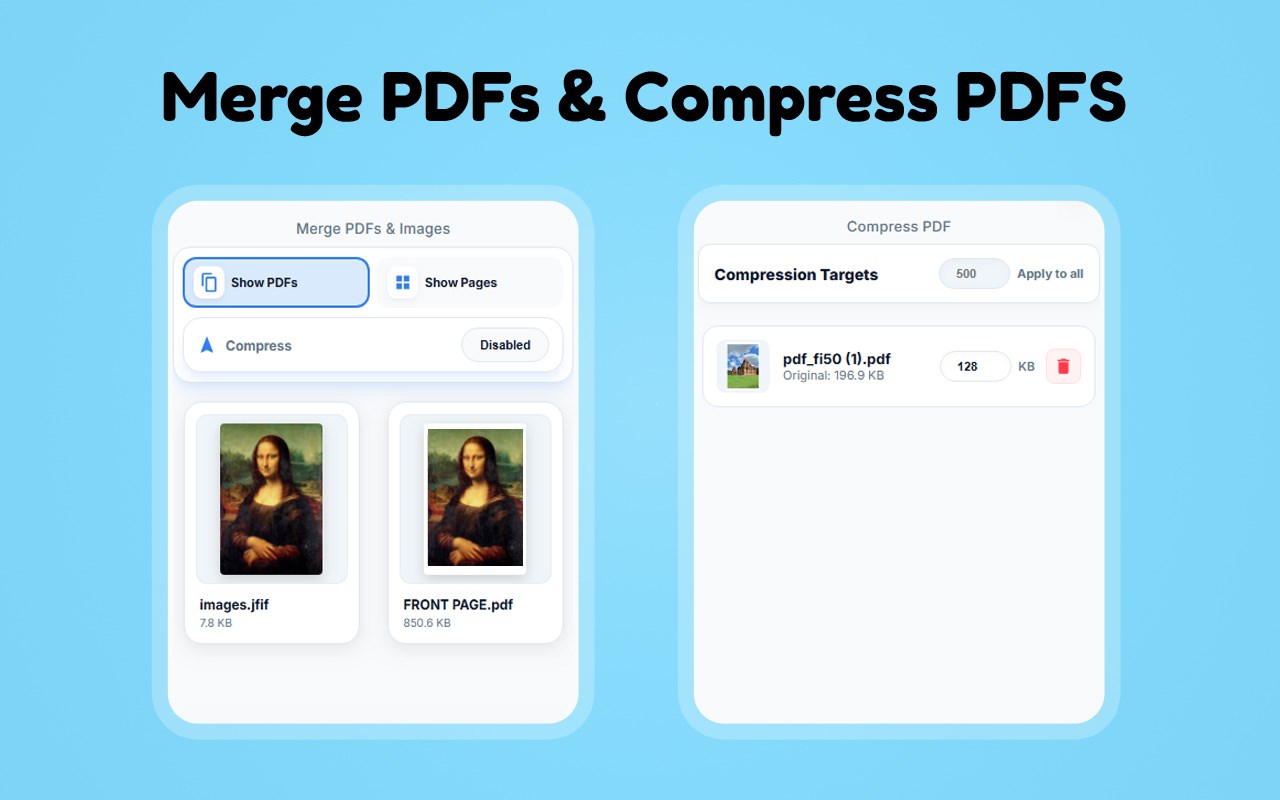
Have multiple PDF files that need to be submitted together? Fi50 Merge PDF feature lets you combine several PDFs into one clean, organized document 🧩.
🗂 Forms with multiple attachments
📄 Scanned documents split into parts
📊 Reports, assignments, or applications
🗜 Compress PDFs to Save Space
Large file sizes can cause upload failures, slow downloads, or email issues. Fi50 PDF compression tool helps reduce file size while keeping text and images clear 📉.
⚠️ A website has a file size limit
🚀 You need faster uploads
💾 You want to save storage space
📐 Resize Images for Forms and Uploads
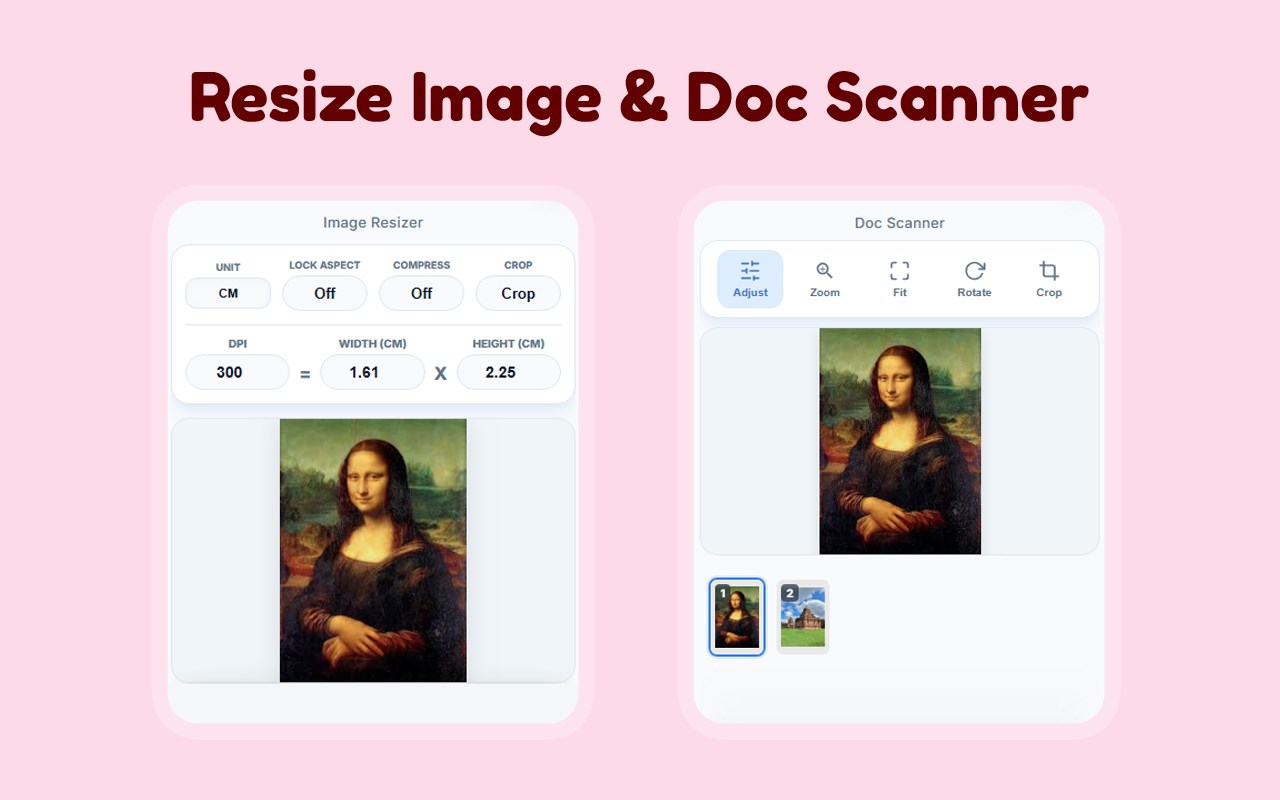
Fi50 includes simple image resizing tools that help you adjust dimensions for online forms, profile pictures, documents, and uploads 🖼️.
📏 A specific width and height
🗂️ A smaller file size
✨ A cleaner image layout
📄 Built-In Document Scanning Support
Fi50 also helps you turn documents into digital files using its document scanning feature. Upload or capture paperwork like receipts, notes, or forms and convert them into clean, high-quality PDFs ✨.
This is especially useful for:
📝 Submitting paperwork online
📂 Digitizing paper documents
📄 Creating PDFs for forms and records
⚡ Fast, Lightweight, and Easy to Use
🚀 Fast and responsive
🧩 Lightweight and browser-friendly
🧠 Easy for beginners
🖥️ Simple, clean, and intuitive
👥 Perfect for Many Types of Users
🎓 Students submitting assignments
💼 Job seekers uploading resumes
🏠 Remote workers handling documents
📊 Small business owners managing paperwork
🌐 Everyday users filling online forms
✅ Why Choose Fi50?
✔ Works directly in your browser 💻
✔ Helps meet online form requirements 📝
✔ Easy resizing, converting, merging, and compressing 🧩
✔ Saves time and reduces upload errors ⏱️
✔ No complicated software needed 🖥️
🚀 Get More Done Online with Fi50
Whether you’re filling out forms, uploading documents, or organizing files online, Fi50: PDF & Image Tools helps make the process smoother, faster, and less stressful 😄.
Install Fi50 and handle your PDF and image tasks with confidence—right from your browser💻.
❓ FAQs — Fi50: PDF & Image Tools
Q1: What is Fi50: PDF & Image Tools?
A: A browser extension to resize, convert, merge, and compress PDFs & images 📄🖼️.
Q2: Can I convert images to PDF?
A: Yes, quickly turn one or multiple images into a single PDF ✅.
Q3: Can I convert PDF to images?
A: Yes, extract pages as images for uploads or sharing 🖼️.
Q4: Can I resize files for online forms?
A: Absolutely, adjust images or PDFs to meet website requirements 📐.
Q5: Can I merge multiple PDFs?
A: Yes, combine PDFs into one organized file 🧩.
Q6: Can I compress large PDFs?
A: Yes, reduce file size while keeping text and images clear 📉.
Q7: Is Fi50 easy to use?
A: Yes, simple interface for beginners and professionals alike 🌐.
Q8: Who can use Fi50: PDF & Image Tools?
A: Students 🎓, job seekers 💼, remote workers 🏠, business owners 📊, and anyone uploading files online.
📞 Contact & Support
For help or feedback, email: support@fi50.com✉️
Fi50: PDF & Image Tools 是做什么的
Fi50: PDF & Image Tools 是一款面向 Edge 的效率工具类扩展,主要用来管住注意力、屏蔽干扰站点、记录时间。官方对它的介绍是:Your everyday PDF and image tools to Convert Images to PDF, PDF to Images, Merge PDF, Compress PDF, Resize Image and Doc Scanner在微软 Edge 加载项商店上,它当前版本 1.0,约 11 名用户。
适合什么人用
从功能定位看,Fi50: PDF & Image Tools 更适合想专注工作学习、减少无效刷网页的用户。如果你平时只是偶尔遇到相关需求,用浏览器自带功能也能凑合;但如果这件事每天都发生,装一个专门处理它的扩展通常比手动操作省事得多。
怎么安装 Fi50: PDF & Image Tools
- 打开微软 Edge 加载项商店上的官方页面;
- 点「添加到浏览器」并确认权限提示;
- 装好后在扩展列表里固定图标,方便随时开关。
本站只做索引与介绍,安装包来自官方商店。如果商店页面提示当前地区不可用,说明该扩展未在你所在区域上架。
常见问题
Fi50: PDF & Image Tools 是免费的吗?
Fi50: PDF & Image Tools 在微软 Edge 加载项商店免费提供下载。它是浏览器扩展,装上就能直接用,不需要注册账号。
Fi50: PDF & Image Tools 安全吗?
它只申请了 0 项权限,范围比较克制,没有申请「读取所有网站数据」这种大权限。
Fi50: PDF & Image Tools 支持哪些浏览器?
当前收录的版本来自微软 Edge 加载项商店,适用于 Edge。同一个扩展在其他商店可能有对应版本,但功能与版本号不一定相同。
怎么卸载 Fi50: PDF & Image Tools?
在扩展管理页找到 Fi50: PDF & Image Tools,点移除即可。它在本地保存的设置会一起清掉,不会残留数据。
权限清单 来自 manifest.json 原文
接口权限 3
activeTabsidePanelstorage