
Email Extract - Email Extractor Tool
Mailmeteor.com · Edge MV3
Extract Emails from Search Engines and the Web with a Semi-Automatic Email Extractor Tool. Generate Lead and Find New Clients
<all_urls>),意味着它可以读取你在任意站点的页面内容,包括已登录的页面。这是许多扩展正常工作的必要条件,但也值得你确认来源可信。
截图
简介
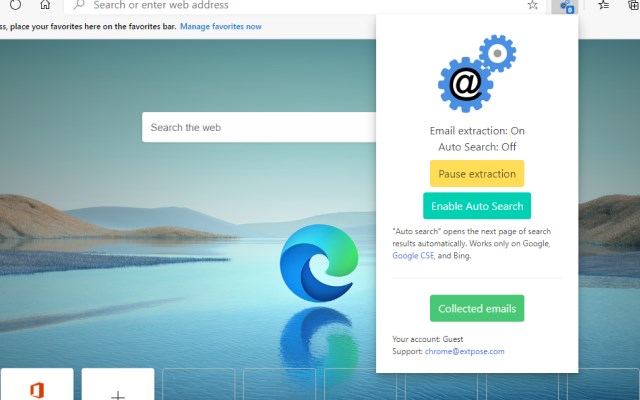
Email Extract extension searches email addresses on pages you visit. Auto search mode automates search for emails on search engines.
Email Extractor is a free tool that can help sales and marketing professionals, recruitment agencies and HR professionals, small business owners, researchers, and digital marketers quickly and easily extract email addresses from various sources, automate email search, and build comprehensive email lists to reach out to their target audience more effectively.
🆕 Here's what's new in our 2025 Q1-Q2 product update:
* Enhanced search functionality for emails, including support for manually obfuscated email formats (e.g., "user[at]domain.com").
* Improved accuracy and speed of email extraction across different web pages.
Features:
✅ Extract emails from visited pages
✅ Extract emails from the current page
✅ Bypass certain obfuscation techniques
✅ "Auto Search" for major search engine like Google and Bing.
✅ Export to Excel in XLSX format with proper data types
How to use the extension:
1️⃣ Once installed, the extension automatically activates the "Email extraction" mode.
2️⃣ The number of collected emails is displayed over the icon in the browser toolbar.
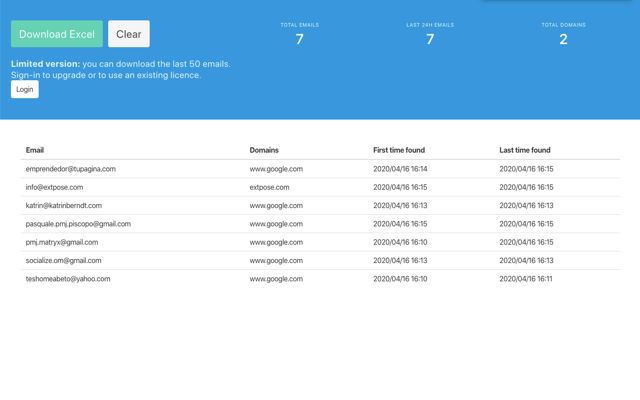
3️⃣ Click the "Collected emails" button to access a full-screen page displaying the collected email table.
4️⃣ Press the "Export" button to retrieve an Excel file.
Please take note: The Email Extractor operates on a freemium model. A license is required to download more than 50 of the latest emails.
Permissions:
"To read and modify all data on every website you visit."
This extension requires this permission to search for emails within website content as you browse without requiring additional consent.
You have the option to manually adjust this access.
Please note that any emails collected stay on your device and are not sent elsewhere.
For more information, please consult your browser's documentation: https://support.microsoft.com/en-us/microsoft-edge/change-site-access-permissions-for-extensions-in-microsoft-edge-7d1c889d-e267-4be0-15d4-3ed5d0c82ef5
Email Extract stands out from dozens of tools in the market by offering a flat-rate subscription, unlimited email extraction, and full transparency — without pay-per-lead models, credit systems, or locked features.
Many users switch to Email Extract after trying tools like Find That Lead (FTL), Snov.io (also listed as Snov io or Snovio), LeadStal, Hunter.io (Hunter io), ZoomInfo, UpLead, Clearbit, Adapt.io, Seamless.ai, Apollo.io, Zoho CRM, and HubSpot Sales Hub. These platforms often charge per contact, restrict usage tiers, or have complex billing structures that make high-volume lead generation expensive.
Email Extract also compares favorably to other email and lead tools like Lusha, GetProspect, Leadfeeder, Lead411, Datanyze, Discoverly, AeroLeads, Lead Forensics, and SalesIntel — offering a simpler UX and no limits on data collected.
If you've experimented with name-to-email generators or enrichment tools like Name2email, getemail.io (getemail io), Email Save, or even AI-powered assistants like AI Email Extractor: Find the Email ID by AI or Ful.io's Email Finder Powered by AI, you’ll find that Email Extract combines automation with accuracy — without compromising your browser performance or data privacy.
We’ve heard from users who previously used other browser extensions and scrapers like Closely: Email Finder & LI Data Scraper, Email Exporter, Email Extract Pro - Simplify Lead Generation with Notion, Email Extractor From Websites | Email Magnet, Email Extractor Lite, Email Extractor: Unlimited B2B Leads Finder, Email Finder, Email Finder & Email Hunter - GMPlus, Email Finder & Phone Enrichment - Clearout, Email Finder - LeadLeaper, Email Finder Expert, Email Finder by Anymailfinder, Email Finder by ColdLead.io, Email Finder by ContactOut – Email Lookup Tool, Email Finder by Leadzen.ai | Get B2B Contacts, Email Finder by Snov.io, Email Finder by VoilaNorbert, Email Finder – PIPILEADS, Email Finder-Kendo Sourcing Ninja, and Email Hunter.
Even niche or emerging tools like Email Intelligence, Email Lookup and Email Search by Webspotter, Email Spy, Email finder by soujiyi.com, and GitHub Email Hunter are commonly used before users discover our lightweight, reliable alternative.
Other data exporting or scraping add-ons we often get compared to include: EmailDrop - Extract Emails in 1 second, Export Emails to Docs, Export Emails to Sheets by cloudHQ, Extract Emails, Extractor Email V.2020, Find Emails + Cell Phone Numbers in Seconds, Find Emails on Websites and Social Networks, Find That Email - Unlimited Leads, Find That Email : Email Address Generator, Finder.io - Email Finder from Websites, Findy: Email Search and Outreach by Reply, GetEmail.io gets the email of anyone on Earth, Hunter - Email Finder Extension, LeadGibbon Email Finder, LeadNear: B2B Email & Phone Finder, Lix - B2B Scraper, Email Finder & API, Phone and Email Finder by Nymeria, Prospeo - Email Finder, Really Good Emails / Capture!, Saleshandy Connect: Email Tracker & Lookup, Scalelist: Linkedin Scraper & Email Finder, Scanlist: Email Finder & Sales Copy Generator, Skrapp.io - Email Finder, Tomba - Email Finder & Email Extractor Plus, UpLead - Find Emails on Websites, ZELIQ - Find Anyone’s Email and Phone Number, and useArtemis - Email Finder Extension.
We even hear from global users looking for 中文 (邮箱和Email查找工具) or Brazilian tools like extrator de emails — all of whom appreciate that Email Extract works fast, in any language, and without borders.
Email Extract - Email Extractor Tool 是做什么的
Email Extract - Email Extractor Tool 是一款面向 Edge 的效率工具类扩展,主要用来管住注意力、屏蔽干扰站点、记录时间。官方对它的介绍是:Extract Emails from Search Engines and the Web with a Semi-Automatic Email Extractor Tool. Generate Lead and Find New Clients在微软 Edge 加载项商店上,它当前版本 2.3.0,评分 5(4831 人评价),约 28,312 名用户。
适合什么人用
从功能定位看,Email Extract - Email Extractor Tool 更适合想专注工作学习、减少无效刷网页的用户。如果你平时只是偶尔遇到相关需求,用浏览器自带功能也能凑合;但如果这件事每天都发生,装一个专门处理它的扩展通常比手动操作省事得多。需要注意的是它作用于所有网站,装上后建议先观察一两天,确认不影响常用站点的正常使用。
怎么安装 Email Extract - Email Extractor Tool
- 打开微软 Edge 加载项商店上的官方页面;
- 点「添加到浏览器」并确认权限提示;
- 装好后在扩展列表里固定图标,方便随时开关。
本站只做索引与介绍,安装包来自官方商店。如果商店页面提示当前地区不可用,说明该扩展未在你所在区域上架。
常见问题
Email Extract - Email Extractor Tool 是免费的吗?
Email Extract - Email Extractor Tool 在微软 Edge 加载项商店免费提供下载。它是浏览器扩展,装上就能直接用,不需要注册账号。
Email Extract - Email Extractor Tool 安全吗?
它只申请了 0 项权限,范围比较克制,没有申请「读取所有网站数据」这种大权限。
Email Extract - Email Extractor Tool 支持哪些浏览器?
当前收录的版本来自微软 Edge 加载项商店,适用于 Edge。同一个扩展在其他商店可能有对应版本,但功能与版本号不一定相同。
怎么卸载 Email Extract - Email Extractor Tool?
在扩展管理页找到 Email Extract - Email Extractor Tool,点移除即可。它在本地保存的设置会一起清掉,不会残留数据。
权限清单 来自 manifest.json 原文
站点访问(可选) 2
http://*/*https://*/*
接口权限 4
alarmsidentitystorageunlimitedStorage