
DownloadX – Download Accelerator EN
SVSS Software · EEdge MV3
Advanced download manager with parallel stream downloading, page media detection and resume support.
<all_urls>),意味着它可以读取你在任意站点的页面内容,包括已登录的页面。这是许多扩展正常工作的必要条件,但也值得你确认来源可信。
截图
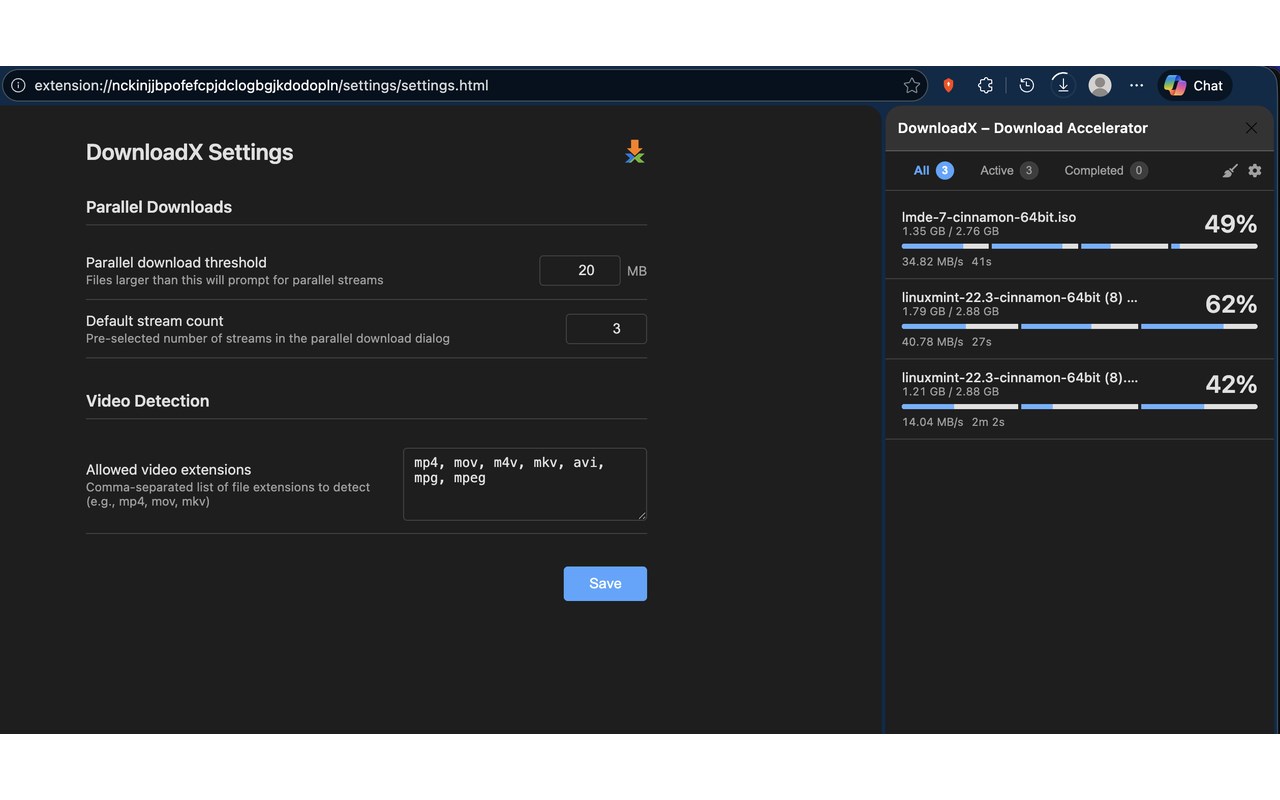
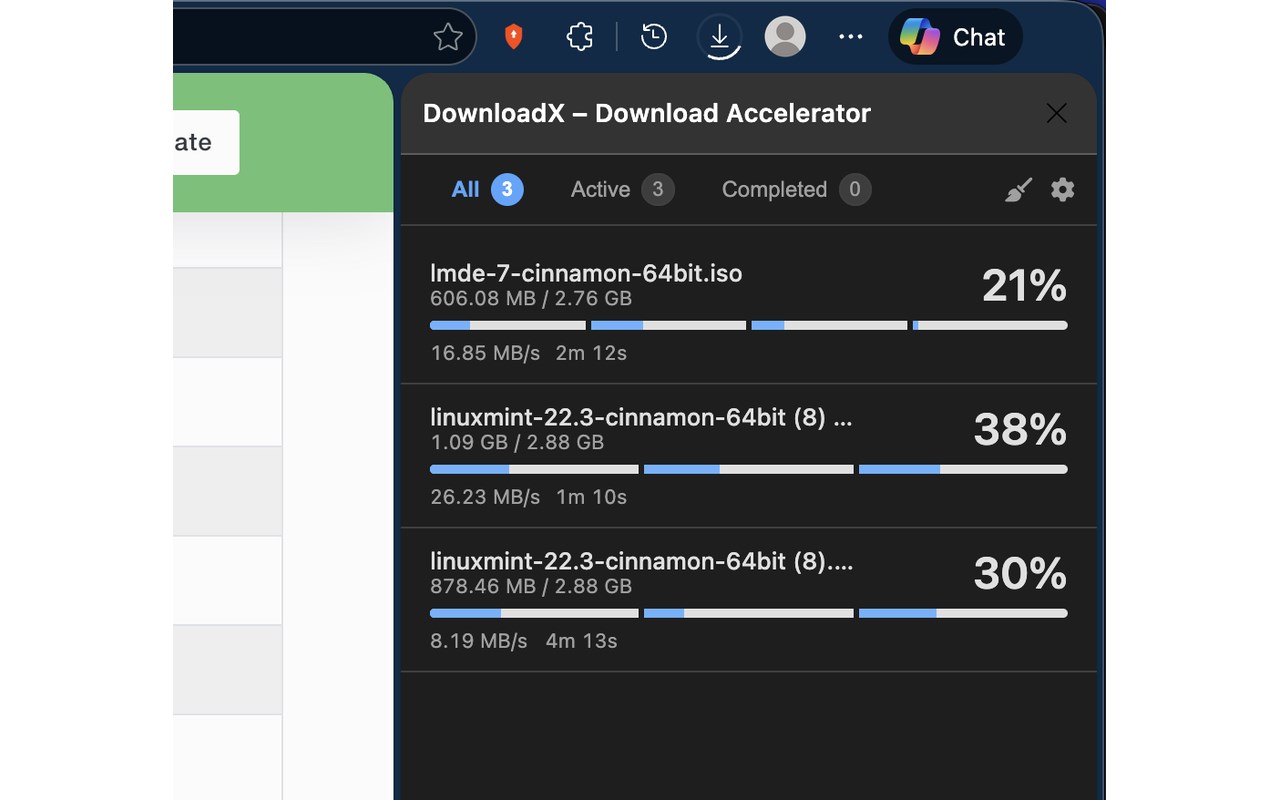
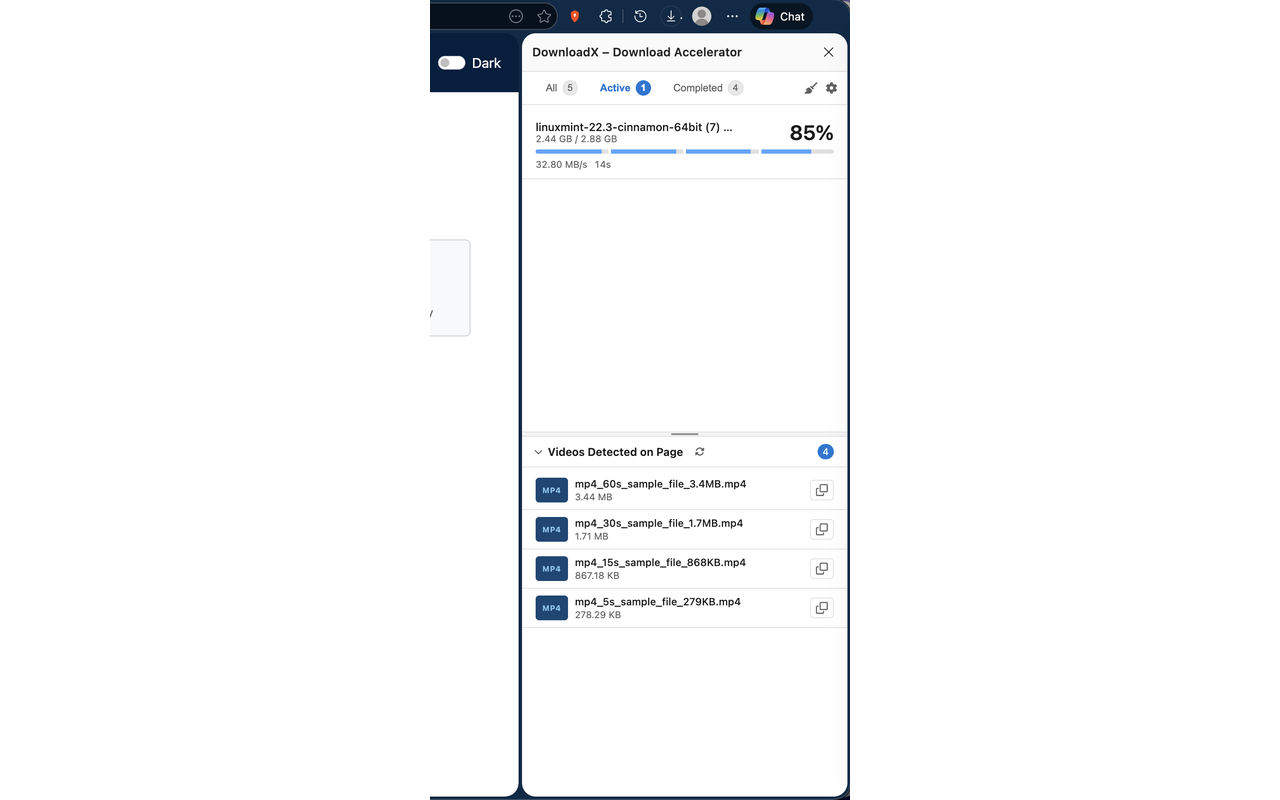
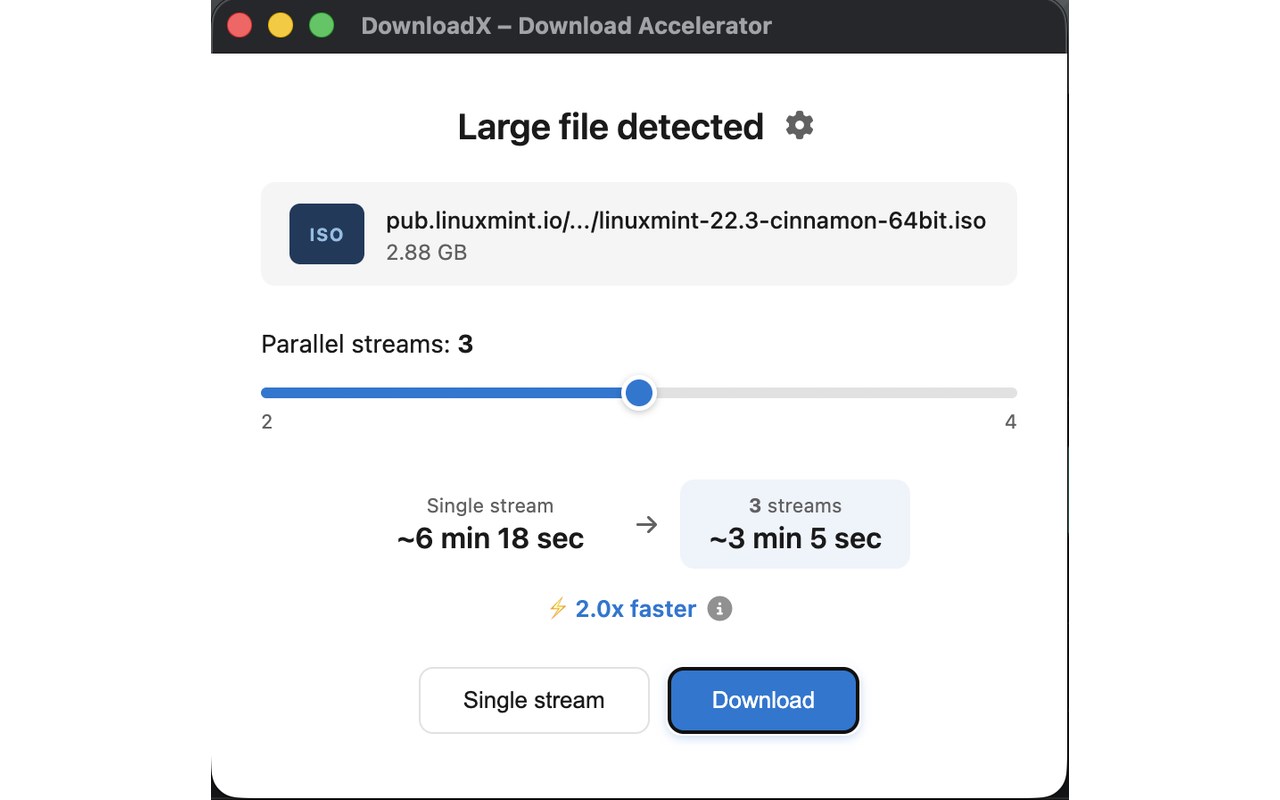
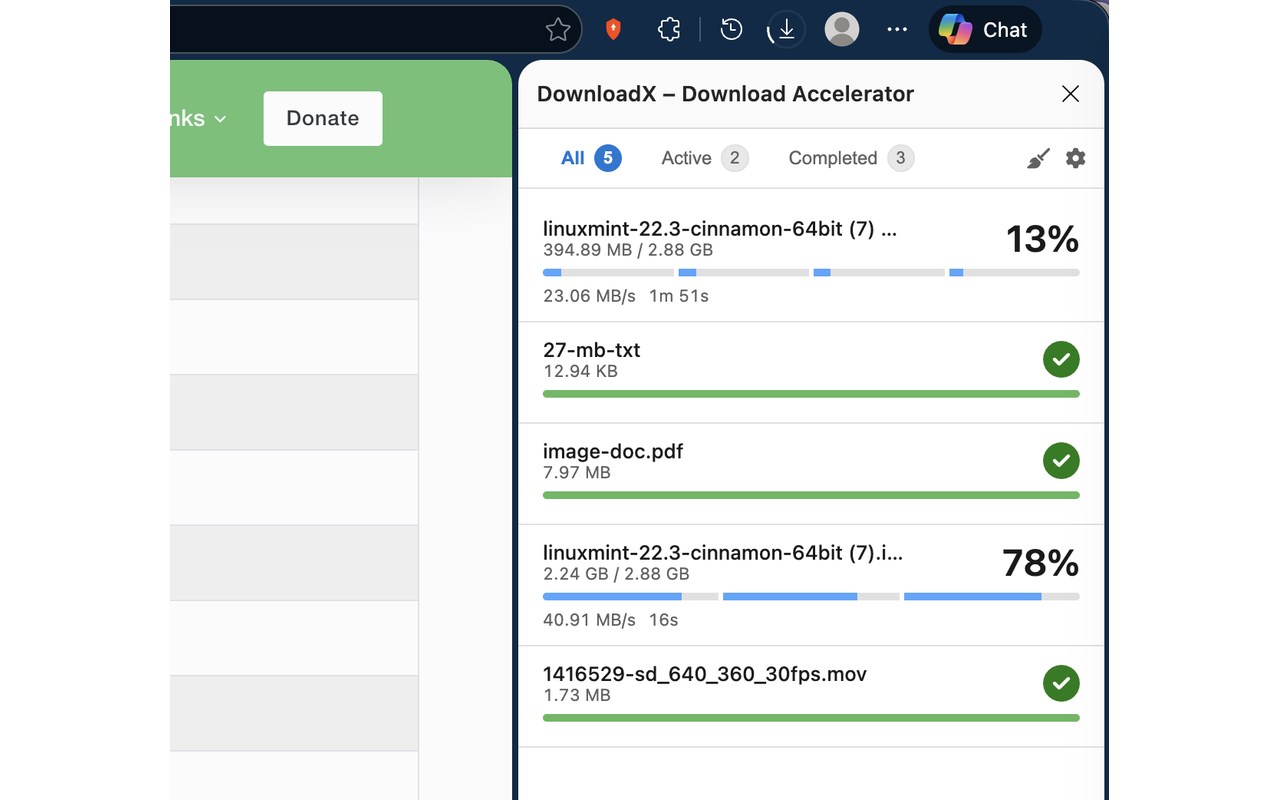
简介
DownloadX – Download Accelerator is a sophisticated browser extension crafted to dramatically enhance your downloading capabilities within Chrome, Edge and other compatible browsers. It empowers users to download all types of files with remarkable speed and reliability by employing advanced techniques like multi-chunk parallel downloading, intelligent media detection, and resilient resume capabilities—all managed seamlessly through an intuitive and unified user interface. Whether you are grabbing large files or detecting videos on sites, DownloadX delivers an efficient, streamlined experience that adapts to your needs while ensuring minimal disruption even during browser crashes or network interruptions.
At its core, DownloadX excels in detecting downloadable media on any webpage, including a wide variety of video formats such as MP4, MOV, MKV, AVI, MPG, MPEG (streaming video capturing coming soon!) —even identifying tricky video streams that other tools might miss. Once detected, videos and files are conveniently displayed within a dedicated side panel, where you can monitor active and completed downloads with ease. DownloadX supports multi-chunk parallel downloads, splitting large files into multiple segments that are downloaded simultaneously to accelerate the process significantly, to maximize your available bandwidth and improve your productivity. When you initiate downloading a large file, the extension will proactively suggest using multiple streams, optimizing throughput in a way usually reserved for standalone download managers.
DownloadX is engineered with resilience in mind. Should your browser close unexpectedly or a network error occur, the extension’s robust resume functionality intelligently safeguards your progress, allowing interrupted downloads to continue smoothly without data corruption. This is complemented by strict consistency checks that verify each resumed segment to maintain integrity throughout the download. Moreover, DownloadX integrates deeply with browser features, utilizing offscreen processing for uninterrupted downloads even when the browser tab is inactive, along with real-time notifications and context menu options for fast actions. For users who prefer customization, the extension offers extensive settings to adjust parameters like parallel stream counts, detection rules for video and file types, thresholds for download acceleration, and debug modes to troubleshoot any issues.
Beyond its technical prowess, DownloadX offers a clean, user-friendly experience with support for dark mode, ensuring comfortable usage in any environment. The interface is designed for both casual users aiming to quickly save videos or files and power users managing multiple large downloads efficiently. Special shortcuts such as pressing Command/Win + Click allow bypassing the accelerator for problematic URLs, providing flexibility and control while maintaining smooth operation. With responsive developer support and a commitment to user feedback, DownloadX stands out as a comprehensive download manager integrated directly into your browsing workflow.
Key Features:
- Intelligent detection of downloadable media, including a wide range of video formats and streaming protocols.
- Multi-chunk parallel downloading significantly accelerates large file transfers.
- Robust pause and resume functionality with strict integrity checks, safeguarding progress through interruptions.
- Unified side panel for managing, grouping, and tracking active and completed downloads effortlessly.
- Customizable detection rules for video file extensions and stream protocols, enabling adaptable compatibility, via dedicated Settings page
- Deep browser integration featuring offscreen processing, real-time notifications, and convenient context menu actions.
- User-centric interface with intuitive controls, dark mode support, and keyboard shortcuts to bypass the extension when needed.
How It Works:
1. Install DownloadX – Download Accelerator from your browser’s extension store.
2. As you browse, DownloadX scans webpages for videos and downloadable files, highlighting them in the side panel.
3. Click detected downloads or use context menus to add files to the download queue.
4. For large downloads, accept prompts to utilize parallel streams that divide files into chunks for faster downloading.
5. Monitor progress within the side panel, which organizes downloads into active and completed groups for easy management.
6. Pause or resume downloads at will, benefiting from strong resume capabilities that protect against data loss due to crashes or network issues.
7. Customize detection parameters, parallel download settings, and troubleshooting options through the settings panel to optimize your experience.
Privacy: - No personal data collected, no tracking, no nothing.
DownloadX – Download Accelerator 是做什么的
DownloadX – Download Accelerator 是一款面向 Edge 的效率工具类扩展,主要用来管住注意力、屏蔽干扰站点、记录时间。官方对它的介绍是:Advanced download manager with parallel stream downloading, page media detection and resume support.在微软 Edge 加载项商店上,它当前版本 1.2.0,约 59 名用户。
适合什么人用
从功能定位看,DownloadX – Download Accelerator 更适合想专注工作学习、减少无效刷网页的用户。如果你平时只是偶尔遇到相关需求,用浏览器自带功能也能凑合;但如果这件事每天都发生,装一个专门处理它的扩展通常比手动操作省事得多。需要注意的是它作用于所有网站,装上后建议先观察一两天,确认不影响常用站点的正常使用。
怎么安装 DownloadX – Download Accelerator
- 打开微软 Edge 加载项商店上的官方页面;
- 点「添加到浏览器」并确认权限提示;
- 装好后在扩展列表里固定图标,方便随时开关。
本站只做索引与介绍,安装包来自官方商店。如果商店页面提示当前地区不可用,说明该扩展未在你所在区域上架。
常见问题
DownloadX – Download Accelerator 是免费的吗?
DownloadX – Download Accelerator 在微软 Edge 加载项商店免费提供下载。它是浏览器扩展,装上就能直接用,不需要注册账号。
DownloadX – Download Accelerator 安全吗?
它只申请了 0 项权限,范围比较克制,没有申请「读取所有网站数据」这种大权限。
DownloadX – Download Accelerator 支持哪些浏览器?
当前收录的版本来自微软 Edge 加载项商店,适用于 Edge。同一个扩展在其他商店可能有对应版本,但功能与版本号不一定相同。
怎么卸载 DownloadX – Download Accelerator?
在扩展管理页找到 DownloadX – Download Accelerator,点移除即可。它在本地保存的设置会一起清掉,不会残留数据。
权限清单 来自 manifest.json 原文
站点访问(可选) 1
<all_urls>
接口权限 11
alarmscontextMenusdownloadsdownloads.uinotificationsoffscreenscriptingsidePanelstoragetabswebRequest