
Discord Text Formatting EN
Yasir Qureshi · EEdge MV3
Easily format your Discord messages with various text styles
截图
简介
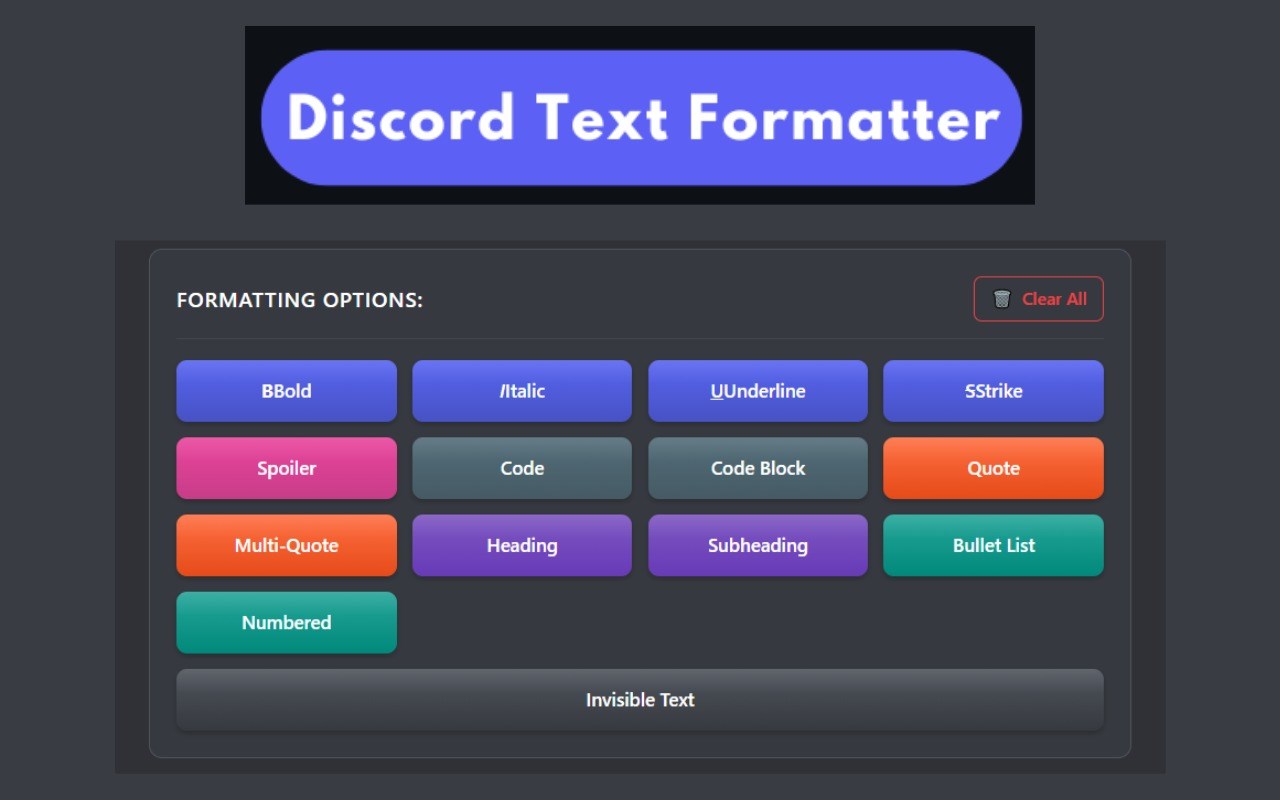
Discord Text Formatting is a powerful browser extension that enhances your Discord messaging experience with a simple, elegant interface for applying various text styles and formats. Stop memorizing Markdown syntax and start communicating more effectively with beautifully formatted messages.
Whether you're emphasizing important points, sharing code snippets, hiding spoilers, or simply adding style to your conversations, Discord Text Formatting makes it effortless with its intuitive interface and live preview.
Key Features
Comprehensive Formatting Options
Bold text with **text**
Italic text with *text*
Underlined text with __text__
Strikethrough text with ~~text~~
||Spoiler text|| with ||text||
Inline code with `code`
Code blocks with triple backticks
Quote text with > text
Elegant User Interface
Clean, Discord-inspired design
Intuitive formatting buttons
Live preview of your formatted text
Dark theme matching Discord's aesthetic
Responsive layout that works on any screen size
Seamless Experience
Easy-to-use popup interface
Optional in-Discord formatting toolbar
Copy formatted text to clipboard with one click
Keyboard shortcuts for common formatting options
Zero configuration required
Privacy Focused
No data collection
No account required
Works completely offline
No permissions needed
How to Use
Popup Method
Click the Discord Text Formatting icon in your browser toolbar
Type or paste your message in the input area
Select text and click formatting buttons to apply styles
See a live preview of how your text will appear
Click "Copy to Clipboard" to copy the formatted text
Paste directly into Discord
In-Discord Method
When typing in Discord, you'll see our formatting toolbar appear
Click any formatting button to apply that style
Continue typing your message with the formatting applied
Send your message as usual
Keyboard Shortcuts
Ctrl+B (or Cmd+B on Mac): Bold text
Ctrl+I (or Cmd+I on Mac): Italic text
Ctrl+U (or Cmd+U on Mac): Underline text
Use Cases
For Everyone
Emphasize important points in conversations
Create more readable and organized messages
Hide spoilers for games, movies, or TV shows
Make your messages stand out in busy channels
For Gamers
Format game strategies and tips
Hide spoilers about game content
Share formatted game commands
Create readable guild announcements
For Developers
Share code snippets with proper formatting
Create readable documentation in Discord
Format technical explanations
Organize project updates and changelogs
For Community Managers
Create professional-looking announcements
Format rules and guidelines for better readability
Organize event information in a structured way
Create visually distinct welcome messages
Frequently Asked Questions
General Questions
Q: Is this extension free?
A: Yes, Discord Text Formatting is completely free to use with no hidden costs or premium features.
Q: Does this extension work with the Discord desktop app?
A: No, the extension only works with Discord in a web browser. The Discord desktop app doesn't support browser extensions.
Q: Will people without the extension see my formatted text?
A: Yes! The extension simply helps you create standard Discord Markdown formatting that anyone can see, whether they have the extension or not.
Q: Do I need a Discord account to use this extension?
A: Yes, you need a Discord account to use Discord. Our extension enhances the Discord experience but doesn't replace it.
Q: Does this extension work on mobile?
A: No, the extension only works on desktop browsers that support extensions (Chrome, Firefox, Edge, etc.).
Technical Questions
Q: What permissions does this extension require?
A: The extension only requires access to Discord websites and clipboard permissions for the copy feature. It doesn't read your messages or collect any data.
Q: Can I use this extension with other websites?
A: The extension is specifically designed for Discord, but the popup formatter can be used to create formatted text for any platform that supports Markdown.
Q: Will the extension slow down my browser?
A: No, the extension is lightweight and only activates when you're using Discord or the popup.
Q: Is my data safe with this extension?
A: Yes, all processing happens locally in your browser. We don't collect, store, or transmit any of your data.
Q: How do I update the extension?
A: Extensions typically update automatically. You can check for updates in your browser's extension management page.
Usage Questions
Q: Can I format messages I've already sent?
A: No, Discord doesn't allow editing the formatting of messages after they've been sent, only the content.
Q: Can I save formatting templates?
A: Not in the current version, but we're considering adding this feature in a future update.
Q: Does this work in Discord DMs?
A: Yes, the extension works in all Discord text areas, including direct messages, group chats, and servers.
Q: Can I customize the formatting buttons?
A: Not in the current version, but we're considering adding customization options in future updates.
Q: How do I report a bug or suggest a feature?
A: Visit our website at https://distextformatting.com/ for support options.
Discord Text Formatting 是做什么的
Discord Text Formatting 是一款面向 Edge 的效率工具类扩展,主要用来管住注意力、屏蔽干扰站点、记录时间。官方对它的介绍是:Easily format your Discord messages with various text styles在微软 Edge 加载项商店上,它当前版本 2.1,约 20 名用户。
适合什么人用
从功能定位看,Discord Text Formatting 更适合想专注工作学习、减少无效刷网页的用户。如果你平时只是偶尔遇到相关需求,用浏览器自带功能也能凑合;但如果这件事每天都发生,装一个专门处理它的扩展通常比手动操作省事得多。
怎么安装 Discord Text Formatting
- 打开微软 Edge 加载项商店上的官方页面;
- 点「添加到浏览器」并确认权限提示;
- 装好后在扩展列表里固定图标,方便随时开关。
本站只做索引与介绍,安装包来自官方商店。如果商店页面提示当前地区不可用,说明该扩展未在你所在区域上架。
常见问题
Discord Text Formatting 是免费的吗?
Discord Text Formatting 在微软 Edge 加载项商店免费提供下载。它是浏览器扩展,装上就能直接用,不需要注册账号。
Discord Text Formatting 安全吗?
它只申请了 0 项权限,范围比较克制,没有申请「读取所有网站数据」这种大权限。
Discord Text Formatting 支持哪些浏览器?
当前收录的版本来自微软 Edge 加载项商店,适用于 Edge。同一个扩展在其他商店可能有对应版本,但功能与版本号不一定相同。
怎么卸载 Discord Text Formatting?
在扩展管理页找到 Discord Text Formatting,点移除即可。它在本地保存的设置会一起清掉,不会残留数据。
权限清单 来自 manifest.json 原文
未解析到权限条目。