Datact: Table extractor to Excel
Datact · EEdge MV3
Capture table areas from pages and export as Excel.
截图


简介
Table Capture to Excel:
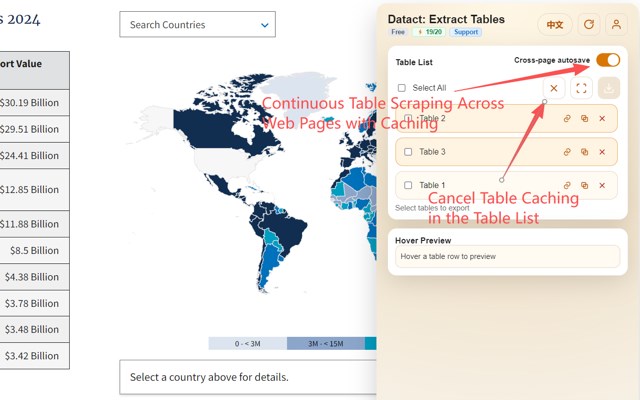
- One-click web table capture: Automatically detects HTML tables on a page and extracts the full row/column structure into editable data.
- Preserve structure on export: Keeps basic structure and merged cells; exports to .xlsx.
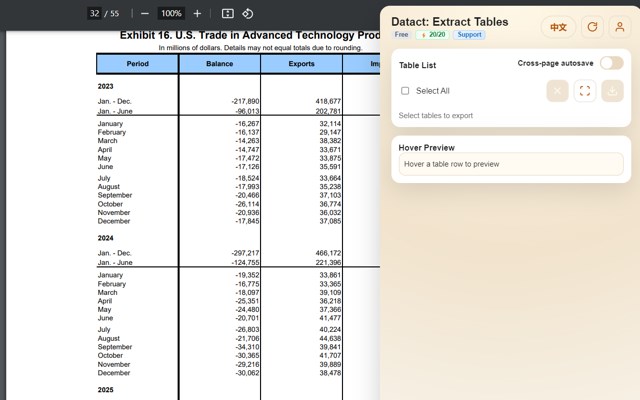
- Screenshot OCR: For tables in images or embedded PDFs, select an area and use cloud OCR to convert to editable table data.
- Multi-browser support: Works consistently on Chrome and Edge.
- Local-first processing: HTML table extraction runs locally and isn’t uploaded; OCR is sent via encrypted transmission, and source images aren’t retained after processing.
- Batch export: Capture multiple tables on the same page and export them in one go.
- Language toggle: UI supports Chinese/English and switches text accordingly.
- Auth & quota management: Supports login; OCR and other cloud resources are quota-managed with overage prompts.
- Preference memory: Remembers language, account info, and common settings for quick reuse.
- Security & compliance reminders: Warns that OCR screenshots may contain sensitive info; use only with content you’re authorized to process.
网页表格提取器,文字版和图片版都支持
- 网页表格一键提取:自动检测页面上的 HTML 表格,将行列结构完整提取为可编辑数据。
- 保留格式导出:保持基本结构与合并单元格,导出为 .xlsx。
- 截图 OCR 识别:对图片或嵌入 PDF 的表格可框选截图,云端 OCR 转为可编辑表格数据。
- 多浏览器支持:兼容 Chrome 与 Edge,体验一致。
- 本地优先处理:HTML 表格提取在浏览器本地完成,不上传内容;OCR 通过加密传输,处理后不保留原图。
- 批量导出:同一页面可连续提取多个表格并一次性导出。
- 语言切换:界面提供中英文切换,文本随语言调整。
- 登录与配额管理:支持账户登录,OCR 等云资源按配额管理,超出有提示。
- 用户偏好记忆:记住语言、账号等常用设置,方便快速使用。
- 安全与合规提示:提示截图可能含敏感信息,建议仅处理有权访问的内容。
Datact: Table extractor to Excel 是做什么的
Datact: Table extractor to Excel 是一款面向 Edge 的效率工具类扩展,主要用来管住注意力、屏蔽干扰站点、记录时间。官方对它的介绍是:Capture table areas from pages and export as Excel.在微软 Edge 加载项商店上,它当前版本 0.1.4,评分 5(1 人评价),约 116 名用户。
适合什么人用
从功能定位看,Datact: Table extractor to Excel 更适合想专注工作学习、减少无效刷网页的用户。如果你平时只是偶尔遇到相关需求,用浏览器自带功能也能凑合;但如果这件事每天都发生,装一个专门处理它的扩展通常比手动操作省事得多。
怎么安装 Datact: Table extractor to Excel
- 打开微软 Edge 加载项商店上的官方页面;
- 点「添加到浏览器」并确认权限提示;
- 装好后在扩展列表里固定图标,方便随时开关。
本站只做索引与介绍,安装包来自官方商店。如果商店页面提示当前地区不可用,说明该扩展未在你所在区域上架。
常见问题
Datact: Table extractor to Excel 是免费的吗?
Datact: Table extractor to Excel 在微软 Edge 加载项商店免费提供下载。它是浏览器扩展,装上就能直接用,不需要注册账号。
Datact: Table extractor to Excel 安全吗?
它只申请了 0 项权限,范围比较克制,没有申请「读取所有网站数据」这种大权限。
Datact: Table extractor to Excel 支持哪些浏览器?
当前收录的版本来自微软 Edge 加载项商店,适用于 Edge。同一个扩展在其他商店可能有对应版本,但功能与版本号不一定相同。
怎么卸载 Datact: Table extractor to Excel?
在扩展管理页找到 Datact: Table extractor to Excel,点移除即可。它在本地保存的设置会一起清掉,不会残留数据。
权限清单 来自 manifest.json 原文
接口权限 8
activeTabdownloadsidentitynotificationsoffscreenscriptingstoragetabs