
Cookie Plus
perk-net inc. · EEdge MV3
Cookie & LocalStorage 多设备加密同步工具
<all_urls>),意味着它可以读取你在任意站点的页面内容,包括已登录的页面。这是许多扩展正常工作的必要条件,但也值得你确认来源可信。
截图
简介
Cookie Plus is a sophisticated browser extension designed to revolutionize how you manage and synchronize cookies and local storage data across multiple devices. Tailored for developers, power users, and privacy-conscious individuals, Cookie Plus offers a secure, seamless platform to backup, sync, and control your session data with strong encryption and versatile sync options. By ensuring that your cookies and local storage remain consistent and accessible no matter where you browse, this tool boosts productivity and convenience while upholding the highest security standards.
At its foundation, Cookie Plus operates as both a synchronization bridge and a security guardian for your browser storage data. You have the flexibility to choose between syncing via a self-hosted server, giving you full ownership and control of your data, or a convenient, centralized platform service managed by Cookie Plus. Once installed, you can select your preferred sync mode and customize how the extension fits your workflow. It actively monitors your specified domains, automatically capturing cookies and local storage changes in real time. Using robust client-side encryption—with an option for deterministic encryption to support specific use cases—your sensitive session tokens and login information are safeguarded so that no unencrypted data ever leaves your device.
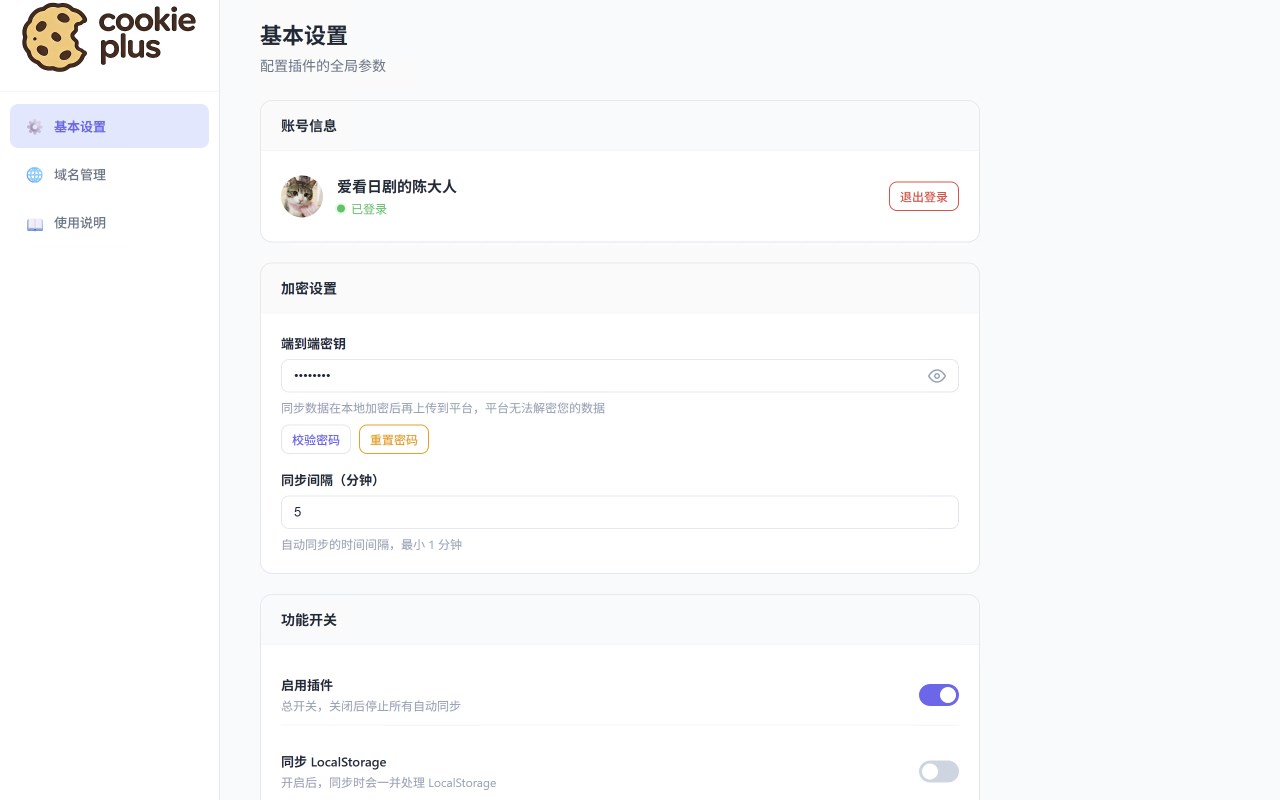
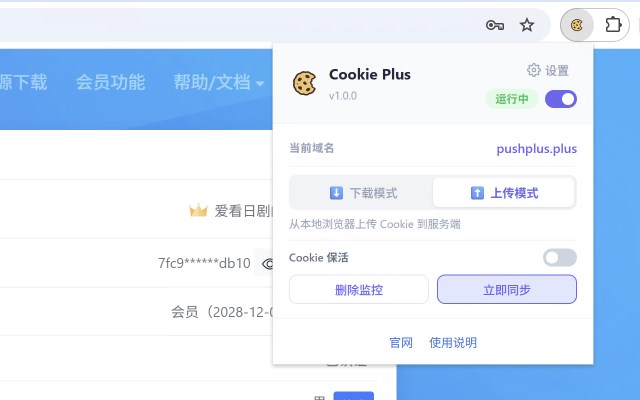
The extension features an intuitive interface accessible from a browser popup and an advanced options page. From the popup, you can quickly check the sync status of the current website, add or remove domains to be monitored, manually trigger synchronization, and review logs or any warnings that arise during sync. The options page provides deeper control, allowing you to manage monitored domains, set sync intervals, tweak encryption settings, manage device identity, and configure advanced server connections. For organizational use and power users, Cookie Plus supports device management capabilities where you can authorize or revoke devices, view sync activities per device, and propagate configuration changes across all your linked devices with ease.
Synchronization in Cookie Plus is engineered for simplicity and reliability. While you browse, the extension continually watches over your configured domains for changes. Upon detection, it prepares encrypted data packets and sends them securely to your chosen backend. Connected devices then retrieve and merge these updates either in real time or according to user-defined sync schedules. With intelligent merge logic tailored for local storage, the extension preserves unique keys on different devices to prevent accidental overwrites or data loss. Cookie synchronization respects cookie lifetimes and HTTP-only flags, ensuring that sessions keep their intended behavior. Additionally, all sync events are transparently logged locally, enabling you to troubleshoot, verify, and maintain oversight over your synchronization processes.
Privacy and security underpin every aspect of Cookie Plus. All data synchronized is encrypted before transmission, protecting your information against interception. The extension employs device fingerprinting to authenticate clients securely, minimizing risk of unauthorized access. Cookie Plus does not collect any personal browsing content beyond the essential data required for synchronization. You retain full control over your sync data—you can delete stored data or remove devices from your account at any moment. Permissions requested by the extension are strictly limited to what is necessary for monitoring and sync activities. Transparency is a priority, with all encryption, sync status, logs, and settings available through a clear and straightforward user interface.
Ideal for a variety of users, Cookie Plus excels for:
- Developers managing login-protected testing environments across multiple browsers and devices.
- Power users seeking consistent login sessions and web data synchronization at home, office, and mobile contexts.
- Teams sharing access to staging environments without repetitive re-authorization steps.
- Privacy advocates demanding encrypted, fine-grained control over what data syncs and where it is stored.
Key Features:
- Multi-device synchronization of cookies and local storage with strong encryption.
- Choose between self-hosted servers or Cookie Plus’s cloud platform for backend sync.
- Granular domain monitoring—only selected sites’ data is captured and synced.
- Quick add/remove domains directly from the browser popup for effortless domain management.
- Manage devices individually: authorize, rename, revoke, and view sync status for each browser instance.
- Client-side encryption with an option for deterministic encryption to facilitate consistent encrypted values.
- Intelligent local storage merge logic preventing overwrites and data loss.
- Detailed logs and sync warnings accessible from popup and options for transparent monitoring.
How It Works:
1. Install Cookie Plus and open the browser popup or options page.
2. Select your synchronization mode: either self-hosted or platform-based.
3. Configure and authorize your sync server or login to the Cookie Plus platform account.
4. Add the domains whose cookies and local storage you want to monitor and synchronize.
5. Cookie Plus continuously observes data changes on monitored domains and syncs encrypted updates across connected devices.
6. Use the options interface to manage devices, adjust sync frequency, trigger manual syncs, and review logs.
7. Remove domains or revoke device access anytime to stop data synchronization and securely erase remote data.
Privacy: - No personal data collected. All synchronization data undergoes end-to-end encryption, with handling strictly limited to the minimum domain, cookie, and storage information necessary for synchronization operations. See our privacy policy for full details.
Cookie Plus 是做什么的
Cookie Plus 是一款面向 Edge 的效率工具类扩展,主要用来管住注意力、屏蔽干扰站点、记录时间。官方对它的介绍是:Cookie & LocalStorage 多设备加密同步工具在微软 Edge 加载项商店上,它当前版本 1.1.2,约 73 名用户。
适合什么人用
从功能定位看,Cookie Plus 更适合想专注工作学习、减少无效刷网页的用户。如果你平时只是偶尔遇到相关需求,用浏览器自带功能也能凑合;但如果这件事每天都发生,装一个专门处理它的扩展通常比手动操作省事得多。需要注意的是它作用于所有网站,装上后建议先观察一两天,确认不影响常用站点的正常使用。
怎么安装 Cookie Plus
- 打开微软 Edge 加载项商店上的官方页面;
- 点「添加到浏览器」并确认权限提示;
- 装好后在扩展列表里固定图标,方便随时开关。
本站只做索引与介绍,安装包来自官方商店。如果商店页面提示当前地区不可用,说明该扩展未在你所在区域上架。
常见问题
Cookie Plus 是免费的吗?
Cookie Plus 在微软 Edge 加载项商店免费提供下载。它是浏览器扩展,装上就能直接用,不需要注册账号。
Cookie Plus 安全吗?
它只申请了 0 项权限,范围比较克制,没有申请「读取所有网站数据」这种大权限。
Cookie Plus 支持哪些浏览器?
当前收录的版本来自微软 Edge 加载项商店,适用于 Edge。同一个扩展在其他商店可能有对应版本,但功能与版本号不一定相同。
怎么卸载 Cookie Plus?
在扩展管理页找到 Cookie Plus,点移除即可。它在本地保存的设置会一起清掉,不会残留数据。
权限清单 来自 manifest.json 原文
站点访问(可选) 1
<all_urls>
接口权限 8
activeTabalarmscookiesnotificationsoffscreenscriptingstoragetabs