
Color Inverter EN
Invert Color · EEdge MV3
Instantly invert image colors. Simple, fast, privacy-first. Works offline.
截图
简介
Color Inverter - Simple & Fast Image Color Inversion
Transform any image with instant color inversion. Perfect for creating negative effects, improving visibility, dark mode conversions, or artistic exploration.
✨ KEY FEATURES
• Simple RGB Inversion - Professional-grade color transformation
• 100% Privacy-First - All processing happens in your browser, nothing uploaded
• Lightning Fast - Instant results with no waiting
• Works Offline - No internet connection required after installation
• Multiple Methods - Right-click menu or drag & drop upload
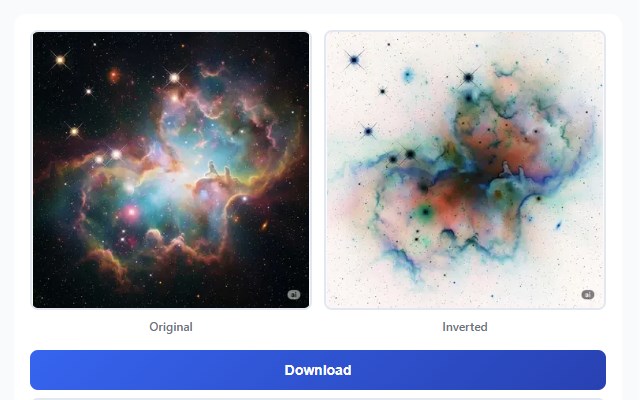
• Side-by-Side Preview - Compare original and inverted images
• One-Click Download - Save inverted images instantly
🎯 HOW TO USE
Method 1: Right-Click (Fastest)
1. Right-click any image on any webpage
2. Select "Invert Image Colors"
3. View the inverted result in a beautiful overlay
4. Click Download to save
Method 2: Extension Popup
1. Click the Color Inverter icon
2. Drag & drop or upload your image
3. Preview original and inverted side-by-side
4. Download with one click
🔒 PRIVACY & SECURITY
• No data collection - We never see your images
• No tracking or analytics
• No sign-up required
• No external servers - Everything processes locally
• All processing happens in your browser using HTML5 Canvas API
• Zero permissions for browsing history or personal data
📁 SUPPORTED FORMATS
• JPEG / JPG
• PNG
• WebP
• GIF
• BMP
Maximum file size: 50MB
🎨 HOW IT WORKS
Uses standard RGB inversion algorithm (255 - RGB):
• Red → Cyan
• Green → Magenta
• Blue → Yellow
• White → Black
• Black → White
Perfect for:
• Creating photo negatives
• Enhancing image visibility
• Artistic effects
• Dark mode conversions
• Medical imaging review
• Accessibility improvements
• Educational purposes
• Creative design work
🌐 BROWSER COMPATIBILITY
Works seamlessly on Chrome, Edge, and all Chromium-based browsers.
💡 WHY CHOOSE COLOR INVERTER?
Unlike online tools that upload your images to remote servers, Color Inverter processes everything directly in your browser. This means:
• Your images never leave your device
• Instant processing with no upload time
• Works completely offline
• No file size limitations from servers
• Complete privacy and security
• Minimal permissions - only what's needed for the core functionality
🔧 MINIMAL PERMISSIONS
• contextMenus - Adds "Invert Image Colors" to right-click menu
• activeTab - Access images only on the page you're viewing when you click
• scripting - Inject the image processing code only when you use the extension
That's it! Only 3 permissions. Scripts only run when you click. No access to your browsing history, passwords, or personal data.
📞 SUPPORT & MORE
Visit https://invertcolor.app for more information and web-based color inversion tools.
---
Free forever. No ads. No tracking. Just simple, fast color inversion.
Color Inverter 是做什么的
Color Inverter 是一款面向 Edge 的实用工具类扩展,主要用来解决浏览器里某类具体的小问题。官方对它的介绍是:Instantly invert image colors. Simple, fast, privacy-first. Works offline.在微软 Edge 加载项商店上,它当前版本 1.0.0,评分 4(1 人评价),约 112 名用户。
适合什么人用
从功能定位看,Color Inverter 更适合想补上浏览器原生缺失功能的用户。如果你平时只是偶尔遇到相关需求,用浏览器自带功能也能凑合;但如果这件事每天都发生,装一个专门处理它的扩展通常比手动操作省事得多。
怎么安装 Color Inverter
- 打开微软 Edge 加载项商店上的官方页面;
- 点「添加到浏览器」并确认权限提示;
- 装好后在扩展列表里固定图标,方便随时开关。
本站只做索引与介绍,安装包来自官方商店。如果商店页面提示当前地区不可用,说明该扩展未在你所在区域上架。
常见问题
Color Inverter 是免费的吗?
Color Inverter 在微软 Edge 加载项商店免费提供下载。它是浏览器扩展,装上就能直接用,不需要注册账号。
Color Inverter 安全吗?
它只申请了 0 项权限,范围比较克制,没有申请「读取所有网站数据」这种大权限。
Color Inverter 支持哪些浏览器?
当前收录的版本来自微软 Edge 加载项商店,适用于 Edge。同一个扩展在其他商店可能有对应版本,但功能与版本号不一定相同。
怎么卸载 Color Inverter?
在扩展管理页找到 Color Inverter,点移除即可。它在本地保存的设置会一起清掉,不会残留数据。
权限清单 来自 manifest.json 原文
接口权限 3
activeTabcontextMenusscripting
其他商店也有这款
同一款扩展在不同浏览器下的版本,权限与更新节奏可能不同
