
Clipboard History Pro EN
Clipboard History Pro · EEdge MV3
Clipboard manager extension for your browser: history of copied text, favorites, context menu paste
<all_urls>),意味着它可以读取你在任意站点的页面内容,包括已登录的页面。这是许多扩展正常工作的必要条件,但也值得你确认来源可信。
截图
简介
Clipboard History Pro is a powerful Edge extension trusted by over 100,000 users to streamline their daily workflow.
Instantly access your entire copy paste history and automate repetitive typing with our seamless, two-in-one productivity tool. With simple, one-click installation, Clipboard History Pro integrates directly into your browser to help you manage every copied item and accelerate your writing.
Key Features:
Unlimited Clipboard History
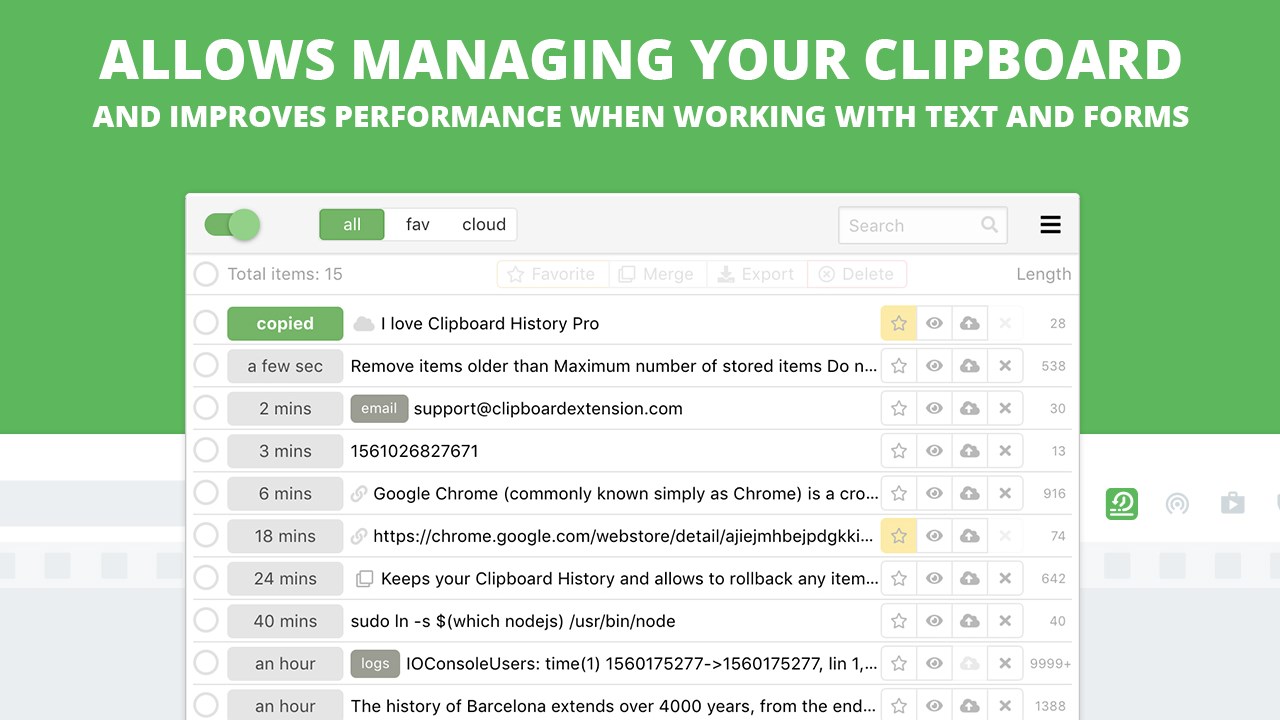
• Never lose a copied item again! Clipboard History Pro keeps a complete, searchable record of all copied text, links, and images. Effortlessly find and reuse past snippets, even if they were copied days ago.
Powerful Text Expander
• Create custom shortcuts that instantly expand into entire sentences, code blocks, or templates. Our text expander automatically replaces your snippets on any webpage.
Smart Organization & Instant Search
• Organize key items with tags and favorites for immediate access. Use our powerful smart search to find exactly what you need in seconds within your extensive clipboard history.
Seamless Mobile Cloud Sync
• Work effortlessly across all your devices. Clipboard History Pro is one of the only solutions that lets you sync your clipboard manager history and text expander snippets between Edge, Android, and iOS.
Password Lock for Data Privacy
• Secure your sensitive clipboard history with an optional Password Lock. Restrict unauthorized access to your list and options page, adding an essential layer of security.
Floating Mode for Power Users
• Boost your efficiency with Floating Mode, which runs Clipboard History Pro in a separate, always-on-top window. Ideal for multi-display setups and users who need constant access to their copy paste history.
Clipboard Widget for Easy Pasting
• Access your clipboard history from any webpage with our convenient widget. Quickly paste multiple items from your history without opening the main extension, streamlining data entry and form-filling.
Customizable Keyboard Shortcuts
• Organize and instantly paste your most frequently used items. Customize quick paste shortcuts (like Shift+Alt+1, 2, 3) for lightning-fast access to your favorite snippets.
Instant Access & History Feed
Access a centralized, up-to-date feed of all recently copied items. Easily find and reuse snippets with a single click, transforming your clipboard into a powerful organizational tool.
Fully Integrated with Edge
• Extension Icon: Quick access to your complete history and text expander settings.
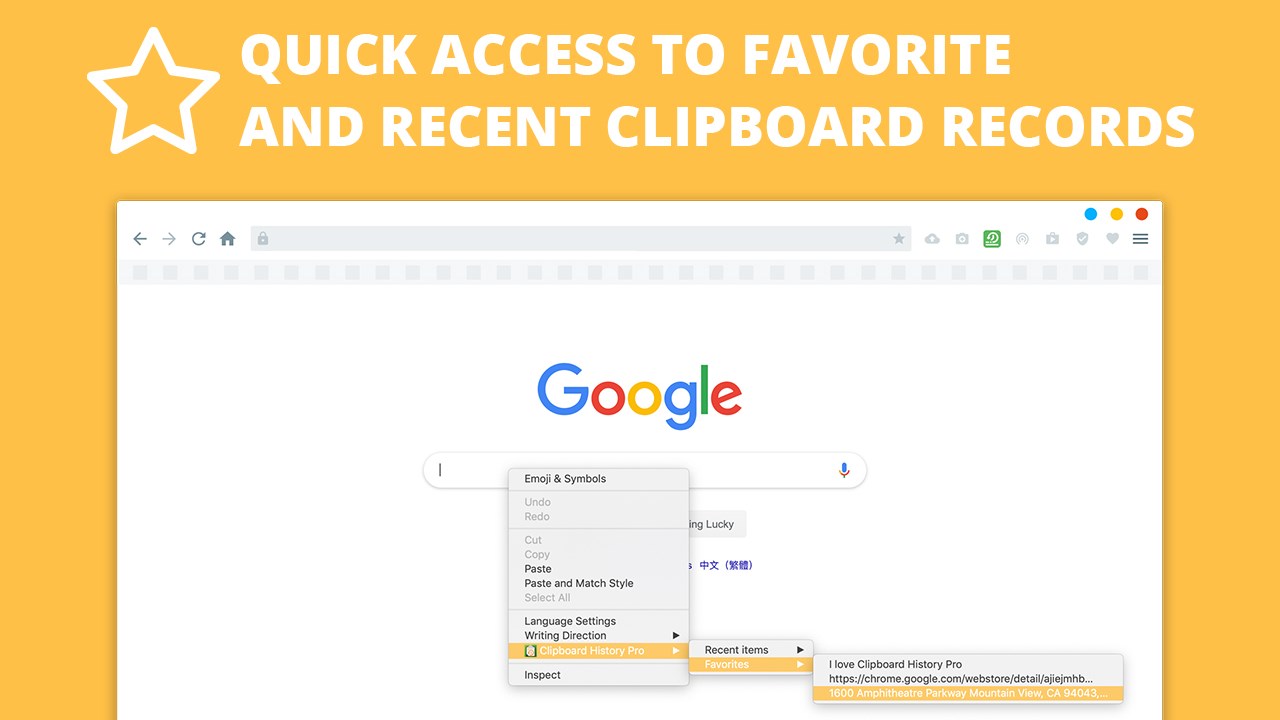
• Context Menus: Right-click in any input field to paste directly from your history.
• Keyboard Shortcuts: Rapidly access and paste items without taking your hands off the keyboard.
Free Plan & Premium Options
• Free Plan: Enjoy essential clipboard history and basic text expansion features to get started.
• Pro Plans: Unlock unlimited history, mobile sync, password lock, floating mode, the clipboard widget, and advanced text expander capabilities for ultimate productivity.
Use Cases
• Cross-Device Workflow: Maintain continuity of your copy paste content between your desktop and mobile devices.
• Timely Content Creation: Quickly insert pre-written responses, code snippets, or marketing copy for emails, social media, and documents.
• Research & Writing: Compile notes, articles, and links from hundreds of sources without ever losing a single piece of information.
• Customer Communication: Automate common replies and product descriptions to ensure consistency and speed with text expander shortcuts.
• Data Entry & Forms: Streamline repetitive data input with multi-paste operations, reducing manual effort and errors.
Frequently Asked Questions (FAQ)
How does Clipboard History Pro save my copied items?
The extension runs quietly in your browser, automatically logging every piece of text, image, or link you copy. Your history is stored locally and can be accessed anytime.
How does the Text Expander work?
You define short, custom shortcuts (e.g., ;sig). When you type that shortcut on any webpage, Clipboard History Pro automatically expands it into your pre-set full text.
Is my clipboard data secure?
Yes, your data is stored locally in your browser. For sensitive information, our Pro version offers an optional Password Lock that restricts unauthorized access to your history, adding an essential layer of security.
Does it work on all websites?
Yes, our clipboard manager and text expander features are designed to work seamlessly across virtually all web pages and online applications within your Edge browser.
Why Choose Clipboard History Pro?
1. Two-in-One Solution: The only Edge extension combining a powerful clipboard manager with a full-featured text expander, offering comprehensive productivity in one tool.
2. Simple Setup: A quick Edge extension, no technical expertise required.
3. Data Privacy & Security: We store your data locally, and our Pro features offer a Password Lock for sensitive information.
4. Proven Reliability: Over 100,000 active users rely on Clipboard History Pro for precise copy paste management and typing automation.
How Clipboard History Pro Works
The extension runs quietly in your browser, automatically saving everything you copy. When you need to retrieve an item, simply open the extension or use a keyboard shortcut. For text expansion, you define short commands that instantly expand into your pre-set text wherever you type them.
Ready to Elevate Your Productivity?
Install Clipboard History Pro today and experience a new level of efficiency in your browser. Never lose a copy, always type less, and take full control of your digital communication!
Website: https://clipboardextension.com
Make every keystroke count with Clipboard History Pro: the easiest, most secure way to manage your copied content and automate your typing.
Clipboard History Pro 是做什么的
Clipboard History Pro 是一款面向 Edge 的效率工具类扩展,主要用来管住注意力、屏蔽干扰站点、记录时间。官方对它的介绍是:Clipboard manager extension for your browser: history of copied text, favorites, context menu paste在微软 Edge 加载项商店上,它当前版本 4.3.1,评分 4.5(24 人评价),约 22,937 名用户。
适合什么人用
从功能定位看,Clipboard History Pro 更适合想专注工作学习、减少无效刷网页的用户。如果你平时只是偶尔遇到相关需求,用浏览器自带功能也能凑合;但如果这件事每天都发生,装一个专门处理它的扩展通常比手动操作省事得多。需要注意的是它作用于所有网站,装上后建议先观察一两天,确认不影响常用站点的正常使用。
怎么安装 Clipboard History Pro
- 打开微软 Edge 加载项商店上的官方页面;
- 点「添加到浏览器」并确认权限提示;
- 装好后在扩展列表里固定图标,方便随时开关。
本站只做索引与介绍,安装包来自官方商店。如果商店页面提示当前地区不可用,说明该扩展未在你所在区域上架。
常见问题
Clipboard History Pro 是免费的吗?
Clipboard History Pro 在微软 Edge 加载项商店免费提供下载。它是浏览器扩展,装上就能直接用,不需要注册账号。
Clipboard History Pro 安全吗?
它只申请了 0 项权限,范围比较克制,没有申请「读取所有网站数据」这种大权限。
Clipboard History Pro 支持哪些浏览器?
当前收录的版本来自微软 Edge 加载项商店,适用于 Edge。同一个扩展在其他商店可能有对应版本,但功能与版本号不一定相同。
怎么卸载 Clipboard History Pro?
在扩展管理页找到 Clipboard History Pro,点移除即可。它在本地保存的设置会一起清掉,不会残留数据。
权限清单 来自 manifest.json 原文
站点访问(可选) 1
<all_urls>
接口权限 9
activeTabalarmsclipboardReadclipboardWritecontextMenusidentityoffscreenscriptingstorage
接口权限(可选) 1
tabs