
Clear Cache & Reload Pro EN
mohamedsubarashi · EEdge MV3
Clear cache, cookies and site data, then reload tabs. Includes precise single-site clearing with no permanent site access.
截图
简介
Clear Cache & Reload is a powerful and comprehensive browser extension designed to optimize your browsing experience by swiftly clearing cache, cookies, history, storage, and a wide range of other browsing data. Ideal for developers who need a clean environment for testing, privacy-conscious users who want to maintain anonymity, or anyone facing performance issues from accumulated browsing data, this extension provides a simple yet highly customizable toolset tailored to meet diverse needs.
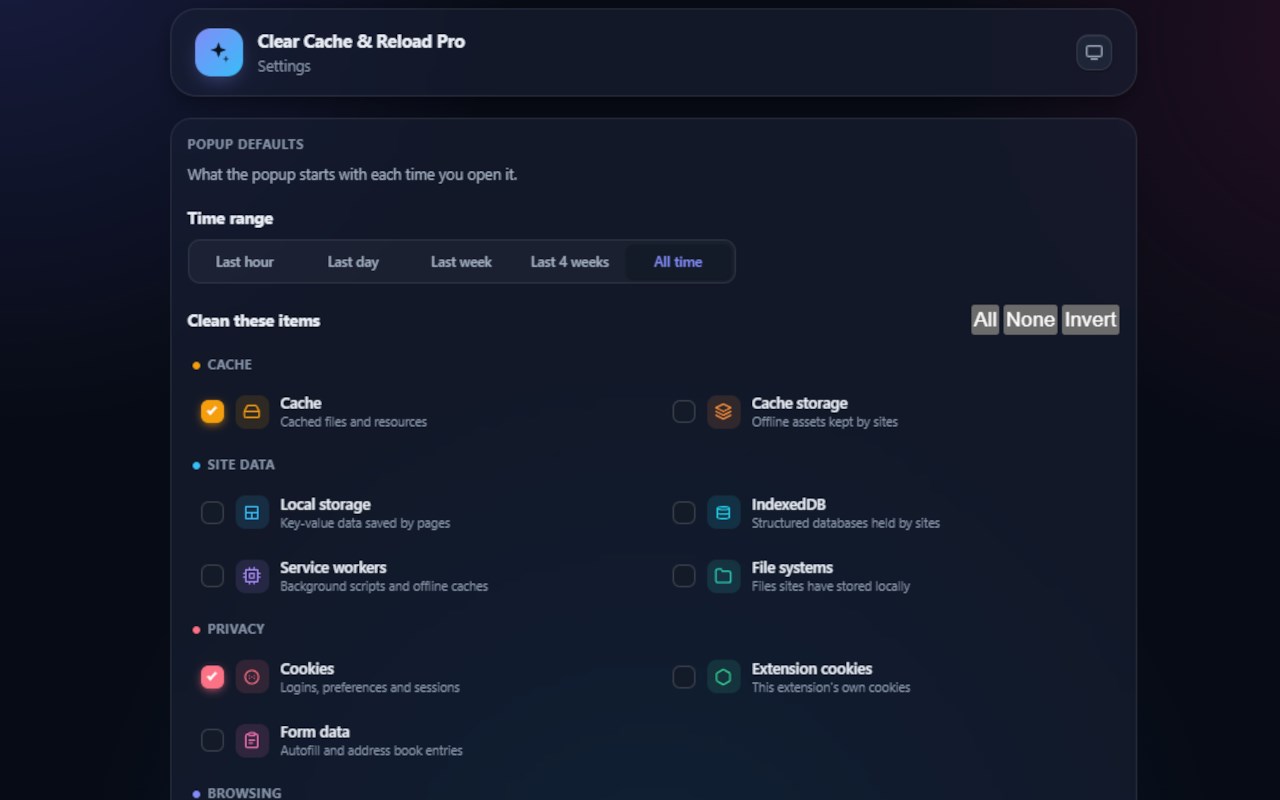
The extension offers an intuitive and user-friendly popup interface alongside a detailed options page for advanced configurations. Clear Cache & Reload allows you to precisely select the types of data you want to erase, including browser cache, cookies (both browser and extension cookies), browsing history, downloads, form autofill data, local storage, IndexedDB, service workers, passwords, and even file system data. You can clear data based on flexible timeframes—from the last hour, day, or week, up to the entirety of your browsing history.
Designed to enhance any workflow, the extension includes convenient features such as one-click clearing and automatic reload of the current tab, ensuring that cleared data takes immediate effect. Theme toggling between light and dark modes is available on both the popup and options page, providing a comfortable visual experience tailored to your preferences. When you first install the extension, the options page opens automatically to simplify initial setup and help you configure your preferred defaults quickly.
Clear Cache & Reload respects user privacy by not collecting any personal data or browsing history. It uses only the necessary browser permissions, such as tabs, cookies, storage, and browsing history access, to deliver a robust and feature-rich experience locally on your device. This confidentiality makes the extension an excellent choice for users demanding high privacy standards, as well as for professionals working with sensitive data.
Key Features:
- Versatile data clearing: Remove cache, cookies, history, downloads, form data, local storage, IndexedDB, service workers, passwords, and file system entries effortlessly.
- Configurable clearance options: Choose specific data types such as browser or extension cookies, storage mechanisms, and more.
- Flexible clearing time ranges: Select intervals like the last hour, last day, last week, or clear all data for thorough cleanup.
- One-click clear and reload: Instantly erase the selected data types and have the current browser tab refresh automatically to reflect changes.
- Intuitive popup interface and detailed options page: Quickly access core controls or dive into advanced settings.
- Theme customization: Switch between light and dark themes to suit your environment or preferences.
- Granular cookie management: Separate controls for clearing browser cookies versus extension-specific cookies.
- Privacy-first design: No personal browsing data is ever collected or transmitted; all operations remain on your device.
How It Works:
1. Install Clear Cache & Reload from your browser’s extension store.
2. After installation, the options page opens automatically for you to configure default data clearing preferences and other settings.
3. When you want to clear browsing data, open the extension’s popup interface.
4. Select the desired time range and the specific types of data (cache, cookies, history, storage, etc.) you wish to remove.
5. Click the “Clear” button to immediately erase the chosen data from your browser.
6. The current active browser tab reloads automatically, ensuring that the cleared data is no longer applied and fresh content is displayed.
7. Use the settings button within the popup or revisit the options page at any time to adjust your preferences, manage cookie clearing in detail, or toggle between light and dark themes for ease of use.
Privacy: - No personal data collected.
Clear Cache & Reload Pro 是做什么的
Clear Cache & Reload Pro 是一款面向 Edge 的实用工具类扩展,主要用来解决浏览器里某类具体的小问题。官方对它的介绍是:Clear cache, cookies and site data, then reload tabs. Includes precise single-site clearing with no permanent site access.在微软 Edge 加载项商店上,它当前版本 2.0.0,约 35 名用户。
适合什么人用
从功能定位看,Clear Cache & Reload Pro 更适合想补上浏览器原生缺失功能的用户。如果你平时只是偶尔遇到相关需求,用浏览器自带功能也能凑合;但如果这件事每天都发生,装一个专门处理它的扩展通常比手动操作省事得多。
怎么安装 Clear Cache & Reload Pro
- 打开微软 Edge 加载项商店上的官方页面;
- 点「添加到浏览器」并确认权限提示;
- 装好后在扩展列表里固定图标,方便随时开关。
本站只做索引与介绍,安装包来自官方商店。如果商店页面提示当前地区不可用,说明该扩展未在你所在区域上架。
常见问题
Clear Cache & Reload Pro 是免费的吗?
Clear Cache & Reload Pro 在微软 Edge 加载项商店免费提供下载。它是浏览器扩展,装上就能直接用,不需要注册账号。
Clear Cache & Reload Pro 安全吗?
它只申请了 0 项权限,范围比较克制,没有申请「读取所有网站数据」这种大权限。
Clear Cache & Reload Pro 支持哪些浏览器?
当前收录的版本来自微软 Edge 加载项商店,适用于 Edge。同一个扩展在其他商店可能有对应版本,但功能与版本号不一定相同。
怎么卸载 Clear Cache & Reload Pro?
在扩展管理页找到 Clear Cache & Reload Pro,点移除即可。它在本地保存的设置会一起清掉,不会残留数据。
权限清单 来自 manifest.json 原文
接口权限 6
activeTabbrowsingDatacookiesscriptingstoragetabs