Chat Translator – Translate WhatsApp, Chatbox & More EN
NexTools · EEdge MV3
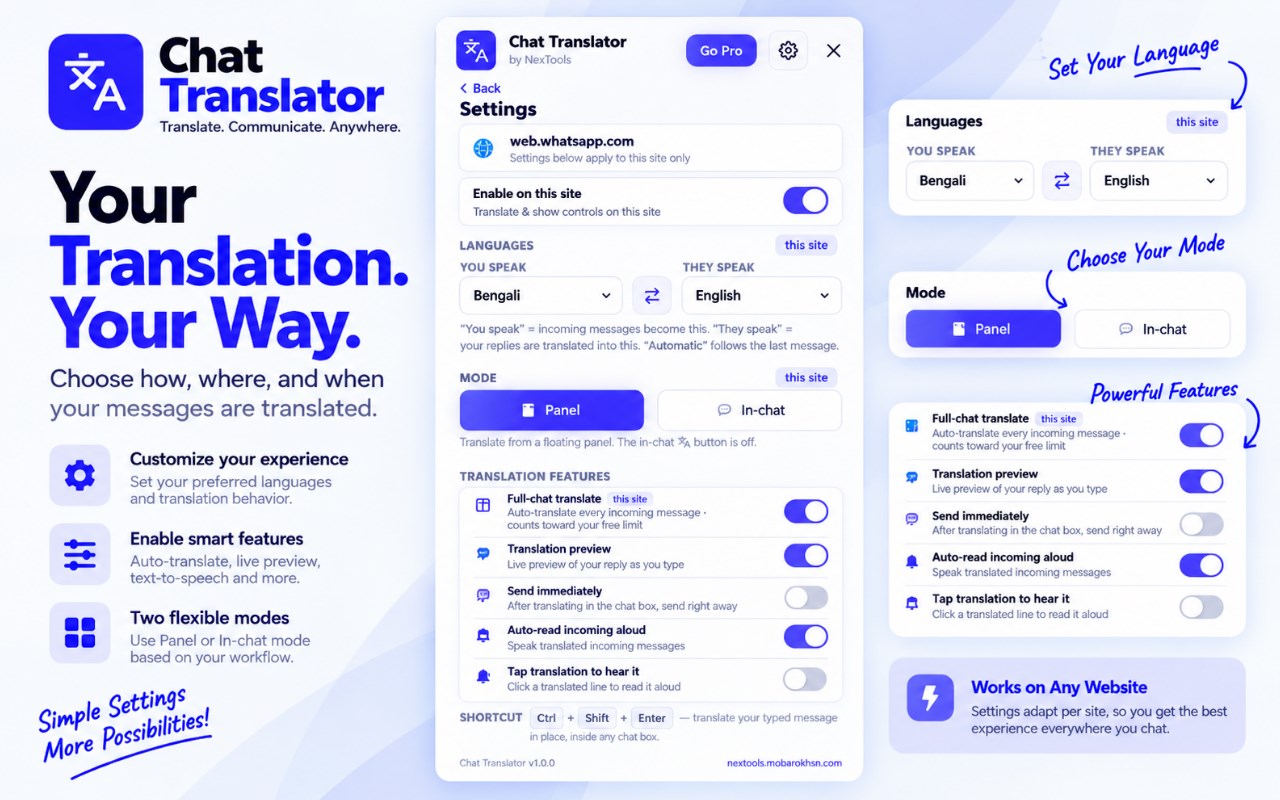
Translate WhatsApp, ChatGPT and web chatboxes in 133+ languages. Write, preview and send messages in your preferred language.
截图
简介
Chat Translator – Translate WhatsApp, Chatbox & More
Chat Translator by NexTools helps you communicate across languages directly from your browser.
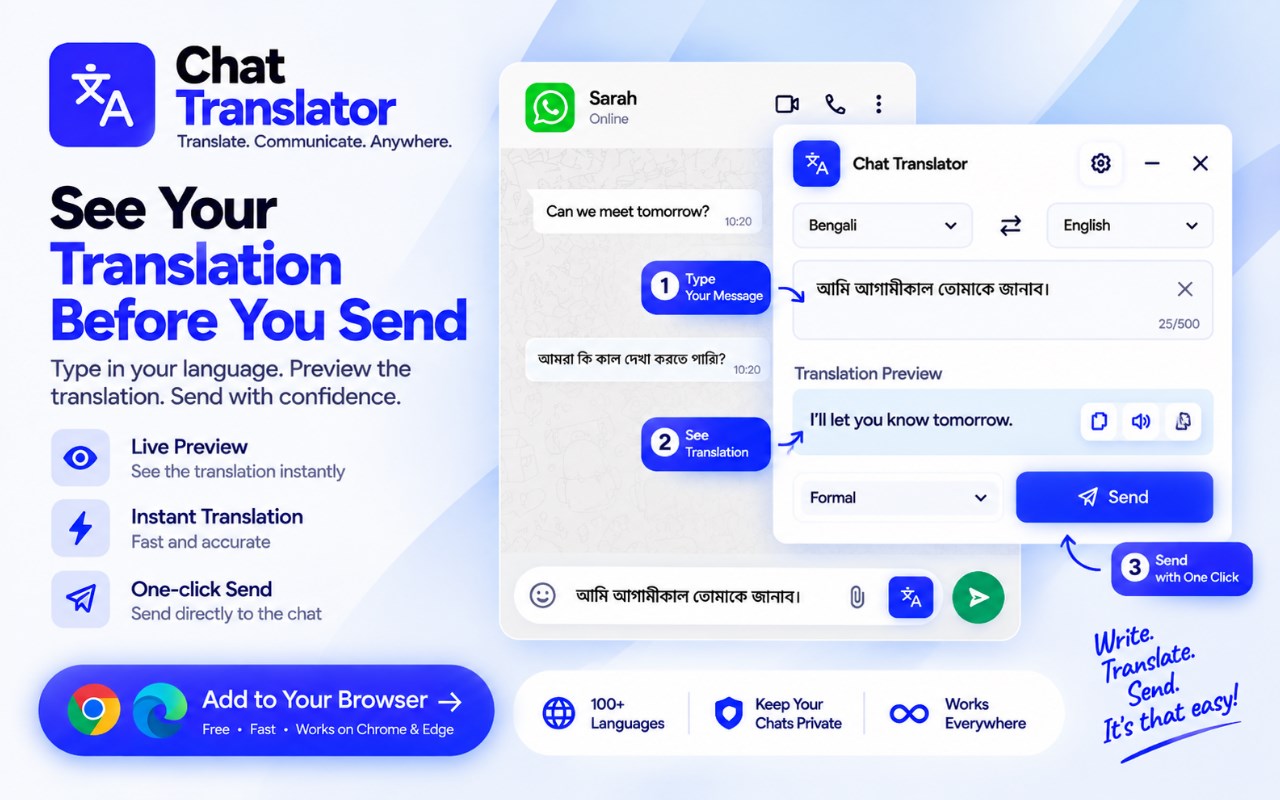
Write a message in your own language, translate it into another language, preview the translation, and send it directly from supported chat boxes and websites.
Whether you're using WhatsApp, ChatGPT, Messenger, Telegram, Discord, or another website with a text input, Chat Translator makes multilingual communication faster and easier.
No more switching between tabs or repeatedly copying text into a separate translation website.
KEY FEATURES
• Translate messages directly inside supported chat boxes
• Write in your own language and translate before sending
• Preview translated text before sending
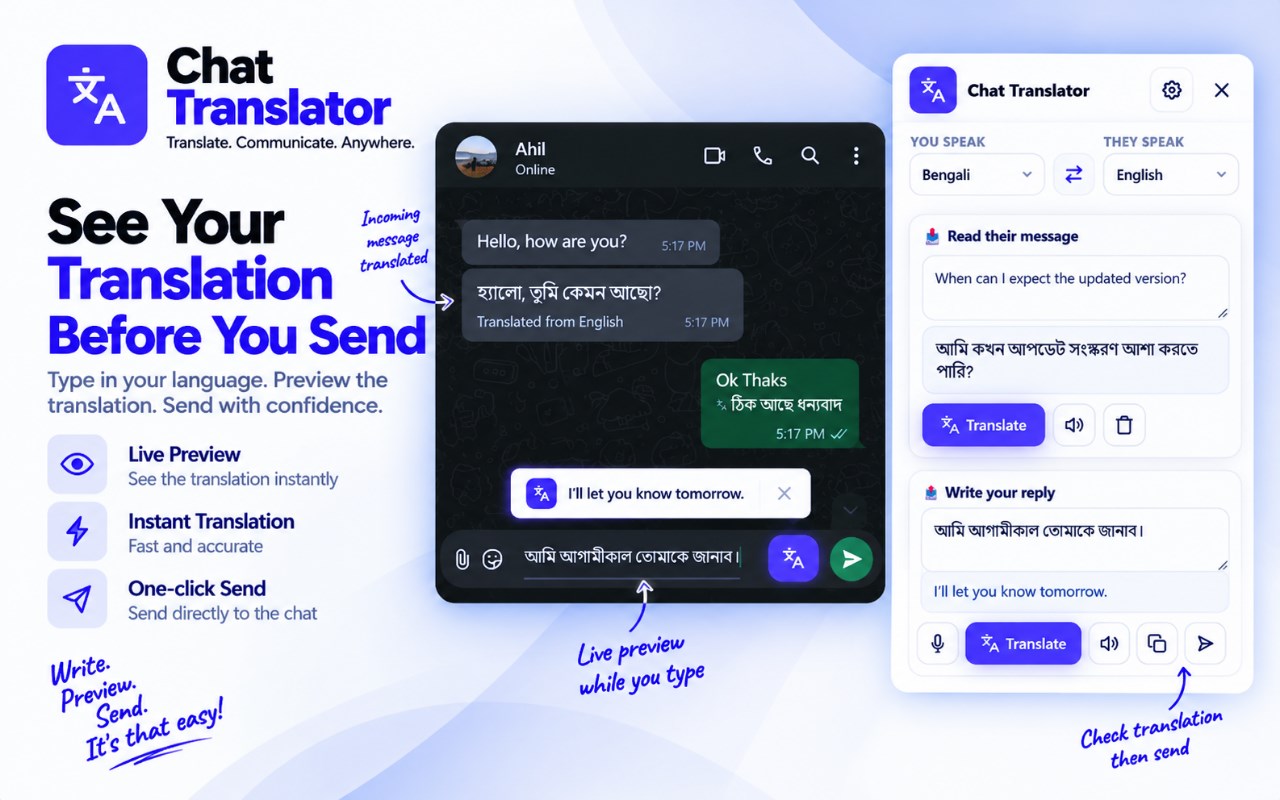
• Translate incoming messages on supported websites
• Voice typing for faster message writing
• Text-to-speech for translated messages
• Automatic language detection
• Support for 133+ languages
• Set preferred languages for different websites
• Enable or disable translation per website
• In-Chat Mode
• Floating Panel Mode
TRANSLATE TEXT ACROSS THE WEB
Chat Translator is designed to work beyond traditional messaging apps.
Use it wherever supported text input fields and chat boxes are available.
For example:
ChatGPT
Write your prompt in Bengali, Hindi, Arabic, or another language and translate it into English before sending.
WhatsApp Web
Write messages in your preferred language and translate them into the language of your contact.
Messenger & Instagram
Prepare translated replies for customers, friends, and international contacts.
Telegram & Discord
Communicate with people who speak different languages.
Other Websites
Use Chat Translator on supported chat boxes and text input fields across the web.
WRITE IN YOUR LANGUAGE. SEND IN THEIRS.
Write your message naturally in your preferred language, translate it, review the result, and send it.
Example:
Bengali:
আপনি কি আমাকে প্রজেক্টটির বিস্তারিত জানাতে পারবেন?
English:
Could you please share the details of the project with me?
Chat Translator helps you complete this workflow without leaving the website you're using.
133+ LANGUAGES
Translate between 133+ languages, including:
• English
• Bengali
• Spanish
• Arabic
• Hindi
• Chinese
• Portuguese
• French
• German
• Russian
• Japanese
• Korean
• Turkish
• Indonesian
• And many more
Automatic language detection can help identify the language of incoming text and simplify the translation process.
LIVE TRANSLATION PREVIEW
Preview your translated message before sending it.
Review the translation, make changes if necessary, and then send your message.
This gives you more control over what you communicate in another language.
VOICE TYPING
Speak instead of typing your message manually.
Voice typing converts your speech into text, which can then be translated into your selected language.
This makes writing messages faster and more convenient.
TEXT-TO-SPEECH
Listen to translated text using text-to-speech functionality supported by your browser.
This can be useful when reading messages in unfamiliar languages or when you prefer listening instead of reading.
FLEXIBLE TRANSLATION MODES
In-Chat Mode
Use translation tools directly inside supported chat interfaces and text input areas.
Floating Panel Mode
Open the translator through a floating panel while browsing supported websites.
Choose the workflow that works best for you.
WEBSITE-SPECIFIC SETTINGS
Different websites may require different translation preferences.
Chat Translator lets you configure supported settings for individual websites.
You can:
• Select your preferred languages
• Configure translation modes
• Enable or disable the translator per website
• Adjust your translation workflow
BUILT FOR EVERYDAY COMMUNICATION
Chat Translator is useful for:
• Freelancers working with international clients
• Online sellers and customer support teams
• Content creators and digital professionals
• Students and international communities
• People using ChatGPT and AI tools
• Multilingual teams and communities
• Anyone who communicates across languages
FREE TO GET STARTED
Chat Translator is available as a free browser extension with daily translation usage.
It is designed for everyday conversations, online communication, international clients, customer support, and multilingual browsing.
Additional usage options may be available through NexTools.
PRIVACY & TRANSLATION SERVICES
Chat Translator is designed to provide translation functionality through your browser.
Depending on the selected translation engine, text may be processed through third-party translation services. Translation quality and availability can vary depending on the language and service.
Please review the NexTools Privacy Policy before using the extension with sensitive or confidential information.
IMPORTANT INFORMATION
Chat Translator is an independent browser extension developed by NexTools.
Modern websites frequently change their layouts, chat interfaces, and text input systems. Because of this, compatibility and functionality may vary between websites, and some websites may require future updates.
Translation quality may vary depending on the selected translation engine, language pair, and available service.
Chat Translator is not affiliated with, endorsed by, or sponsored by WhatsApp, Meta, Telegram, Discord, TikTok, Twitch, X, or OpenAI.
All product names, trademarks, and logos belong to their respective owners.
NEXTOOLS
Built by NexTools to make everyday digital workflows faster, simpler, and more productive.
Write. Translate. Communicate.
Chat Translator – Translate WhatsApp, Chatbox & More 是做什么的
Chat Translator – Translate WhatsApp, Chatbox & More 是一款面向 Edge 的效率工具类扩展,主要用来管住注意力、屏蔽干扰站点、记录时间。官方对它的介绍是:Translate WhatsApp, ChatGPT and web chatboxes in 133+ languages. Write, preview and send messages in your preferred language.在微软 Edge 加载项商店上,它当前版本 1.0.0,约 4 名用户。
适合什么人用
从功能定位看,Chat Translator – Translate WhatsApp, Chatbox & More 更适合想专注工作学习、减少无效刷网页的用户。如果你平时只是偶尔遇到相关需求,用浏览器自带功能也能凑合;但如果这件事每天都发生,装一个专门处理它的扩展通常比手动操作省事得多。
怎么安装 Chat Translator – Translate WhatsApp, Chatbox & More
- 打开微软 Edge 加载项商店上的官方页面;
- 点「添加到浏览器」并确认权限提示;
- 装好后在扩展列表里固定图标,方便随时开关。
本站只做索引与介绍,安装包来自官方商店。如果商店页面提示当前地区不可用,说明该扩展未在你所在区域上架。
常见问题
Chat Translator – Translate WhatsApp, Chatbox & More 是免费的吗?
Chat Translator – Translate WhatsApp, Chatbox & More 在微软 Edge 加载项商店免费提供下载。它是浏览器扩展,装上就能直接用,不需要注册账号。
Chat Translator – Translate WhatsApp, Chatbox & More 安全吗?
它只申请了 0 项权限,范围比较克制,没有申请「读取所有网站数据」这种大权限。
Chat Translator – Translate WhatsApp, Chatbox & More 支持哪些浏览器?
当前收录的版本来自微软 Edge 加载项商店,适用于 Edge。同一个扩展在其他商店可能有对应版本,但功能与版本号不一定相同。
怎么卸载 Chat Translator – Translate WhatsApp, Chatbox & More?
在扩展管理页找到 Chat Translator – Translate WhatsApp, Chatbox & More,点移除即可。它在本地保存的设置会一起清掉,不会残留数据。
权限清单 来自 manifest.json 原文
接口权限 2
activeTabstorage