
Chat GPT Toolkit
ChatGPT Toolkit · EEdge MV3
Unleash AI Potential: Chat GPT Toolkit for Enhanced Conversational Experiences!
<all_urls>),意味着它可以读取你在任意站点的页面内容,包括已登录的页面。这是许多扩展正常工作的必要条件,但也值得你确认来源可信。
截图
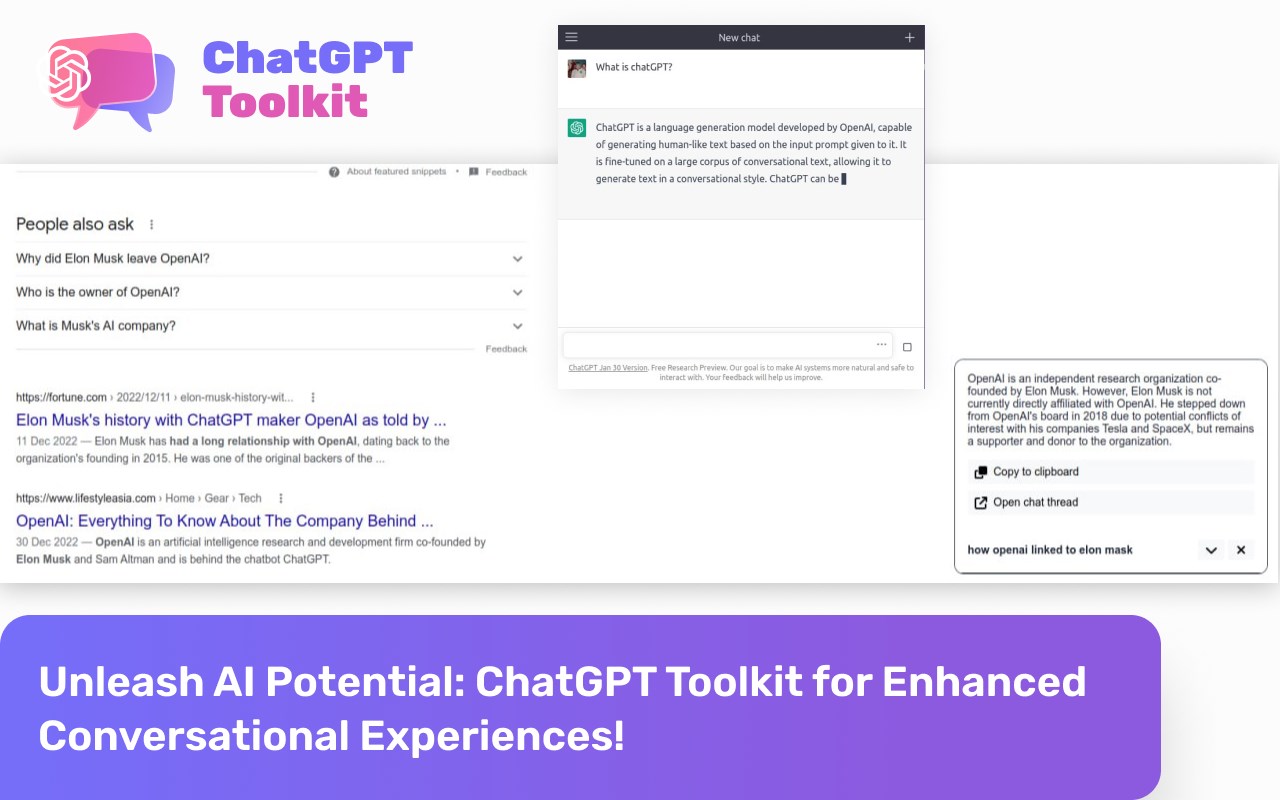
简介
Are you ready to take your conversations to the next level? Look no further than the Chat GPT Toolkit, your ultimate browser extension for an AI-powered chat experience like never before! 💬💪
🔍📝 Seamlessly integrated into your browsing, the Chat GPT Toolkit offers a range of exciting features designed to empower you in every conversation:
1️⃣ Chat GPT in Extension's Popup: Say goodbye to switching tabs! Engage with the power of Chat GPT directly within the extension's convenient popup. Instantly generate intelligent and natural responses, making your conversations a breeze. 💬💡
2️⃣ Address Bar Integration: Harnessing the convenience of the address bar, simply type "gpt" and add a space to insert a prompt for Chat GPT. Watch as your ideas come to life with AI assistance, effortlessly enhancing your communication. 📝🔗
3️⃣ Search Engine Integration: Boost your productivity by integrating Chat GPT results directly into your search engine results pages (SERPs). Instantly access valuable AI-generated insights alongside your regular search results, revolutionizing your information discovery process. 🧠🔎
4️⃣ Run from Context Menu: Take control of your conversations with a single right-click. Access the power of Chat GPT directly from the context menu, enabling you to generate creative responses on the fly. 🖱️💬
Don't miss out on this incredible opportunity to unlock the full potential of AI in your conversations. With the Chat GPT Toolkit, your communication skills will soar to new heights, captivating your audience and transforming the way you connect. 💫✨
✨🔥 Get the Chat GPT Toolkit today and experience the future of conversational AI! 🔥✨
你准备好将你的对话提升到一个新的层次了吗?别再犹豫了,Chat GPT Toolkit就是你的终极浏览器扩展,为你带来前所未有的人工智能聊天体验!💬💪
🔍📝 Chat GPT Toolkit无缝地集成到你的浏览器中,提供一系列令人兴奋的功能,旨在让你在每次对话中更加自信:
1️⃣ 扩展弹窗中的Chat GPT:告别切换标签页!直接在方便的弹窗中与Chat GPT的强大功能互动。即刻生成智能自然的回应,让你的对话变得轻松自如。💬💡
2️⃣ 地址栏集成:利用地址栏的便利,只需键入"gpt"并加上空格,即可插入Chat GPT的提示。看着你的想法在人工智能的辅助下变为现实,轻松提升你的沟通能力。📝🔗
3️⃣ 搜索引擎集成:将Chat GPT的结果直接集成到你的搜索引擎结果页面(SERP)中,提升你的工作效率。即刻获取有价值的人工智能生成洞察力,与常规搜索结果一起改变你的信息发现过程。🧠🔎
4️⃣ 从右键菜单中运行:通过单击右键,掌控你的对话。直接从右键菜单中使用Chat GPT的强大功能,让你能够随心所欲地生成创意回应。🖱️💬
不要错过这个令人难以置信的机会,解锁人工智能在你的对话中的全部潜力。借助Chat GPT Toolkit,你的沟通技巧将飞跃到新的高度,吸引你的听众,改变你的连接方式。💫✨
✨🔥 立即获取Chat GPT Toolkit,体验会话人工智能的未来!🔥✨
Chat GPT Toolkit 是做什么的
Chat GPT Toolkit 是一款面向 Edge 的效率工具类扩展,主要用来管住注意力、屏蔽干扰站点、记录时间。官方对它的介绍是:Unleash AI Potential: Chat GPT Toolkit for Enhanced Conversational Experiences!在微软 Edge 加载项商店上,它当前版本 1.0.7,评分 5(3690 人评价),约 9,360 名用户。
适合什么人用
从功能定位看,Chat GPT Toolkit 更适合想专注工作学习、减少无效刷网页的用户。如果你平时只是偶尔遇到相关需求,用浏览器自带功能也能凑合;但如果这件事每天都发生,装一个专门处理它的扩展通常比手动操作省事得多。需要注意的是它作用于所有网站,装上后建议先观察一两天,确认不影响常用站点的正常使用。
怎么安装 Chat GPT Toolkit
- 打开微软 Edge 加载项商店上的官方页面;
- 点「添加到浏览器」并确认权限提示;
- 装好后在扩展列表里固定图标,方便随时开关。
本站只做索引与介绍,安装包来自官方商店。如果商店页面提示当前地区不可用,说明该扩展未在你所在区域上架。
常见问题
Chat GPT Toolkit 是免费的吗?
Chat GPT Toolkit 在微软 Edge 加载项商店免费提供下载。它是浏览器扩展,装上就能直接用,不需要注册账号。
Chat GPT Toolkit 安全吗?
它只申请了 0 项权限,范围比较克制,没有申请「读取所有网站数据」这种大权限。
Chat GPT Toolkit 支持哪些浏览器?
当前收录的版本来自微软 Edge 加载项商店,适用于 Edge。同一个扩展在其他商店可能有对应版本,但功能与版本号不一定相同。
怎么卸载 Chat GPT Toolkit?
在扩展管理页找到 Chat GPT Toolkit,点移除即可。它在本地保存的设置会一起清掉,不会残留数据。
权限清单 来自 manifest.json 原文
站点访问(可选) 1
<all_urls>
接口权限 5
alarmscontextMenusdeclarativeNetRequestscriptingstorage